

- Posts: 103
- Thank you received: 0
Discount on products for layby
13 years 8 months ago #91697
by gofer123
Discount on products for layby was created by gofer123
Hi,
I just can't get the discount to work, I've gone into Orders,created a new Discount, set at 70% (for layby) gave it a code of lb, set it to discount and not coupon and selected a product but will not work.
www.elandesigndev.co.nz/sapphire/index.php/ball-gowns
Some help for a novice please.
I just can't get the discount to work, I've gone into Orders,created a new Discount, set at 70% (for layby) gave it a code of lb, set it to discount and not coupon and selected a product but will not work.
www.elandesigndev.co.nz/sapphire/index.php/ball-gowns
Some help for a novice please.
Please Log in or Create an account to join the conversation.

Less
More
- Posts: 12953
- Thank you received: 1778
13 years 8 months ago - 13 years 8 months ago #91722
by Mohamed Thelji
Replied by Mohamed Thelji on topic Discount on products for layby
Hi,
Can you show me how did you configured through some screenshots :
- Your discount ("Hikashop->Orders->Discounts->'YOUR DISCOUNT'")
- Your product listing ("Hikashop->Display->Content menu->'YOUR PRODUCT LISTING'")
Thank you.
Can you show me how did you configured through some screenshots :
- Your discount ("Hikashop->Orders->Discounts->'YOUR DISCOUNT'")
- Your product listing ("Hikashop->Display->Content menu->'YOUR PRODUCT LISTING'")
Thank you.
Last edit: 13 years 8 months ago by Mohamed Thelji.
Please Log in or Create an account to join the conversation.
13 years 8 months ago #91725
by gofer123
Replied by gofer123 on topic Discount on products for layby
Thanks Mohamed,
Hope these are the correct ones?
Regards
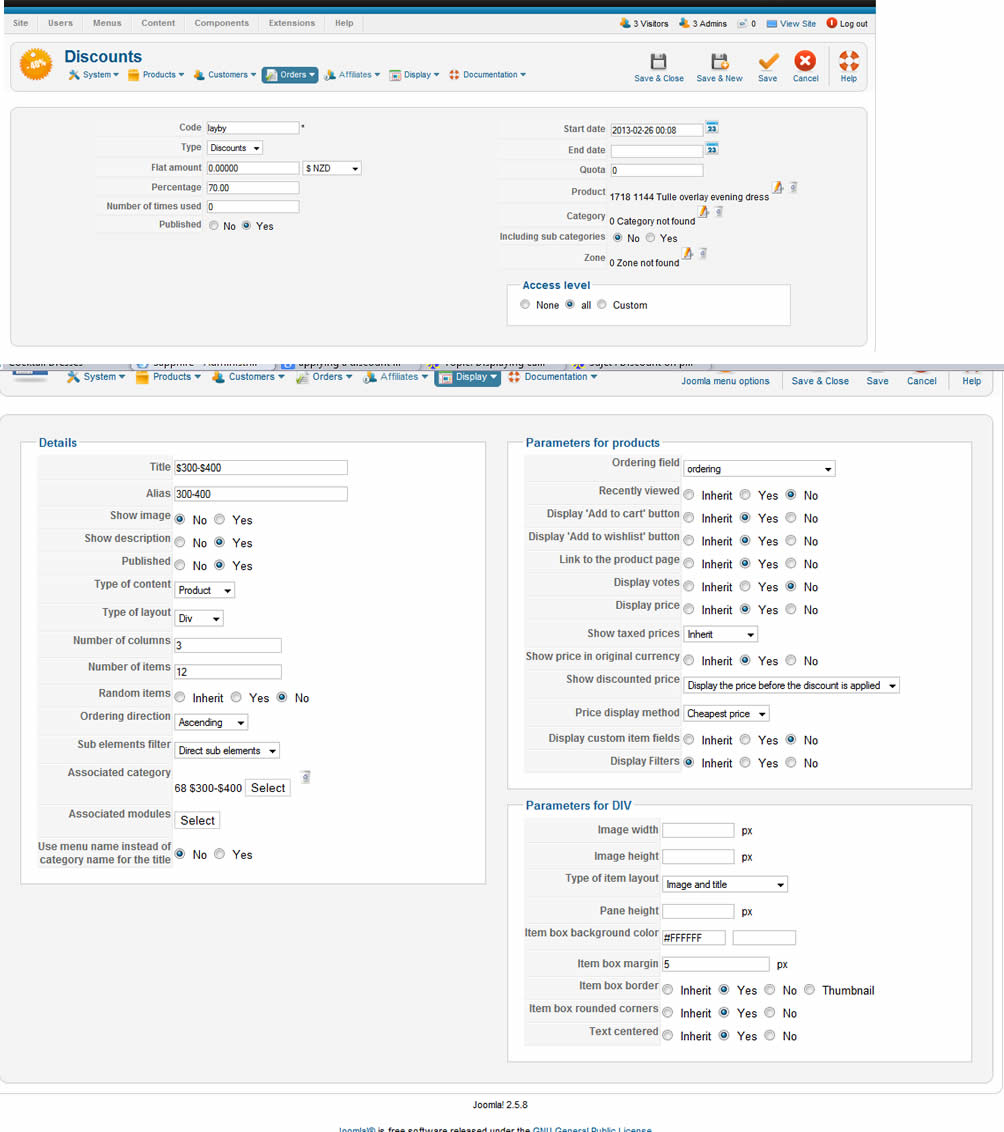
Hope these are the correct ones?
Regards
Please Log in or Create an account to join the conversation.
Less
More
- Posts: 12953
- Thank you received: 1778
13 years 8 months ago #91741
by Mohamed Thelji
Replied by Mohamed Thelji on topic Discount on products for layby
You should set the "Category" option of your discount to the category "$300-$400" with the ID number 68
Please Log in or Create an account to join the conversation.
13 years 8 months ago #91799
by gofer123
Replied by gofer123 on topic Discount on products for layby
Hi,
I've done that, now it's only displaying 2 products?
I've done that, now it's only displaying 2 products?
Please Log in or Create an account to join the conversation.
Less
More
- Posts: 12953
- Thank you received: 1778
13 years 8 months ago #91895
by Mohamed Thelji
Replied by Mohamed Thelji on topic Discount on products for layby
Then you should just set the "Category" option to the category of the products that you want to be in reduction.
Please Log in or Create an account to join the conversation.
13 years 8 months ago #91908
by gofer123
Replied by gofer123 on topic Discount on products for layby
Hi,
I went into the Discounts window and set the Category option to a category for testing but now it shows a 70% next to the price in Catalog view and in the check out without applying any code.
Don't know what to try next.
Regards
Pete
I went into the Discounts window and set the Category option to a category for testing but now it shows a 70% next to the price in Catalog view and in the check out without applying any code.
Don't know what to try next.
Regards
Pete
Please Log in or Create an account to join the conversation.
Less
More
- Posts: 12953
- Thank you received: 1778
13 years 8 months ago #91927
by Mohamed Thelji
Replied by Mohamed Thelji on topic Discount on products for layby
If you want the reduction to be applied with a code, you'll have to set the "Type" option of your discount to "COUPON". Then your customer will just have to use the code which is in your "code" option to use the discount.
Please Log in or Create an account to join the conversation.
13 years 8 months ago #91929
by gofer123
Replied by gofer123 on topic Discount on products for layby
OK, thanks I'll give that a try
Pete
Pete
Please Log in or Create an account to join the conversation.
13 years 8 months ago #91935
by gofer123
Replied by gofer123 on topic Discount on products for layby
I'm afraid that doesn't work either
Pete
Pete
Please Log in or Create an account to join the conversation.
Less
More
- Posts: 12953
- Thank you received: 1778
13 years 8 months ago #91936
by Mohamed Thelji
Replied by Mohamed Thelji on topic Discount on products for layby
What did you tried ?
Do you have a coupon step through your checkout workflow ("Hikashop->System->Configuration->'Checkout'") ?
Do you have a coupon step through your checkout workflow ("Hikashop->System->Configuration->'Checkout'") ?
Please Log in or Create an account to join the conversation.
13 years 8 months ago #91937
by gofer123
Replied by gofer123 on topic Discount on products for layby
Hi tried selecting a category then product, the coupon is in the Checkout workflow.
Pete
Pete
Please Log in or Create an account to join the conversation.

13 years 8 months ago #92096
by nicolas
Replied by nicolas on topic Discount on products for layby
Mmm. I see the problem but we can't reproduce it on our end.
We'll need a FTP access to be able to trace the issue.
Could you provide that please via our contact form ?
We'll need a FTP access to be able to trace the issue.
Could you provide that please via our contact form ?
Please Log in or Create an account to join the conversation.
13 years 7 months ago #93300
by nicolas
Replied by nicolas on topic Discount on products for layby
Hi,
I found the problem with the coupon and fixed it. It's working fine for me now on your website.
I found the problem with the coupon and fixed it. It's working fine for me now on your website.
Please Log in or Create an account to join the conversation.
Time to create page: 0.182 seconds