
- Posts: 3
- Thank you received: 0
Change Layout - payment button on checkout page
- shirthaus100
-
 Topic Author
- Offline
Less
More
13 years 8 months ago #92444
by shirthaus100
Change Layout - payment button on checkout page was created by shirthaus100
Hi there,
i cant find the class in the CSS-frontend file, to change the background-color from the radio-buttons on checkout page.
i have a darkblue background color at the radio buttons from shipping and payment options.
i want to change it into green
any ideas?
thanks ...
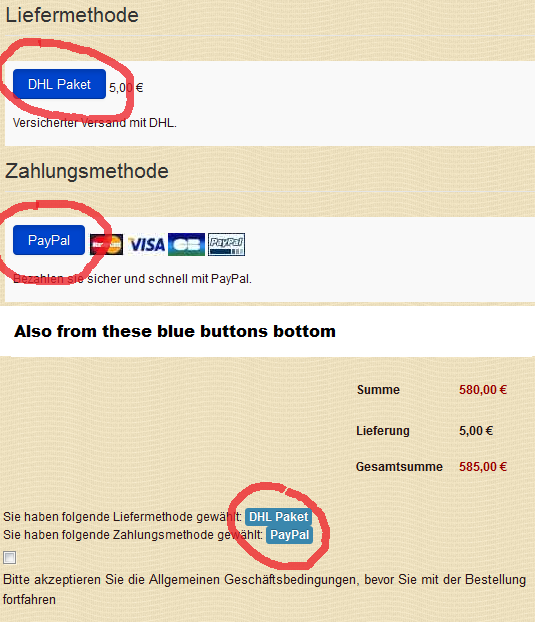
i cant find the class in the CSS-frontend file, to change the background-color from the radio-buttons on checkout page.
i have a darkblue background color at the radio buttons from shipping and payment options.
i want to change it into green
any ideas?
thanks ...
Please Log in or Create an account to join the conversation.

13 years 8 months ago #92506
by Jerome
Jerome - Obsidev.com
HikaMarket & HikaSerial developer / HikaShop core dev team.
Replied by Jerome on topic Change Layout - payment button on checkout page
Hi,
It uses the default bootstrap rules.
The "PayPal" button is in the view "checkout | payment" and it is displayed using this line:
You can create a special CSS rule by using his parent id from:
About the shipping, it's the same thing but in the view "checkout | shipping".
But the parent div container would have a different id, for the shipping.
About the status (your last image), it's in the view "checkout | status". It uses a span with the classes "label" and "label-info".
You can edit the view in order to use another class name or you can create a specific CSS rule using his parent (with id: hikashop_checkout_status).
Regards,
It uses the default bootstrap rules.
The "PayPal" button is in the view "checkout | payment" and it is displayed using this line:
Code:
<label class="btn btn-radio" for="radio_<?php echo $method->payment_type.'_'.$method->payment_id;?>"><?php echo $method->payment_name;?></label>
Code:
<div id="hikashop_payment_methods" class="hikashop_payment_methods">
About the shipping, it's the same thing but in the view "checkout | shipping".
But the parent div container would have a different id, for the shipping.
About the status (your last image), it's in the view "checkout | status". It uses a span with the classes "label" and "label-info".
Code:
<span class="label label-info">'.$this->payment_data->payment_name.'</span>
Regards,
Jerome - Obsidev.com
HikaMarket & HikaSerial developer / HikaShop core dev team.
The following user(s) said Thank You: shirthaus100
Please Log in or Create an account to join the conversation.
- shirthaus100
-
Topic Author
- Offline
Less
More
- Posts: 3
- Thank you received: 0
13 years 8 months ago #92560
by shirthaus100
Replied by shirthaus100 on topic Change Layout - payment button on checkout page
Hi Jerome,
thank you very much ... i will do this and post the result here
best regards,
Dirk
thank you very much ... i will do this and post the result here
best regards,
Dirk
Please Log in or Create an account to join the conversation.
Time to create page: 0.090 seconds