

- Posts: 27
- Thank you received: 0
Product Images
15 years 8 months ago #8072
by tandy
Product Images was created by tandy
Hello
Wonderful product, thank you very much for all the hard work that has been put in to it.
I wonder if someone can help? I would like the images on the individual product listing to have a main picture set at 400x400px and then the additional images to be 200x200px. I know that I can change some image views in configuration but not this.
I am guessing that I can edit the CSS code in one of the frontend files in the "display" tab, but am unsure which one to edit.
Is this possible? If so, which file is the right one to edit and what code should I change?
Thanks
Mark
Wonderful product, thank you very much for all the hard work that has been put in to it.
I wonder if someone can help? I would like the images on the individual product listing to have a main picture set at 400x400px and then the additional images to be 200x200px. I know that I can change some image views in configuration but not this.
I am guessing that I can edit the CSS code in one of the frontend files in the "display" tab, but am unsure which one to edit.
Is this possible? If so, which file is the right one to edit and what code should I change?
Thanks
Mark
Please Log in or Create an account to join the conversation.

15 years 8 months ago #8074
by nicolas
Replied by nicolas on topic Re: Product Images
Hi,
I suppose that you're talking about the small images below the main thumbnail on the product page. By default their size is limited in CSS by their height:
div#hikashop_product_left_part img.hikashop_child_image{
margin : 2px;
height:25px;
}
You can edit that CSS in the config under the tab display, in the CSS zone and increase the height to 200px.
I suppose that you're talking about the small images below the main thumbnail on the product page. By default their size is limited in CSS by their height:
div#hikashop_product_left_part img.hikashop_child_image{
margin : 2px;
height:25px;
}
You can edit that CSS in the config under the tab display, in the CSS zone and increase the height to 200px.
Please Log in or Create an account to join the conversation.
15 years 8 months ago #8107
by tandy
Replied by tandy on topic Re: Product Images
Thanks, Nicolas. I can't believe I didn't spot that myself! Must have been looking at the screen far too long!
Thanks
Mark
Thanks
Mark
Please Log in or Create an account to join the conversation.
15 years 8 months ago #8122
by tandy
Replied by tandy on topic Re: Product Images
Hi again
Thanks for the help, the above suggestion made is possible to make the thumbnails below the main image larger, but how do I increase the size of the main image itself?
Thanks
Mark
Thanks for the help, the above suggestion made is possible to make the thumbnails below the main image larger, but how do I increase the size of the main image itself?
Thanks
Mark
Please Log in or Create an account to join the conversation.
15 years 8 months ago #8133
by nicolas
Replied by nicolas on topic Re: Product Images
The main image size is defined in the config under the tab files. You can set the thumbnail size as well as the full image size.
Once you change your thumbnails size, you will have to delete the thumbnails folder under the upload folder so that hikashop can automatically recreated the thumbnails to the good size.
Once you change your thumbnails size, you will have to delete the thumbnails folder under the upload folder so that hikashop can automatically recreated the thumbnails to the good size.
Please Log in or Create an account to join the conversation.
15 years 8 months ago #8332
by tandy
Replied by tandy on topic Re: Product Images
Thanks for the help so far. I still can't quite get the layout I would like.
In this screenshot, I am trying to make image A 400x400px but without changing the size of image B. Image C I can change in the css easily.
Is there a way to make A change without affecting B?
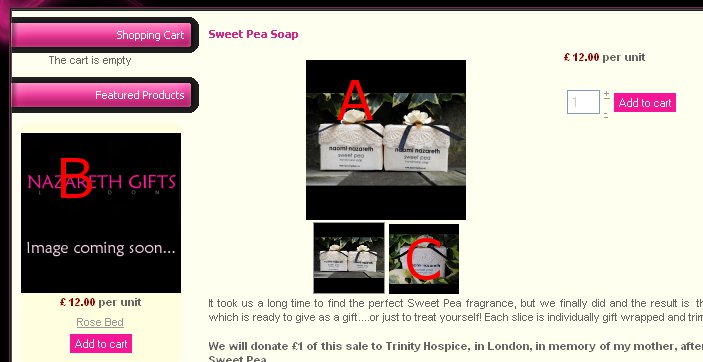
In this screenshot, I am trying to make image A 400x400px but without changing the size of image B. Image C I can change in the css easily.
Is there a way to make A change without affecting B?
Please Log in or Create an account to join the conversation.
15 years 8 months ago #8333
by nicolas
Replied by nicolas on topic Re: Product Images
HikaShop handles only one size of thumbnails so A == B == C which though has the same size is redimensioned in CSS. So you could also redimension B in CSS.
You could try to add such CSS :
.hikashop_product_image image {width: 200px !important; height: 200px !important; }
You could try to add such CSS :
.hikashop_product_image image {width: 200px !important; height: 200px !important; }
Please Log in or Create an account to join the conversation.
Time to create page: 0.111 seconds