
- Posts: 8
- Thank you received: 0
Frontend product listing
- apelsinskal
-
 Topic Author
- Offline
Less
More
13 years 6 months ago #100501
by apelsinskal
Frontend product listing was created by apelsinskal
Hi all! I am new to HikaShop. I wanted to have a frontend product listing - in the table layout - but I want more information.
At the moment there is
Photo Product Article no Price
I want to add two more fields here. How do I do this?
I also wonder, why the "add to cart" button doesn't show on the product listing? I only have a field for writing amount, but no "add"-button.
If I go to my menu item - Products (Products listing) - Advanced options - HikaShop Options - Display "Add to cart" button, this is set to "yes".
At the moment there is
Photo Product Article no Price
I want to add two more fields here. How do I do this?
I also wonder, why the "add to cart" button doesn't show on the product listing? I only have a field for writing amount, but no "add"-button.
If I go to my menu item - Products (Products listing) - Advanced options - HikaShop Options - Display "Add to cart" button, this is set to "yes".
Please Log in or Create an account to join the conversation.

Less
More
- Posts: 12953
- Thank you received: 1778
13 years 6 months ago - 13 years 6 months ago #100506
by Mohamed Thelji
Replied by Mohamed Thelji on topic Frontend product listing
Hi,
1. I think that you'll have to edit the code of the "listing_tab" file of the "product" view of your front-end template through "Hikashop->Display->Views".
2. Does your product have :
- quantity ?
- price ?
1. I think that you'll have to edit the code of the "listing_tab" file of the "product" view of your front-end template through "Hikashop->Display->Views".
2. Does your product have :
- quantity ?
- price ?
Last edit: 13 years 6 months ago by Mohamed Thelji.
Please Log in or Create an account to join the conversation.
- apelsinskal
-
Topic Author
- Offline
Less
More
- Posts: 8
- Thank you received: 0
13 years 6 months ago #100510
by apelsinskal
Replied by apelsinskal on topic Frontend product listing
Yes they have both quantity and price.
Edit the code, hmmm.... don't know if I will suceed with that. I have the free version of hikashop, would I get more options to product listing if I buy the full version?
Edit the code, hmmm.... don't know if I will suceed with that. I have the free version of hikashop, would I get more options to product listing if I buy the full version?
Please Log in or Create an account to join the conversation.
Less
More
- Posts: 12953
- Thank you received: 1778
13 years 6 months ago #100531
by Mohamed Thelji
Replied by Mohamed Thelji on topic Frontend product listing
1.
Sure you'll get more options, but I think that editing the code will be the best solution.
2. Can you tell me how did you configured:
- Your "Catalogue mode" option through "Hikashop->System->Configuration->'Features'" ?
- Your product listing configuration page ("Hikahsop->Display->Content menus->'YOUR PRODUCT LISTING'"")?
Sure you'll get more options, but I think that editing the code will be the best solution.
2. Can you tell me how did you configured:
- Your "Catalogue mode" option through "Hikashop->System->Configuration->'Features'" ?
- Your product listing configuration page ("Hikahsop->Display->Content menus->'YOUR PRODUCT LISTING'"")?
Please Log in or Create an account to join the conversation.
- apelsinskal
-
Topic Author
- Offline
Less
More
- Posts: 8
- Thank you received: 0
13 years 6 months ago #100534
by apelsinskal
Replied by apelsinskal on topic Frontend product listing
Catalogue mode: no
Attaching a screenshot of the product listing configuration page!
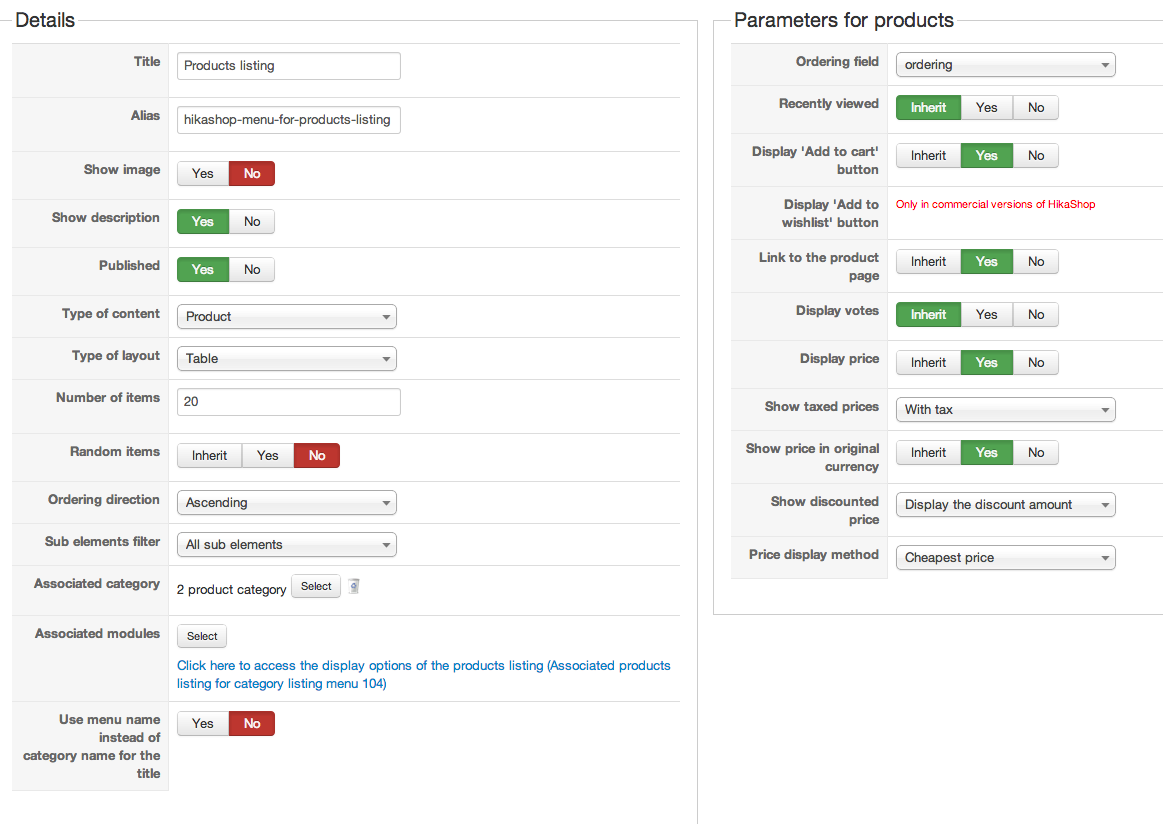
Attaching a screenshot of the product listing configuration page!
Please Log in or Create an account to join the conversation.
Less
More
- Posts: 12953
- Thank you received: 1778
13 years 6 months ago #100536
by Mohamed Thelji
Replied by Mohamed Thelji on topic Frontend product listing
Ok, a link to your website will probably help me to determine what the problem really is  .
. Please Log in or Create an account to join the conversation.
- apelsinskal
-
Topic Author
- Offline
Less
More
- Posts: 8
- Thank you received: 0
13 years 6 months ago #100538
by apelsinskal
Replied by apelsinskal on topic Frontend product listing
I'll send you a message, it is only for registered users!
Please Log in or Create an account to join the conversation.
Less
More
- Posts: 12953
- Thank you received: 1778
13 years 6 months ago #100548
by Mohamed Thelji
Replied by Mohamed Thelji on topic Frontend product listing
Can you set the "Display the quantity field on the product page" option to ajax input through "Hikashop->System->Configuration->'Main'" ? then it should solve your problem.
Please Log in or Create an account to join the conversation.
- apelsinskal
-
Topic Author
- Offline
Less
More
- Posts: 8
- Thank you received: 0
13 years 6 months ago #100555
by apelsinskal
Replied by apelsinskal on topic Frontend product listing
Thank you! Now I have a cart-button. Is it possible to have both cart-button and the field where you can fill in the quantity you want to buy?
I tried to copy/paste some code (product name) in the listing table, just to see if I get product name twice (easiest way to see if it works) but I couldn't see any changes. Do I have to edit the code on more places to succeed?
I tried to copy/paste some code (product name) in the listing table, just to see if I get product name twice (easiest way to see if it works) but I couldn't see any changes. Do I have to edit the code on more places to succeed?
Please Log in or Create an account to join the conversation.
- apelsinskal
-
Topic Author
- Offline
Less
More
- Posts: 8
- Thank you received: 0
13 years 6 months ago #100556
by apelsinskal
Replied by apelsinskal on topic Frontend product listing
I think I need to explain why I am doing this. The customers already know about our products, so they generally don't have to read a lot of information. In this case it would be good if they can buy what they want without click on the product to read the specifications. That is why I want additional fields visible in the product listing 
Please Log in or Create an account to join the conversation.
Less
More
- Posts: 12953
- Thank you received: 1778
13 years 6 months ago #100580
by Mohamed Thelji
Replied by Mohamed Thelji on topic Frontend product listing
1. I think that you'll find your answer
there
:
2. Can you tell me what file/view did you edited and how ?
You can edit the file listing_img_title of the view product via the menu Display->Views and add the code:
$this->params->set('show_quantity_field', 1);
at the beginning after the first <?php tag.
2. Can you tell me what file/view did you edited and how ?
Please Log in or Create an account to join the conversation.
- apelsinskal
-
Topic Author
- Offline
Less
More
- Posts: 8
- Thank you received: 0
13 years 6 months ago #100745
by apelsinskal
Replied by apelsinskal on topic Frontend product listing
Display - Views - listing_img_title
The one listed under Client: Front end / Template: protostar / View: Product / File: listing_img_title
The one listed under Client: Front end / Template: protostar / View: Product / File: listing_img_title
Please Log in or Create an account to join the conversation.
Less
More
- Posts: 12953
- Thank you received: 1778
13 years 6 months ago #100845
by Mohamed Thelji
Replied by Mohamed Thelji on topic Frontend product listing
Ok, I think that the best solution would be to :
1. Edit the file "listing_img_title" of the view "product" via the menu Display->Views and just add a line of code to display the description:
2. Go to your product listing (which have the ID number 117) configuration page, and set the "Link to the product page" option to NO
1. Edit the file "listing_img_title" of the view "product" via the menu Display->Views and just add a line of code to display the description:
Code:
<?php echo $this->row->product_description; ?>
2. Go to your product listing (which have the ID number 117) configuration page, and set the "Link to the product page" option to NO
Please Log in or Create an account to join the conversation.
- apelsinskal
-
Topic Author
- Offline
Less
More
- Posts: 8
- Thank you received: 0
13 years 6 months ago #100849
by apelsinskal
Replied by apelsinskal on topic Frontend product listing
Done - but the only difference is that the products are no longer clickable...
Looks like it has to be some more code here. All the other columns has code like:
<!-- PRODUCT IMG -->
code here
<!-- EO PRODUCT IMG -->
<!-- PRODUCT PRICE -->
code here
<!-- EO PRODUCT PRICE -->
<!-- PRODUCT NAME -->
code here
<!-- EO PRODUCT NAME -->
If I want to add for example 4 more rows in the table listing, (description, url, meta description, keywords just to make it easy with already available fields on the product page), don't I need to add this type of code for each column?
Looks like it has to be some more code here. All the other columns has code like:
<!-- PRODUCT IMG -->
code here
<!-- EO PRODUCT IMG -->
<!-- PRODUCT PRICE -->
code here
<!-- EO PRODUCT PRICE -->
<!-- PRODUCT NAME -->
code here
<!-- EO PRODUCT NAME -->
If I want to add for example 4 more rows in the table listing, (description, url, meta description, keywords just to make it easy with already available fields on the product page), don't I need to add this type of code for each column?
Please Log in or Create an account to join the conversation.

13 years 6 months ago #101181
by nicolas
Replied by nicolas on topic Frontend product listing
I see that you're using a listing with a "table" layout.
So you need to edit the file "listing_table".
The listing_img_title file is only used for DIV layout listings so it won't change anything if you modify it.
For example, for the description you would have to add the code:
<th class="title" align="center">Description</th>
before the first line:
<?php if($this->params->get('show_vote_product')){ ?>
and the code :
<td><?php echo $this->row->product_description; ?></td>
before the second line:
<?php if($this->params->get('show_vote_product')){ ?>
And do that for each field in a similar maner in the listing_table view file.
So you need to edit the file "listing_table".
The listing_img_title file is only used for DIV layout listings so it won't change anything if you modify it.
For example, for the description you would have to add the code:
<th class="title" align="center">Description</th>
before the first line:
<?php if($this->params->get('show_vote_product')){ ?>
and the code :
<td><?php echo $this->row->product_description; ?></td>
before the second line:
<?php if($this->params->get('show_vote_product')){ ?>
And do that for each field in a similar maner in the listing_table view file.
Please Log in or Create an account to join the conversation.
Time to create page: 0.168 seconds