
- Posts: 51
- Thank you received: 1
Message on checkout page
- isabelleandco
-
 Topic Author
- Offline
Less
More
13 years 6 months ago #100683
by isabelleandco
Message on checkout page was created by isabelleandco
I would like to add an article or module on the checkout page to show a message.
How would I do that?
How would I do that?
Please Log in or Create an account to join the conversation.

Less
More
- Posts: 12953
- Thank you received: 1778
13 years 6 months ago #100765
by Mohamed Thelji
Replied by Mohamed Thelji on topic Message on checkout page
Hi,
I think that you'll be able to do that by :
- Creating a menu and a module through "Hikashop->Display->Content menus/modules"
- Putting the module on the "Associated modules" option of your content menu
- Putting the menu on the "Menu" option of your content module
- Putting the menu on the "Force a menu on the checkout" option of your "Hikashop->System->Configuration->Checkout" page.
Hope this will help you a little.
I think that you'll be able to do that by :
- Creating a menu and a module through "Hikashop->Display->Content menus/modules"
- Putting the module on the "Associated modules" option of your content menu
- Putting the menu on the "Menu" option of your content module
- Putting the menu on the "Force a menu on the checkout" option of your "Hikashop->System->Configuration->Checkout" page.
Hope this will help you a little.
Please Log in or Create an account to join the conversation.
- isabelleandco
-
Topic Author
- Offline
Less
More
- Posts: 51
- Thank you received: 1
13 years 6 months ago #101286
by isabelleandco
Replied by isabelleandco on topic Message on checkout page
Alright, I figured it out.
(It was less complicated that your instructions, all I had to do with create a checkout page from hika shop, put a custom module at the top, but them force the page on checkout like you said, so thank! that helped out a lot).
But it looks like there is a lot of space between the checkout fields and the module on the top. is there anyway to lessen this gap?
shopisabelle.com/index.php/checkout/checkout
(It was less complicated that your instructions, all I had to do with create a checkout page from hika shop, put a custom module at the top, but them force the page on checkout like you said, so thank! that helped out a lot).
But it looks like there is a lot of space between the checkout fields and the module on the top. is there anyway to lessen this gap?
shopisabelle.com/index.php/checkout/checkout
Please Log in or Create an account to join the conversation.

13 years 6 months ago - 13 years 6 months ago #101403
by Xavier
Replied by Xavier on topic Message on checkout page
The space come from your custom module, as you can see in the screenshot.
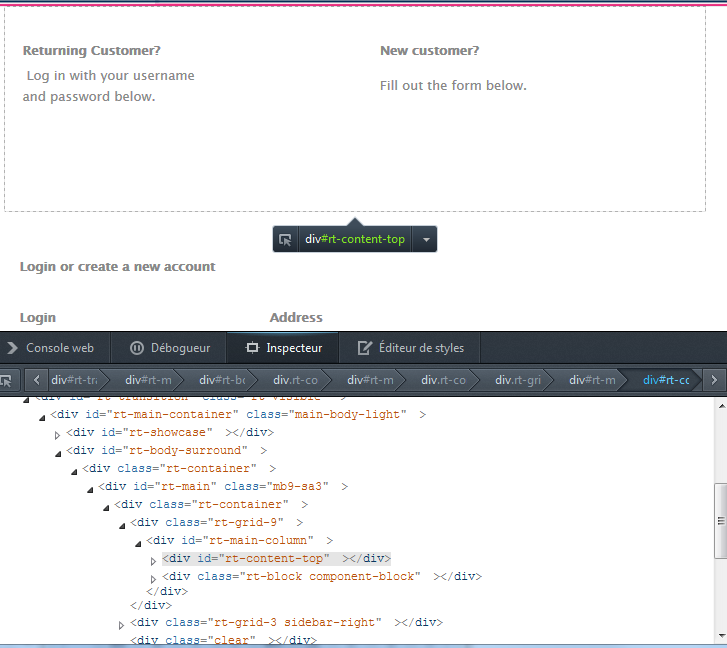
Thanks to follow this tutorial to see how to solve this problem.
www.hikashop.com/fr/support/documentatio...ize-the-display.html
Thanks to follow this tutorial to see how to solve this problem.
www.hikashop.com/fr/support/documentatio...ize-the-display.html
Last edit: 13 years 6 months ago by Xavier.
Please Log in or Create an account to join the conversation.
Time to create page: 0.195 seconds