

- Posts: 21
- Thank you received: 0
How to show sub-menu items
13 years 6 months ago #100879
by freeman76
How to show sub-menu items was created by freeman76
Hi,
I'm building a shopping cart with Hikashop Business and I'd like to know if it is possible to show the sub-menu items when some one clicks on the category product.
I'm going to try to explain it better I've attached an image.
So in this image, I have a menu on the left, as you can see, each menu item as a "+" which means they have sub-categories. On the right, we see images of the main categories. When we click on a category, we'll see the sub-categories of this product in the right side. I'd like to know if it is possible to show the same sub-categories in the menu on the left (open the menu to show the sub-categories).
I hope it was clear enough
Thank you
I'm building a shopping cart with Hikashop Business and I'd like to know if it is possible to show the sub-menu items when some one clicks on the category product.
I'm going to try to explain it better
I've attached an image.So in this image, I have a menu on the left, as you can see, each menu item as a "+" which means they have sub-categories. On the right, we see images of the main categories. When we click on a category, we'll see the sub-categories of this product in the right side. I'd like to know if it is possible to show the same sub-categories in the menu on the left (open the menu to show the sub-categories).
I hope it was clear enough
Thank you
Please Log in or Create an account to join the conversation.

13 years 6 months ago #100953
by Xavier
Replied by Xavier on topic How to show sub-menu items
Hi,
You can try to use the same menu in the modules options.
And use the main display as a module, for the menu "Menu" display nothing (empty article) and assign a module to this menu (the categories listing), then use the same menu option than the categories listing on the left side.
You can try to use the same menu in the modules options.
And use the main display as a module, for the menu "Menu" display nothing (empty article) and assign a module to this menu (the categories listing), then use the same menu option than the categories listing on the left side.
Please Log in or Create an account to join the conversation.
13 years 6 months ago #100995
by freeman76
Replied by freeman76 on topic How to show sub-menu items
Hi Xavier,
Thank you for your reply. When you talk about using the same menu in the modules options, what do you mean exactly? I don't see any Hikashop menu module.
And in the main menu item "Menu" I will display an Hikashop module. I've checked the modules for Hikashop but don't see any categories listing module.
Thank you again for you time.
Thank you for your reply. When you talk about using the same menu in the modules options, what do you mean exactly? I don't see any Hikashop menu module.
And in the main menu item "Menu" I will display an Hikashop module. I've checked the modules for Hikashop but don't see any categories listing module.
Thank you again for you time.
Please Log in or Create an account to join the conversation.
13 years 6 months ago #101096
by Xavier
Replied by Xavier on topic How to show sub-menu items
Hi,
You can create your own module, like on this screenshot to display the categories listing.
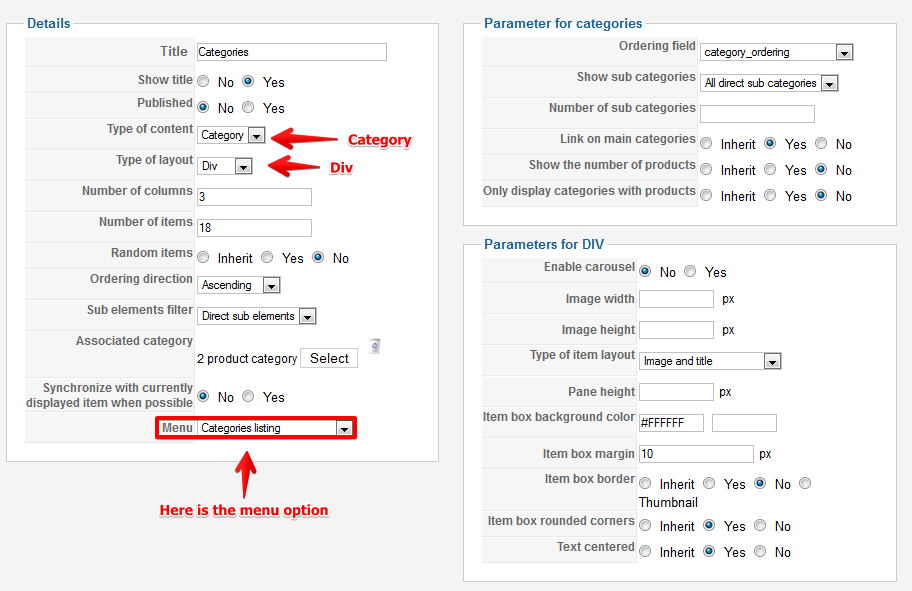
You can create your own module, like on this screenshot to display the categories listing.
Please Log in or Create an account to join the conversation.
13 years 6 months ago #101225
by freeman76
Replied by freeman76 on topic How to show sub-menu items
Hi Xavier,
When you say to creat my own module, are you talking using an Hikashop module? If yes, which one?
Thank you
When you say to creat my own module, are you talking using an Hikashop module? If yes, which one?
Thank you
Please Log in or Create an account to join the conversation.
13 years 6 months ago #101378
by Xavier
Replied by Xavier on topic How to show sub-menu items
Hi,
You can use any HikaShop module, and you can create a new one, you just have to configure it correctly.
You can use any HikaShop module, and you can create a new one, you just have to configure it correctly.
Please Log in or Create an account to join the conversation.
Time to create page: 0.067 seconds