
- Posts: 241
- Thank you received: 5
Limit Reached.. but it is not reached
- cberry1971
-
 Topic Author
- Offline
Less
More
13 years 5 months ago - 13 years 5 months ago #100989
by cberry1971
Limit Reached.. but it is not reached was created by cberry1971
In this product:
184.154.228.9/~throwdow/billel/index.php...uct&task=show&cid=20
I show quantity available= 24 but when i try to "add to cart" i get the error message:
"Limit reached. You can't add the product: Atlas Games Team"
I am clearly doing something wrong but can't figure out the issue.
thanks as always for the great support.
184.154.228.9/~throwdow/billel/index.php...uct&task=show&cid=20
I show quantity available= 24 but when i try to "add to cart" i get the error message:
"Limit reached. You can't add the product: Atlas Games Team"
I am clearly doing something wrong but can't figure out the issue.
thanks as always for the great support.
Last edit: 13 years 5 months ago by cberry1971.
Please Log in or Create an account to join the conversation.

Less
More
- Posts: 12953
- Thank you received: 1778
13 years 5 months ago #101008
by Mohamed Thelji
Replied by Mohamed Thelji on topic Limit Reached.. but it is not reached
Hi,
I think that the problem is coming from the way you configured your product, did you use the "Maximum quantity per order" option of your product configuration page ?
I think that the problem is coming from the way you configured your product, did you use the "Maximum quantity per order" option of your product configuration page ?
Please Log in or Create an account to join the conversation.
- cberry1971
-
Topic Author
- Offline
Less
More
- Posts: 241
- Thank you received: 5
13 years 5 months ago #101340
by cberry1971
Replied by cberry1971 on topic Limit Reached.. but it is not reached
I can't figure out what is wrong.
Here: 184.154.228.9/~throwdow/billel/index.php...uct&task=show&cid=20
If you try to purchase Paleo - Custom Fit Meal = yes
and then go to checkout, I get the error: "Limit reached. You can't add the product: Paleo - Custom Fit Meal (4 meals)"
Yet they are setup as per the screenshots below:
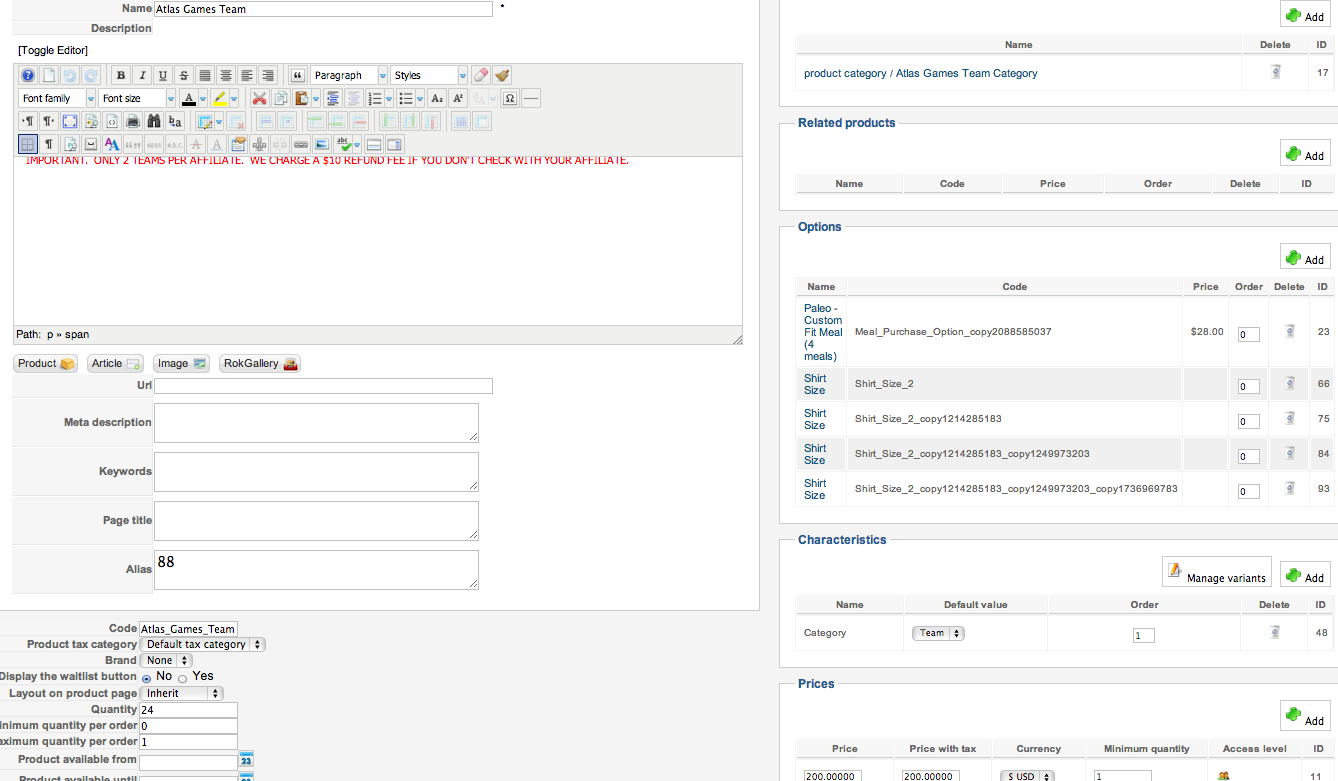
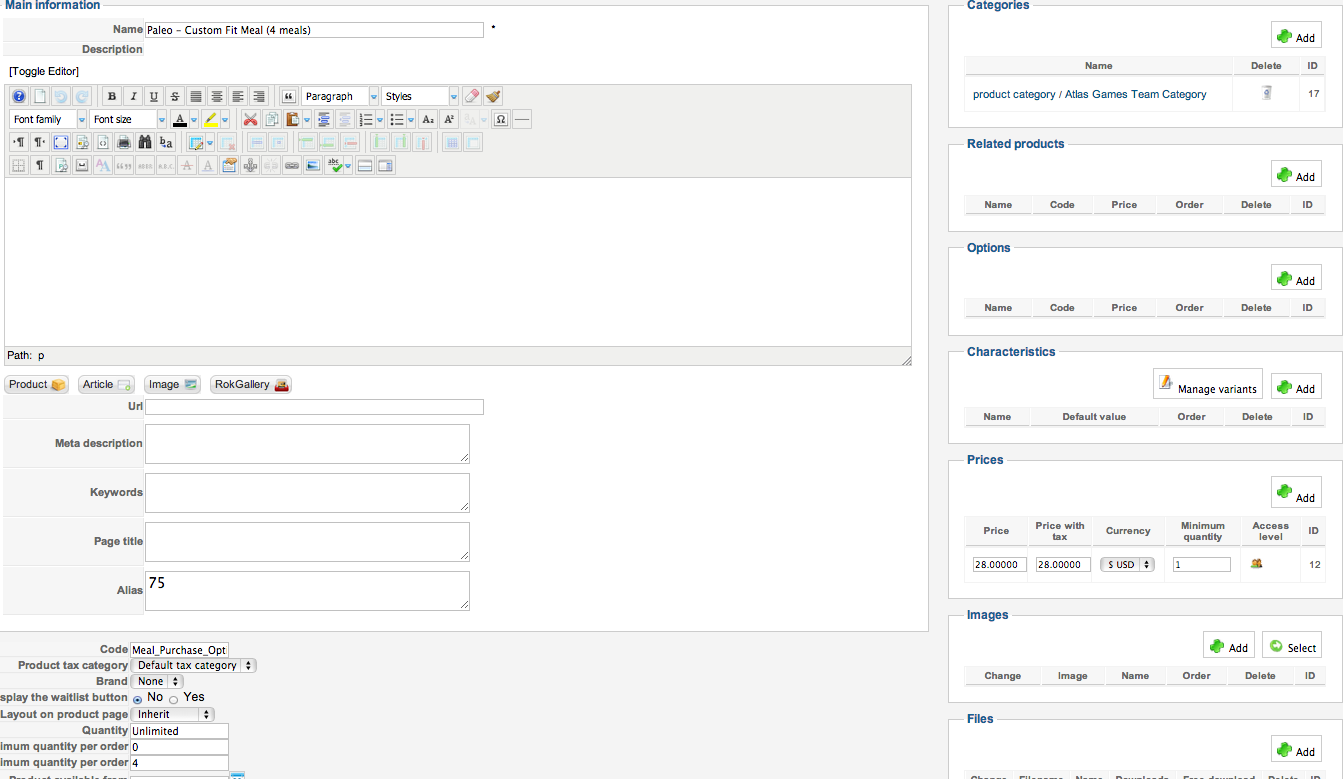
Here: 184.154.228.9/~throwdow/billel/index.php...uct&task=show&cid=20
If you try to purchase Paleo - Custom Fit Meal = yes
and then go to checkout, I get the error: "Limit reached. You can't add the product: Paleo - Custom Fit Meal (4 meals)"
Yet they are setup as per the screenshots below:
Please Log in or Create an account to join the conversation.
Less
More
- Posts: 12953
- Thank you received: 1778
13 years 5 months ago - 13 years 5 months ago #101413
by Mohamed Thelji
Replied by Mohamed Thelji on topic Limit Reached.. but it is not reached
Hi,
As I said in my previous post, Can you unset the value that you gave to your Maximum quantity per order option and try it again ?
As I said in my previous post, Can you unset the value that you gave to your Maximum quantity per order option and try it again ?
Last edit: 13 years 5 months ago by Mohamed Thelji.
Please Log in or Create an account to join the conversation.
- cberry1971
-
Topic Author
- Offline
Less
More
- Posts: 241
- Thank you received: 5
13 years 5 months ago #101637
by cberry1971
Replied by cberry1971 on topic Limit Reached.. but it is not reached
Yes.. again not working. When i unset the value and click save, it reverts to "unlimited" and still throws the same "limit reached" error.
Please Log in or Create an account to join the conversation.
Less
More
- Posts: 12953
- Thank you received: 1778
13 years 5 months ago - 13 years 5 months ago #101643
by Mohamed Thelji
Replied by Mohamed Thelji on topic Limit Reached.. but it is not reached
Ok,
I thought you were changing the "Quantity" instead of the "Maximum quantity per order" option like you showed me in your previous screenshots, so can you give me a temporary access to your back-end for testing purpose trough Private Message?
Thank you .
.
I thought you were changing the "Quantity" instead of the "Maximum quantity per order" option like you showed me in your previous screenshots, so can you give me a temporary access to your back-end for testing purpose trough Private Message?
Thank you
.
Last edit: 13 years 5 months ago by Mohamed Thelji.
Please Log in or Create an account to join the conversation.
- cberry1971
-
Topic Author
- Offline
Less
More
- Posts: 241
- Thank you received: 5
13 years 5 months ago #101795
by cberry1971
Replied by cberry1971 on topic Limit Reached.. but it is not reached
PM you now. thanks.
Please Log in or Create an account to join the conversation.

13 years 5 months ago #101935
by Xavier
Replied by Xavier on topic Limit Reached.. but it is not reached
Hi,
The problem come from the "Shirt size" products which is limited to 1 per order (product edition page) so you have to change this value.
Changing the main product quantity, change the quantity of the option products too.
The problem come from the "Shirt size" products which is limited to 1 per order (product edition page) so you have to change this value.
Changing the main product quantity, change the quantity of the option products too.
Please Log in or Create an account to join the conversation.
- cberry1971
-
Topic Author
- Offline
Less
More
- Posts: 241
- Thank you received: 5
13 years 5 months ago #102194
by cberry1971
Replied by cberry1971 on topic Limit Reached.. but it is not reached
I am sorry but i am still confused. I don't want users to have greater than 1 shirt so i have to limit shirt. What changes do i make so this error is not there but they can't have greater than 1 shirt?
Thank you.
Thank you.
Please Log in or Create an account to join the conversation.
- cberry1971
-
Topic Author
- Offline
Less
More
- Posts: 241
- Thank you received: 5
13 years 5 months ago #102281
by cberry1971
Replied by cberry1971 on topic Limit Reached.. but it is not reached
<SOLVED> It did not have to do with the limits or the max quantity. It has to do with the max items allowed in a shopping cart. The default = 5 but since I have:
1 event ticket
1 meal option
4 t-shirt sizes
the total > 5 so the last item was kicked out of the cart.
1 event ticket
1 meal option
4 t-shirt sizes
the total > 5 so the last item was kicked out of the cart.
The following user(s) said Thank You: Jerome
Please Log in or Create an account to join the conversation.
Time to create page: 0.294 seconds