

- Posts: 178
- Thank you received: 5
Delivery cost depending on categories
13 years 4 months ago - 13 years 4 months ago #101656
by alikon1
Delivery cost depending on categories was created by alikon1
I have some categories in a shop: AUTOMOBILE, FASHION, COMPUTING, PICTURES, limited (hikashop demo).
How can i arrange for each category to have its own delivery cost and amount of minimal order?
For example:
For example, the minimal amount of your order in AUTOMOBILE category is 300 USD, while the minimal order for FASHION category is 100 USD. Delivery price for AUTOMOBILE is 15 USD and for FASHION is 7 USD. The total for delivery is 22 USD.
That is, if you select, at least, one item from a category, the delivery price will increase by the amount of delivery price for that category. The order will not be placed until you purchase the number of items for the minimum amount of order for that category.
How can i arrange for each category to have its own delivery cost and amount of minimal order?
For example:
| Category | Delivery cost | Minimal order |
| AUTOMOBILE | 15$ | 300$ |
| COMPUTING | 25$ | 150$ |
| FASHION | 7$ | 100$ |
For example, the minimal amount of your order in AUTOMOBILE category is 300 USD, while the minimal order for FASHION category is 100 USD. Delivery price for AUTOMOBILE is 15 USD and for FASHION is 7 USD. The total for delivery is 22 USD.
That is, if you select, at least, one item from a category, the delivery price will increase by the amount of delivery price for that category. The order will not be placed until you purchase the number of items for the minimum amount of order for that category.
Last edit: 13 years 4 months ago by alikon1.
Please Log in or Create an account to join the conversation.

Less
More
- Posts: 12953
- Thank you received: 1778
13 years 4 months ago #101667
by Mohamed Thelji
Replied by Mohamed Thelji on topic Delivery cost depending on categories
Hi,
1. Regarding the delivery cost per category, the best solution would be to :
- Create 3 shipping methods (one shipping method per category)
- Use the "Use the prices per product" option of your manual shipping method.
- Set a price for each and a minimum quantity products through the "Shipping prices" tab of each product's page regarding their category.
2. Regarding the maximum order price, I think that you'll just have to set a minimum price in your manual shipping methods and the users won't be able to finish the checkout under that price.
Hope this will help you a little.
1. Regarding the delivery cost per category, the best solution would be to :
- Create 3 shipping methods (one shipping method per category)
- Use the "Use the prices per product" option of your manual shipping method.
- Set a price for each and a minimum quantity products through the "Shipping prices" tab of each product's page regarding their category.
2. Regarding the maximum order price, I think that you'll just have to set a minimum price in your manual shipping methods and the users won't be able to finish the checkout under that price.
Hope this will help you a little.
Please Log in or Create an account to join the conversation.
13 years 4 months ago #101824
by alikon1
If I set a price for each products and then add two products from one category, total delivery cost will count twice. But should count once despite how many products I added from this category, one or all.
Replied by alikon1 on topic Delivery cost depending on categories
Mohamed Thelji wrote: Hi,
1. Regarding the delivery cost per category, the best solution would be to :
- Create 3 shipping methods (one shipping method per category)
- Use the "Use the prices per product" option of your manual shipping method.
- Set a price for each and a minimum quantity products through the "Shipping prices" tab of each product's page regarding their category.
2. Regarding the maximum order price, I think that you'll just have to set a minimum price in your manual shipping methods and the users won't be able to finish the checkout under that price.
Hope this will help you a little.
If I set a price for each products and then add two products from one category, total delivery cost will count twice. But should count once despite how many products I added from this category, one or all.
Please Log in or Create an account to join the conversation.
Less
More
- Posts: 12953
- Thank you received: 1778
13 years 4 months ago #101999
by Mohamed Thelji
Replied by Mohamed Thelji on topic Delivery cost depending on categories
Ok, but unfortunately you cannot for the moment restrict shipping methods based on categories.
You could set a volume/weight for the products in that category and use volume/weight restrictions in order to choose what shipping method you'll display regarding products categories. Moreover I think that the best solution was to use the prices per product option.
You could set a volume/weight for the products in that category and use volume/weight restrictions in order to choose what shipping method you'll display regarding products categories. Moreover I think that the best solution was to use the prices per product option.
Please Log in or Create an account to join the conversation.
13 years 4 months ago #103792
by alikon1
Replied by alikon1 on topic Delivery cost depending on categories
Edit hikashop_category table. Add fields min_sum (for the minimum amount) and price_delivery (for the amount of delivery price for that category).
Then edit components/com_hikashop/views/checkout/tmpl/cart.php
Add there:
And
Now it count delivery for every category separately.
Then edit components/com_hikashop/views/checkout/tmpl/cart.php
Add there:
Code:
<?php $session =& JFactory::getSession(); $session_id=$session->getID(); ?>
<?php
$link = mysql_connect("localhost", "user", "pass")
or die("Could not connect : " . mysql_error());
mysql_query ("SET CHARACTER SET 'utf8'", $link);
mysql_select_db("db_name") or die("Could not select database");
$query = 'SELECT DISTINCT hje52_hikashop_category.category_name, hje52_hikashop_category.min_sum, hje52_hikashop_category.price_delivery FROM hje52_hikashop_product, ((hje52_hikashop_cart INNER JOIN hje52_hikashop_cart_product ON hje52_hikashop_cart.cart_id = hje52_hikashop_cart_product.cart_id) INNER JOIN hje52_hikashop_product_category ON hje52_hikashop_cart_product.product_id = hje52_hikashop_product_category.product_id) INNER JOIN hje52_hikashop_category ON hje52_hikashop_product_category.category_id = hje52_hikashop_category.category_id WHERE (((hje52_hikashop_cart.session_id)="'.$session_id.'"));';
$query2 = 'SELECT Sum(hje52_hikashop_cart_product.cart_product_quantity*hje52_hikashop_price.price_value) AS PRZ, hje52_hikashop_category.min_sum
FROM hje52_hikashop_cart INNER JOIN (((hje52_hikashop_cart_product INNER JOIN hje52_hikashop_price ON hje52_hikashop_cart_product.product_id = hje52_hikashop_price.price_product_id) INNER JOIN hje52_hikashop_product_category ON hje52_hikashop_cart_product.product_id = hje52_hikashop_product_category.product_id) INNER JOIN hje52_hikashop_category ON hje52_hikashop_product_category.category_id = hje52_hikashop_category.category_id) ON hje52_hikashop_cart.cart_id = hje52_hikashop_cart_product.cart_id
WHERE (((hje52_hikashop_cart.session_id)="'.$session_id.'"))
GROUP BY hje52_hikashop_category.category_id, hje52_hikashop_category.min_sum;
';
$result = mysql_query($query) or die("Query failed : " . mysql_error());
$result2 = mysql_query($query2) or die("Query failed : " . mysql_error()); ?>
<?php while ($row = mysql_fetch_array($result2, MYSQL_ASSOC))
{
if ($row['min_sum'] > $row['PRZ'])
{
echo "<div class=\"error_sum\">The total of your order is too low for all the possible shipping methods.</div>";
}
} ?>
<?php
$col2_sum = 0;
print "<table class=\"chekout_price_table_th\">\n";
print "<tr><th></th><th>Minimum amount</th><th>Delivery cost</th></tr>\n";
while ($line = mysql_fetch_array($result, MYSQL_ASSOC)) {
$col2_sum += $line['price_delivery'];
print "\t<tr>\n";
foreach ($line as $col_value) {
print "\t\t<td class=\"chekout_price_table\">$col_value</td>\n";
}
print "\t</tr>\n";
}
print "</table>\n";
mysql_free_result($result);
mysql_free_result($result2);
mysql_close($link);
?>
And
Code:
<td class="hikashop_cart_total_value">
<span class="hikashop_checkout_cart_final_total">
<?php
echo $this->currencyHelper->format($this->full_total->prices[0]->price_value_with_tax+$col2_sum,$this->full_total->prices[0]->price_currency_id);
?>
</span>
</td>
Now it count delivery for every category separately.
Please Log in or Create an account to join the conversation.
13 years 4 months ago #103835
by alikon1
Replied by alikon1 on topic Delivery cost depending on categories
Can you advice, where I shold past $col2_sum variable, to calculate it in admin panel too?
How can I insert it in hikashop_order.order_shipping_price field for the order? In which file calculating delivery cost?
How can I insert it in hikashop_order.order_shipping_price field for the order? In which file calculating delivery cost?
Please Log in or Create an account to join the conversation.

13 years 4 months ago #103851
by nicolas
Replied by nicolas on topic Delivery cost depending on categories
It would be better to modify the plugins/hikashopshipping/manual/manual.php file to handle custom shipping fee calculation in the onShippingDisplay function rather than trying to edit all the code of HikaShop which will use the shipping price.
Because with the way you're modifying the code, your payment methods won't get the shipping price. The emails neither, the invoice neither and the backend edition neither etc.
Because with the way you're modifying the code, your payment methods won't get the shipping price. The emails neither, the invoice neither and the backend edition neither etc.
The following user(s) said Thank You: alikon1
Please Log in or Create an account to join the conversation.
13 years 4 months ago #104092
by alikon1
Thanks. After
add
Replied by alikon1 on topic Delivery cost depending on categories
nicolas wrote: It would be better to modify the plugins/hikashopshipping/manual/manual.php file to handle custom shipping fee calculation in the onShippingDisplay function rather than trying to edit all the code of HikaShop which will use the shipping price.
Because with the way you're modifying the code, your payment methods won't get the shipping price. The emails neither, the invoice neither and the backend edition neither etc.
Thanks. After
Code:
foreach($dbrates as $k => $rate){
if($rate->shipping_type=='manual' && !empty($rate->shipping_published)){
$rates[]=$rate;
add
Code:
$rates[0]->shipping_price=$col2_sum;
Please Log in or Create an account to join the conversation.
12 years 7 months ago #142829
by alikon1
What file I should edit in Hikashop 2.2.3 version? There is no onShippingDisplay function now.
Replied by alikon1 on topic Delivery cost depending on categories
nicolas wrote: It would be better to modify the plugins/hikashopshipping/manual/manual.php file to handle custom shipping fee calculation in the onShippingDisplay function rather than trying to edit all the code of HikaShop which will use the shipping price.
Because with the way you're modifying the code, your payment methods won't get the shipping price. The emails neither, the invoice neither and the backend edition neither etc.
What file I should edit in Hikashop 2.2.3 version? There is no onShippingDisplay function now.
Please Log in or Create an account to join the conversation.
Less
More
- Posts: 12953
- Thank you received: 1778
12 years 7 months ago #142855
by Mohamed Thelji
Replied by Mohamed Thelji on topic Delivery cost depending on categories
Hi,
The file that you'll ave to edit will be the "administrator\components\com_hikashop\helpers\helper.php" file, but note that the "onShippingDisplay" is generic and used for each shipping method, so a solution can be to copy the onShippingDisplay of the file helper.php through your manual.php and edit it as you want.
The file that you'll ave to edit will be the "administrator\components\com_hikashop\helpers\helper.php" file, but note that the "onShippingDisplay" is generic and used for each shipping method, so a solution can be to copy the onShippingDisplay of the file helper.php through your manual.php and edit it as you want.
Please Log in or Create an account to join the conversation.
12 years 7 months ago #143162
by alikon1
I copy my code from manual.php to helper.php, but it don't work anymore.
Replied by alikon1 on topic Delivery cost depending on categories
Can you help me please?Mohamed Thelji wrote: Hi,
The file that you'll ave to edit will be the "administrator\components\com_hikashop\helpers\helper.php" file, but note that the "onShippingDisplay" is generic and used for each shipping method, so a solution can be to copy the onShippingDisplay of the file helper.php through your manual.php and edit it as you want.
I copy my code from manual.php to helper.php, but it don't work anymore.
Please Log in or Create an account to join the conversation.
12 years 7 months ago - 12 years 7 months ago #143163
by alikon1
Replied by alikon1 on topic Delivery cost depending on categories
In 2.1.1 I inserted in function onShippingDisplay(&$order,&$dbrates,&$usable_rates,&$messages) my SQL query at the beginning, and modify (add line)
In 2.2.3 it don't work.
Delivery price output was echo $this->currencyHelper->format(@$this->shipping->shipping_price,$this->shipping->shipping_currency_id);. Now I look it's $shipping_price += $shipping->shipping_price;
Maybe in 2.2.3 I should change something else?
Code:
foreach($dbrates as $k => $rate){
if($rate->shipping_type=='manual' && !empty($rate->shipping_published)){
$rates[]=$rate;
$rates[0]->shipping_price=$col2_sum;
}
}
Delivery price output was echo $this->currencyHelper->format(@$this->shipping->shipping_price,$this->shipping->shipping_currency_id);. Now I look it's $shipping_price += $shipping->shipping_price;
Maybe in 2.2.3 I should change something else?
Last edit: 12 years 7 months ago by alikon1.
Please Log in or Create an account to join the conversation.
Less
More
- Posts: 12953
- Thank you received: 1778
12 years 7 months ago #143221
by Mohamed Thelji
Replied by Mohamed Thelji on topic Delivery cost depending on categories
Hello,
Can you show me how did you set your "onShippingDisplay" function, so that I will maybe be able to understand the issue that you are having ?
Can you show me how did you set your "onShippingDisplay" function, so that I will maybe be able to understand the issue that you are having ?
Please Log in or Create an account to join the conversation.
12 years 7 months ago #143271
by alikon1
Inseart my query at the beginning.
And
Replied by alikon1 on topic Delivery cost depending on categories
I did as I did in previous version. Edit helper.php instead manual.php.Mohamed Thelji wrote: Hello,
Can you show me how did you set your "onShippingDisplay" function, so that I will maybe be able to understand the issue that you are having ?
Inseart my query at the beginning.
Code:
function onShippingDisplay(&$order, &$dbrates, &$usable_rates, &$messages) {
/* START Harry Delivery*/
$session =& JFactory::getSession(); $session_id=$session->getID();
$link = mysql_connect("localhost", "*user*", "*pass*") or die("Could not connect : " . mysql_error());
mysql_query ("SET CHARACTER SET 'utf8'", $link);
mysql_select_db("*BD*") or die("Could not select database");
$query = 'SELECT DISTINCT jqp92_hikashop_category.category_name, jqp92_hikashop_category.min_sum, jqp92_hikashop_category.price_delivery FROM jqp92_hikashop_product, ((jqp92_hikashop_cart INNER JOIN jqp92_hikashop_cart_product ON jqp92_hikashop_cart.cart_id = jqp92_hikashop_cart_product.cart_id) INNER JOIN jqp92_hikashop_product_category ON jqp92_hikashop_cart_product.product_id = jqp92_hikashop_product_category.product_id) INNER JOIN jqp92_hikashop_category ON jqp92_hikashop_product_category.category_id = jqp92_hikashop_category.category_id WHERE (((jqp92_hikashop_cart.session_id)="'.$session_id.'"));';
$result = mysql_query($query) or die("Query failed : " . mysql_error());
$col2_sum = 0;
while ($line = mysql_fetch_array($result, MYSQL_ASSOC)) {$col2_sum += $line['price_delivery'];}
mysql_free_result($result);
mysql_close($link);
/* END Harry Delivery*/
$config =& hikashop_config();
And
Code:
foreach($dbrates as $k => $rate) {
if($rate->shipping_type == $this->name && !empty($rate->shipping_published)) {
$rates[] = $rate;
$rates[0]->shipping_price=$col2_sum;
}
}
Please Log in or Create an account to join the conversation.
12 years 7 months ago #143360
by nicolas
Replied by nicolas on topic Delivery cost depending on categories
Instead of:
$rates[] = $rate;
$rates[0]->shipping_price=$col2_sum;
you should rather do:
$rate->shipping_price=$col2_sum;
$rates[] = $rate;
For the rest, it looks ok to me.
$rates[] = $rate;
$rates[0]->shipping_price=$col2_sum;
you should rather do:
$rate->shipping_price=$col2_sum;
$rates[] = $rate;
For the rest, it looks ok to me.
Please Log in or Create an account to join the conversation.
12 years 7 months ago #143371
by alikon1
Replied by alikon1 on topic Delivery cost depending on categories
In options
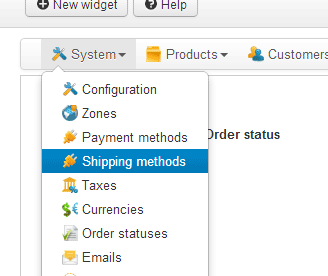
set Manual shipping cost - 100

But on site still see Shipping - 0
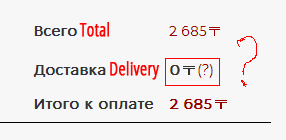
set Manual shipping cost - 100
But on site still see Shipping - 0
Please Log in or Create an account to join the conversation.
Less
More
- Posts: 12953
- Thank you received: 1778
12 years 7 months ago #143415
by Mohamed Thelji
Replied by Mohamed Thelji on topic Delivery cost depending on categories
Hi,
I think that you should replace this line :
By :
I think that you should replace this line :
Code:
$rate->shipping_price=$col2_sum;
Code:
$rate->shipping_price+=$col2_sum;
Please Log in or Create an account to join the conversation.
12 years 7 months ago #143417
by alikon1
Replied by alikon1 on topic Delivery cost depending on categories
Add print_r($shipping); in /components/com_hikashop/views/checkout/tmpl/cart.php
[shipping_price] => 0.00000, but in pnpMyAdmin I see in jqp92_hikashop_shipping table shipping_price is not 0.
Code:
stdClass Object ( [shipping_id] => 1 [shipping_type] => manual [shipping_zone_namekey] => [shipping_tax_id] => 0 [shipping_price] => 0.00000 [shipping_currency_id] => 81 [shipping_name] => Курьерская доставка [shipping_description] => [shipping_published] => 1 [shipping_ordering] => 3 [shipping_params] => stdClass Object ( [shipping_percentage] => 0 [shipping_per_product] => 0 [shipping_price_per_product] => [shipping_min_price] => [shipping_max_price] => [shipping_price_use_tax] => 1 [shipping_virtual_included] => 1 [shipping_override_address] => 0 [shipping_override_address_text] => [shipping_min_weight] => [shipping_max_weight] => [shipping_weight_unit] => kg [shipping_zip_prefix] => [shipping_min_zip] => [shipping_max_zip] => [shipping_zip_suffix] => [shipping_min_volume] => [shipping_max_volume] => [shipping_size_unit] => m ) [shipping_images] => [shipping_access] => all [shippingkey] => 0,1 [shipping_warehouse_id] => 0 [shipping_price_with_tax] => 0.00000 [shipping_price_orig_with_tax] => )
Please Log in or Create an account to join the conversation.
12 years 7 months ago #143421
by alikon1
Nothing has changed.
Replied by alikon1 on topic Delivery cost depending on categories
Mohamed Thelji wrote: Hi,
I think that you should replace this line :By :Code:$rate->shipping_price=$col2_sum;Code:$rate->shipping_price+=$col2_sum;
Nothing has changed.
Please Log in or Create an account to join the conversation.
12 years 7 months ago #143452
by alikon1
Replied by alikon1 on topic Delivery cost depending on categories
Now when open checkout - get error "No shipping method found".
But I have one shipping method in options.
But I have one shipping method in options.
Please Log in or Create an account to join the conversation.
Time to create page: 0.340 seconds