

- Posts: 178
- Thank you received: 5
Delivery cost depending on categories
11 years 10 months ago #178890
by alikon1
Replied by alikon1 on topic Delivery cost depending on categories
Noticed some problems with this hack after a year 
As you said, I edited "administrator\components\com_hikashop\helpers\helper.php" file.
My hack set own Delivery cost for each category. But if customer orders many items, Delivery cost is 0. I made video example .
Delivery cost is 500. And when total order > 4000 it should be 0. But checkout page don't check second time helper.php's function onShippingDisplay, until I change quantity.
Try for test write in helper.php:
And it's not affect Checkout page after page refresh, only after Quantity change.
How to update shipping_price after every page refresh?
As you said, I edited "administrator\components\com_hikashop\helpers\helper.php" file.
My hack set own Delivery cost for each category. But if customer orders many items, Delivery cost is 0. I made video example .
Delivery cost is 500. And when total order > 4000 it should be 0. But checkout page don't check second time helper.php's function onShippingDisplay, until I change quantity.
Try for test write in helper.php:
Code:
foreach($dbrates as $k => $rate) {
if($rate->shipping_type == $this->name && empty($rate->shipping_published)) {
$rate->shipping_price=500;
$rates[] = $rate;
}
How to update shipping_price after every page refresh?
Please Log in or Create an account to join the conversation.
11 years 10 months ago - 11 years 10 months ago #178948
by alikon1
Replied by alikon1 on topic Delivery cost depending on categories
Try change delivery cost on test clear hikashop installation without any hacks.
Captured video example .
Why only quantity change can update delivery cost? Why it's not updated with page refresh?
Captured video example .
Why only quantity change can update delivery cost? Why it's not updated with page refresh?
Last edit: 11 years 10 months ago by alikon1.
Please Log in or Create an account to join the conversation.

11 years 10 months ago #178977
by Jerome
Jerome - Obsidev.com
HikaMarket & HikaSerial developer / HikaShop core dev team.
Also helping the HikaShop support team when having some time or couldn't sleep.
By the way, do not send me private message, use the "contact us" form instead.
Replied by Jerome on topic Delivery cost depending on categories
Hi,
HikaShop uses a cache for the shipping.
You can edit the file "administrator/components/com_hikashop/classes/shipping.php" and replace
By
In order to deactivate the shipping cache.
For the next HikaShop release, we will improve that and let the shipping methods indicate if they want to use the shipping cache or not.
Regards,
HikaShop uses a cache for the shipping.
You can edit the file "administrator/components/com_hikashop/classes/shipping.php" and replace
Code:
$shipping_key = sha1(serialize($order_clone).serialize($rates));
if($app->getUserState(HIKASHOP_COMPONENT.'.shipping.'.$shipping_key.'.key',false)){
Code:
$use_cache = false;
$shipping_key = sha1(serialize($order_clone).serialize($rates));
if($use_cache && $app->getUserState(HIKASHOP_COMPONENT.'.shipping.'.$shipping_key.'.key',false)){
For the next HikaShop release, we will improve that and let the shipping methods indicate if they want to use the shipping cache or not.
Regards,
Jerome - Obsidev.com
HikaMarket & HikaSerial developer / HikaShop core dev team.
Also helping the HikaShop support team when having some time or couldn't sleep.
By the way, do not send me private message, use the "contact us" form instead.
Please Log in or Create an account to join the conversation.
11 years 10 months ago - 11 years 10 months ago #179031
by alikon1
Replied by alikon1 on topic Delivery cost depending on categories
Edited this file, but nothing changed. Delivery cost doesn't change, when surf or update page.
In Production I use 2.3.0 version, not latest. It's the same hack there?
In Production I use 2.3.0 version, not latest. It's the same hack there?
Last edit: 11 years 10 months ago by alikon1.
Please Log in or Create an account to join the conversation.
11 years 10 months ago #179042
by Jerome
Jerome - Obsidev.com
HikaMarket & HikaSerial developer / HikaShop core dev team.
Also helping the HikaShop support team when having some time or couldn't sleep.
By the way, do not send me private message, use the "contact us" form instead.
Replied by Jerome on topic Delivery cost depending on categories
Hi,
In order to disable the shipping cache : yes.
It is clearly not logical or regarding the code not possible.
If the shipping methods are not returned from cache, HikaShop will re-trigger the shipping plugins.
The other problem is that when you change a shipping method configuration, you change his modification date so it should invalidate the cache.
So I am more thinking about a browser/Joomla cache.
But if you want to test (and I am more than sure that it is working ; you can simply comment this code
and if you still get the same shipping problem ; it will indicate that the problem is coming from another kind of cache (and not the HikaShop one).
Regards,
In order to disable the shipping cache : yes.
It is clearly not logical or regarding the code not possible.
If the shipping methods are not returned from cache, HikaShop will re-trigger the shipping plugins.
The other problem is that when you change a shipping method configuration, you change his modification date so it should invalidate the cache.
So I am more thinking about a browser/Joomla cache.
But if you want to test (and I am more than sure that it is working ; you can simply comment this code
Code:
/*
if($app->getUserState(HIKASHOP_COMPONENT.'.shipping.'.$shipping_key.'.key',false)){
$this->errors = $errors = $app->getUserState(HIKASHOP_COMPONENT.'.shipping.'.$shipping_key.'.errors',array());
$shipping_groups = $app->getUserState(HIKASHOP_COMPONENT.'.shipping.'.$shipping_key.'.shipping_groups',null);
$usable_methods = $app->getUserState(HIKASHOP_COMPONENT.'.shipping.'.$shipping_key.'.usable_methods',null);
$order->shipping_groups =& $shipping_groups;
return $usable_methods;
}
*/
Regards,
Jerome - Obsidev.com
HikaMarket & HikaSerial developer / HikaShop core dev team.
Also helping the HikaShop support team when having some time or couldn't sleep.
By the way, do not send me private message, use the "contact us" form instead.
Please Log in or Create an account to join the conversation.
11 years 6 months ago #195332
by alikon1
Replied by alikon1 on topic Delivery cost depending on categories
I didn't find this in Hikashop 2.3.5
What should I change now?
Code:
$shipping_key = sha1(serialize($order_clone).serialize($rates));
if($app->getUserState(HIKASHOP_COMPONENT.'.shipping.'.$shipping_key.'.key',false)){
What should I change now?
Please Log in or Create an account to join the conversation.

Less
More
- Posts: 12953
- Thank you received: 1778
11 years 2 months ago #207977
by Mohamed Thelji
Replied by Mohamed Thelji on topic Delivery cost depending on categories
Hello,
Sorry for the late reply.
If you are still having your issue, can you download the last Hikashop version through our website, install it and then change that line :
By :
Sorry for the late reply.
If you are still having your issue, can you download the last Hikashop version through our website, install it and then change that line :
Code:
$use_cache = $config->get('use_shipping_cache', true);
Code:
$use_cache = $config->get('use_shipping_cache', true);
$use_cache = false;
Please Log in or Create an account to join the conversation.
10 years 4 months ago #240915
by alikon1
Replied by alikon1 on topic Delivery cost depending on categories
Updated to 2.6.3 from 2.3.3 and modification stop working.
Unfortunately I don't remember exactly what I did.
Edited \administrator\com_hikashop\helpers\helper.php
And then:
But don't work now. Something changed?
Unfortunately I don't remember exactly what I did.
Edited \administrator\com_hikashop\helpers\helper.php
Code:
/* START Harry Delivery*/
$session =& JFactory::getSession(); $session_id=$session->getID();
$link = mysql_connect("localhost", "bduser", "bdpass") or die("Could not connect : " . mysql_error());
mysql_query ("SET CHARACTER SET 'utf8'", $link);
mysql_select_db("dbname") or die("Could not select database");
$query = 'SELECT DISTINCT tyr72_hikashop_category.category_name, tyr72_hikashop_category.min_sum, tyr72_hikashop_category.price_delivery FROM tyr72_hikashop_product, ((tyr72_hikashop_cart INNER JOIN tyr72_hikashop_cart_product ON tyr72_hikashop_cart.cart_id = tyr72_hikashop_cart_product.cart_id) INNER JOIN tyr72_hikashop_product_category ON tyr72_hikashop_cart_product.product_id = tyr72_hikashop_product_category.product_id) INNER JOIN tyr72_hikashop_category ON tyr72_hikashop_product_category.category_id = tyr72_hikashop_category.category_id WHERE (((tyr72_hikashop_cart.session_id)="'.$session_id.'"));';
$result = mysql_query($query) or die("Query failed : " . mysql_error());
$query2 = 'SELECT Sum(tyr72_hikashop_cart_product.cart_product_quantity*tyr72_hikashop_price.price_value) AS PRZ, tyr72_hikashop_category.min_sum, tyr72_hikashop_category.category_name, tyr72_hikashop_category.free_delivery, tyr72_hikashop_category.price_delivery
FROM tyr72_hikashop_cart INNER JOIN (((tyr72_hikashop_cart_product INNER JOIN tyr72_hikashop_price ON tyr72_hikashop_cart_product.product_id = tyr72_hikashop_price.price_product_id) INNER JOIN tyr72_hikashop_product_category ON tyr72_hikashop_cart_product.product_id = tyr72_hikashop_product_category.product_id) INNER JOIN tyr72_hikashop_category ON tyr72_hikashop_product_category.category_id = tyr72_hikashop_category.category_id) ON tyr72_hikashop_cart.cart_id = tyr72_hikashop_cart_product.cart_id
WHERE (((tyr72_hikashop_cart.session_id)="'.$session_id.'"))
GROUP BY tyr72_hikashop_category.min_sum, tyr72_hikashop_category.category_id, tyr72_hikashop_category.category_name;';
$result2 = mysql_query($query2) or die("Query failed : " . mysql_error());
$col2_sum = 0;
while ($row = mysql_fetch_array($result2, MYSQL_ASSOC)) {
if (($row['free_delivery'] <= $row['PRZ']) AND ($row['free_delivery'] <> 0))
{$col2_sum-= $row['price_delivery'];}
}
while ($line = mysql_fetch_array($result, MYSQL_ASSOC)) {$col2_sum += $line['price_delivery'];}
mysql_free_result($result);
mysql_free_result($result2);
mysql_close($link);
/* END Harry Delivery*/
And then:
Code:
$rates = array();
foreach($dbrates as $k => $rate) {
if($rate->shipping_type == $this->name && !empty($rate->shipping_published)) {
$rate->shipping_price+=$col2_sum; //harry edit
$rates[] = $rate;
}
}
But don't work now. Something changed?
Please Log in or Create an account to join the conversation.
10 years 4 months ago #240916
by alikon1
Replied by alikon1 on topic Delivery cost depending on categories
Sorry. I didn't notice that DB name has changed. Check again now.
Please Log in or Create an account to join the conversation.
10 years 4 months ago #240917
by alikon1
You did this changes? Where I can disable shipping price cache in menu?
Replied by alikon1 on topic Delivery cost depending on categories
Jerome wrote: For the next HikaShop release, we will improve that and let the shipping methods indicate if they want to use the shipping cache or not.Regards,
You did this changes? Where I can disable shipping price cache in menu?
Please Log in or Create an account to join the conversation.
10 years 4 months ago #240919
by alikon1
Replied by alikon1 on topic Delivery cost depending on categories
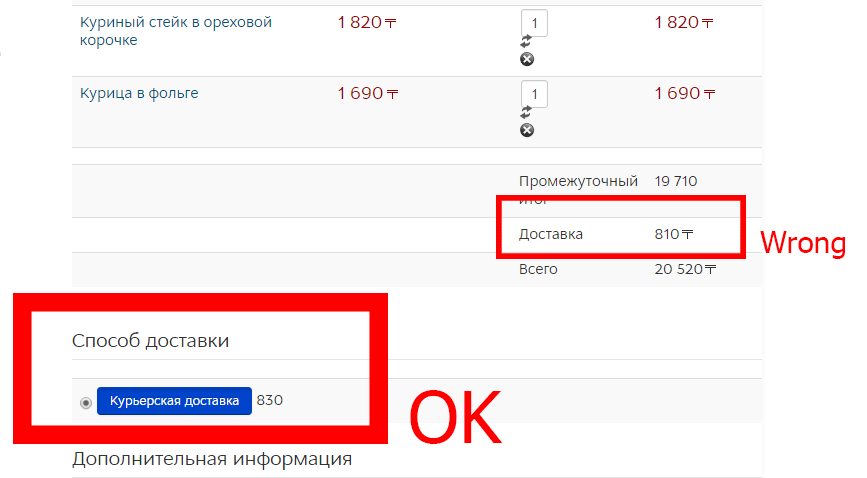
Noticed now that shipping prices are different on checkout page. One (OK) is change when change it in Adnin panel -> Shipping methods and then just reload page. But another (wrong) changes only when change quantity in checkout. How to change both by page refresh?
Please Log in or Create an account to join the conversation.
Less
More
- Posts: 12953
- Thank you received: 1778
10 years 4 months ago #240921
by Mohamed Thelji
Replied by Mohamed Thelji on topic Delivery cost depending on categories
Hello,
You'll have to add that modification through the file "administrator/components/com_hikashop/classes/shipping.php"Unfortunately I don't remember exactly what I did.
Edited \administrator\com_hikashop\helpers\helper.php
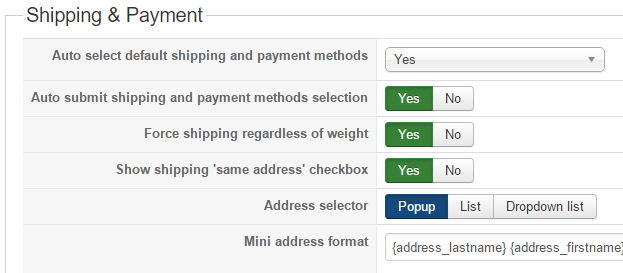
Can you make sure that your "Auto submit shipping and payment methods selection" option is set to "Yes" via "Hikashop->System->Configuration->Checkout"How to change both by page refresh?
Please Log in or Create an account to join the conversation.
10 years 4 months ago #241030
by alikon1
Replied by alikon1 on topic Delivery cost depending on categories
Mohamed Thelji wrote: Hello,
Can you make sure that your "Auto submit shipping and payment methods selection" option is set to "Yes" via "Hikashop->System->Configuration->Checkout"How to change both by page refresh?
Please Log in or Create an account to join the conversation.

10 years 4 months ago #241050
by nicolas
So supposes that you're using the manual shipping plugin.
You would have to edit the file plugins/hikashopshipping/manual/manual.php file and add the line:
var $use_cache = false;
after the line:
class plgHikaShopshippingManual extends hikashopShippingPlugin {
so that the cache would be automatically disabled for all the payment methods of that plugin, without changing any code or setting.
Replied by nicolas on topic Delivery cost depending on categories
The shipping cache can be disabled by the shipping plugin itself when it requires that.For the next HikaShop release, we will improve that and let the shipping methods indicate if they want to use the shipping cache or not.Regards,
You did this changes? Where I can disable shipping price cache in menu?
So supposes that you're using the manual shipping plugin.
You would have to edit the file plugins/hikashopshipping/manual/manual.php file and add the line:
var $use_cache = false;
after the line:
class plgHikaShopshippingManual extends hikashopShippingPlugin {
so that the cache would be automatically disabled for all the payment methods of that plugin, without changing any code or setting.
Please Log in or Create an account to join the conversation.
10 years 4 months ago - 10 years 3 months ago #241134
by alikon1
Added but nothing changed. When change shipping method cost in backend, it doesn't change in checkout until change quantity.
Maybe you can check it. I can give test access.
Replied by alikon1 on topic Delivery cost depending on categories
nicolas wrote:
The shipping cache can be disabled by the shipping plugin itself when it requires that.For the next HikaShop release, we will improve that and let the shipping methods indicate if they want to use the shipping cache or not.Regards,
You did this changes? Where I can disable shipping price cache in menu?
So supposes that you're using the manual shipping plugin.
You would have to edit the file plugins/hikashopshipping/manual/manual.php file and add the line:
var $use_cache = false;
after the line:
class plgHikaShopshippingManual extends hikashopShippingPlugin {
so that the cache would be automatically disabled for all the payment methods of that plugin, without changing any code or setting.
Added but nothing changed. When change shipping method cost in backend, it doesn't change in checkout until change quantity.
Maybe you can check it. I can give test access.
Last edit: 10 years 3 months ago by alikon1.
Please Log in or Create an account to join the conversation.
10 years 4 months ago #241218
by nicolas
Replied by nicolas on topic Delivery cost depending on categories
Hi,
I had a hard time trying to reproduce the problem as I don't see the shipping methods selection area, I can click on the button, I don't read your language, etc.
I don't understand why I get "Стоимость доставки зависит от выбранного заведения." instead of the shipping price. There is no system in HikaShop for that.
What the shipping methods caching system does is that when nothing changes in the cart, the shipping methods displayed in the shipping methods selection interface are not updated. When it is turned off, the shipping methods will be recalculated for that view of the checkout.
However, it doesn't act on the shipping method selected for the cart. When it is selected, its data is stored in the session so that it can be directly used on the cart view without having to calculate all the shipping methods.
So if you're talking about the shipping fee in the cart, adding the use_cache attribute in your shipping method won't change anything. It will only change for the shipping methods selection area where the price of each shipping methods available is displayed for the customer to select one among them.
I had a hard time trying to reproduce the problem as I don't see the shipping methods selection area, I can click on the button, I don't read your language, etc.
I don't understand why I get "Стоимость доставки зависит от выбранного заведения." instead of the shipping price. There is no system in HikaShop for that.
What the shipping methods caching system does is that when nothing changes in the cart, the shipping methods displayed in the shipping methods selection interface are not updated. When it is turned off, the shipping methods will be recalculated for that view of the checkout.
However, it doesn't act on the shipping method selected for the cart. When it is selected, its data is stored in the session so that it can be directly used on the cart view without having to calculate all the shipping methods.
So if you're talking about the shipping fee in the cart, adding the use_cache attribute in your shipping method won't change anything. It will only change for the shipping methods selection area where the price of each shipping methods available is displayed for the customer to select one among them.
Please Log in or Create an account to join the conversation.
10 years 4 months ago #241254
by alikon1
Replied by alikon1 on topic Delivery cost depending on categories
The topic was how to make it's own delivery cost for every category, and with your advices I made it by editing \administrator\com_hikashop\helpers\helper.php file
here
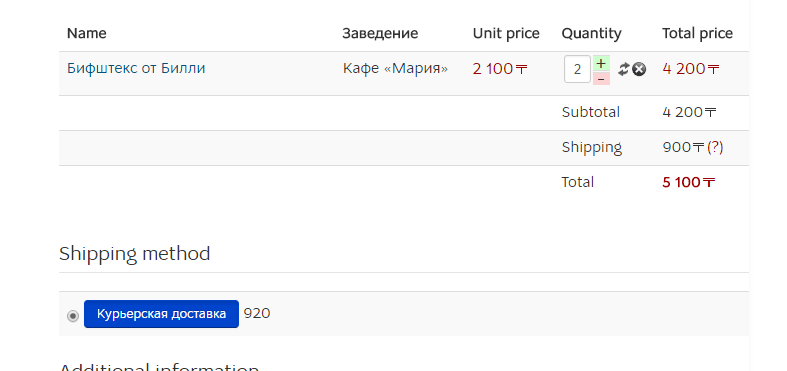
In Shipping method delivery cost update OK when page refresh. But Total value calculated not with this value (920). Total use Shipping (900) under Subtotal. I thought this values (Shipping and Shipping Method) should be the same, but they are not.
In Shipping method delivery cost update OK when page refresh. But Total value calculated not with this value (920). Total use Shipping (900) under Subtotal. I thought this values (Shipping and Shipping Method) should be the same, but they are not.
Please Log in or Create an account to join the conversation.
10 years 4 months ago #241277
by nicolas
Replied by nicolas on topic Delivery cost depending on categories
Hi,
As I said, in my previous message, that's normal that the rate in the cart doesn't change if the data in the session is not updated.
It's different from the cache system.
But I don't see why that is a problem.
What you're talking about will only happen when you change shipping fees in the backend, and it's not something you change much normally.
As I said, in my previous message, that's normal that the rate in the cart doesn't change if the data in the session is not updated.
It's different from the cache system.
But I don't see why that is a problem.
What you're talking about will only happen when you change shipping fees in the backend, and it's not something you change much normally.
Please Log in or Create an account to join the conversation.
Time to create page: 0.307 seconds