
- Posts: 73
- Thank you received: 0
Hide the positive symbol in the options dropdown?
- shamrockshirts
-
 Topic Author
- Offline
Less
More
13 years 6 months ago #103277
by shamrockshirts
Hide the positive symbol in the options dropdown? was created by shamrockshirts
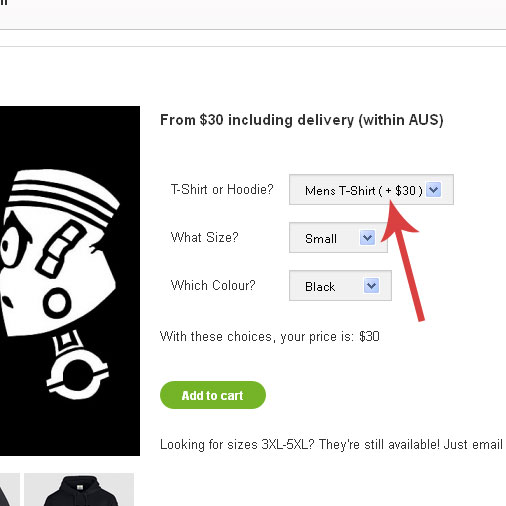
Is it possible to hide the positive symbol in the product options dropdown menu?
Please Log in or Create an account to join the conversation.

13 years 6 months ago #103290
by Jerome
Jerome - Obsidev.com
HikaMarket & HikaSerial developer / HikaShop core dev team.
Replied by Jerome on topic Hide the positive symbol in the options dropdown?
Hi,
The positive symbol in the product options dropdown menu ?
Can you provide an screenshot or an image. I don't see what you're talking about.
Regards,
The positive symbol in the product options dropdown menu ?
Can you provide an screenshot or an image. I don't see what you're talking about.
Regards,
Jerome - Obsidev.com
HikaMarket & HikaSerial developer / HikaShop core dev team.
Please Log in or Create an account to join the conversation.
- shamrockshirts
-
Topic Author
- Offline
Less
More
- Posts: 73
- Thank you received: 0
13 years 6 months ago #103321
by shamrockshirts
Replied by shamrockshirts on topic Hide the positive symbol in the options dropdown?
Please Log in or Create an account to join the conversation.
13 years 6 months ago #103331
by Jerome
Jerome - Obsidev.com
HikaMarket & HikaSerial developer / HikaShop core dev team.
Replied by Jerome on topic Hide the positive symbol in the options dropdown?
Hi,
Thanks !
You have to edit the view "product | option". You will find the line:
So you can replace it by
To remove the "+" before the price.
Regards,
Thanks !
You have to edit the view "product | option". You will find the line:
Code:
$text.=' ( '.($positive?'+ ':'').strip_tags($this->loadTemplate()).' )';
Code:
$text.=' ( '.strip_tags($this->loadTemplate()).' )';
Regards,
Jerome - Obsidev.com
HikaMarket & HikaSerial developer / HikaShop core dev team.
Please Log in or Create an account to join the conversation.
- shamrockshirts
-
Topic Author
- Offline
Less
More
- Posts: 73
- Thank you received: 0
13 years 6 months ago #103587
by shamrockshirts
Replied by shamrockshirts on topic Hide the positive symbol in the options dropdown?
Unfortunately that didn't work
Please Log in or Create an account to join the conversation.
13 years 6 months ago #103590
by Jerome
Jerome - Obsidev.com
HikaMarket & HikaSerial developer / HikaShop core dev team.
Replied by Jerome on topic Hide the positive symbol in the options dropdown?
Hi,
The line that I mentioned is used two times in the view (so, two replacements to do).
Regards,
The line that I mentioned is used two times in the view (so, two replacements to do).
Regards,
Jerome - Obsidev.com
HikaMarket & HikaSerial developer / HikaShop core dev team.
Please Log in or Create an account to join the conversation.
- shamrockshirts
-
Topic Author
- Offline
Less
More
- Posts: 73
- Thank you received: 0
13 years 6 months ago #103593
by shamrockshirts
Replied by shamrockshirts on topic Hide the positive symbol in the options dropdown?
That worked perfectly Jerome, thank you so much.
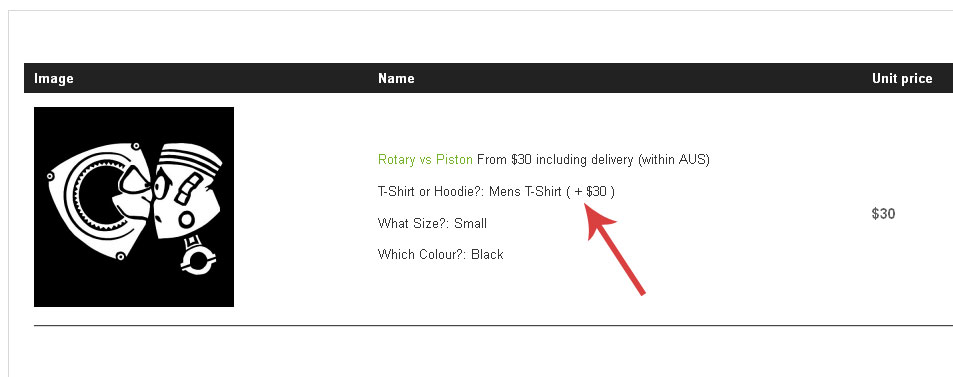
Is it also possible to remove it from the text in the shopping cart?
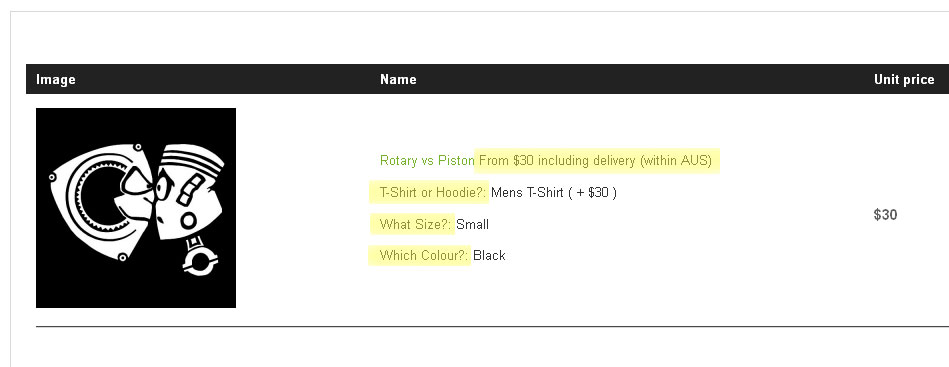
Lastly, I would also like to remove the text from the shopping cart which is highlighted in yellow on the image below. I think the cart would look a lot simpler and easier to read if this text was not there. Is this possible?
Thank you so much for all of your help. Your positive attitude and polite responses are much appreciated.
Is it also possible to remove it from the text in the shopping cart?
Lastly, I would also like to remove the text from the shopping cart which is highlighted in yellow on the image below. I think the cart would look a lot simpler and easier to read if this text was not there. Is this possible?
Thank you so much for all of your help. Your positive attitude and polite responses are much appreciated.
Please Log in or Create an account to join the conversation.
13 years 6 months ago #103594
by Jerome
Jerome - Obsidev.com
HikaMarket & HikaSerial developer / HikaShop core dev team.
Replied by Jerome on topic Hide the positive symbol in the options dropdown?
Hi,
Same procedure, another view : "checkout | cart".
Look at the line:{code]echo ' ( + ';[/code]
You can customize the rest of the view in order to remove the content you don't want to display.
Regards,
Same procedure, another view : "checkout | cart".
Look at the line:{code]echo ' ( + ';[/code]
You can customize the rest of the view in order to remove the content you don't want to display.
Regards,
Jerome - Obsidev.com
HikaMarket & HikaSerial developer / HikaShop core dev team.
Please Log in or Create an account to join the conversation.
Time to create page: 0.077 seconds