

- Posts: 28
- Thank you received: 0
payment choose
13 years 5 months ago #103636
by ljrr
payment choose was created by ljrr
Hi, can i only choose the payment by buttons? are there any alternatives?
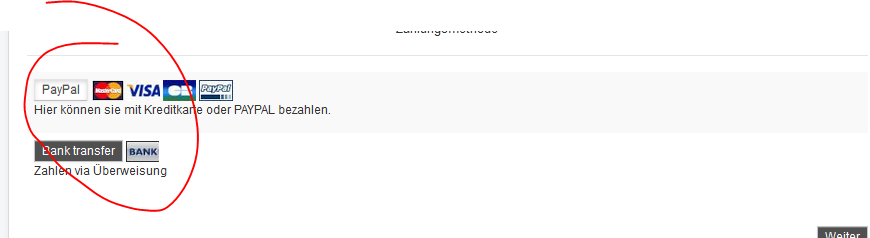
when the step "payment" appear there are two options. at the beginning one option is chosen. i think its confusing.. can i change it?
thx
when the step "payment" appear there are two options. at the beginning one option is chosen. i think its confusing.. can i change it?
thx
Please Log in or Create an account to join the conversation.

13 years 5 months ago #103654
by Jerome
Jerome - Obsidev.com
HikaMarket & HikaSerial developer / HikaShop core dev team.
Replied by Jerome on topic payment choose
Hi,
You have the HikaShop option which auto select the payment method in the checkout.
After that, if you don't want to use the bootstrap design, you can deactivate the option (but it will affect the entire site) or you can override the "checkout | payment" view in order to have you own design.
The payment select is not really using buttons, it is using radio with a "btn" class style.
Regards,
You have the HikaShop option which auto select the payment method in the checkout.
After that, if you don't want to use the bootstrap design, you can deactivate the option (but it will affect the entire site) or you can override the "checkout | payment" view in order to have you own design.
The payment select is not really using buttons, it is using radio with a "btn" class style.
Regards,
Jerome - Obsidev.com
HikaMarket & HikaSerial developer / HikaShop core dev team.
Please Log in or Create an account to join the conversation.
13 years 5 months ago - 13 years 5 months ago #103725
by ljrr
Replied by ljrr on topic payment choose
Where i can choose the design? cant find the option?
it is not possibile without great php skills..?
it is not possibile without great php skills..?
Last edit: 13 years 5 months ago by ljrr.
Please Log in or Create an account to join the conversation.
13 years 5 months ago #103739
by Jerome
Jerome - Obsidev.com
HikaMarket & HikaSerial developer / HikaShop core dev team.
Replied by Jerome on topic payment choose
Hi,
The option is called "Use bootstrap design":
www.hikashop.com/en/support/documentatio...html#display_general
Modifying a view for this modification does not require great php skills.
You can just edit the "checkout | payment" view and replace:
By
In order to switch to the non-bootstrap design for this specific view.
Regards,
The option is called "Use bootstrap design":
www.hikashop.com/en/support/documentatio...html#display_general
Modifying a view for this modification does not require great php skills.
You can just edit the "checkout | payment" view and replace:
Code:
if(!HIKASHOP_RESPONSIVE) {
Code:
if(true) {
Regards,
Jerome - Obsidev.com
HikaMarket & HikaSerial developer / HikaShop core dev team.
The following user(s) said Thank You: ljrr
Please Log in or Create an account to join the conversation.
Time to create page: 0.057 seconds