

- Posts: 28
- Thank you received: 0
deactivate image-zoom
13 years 5 months ago #103842
by ljrr
deactivate image-zoom was created by ljrr
if i click on a image in my products it will appear again on this way:
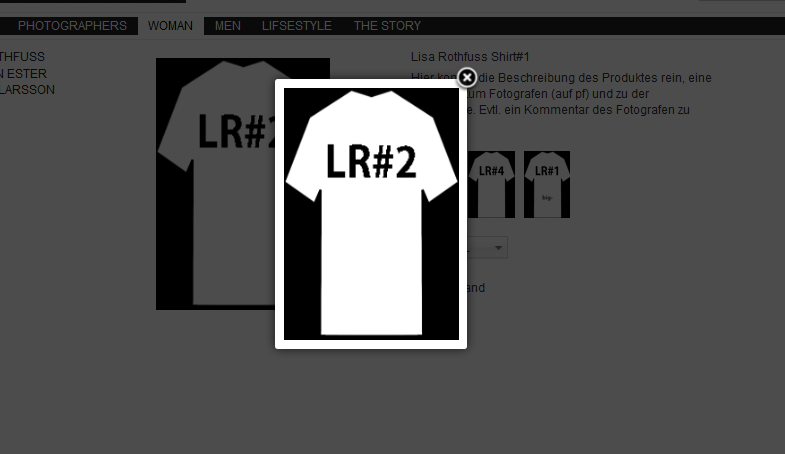
how i can deaktivate it?
thx
how i can deaktivate it?
thx
Please Log in or Create an account to join the conversation.

13 years 5 months ago #103858
by nicolas
Replied by nicolas on topic deactivate image-zoom
Hi,
Go in the menu Display->Views, edit the file "show_block_img" for your template and change the line:
to:
and that should do it.
Go in the menu Display->Views, edit the file "show_block_img" for your template and change the line:
Code:
echo $this->image->display(@$image->file_path,true,@$image->file_name,'id="hikashop_main_image'.$variant_name.'" style="margin-top:10px;margin-bottom:10px;display:inline-block;vertical-align:middle"','id="hikashop_main_image_link"', $width, $height);
Code:
echo $this->image->display(@$image->file_path,false,@$image->file_name,'id="hikashop_main_image'.$variant_name.'" style="margin-top:10px;margin-bottom:10px;display:inline-block;vertical-align:middle"','id="hikashop_main_image_link"', $width, $height);
The following user(s) said Thank You: ljrr
Please Log in or Create an account to join the conversation.
13 years 5 months ago #103861
by ljrr
Replied by ljrr on topic deactivate image-zoom
thx, it work for the big picture - but not for the thumbs... with mouse:hover will replace the big picture. so i dont need the funktion there too.
Please Log in or Create an account to join the conversation.

13 years 5 months ago - 13 years 5 months ago #103883
by Xavier
Replied by Xavier on topic deactivate image-zoom
Hi,
To remove the popup onClick on the thumbs you have to edit:
To have:
If you want to remove the onmouseover on the thumbnails, you will have to edit the file "administrator/components/com_hikashop/helpers/image.php" and in the function "display()" edit the line:
and remove:
To remove the popup onClick on the thumbs you have to edit:
Code:
echo $this->image->display($image->file_path, 'hikashop_main_image'.$variant_name, $image->file_name, 'class="hikashop_child_image"','', $width, $height);
Code:
echo $this->image->display($image->file_path, false, $image->file_name, 'class="hikashop_child_image"','', $width, $height);
If you want to remove the onmouseover on the thumbnails, you will have to edit the file "administrator/components/com_hikashop/helpers/image.php" and in the function "display()" edit the line:
Code:
$html = '<a title="'.$alt.'" class="hikashop_image_small_link" rel="{handler: \'image\'}" href="'.$this->uploadFolder_url.$path.'" onclick="SqueezeBox.fromElement(this,{parse: \'rel\'});return false;" target="_blank" onmouseover="return hikashopChangeImage(\''.$addpopup.'\',\''.$this->uploadFolder_url_thumb.'\',\''.$this->thumbnail_x.'\',\''.$this->thumbnail_y.'\',this,\''.$alt.'\');" '.$optionslink.'>'.$html.'</a>';
Code:
onmouseover="return hikashopChangeImage(\''.$addpopup.'\',\''.$this->uploadFolder_url_thumb.'\',\''.$this->thumbnail_x.'\',\''.$this->thumbnail_y.'\',this,\''.$alt.'\');"
Last edit: 13 years 5 months ago by Xavier.
Please Log in or Create an account to join the conversation.
13 years 5 months ago #103910
by ljrr
Replied by ljrr on topic deactivate image-zoom
i only want to remove the onclick popup.
i replaced
to
it dont work and dont look well xD, look
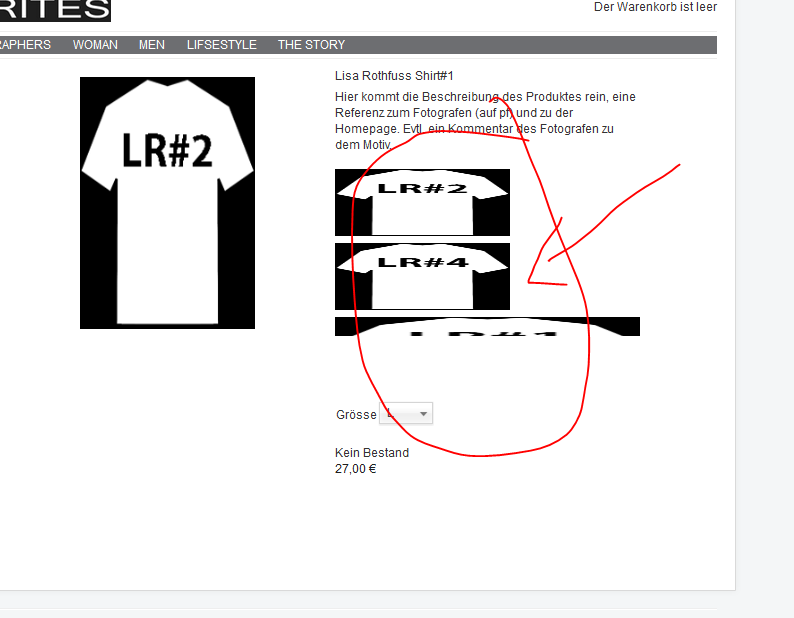
i replaced
Code:
echo $this->image->display($image->file_path, 'hikashop_main_image'.$variant_name, $image->file_name, 'class="hikashop_child_image"','', $width, $height);
to
Code:
echo $this->image->display($image->file_path, false, $image->file_name, 'class="hikashop_child_image"','', $width, $height);
it dont work and dont look well xD, look
Please Log in or Create an account to join the conversation.
13 years 5 months ago #104057
by Xavier
Replied by Xavier on topic deactivate image-zoom
Hi,
What you can do is replace the code:
By a custom html code displaying the image, something like:
What you can do is replace the code:
Code:
echo $this->image->display($image->file_path, 'hikashop_main_image'.$variant_name, $image->file_name, 'class="hikashop_child_image"','', $width, $height);
Code:
<img src="<?php echo $image->file_path.'/thumbnail_'.$width.'x'.$height.'/'.$image->file_name;" alt="$image->file_name"/>
Please Log in or Create an account to join the conversation.
Time to create page: 0.065 seconds