

- Posts: 107
- Thank you received: 1
Where is the code of "options" for Hikashop menu
13 years 5 months ago - 13 years 5 months ago #104288
by tinachou
Where is the code of "options" for Hikashop menu was created by tinachou
Hi there,
I hope to change some code of "options" for "the menu item of Hikashop type" in the Joomla Menu. But I couldn't find which source file to edit. Could someone give me a hand?
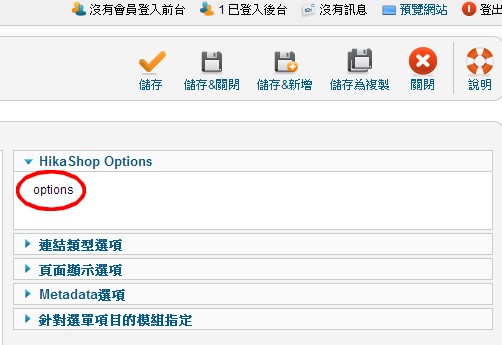
Really thanks!
I hope to change some code of "options" for "the menu item of Hikashop type" in the Joomla Menu. But I couldn't find which source file to edit. Could someone give me a hand?
Really thanks!
Last edit: 13 years 5 months ago by tinachou.
Please Log in or Create an account to join the conversation.

13 years 5 months ago #104292
by nicolas
Replied by nicolas on topic Where is the code of "options" for Hikashop menu
It's the file components/com_hikashop/fields/selectoptions.php
The following user(s) said Thank You: tinachou
Please Log in or Create an account to join the conversation.
13 years 5 months ago #104743
by tinachou
Replied by tinachou on topic Where is the code of "options" for Hikashop menu
Hello,
Thank you so much.
Unfortunately, my problem is that the function of "options" is no longer valid. Now when I press "options", there is no reaction. It seems it has lost its link and I do not know where to fix it.
The file you provided seems not directly match to the Joomla menu parameter setting. Do you know some other files which could cause the problem?
Thank you so much.
Unfortunately, my problem is that the function of "options" is no longer valid. Now when I press "options", there is no reaction. It seems it has lost its link and I do not know where to fix it.
The file you provided seems not directly match to the Joomla menu parameter setting. Do you know some other files which could cause the problem?
Please Log in or Create an account to join the conversation.

13 years 5 months ago #104777
by Xavier
Replied by Xavier on topic Where is the code of "options" for Hikashop menu
Hi,
The file given By Nicolas, is the view called in the Joomla menu parameters when the menu type is HikaShop.
So if you want to change something here, it's the file to edit.
It's no more working maybe because you have wrongly edited it.
This file is just calling the "menus" controller of HikaShop, so you will maybe have to make some modifications in the controller.
Here is the default content of the file "selectoptions.php" if you need to revert back the file.
The file given By Nicolas, is the view called in the Joomla menu parameters when the menu type is HikaShop.
So if you want to change something here, it's the file to edit.
It's no more working maybe because you have wrongly edited it.
This file is just calling the "menus" controller of HikaShop, so you will maybe have to make some modifications in the controller.
Here is the default content of the file "selectoptions.php" if you need to revert back the file.
Code:
<?php
class JFormFieldSelectoptions extends JFormField{
protected $type = 'selectoptions';
protected function getInput() {
if(!defined('DS'))
define('DS', DIRECTORY_SEPARATOR);
if(!function_exists('hikashop_config') && !include_once(rtrim(JPATH_ADMINISTRATOR,DS).DS.'components'.DS.'com_hikashop'.DS.'helpers'.DS.'helper.php')){
return 'This menu options cannot be displayed without the Hikashop Component';
}
$config =& hikashop_config();
if(!hikashop_isAllowed($config->get('acl_menus_manage','all'))){
return 'Access to the HikaShop options of the menus is restricted';
}
$id = JRequest::getInt('id');
if(!empty($id)){
$text = '<a title="'.JText::_('HIKASHOP_OPTIONS').'" href="'.JRoute::_('index.php?option=com_hikashop&ctrl=menus&fromjoomla=1&task=edit&cid[]='.$id).'" >'.JText::_('HIKASHOP_OPTIONS').'</a>';
}else{
$text = JText::_('HIKASHOP_OPTIONS_EDIT');
}
return $text;
}
}
Please Log in or Create an account to join the conversation.
Time to create page: 0.067 seconds