
- Posts: 11
- Thank you received: 1
Align currency symbol
- supercrema
-
 Topic Author
- Offline
Less
More
13 years 5 months ago - 13 years 5 months ago #105005
by supercrema
Align currency symbol was created by supercrema
Hi Nicolas and sorry for my bad english 
I purchase Hikashop Business for my site anda I have a problem.
I use one page checkout and the symbol of currency is not allign in vertical.
This is the screenshot
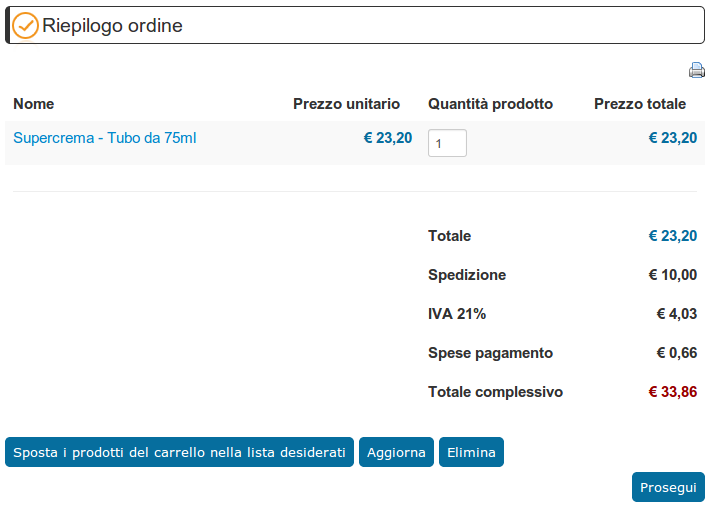
How to align the currency symbol?
Thi is the example:
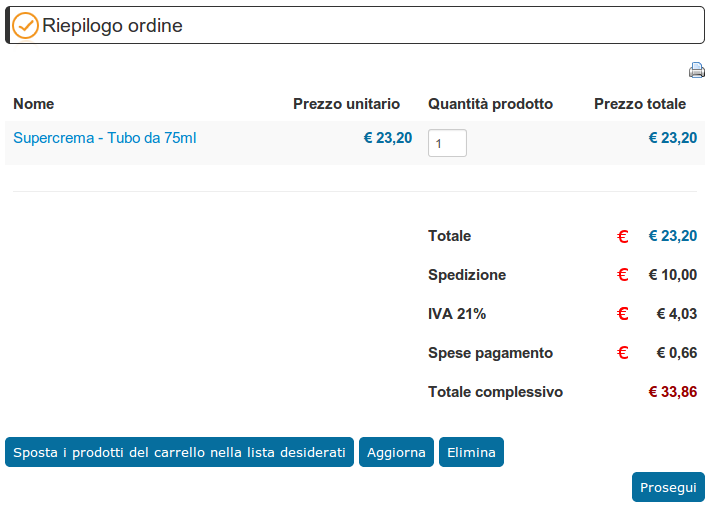
Thanks for your attention and good work
I purchase Hikashop Business for my site anda I have a problem.
I use one page checkout and the symbol of currency is not allign in vertical.
This is the screenshot
How to align the currency symbol?
Thi is the example:
Thanks for your attention and good work
Last edit: 13 years 5 months ago by supercrema.
Please Log in or Create an account to join the conversation.

13 years 5 months ago #105007
by nicolas
Replied by nicolas on topic Align currency symbol
Hi,
I don't see any solution to do that.
The symbol and the price are displayed together on the page.
You can potentially put the euro symbol on the right of the price and thus it will be aligned automatically.
You can do that by editing the options of the currency via System>Currencies.
I don't see any solution to do that.
The symbol and the price are displayed together on the page.
You can potentially put the euro symbol on the right of the price and thus it will be aligned automatically.
You can do that by editing the options of the currency via System>Currencies.
Please Log in or Create an account to join the conversation.
- supercrema
-
Topic Author
- Offline
Less
More
- Posts: 11
- Thank you received: 1
13 years 5 months ago #105011
by supercrema
Replied by supercrema on topic Align currency symbol
Thanks for the quick reply, Nicolas
The problem is that my client would like to see it just like that.
In Italy we use to put the euro symbol before the price and would be more professional than the currency symbol to be aligned.
You have no other possible ideas to propose?
The problem is that my client would like to see it just like that.
In Italy we use to put the euro symbol before the price and would be more professional than the currency symbol to be aligned.
You have no other possible ideas to propose?
Please Log in or Create an account to join the conversation.

13 years 5 months ago #105060
by Jerome
Jerome - Obsidev.com
HikaMarket & HikaSerial developer / HikaShop core dev team.
Replied by Jerome on topic Align currency symbol
Hi,
The only solution I see is to override the views in order to create a specific design.
The idea is to display the prices and remove the "€" symbol from the returned text. So, the "€" symbol can be displayed in another cell in the table and the price can be displayed without the symbol.
At this moment, you will have aligned symbols and aligned prices.
But it requires some development skills (in order to modify the views correctly).
Regards,
The only solution I see is to override the views in order to create a specific design.
The idea is to display the prices and remove the "€" symbol from the returned text. So, the "€" symbol can be displayed in another cell in the table and the price can be displayed without the symbol.
At this moment, you will have aligned symbols and aligned prices.
But it requires some development skills (in order to modify the views correctly).
Regards,
Jerome - Obsidev.com
HikaMarket & HikaSerial developer / HikaShop core dev team.
Please Log in or Create an account to join the conversation.
Time to create page: 0.061 seconds