
- Posts: 223
- Thank you received: 1
Missing check-out step?
- plumbingdeals
-
 Topic Author
- Offline
Less
More
13 years 5 months ago #105298
by plumbingdeals
Missing check-out step? was created by plumbingdeals
Seems like something is missing...
On the view cart/checkout page, should there be a continue button so that after address/payment info, etc...is entered, the customer can proceed?
Thank you
On the view cart/checkout page, should there be a continue button so that after address/payment info, etc...is entered, the customer can proceed?
Thank you
Please Log in or Create an account to join the conversation.

13 years 5 months ago #105305
by Jerome
Jerome - Obsidev.com
HikaMarket & HikaSerial developer / HikaShop core dev team.
Replied by Jerome on topic Missing check-out step?
Hi,
It depends.
If there is an error in the checkout, the button to continue is not displayed (because there is an error in the checkout).
Like: "no shipping method found" / "no payment method found" / "no address" / "user not logged" / etc
Regards,
It depends.
If there is an error in the checkout, the button to continue is not displayed (because there is an error in the checkout).
Like: "no shipping method found" / "no payment method found" / "no address" / "user not logged" / etc
Regards,
Jerome - Obsidev.com
HikaMarket & HikaSerial developer / HikaShop core dev team.
Please Log in or Create an account to join the conversation.
- plumbingdeals
-
Topic Author
- Offline
Less
More
- Posts: 223
- Thank you received: 1
13 years 5 months ago #105309
by plumbingdeals
Replied by plumbingdeals on topic Missing check-out step?
How do I troubleshoot this, as I don't see any errors?
Please Log in or Create an account to join the conversation.
13 years 5 months ago #105316
by Jerome
Jerome - Obsidev.com
HikaMarket & HikaSerial developer / HikaShop core dev team.
Replied by Jerome on topic Missing check-out step?
Hi,
It is just some ideas. I don't know your website url so I can just make speculations.
But, if the user is not logged and the "login" step is display in the checkout. You won't have any error message. At this moment, the user have to use the "login" or the "register" button to continue.
Otherwise, you can check it ; just in case your template does not display the error messages: www.hikashop.com/en/support/documentatio...issues.html#messages
And if you have some information, like your website, a screenshot of your checkout workflow, a screenshot of your checkout where the "continue" button seams missing. It will help us to help you.
Best regards,
It is just some ideas. I don't know your website url so I can just make speculations.
But, if the user is not logged and the "login" step is display in the checkout. You won't have any error message. At this moment, the user have to use the "login" or the "register" button to continue.
Otherwise, you can check it ; just in case your template does not display the error messages: www.hikashop.com/en/support/documentatio...issues.html#messages
And if you have some information, like your website, a screenshot of your checkout workflow, a screenshot of your checkout where the "continue" button seams missing. It will help us to help you.
Best regards,
Jerome - Obsidev.com
HikaMarket & HikaSerial developer / HikaShop core dev team.
Please Log in or Create an account to join the conversation.
- plumbingdeals
-
Topic Author
- Offline
Less
More
- Posts: 223
- Thank you received: 1
13 years 5 months ago #105319
by plumbingdeals
Replied by plumbingdeals on topic Missing check-out step?
see attached....
site is decorativeplumbingonline.com
i have pm'd backend access to you
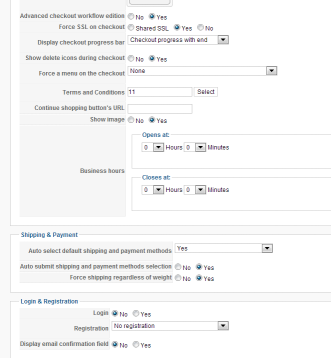
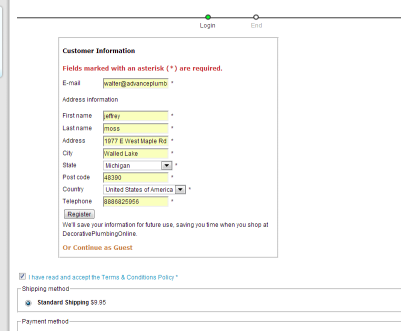
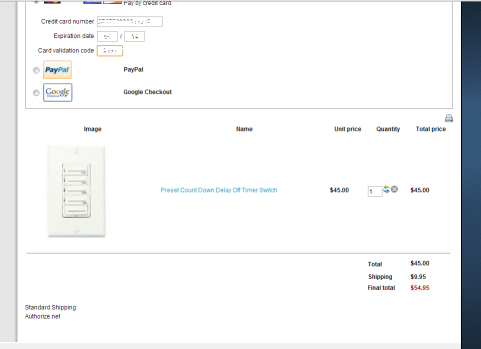
site is decorativeplumbingonline.com
i have pm'd backend access to you
Please Log in or Create an account to join the conversation.
13 years 5 months ago #105321
by Jerome
Jerome - Obsidev.com
HikaMarket & HikaSerial developer / HikaShop core dev team.
Replied by Jerome on topic Missing check-out step?
Hi
Regards,
It is your case. You have a button "register" just below the subscription form.But, if the user is not logged and the "login" step is display in the checkout. You won't have any error message. At this moment, the user have to use the "login" or the "register" button to continue.
Regards,
Jerome - Obsidev.com
HikaMarket & HikaSerial developer / HikaShop core dev team.
Please Log in or Create an account to join the conversation.
- plumbingdeals
-
Topic Author
- Offline
Less
More
- Posts: 223
- Thank you received: 1
13 years 5 months ago #105322
by plumbingdeals
Replied by plumbingdeals on topic Missing check-out step?
yes, but the reason we chose hikashop was because we were told by Nicholas that guest checkout was an option. we do not want to require customers to create an account to purchase. if need be, i will find the forums post(s) from nicholas indicating that an account WAS NOT needed to purchase/check-out.
Please Log in or Create an account to join the conversation.
13 years 5 months ago #105324
by Jerome
Jerome - Obsidev.com
HikaMarket & HikaSerial developer / HikaShop core dev team.
Replied by Jerome on topic Missing check-out step?
Hi,
At this moment, you have to remove the "login" step from your checkout workflow and just use the "address" one.
As you can see, there is a button "register" and a link "or continue as a guest"
Regards,
At this moment, you have to remove the "login" step from your checkout workflow and just use the "address" one.
As you can see, there is a button "register" and a link "or continue as a guest"
Regards,
Jerome - Obsidev.com
HikaMarket & HikaSerial developer / HikaShop core dev team.
Please Log in or Create an account to join the conversation.
- plumbingdeals
-
Topic Author
- Offline
Less
More
- Posts: 223
- Thank you received: 1
13 years 5 months ago #105628
by plumbingdeals
Replied by plumbingdeals on topic Missing check-out step?
I don't know if we were mislead, or there is a language problem...but we have a real problem here.
We were told by Nicholas, that with PAID versions, guest checkout is allowed, that is why we paid for, and have since renewed Hikashop
Removing the "login" step generated this error:

We were lead to believe that with the PAID version, guest checkout would be allowed and buyers would be able to provide name, address, etc... for processing of orders...
if this IS NOT the case, we feel we were clearly mislead...
We were told by Nicholas, that with PAID versions, guest checkout is allowed, that is why we paid for, and have since renewed Hikashop
Removing the "login" step generated this error:
We were lead to believe that with the PAID version, guest checkout would be allowed and buyers would be able to provide name, address, etc... for processing of orders...
if this IS NOT the case, we feel we were clearly mislead...
Please Log in or Create an account to join the conversation.

13 years 5 months ago #105785
by nicolas
Replied by nicolas on topic Missing check-out step?
Hi,
I think that there is a misunderstanding here.
If you change the "registration" option of the configuration to "no registration" you will indeed be able to have a guest checkout: that means that you won't have any user account created for the user during the checkout. That's what the commercial edition allows (among other things).
That doesn't mean that you can remove the login view from the checkout. You still want it in order for your customers to be able to enter their address (which is what you want), but you don't have anymore the "username", "password" fields that you have in "registration" mode since no user account is created anymore.
I think that there is a misunderstanding here.
If you change the "registration" option of the configuration to "no registration" you will indeed be able to have a guest checkout: that means that you won't have any user account created for the user during the checkout. That's what the commercial edition allows (among other things).
That doesn't mean that you can remove the login view from the checkout. You still want it in order for your customers to be able to enter their address (which is what you want), but you don't have anymore the "username", "password" fields that you have in "registration" mode since no user account is created anymore.
Please Log in or Create an account to join the conversation.
- plumbingdeals
-
Topic Author
- Offline
Less
More
- Posts: 223
- Thank you received: 1
13 years 5 months ago #105814
by plumbingdeals
Replied by plumbingdeals on topic Missing check-out step?
It would seem that what you are Jerome are saying are two different things...which is causing the misunderstanding...he said the "login step should be removed from the checkout process....
"At this moment, you have to remove the "login" step from your checkout workflow and just use the "address" one.
As you can see, there is a button "register" and a link "or continue as a guest""
You seem to be saying that it should NOT be removed, but that I should simply change the name of the button...so a customer will then have no option on the checkout page to create an account, correct?
"At this moment, you have to remove the "login" step from your checkout workflow and just use the "address" one.
As you can see, there is a button "register" and a link "or continue as a guest""
You seem to be saying that it should NOT be removed, but that I should simply change the name of the button...so a customer will then have no option on the checkout page to create an account, correct?
Please Log in or Create an account to join the conversation.
13 years 5 months ago #105854
by nicolas
Replied by nicolas on topic Missing check-out step?
That's correct.
If you remove the login view, you need to remove the address view, and then you don't get any information about the users. Both views are linked together, you can't have one without the other so what Jerome said was wrong.
And yes, users won't have the option to register since it will be a guest checkout.
However, if you still want to give them the possibility to register, you can just add a link to the Joomla user registration page and the users will be able to register if they want before proceeding back to the checkout.
If you remove the login view, you need to remove the address view, and then you don't get any information about the users. Both views are linked together, you can't have one without the other so what Jerome said was wrong.
And yes, users won't have the option to register since it will be a guest checkout.
However, if you still want to give them the possibility to register, you can just add a link to the Joomla user registration page and the users will be able to register if they want before proceeding back to the checkout.
Please Log in or Create an account to join the conversation.
- plumbingdeals
-
Topic Author
- Offline
Less
More
- Posts: 223
- Thank you received: 1
13 years 5 months ago #105966
by plumbingdeals
Replied by plumbingdeals on topic Missing check-out step?
Problem solved...a bit of miscommunication and misunderstanding.
Guest checkout does in fact work when properly configured...results can be seen at decorativeplumbingonline, just put an item in the cart.
Thanks for the help
Guest checkout does in fact work when properly configured...results can be seen at decorativeplumbingonline, just put an item in the cart.
Thanks for the help
Please Log in or Create an account to join the conversation.
Time to create page: 0.182 seconds