
How do I setup a simple line listing on the front?
- sloanthrasher
-
 Topic Author
- Offline
Less
More
15 years 8 months ago #8281
by sloanthrasher
Sloan Thrasher
How do I setup a simple line listing on the front? was created by sloanthrasher
I would like a simple listing, one item per line showing the name, description, price, quantity and an add to cart button.
If possible, I'd like to display the products grouped by category, so that the category is shown on one line, followed by the products in that category, then the next category and it's products, etc.
Ideally, I want a customer to be able to order multiple items without going back and forth between categories, or loosing their place in the product list.
Customers will be ordering many items (around 20-100 per order), and it needs to be quick, simple and easy for them.
Something like:
Canned Peas | 24 #8 cans/case | $4.00 | ____ | Add To Cart
Canned Corn | 24 #8 cans/case | $4.00 | ____ | Add To Cart
Is this possible?
Thanks!
If possible, I'd like to display the products grouped by category, so that the category is shown on one line, followed by the products in that category, then the next category and it's products, etc.
Ideally, I want a customer to be able to order multiple items without going back and forth between categories, or loosing their place in the product list.
Customers will be ordering many items (around 20-100 per order), and it needs to be quick, simple and easy for them.
Something like:
Canned Peas | 24 #8 cans/case | $4.00 | ____ | Add To Cart
Canned Corn | 24 #8 cans/case | $4.00 | ____ | Add To Cart
Is this possible?
Thanks!
Sloan Thrasher
Please Log in or Create an account to join the conversation.

15 years 8 months ago #8292
by nicolas
Replied by nicolas on topic Re: How do I setup a simple line listing on the front?
Yes.
First, if you display all your products one one page, you don't really need categories...
Just create all your products in one category ( you can configure their ordering ). Then, create a listing products menu and go in the hikashop options of the menu. There, you will set the layout type to list, and toggle on the add to cart button.
Then, you will have to edit the file listing_list of the view product via the menu Display->Views and add near the beginning the line: $this->params->set('show_quantity_field',1);
If you want to display the category name, I would recommend to add a custom product field via the menu Display->Custom fields (only in commercial versions) so that for each product, you can select a category via a dropdown and then in the same listing_list file view, you can change the line:
echo $row->product_name;
to:
echo $row->custom_field_column_name.' '. $row->product_name;
in order to display both the category and the name
around those lines, you will be able to really personalize the display to have it like you want.
First, if you display all your products one one page, you don't really need categories...
Just create all your products in one category ( you can configure their ordering ). Then, create a listing products menu and go in the hikashop options of the menu. There, you will set the layout type to list, and toggle on the add to cart button.
Then, you will have to edit the file listing_list of the view product via the menu Display->Views and add near the beginning the line: $this->params->set('show_quantity_field',1);
If you want to display the category name, I would recommend to add a custom product field via the menu Display->Custom fields (only in commercial versions) so that for each product, you can select a category via a dropdown and then in the same listing_list file view, you can change the line:
echo $row->product_name;
to:
echo $row->custom_field_column_name.' '. $row->product_name;
in order to display both the category and the name
around those lines, you will be able to really personalize the display to have it like you want.
Please Log in or Create an account to join the conversation.
- sloanthrasher
-
Topic Author
- Offline
15 years 8 months ago #8299
by sloanthrasher
Sloan Thrasher
Replied by sloanthrasher on topic Re: How do I setup a simple line listing on the front?
Thanks,
I do need the categories, as there are hundreds of products in about 40 categories. I don't want to display all of them at once, but maybe in a paged list, and maybe in lists by category.
Thanks for the quick reply, and I'll try the changes you offered.
I do need the categories, as there are hundreds of products in about 40 categories. I don't want to display all of them at once, but maybe in a paged list, and maybe in lists by category.
Thanks for the quick reply, and I'll try the changes you offered.
Sloan Thrasher
Please Log in or Create an account to join the conversation.
- sloanthrasher
-
Topic Author
- Offline
15 years 8 months ago - 15 years 8 months ago #8304
by sloanthrasher
Sloan Thrasher
Replied by sloanthrasher on topic Re: How do I setup a simple line listing on the front?
Thanks for the help. This is what I get:
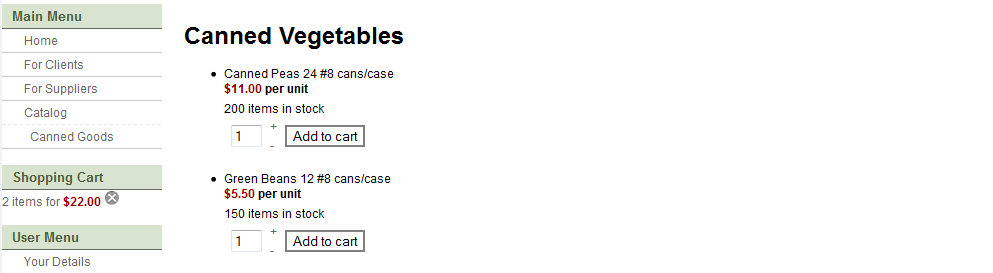
If possible, I'd like to have all the info on one line, using the whole width of the listing area. Is that possible?
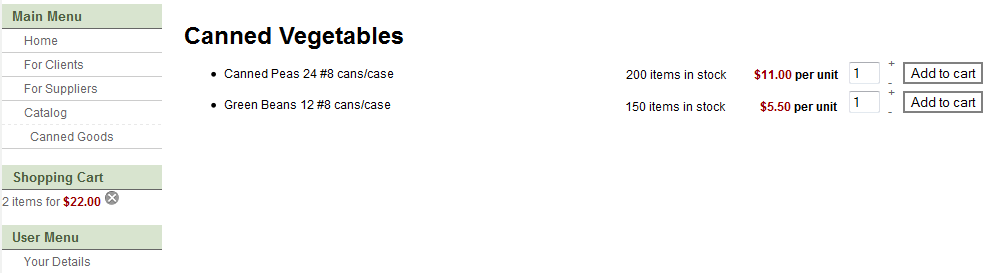
Thanks!
If possible, I'd like to have all the info on one line, using the whole width of the listing area. Is that possible?
Thanks!
Sloan Thrasher
Last edit: 15 years 8 months ago by sloanthrasher.
Please Log in or Create an account to join the conversation.
15 years 8 months ago #8308
by nicolas
Replied by nicolas on topic Re: How do I setup a simple line listing on the front?
First, you need to change the number of columns in the hikashop options of your menu so that you only have one column.
Then, you will have to edit the CSS of hikashop to have everything on one row. You can edit it in the config under the tab display. If you could give us the URL of that page, we should be able to give you more precise directions.
Then, you will have to edit the CSS of hikashop to have everything on one row. You can edit it in the config under the tab display. If you could give us the URL of that page, we should be able to give you more precise directions.
Please Log in or Create an account to join the conversation.
- sloanthrasher
-
Topic Author
- Offline
15 years 8 months ago - 15 years 8 months ago #8322
by sloanthrasher
Sloan Thrasher
Replied by sloanthrasher on topic Re: How do I setup a simple line listing on the front?
Thanks Nicolas!
The #of columns is set to 1 AFAIK.
sloantest.proteushosting.net/index.php?o...ut=listing&Itemid=56
It's a test site, so most stuff isn't working. Just seeing if HikaShop will work.
You can use a login ID of test1 and PW of test1
The #of columns is set to 1 AFAIK.
sloantest.proteushosting.net/index.php?o...ut=listing&Itemid=56
It's a test site, so most stuff isn't working. Just seeing if HikaShop will work.
You can use a login ID of test1 and PW of test1
Sloan Thrasher
Last edit: 15 years 8 months ago by sloanthrasher. Reason: Add info
Please Log in or Create an account to join the conversation.
15 years 8 months ago #8323
by nicolas
Replied by nicolas on topic Re: How do I setup a simple line listing on the front?
Almost: "To access the private area of this site, please log in." 
Please Log in or Create an account to join the conversation.
- sloanthrasher
-
Topic Author
- Offline
15 years 8 months ago #8326
by sloanthrasher
Sloan Thrasher
Replied by sloanthrasher on topic Re: How do I setup a simple line listing on the front?
Did you try test1/test1? I edited the previous post, so I might have missed you looking at it -- sorry.
Sloan Thrasher
Please Log in or Create an account to join the conversation.
15 years 8 months ago #8328
by nicolas
Replied by nicolas on topic Re: How do I setup a simple line listing on the front?
If you edit your post, we don't receive a new notice so if we looked directly to your post when you did it, we don't see your modification, which was the case. We'll look at that now.
Please Log in or Create an account to join the conversation.
15 years 8 months ago #8331
by nicolas
Replied by nicolas on topic Re: How do I setup a simple line listing on the front?
You can first remove the display: block; in the CSS code :
span.hikashop_product_price_full {
font-weight: bold;
display: block;
margin-bottom: 5px;
}
and then add the CSS code:
.hikashop_product_stock{ float:right; margin-top: -28px; }
.hikashop_product_name_in_list{ float:left; }
That will make only one line per product
span.hikashop_product_price_full {
font-weight: bold;
display: block;
margin-bottom: 5px;
}
and then add the CSS code:
.hikashop_product_stock{ float:right; margin-top: -28px; }
.hikashop_product_name_in_list{ float:left; }
That will make only one line per product
Please Log in or Create an account to join the conversation.
- sloanthrasher
-
Topic Author
- Offline
15 years 8 months ago #8334
by sloanthrasher
Sloan Thrasher
Replied by sloanthrasher on topic Re: How do I setup a simple line listing on the front?
Thanks for such a quick solution!
Sloan Thrasher
Please Log in or Create an account to join the conversation.
Time to create page: 0.253 seconds