

- Posts: 75
- Thank you received: 3
[SOLVED] navigation problem
13 years 4 months ago - 13 years 4 months ago #107680
by kubwit
[SOLVED] navigation problem was created by kubwit
Hallo.
I have setup a menu to reach the shop in
Menu -> category listing.
It arrives here:
URL1 -> https:// www. ilmondodiwit. com/shop/gioielli.html (take out spaces)
when i'm browsing the products of one category in this way:
URL2 -> https:// www .ilmondodiwit .com/shop/artigianali/737-ciondolo-etnico-shiva-piccolo.html
and i get then on an related product i come here:
URL3 -> https:// www. ilmondodiwit. com/elenco-categorie/artigianali/765-ciondolo-etnico-bhairava-shiva.html
Now my questions:
1. Which element, module do i have to configure
2. can i create a menu using the module/element like URL3 (i don't find it out where/what it is) URL1 is created by the menu entry hikashop->category listing
Thanks for reply
I have setup a menu to reach the shop in
Menu -> category listing.
It arrives here:
URL1 -> https:// www. ilmondodiwit. com/shop/gioielli.html (take out spaces)
when i'm browsing the products of one category in this way:
URL2 -> https:// www .ilmondodiwit .com/shop/artigianali/737-ciondolo-etnico-shiva-piccolo.html
and i get then on an related product i come here:
URL3 -> https:// www. ilmondodiwit. com/elenco-categorie/artigianali/765-ciondolo-etnico-bhairava-shiva.html
Now my questions:
1. Which element, module do i have to configure
2. can i create a menu using the module/element like URL3 (i don't find it out where/what it is) URL1 is created by the menu entry hikashop->category listing
Thanks for reply
Last edit: 13 years 4 months ago by kubwit.
Please Log in or Create an account to join the conversation.

13 years 4 months ago #107725
by Eliot
Replied by Eliot on topic navigation problem
Hi there,
The url actually depends of the associated menu selected in your module. Just find your module and select the same menu that you are using for your menu listing.
For example: if your category listing is "shop", just select this one in the "menu" option (bottom left of the menu/module configuration).
I hope it's clear enough.
The url actually depends of the associated menu selected in your module. Just find your module and select the same menu that you are using for your menu listing.
For example: if your category listing is "shop", just select this one in the "menu" option (bottom left of the menu/module configuration).
I hope it's clear enough.
Please Log in or Create an account to join the conversation.
13 years 4 months ago #107732
by kubwit
Replied by kubwit on topic navigation problem
Thanks for your reply.
Yes i think you were clear. But i still don't understand the logic of the modules and menus depending on hikashop. For me it's quite confusing and i'm moving accidently hoping that it works what i want :blush:.
Do i have to enable the modules in the hikashop administration?
If you can help me to find out howto get my joomla menu "shop" to get the module using URL3. I cannot find out how to do this.
thanks for reply
Yes i think you were clear. But i still don't understand the logic of the modules and menus depending on hikashop. For me it's quite confusing and i'm moving accidently hoping that it works what i want :blush:.
Yes this is clear on my side. My issue was not the url creation itself. it is to identify which module and how can i identify which is taken.The url actually depends of the associated menu selected in your module.
yes my problem is to understand whichJust find your module and .....
Do i have to enable the modules in the hikashop administration?
If you can help me to find out howto get my joomla menu "shop" to get the module using URL3. I cannot find out how to do this.
thanks for reply
Please Log in or Create an account to join the conversation.
13 years 4 months ago #107742
by Eliot
Replied by Eliot on topic navigation problem
The best way to do it is to go to your joomla menu, open the hikashop attached menu.
Then you can see the menu option at the bottom left. If your product and categories are in this menu (and the bug appears here), this is the menu you have to change.
If your categories are in the attached module, click on it name and do the operation for the module.
I know it may be confusing so don't hesitate to ask.
Then you can see the menu option at the bottom left. If your product and categories are in this menu (and the bug appears here), this is the menu you have to change.
If your categories are in the attached module, click on it name and do the operation for the module.
I know it may be confusing so don't hesitate to ask.
Please Log in or Create an account to join the conversation.
13 years 4 months ago #107765
by kubwit
Replied by kubwit on topic navigation problem
thanks.
i'm getting a little crazy.
I tried to rebuild my shop menu new cancelling what i did before (and maybe more !?!)
So here is what id did.
Created new menu:
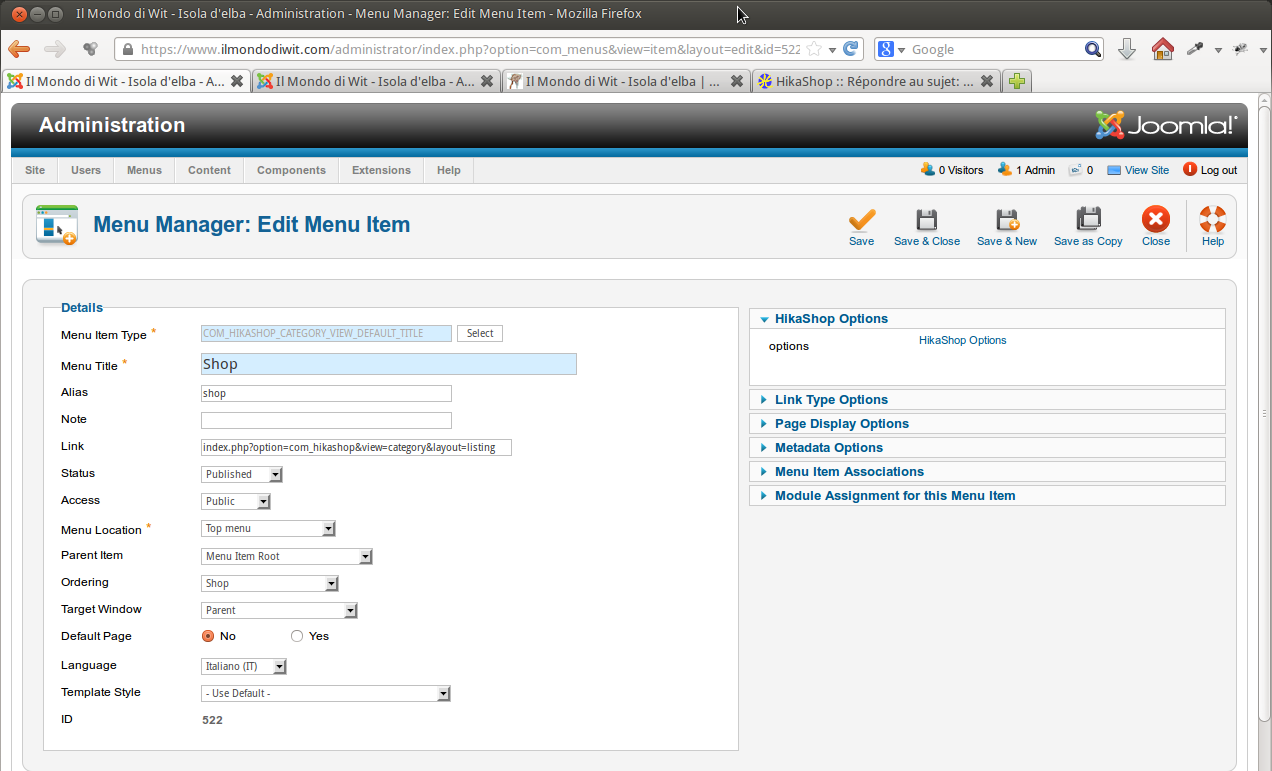
save and click hikashop options on the upper right
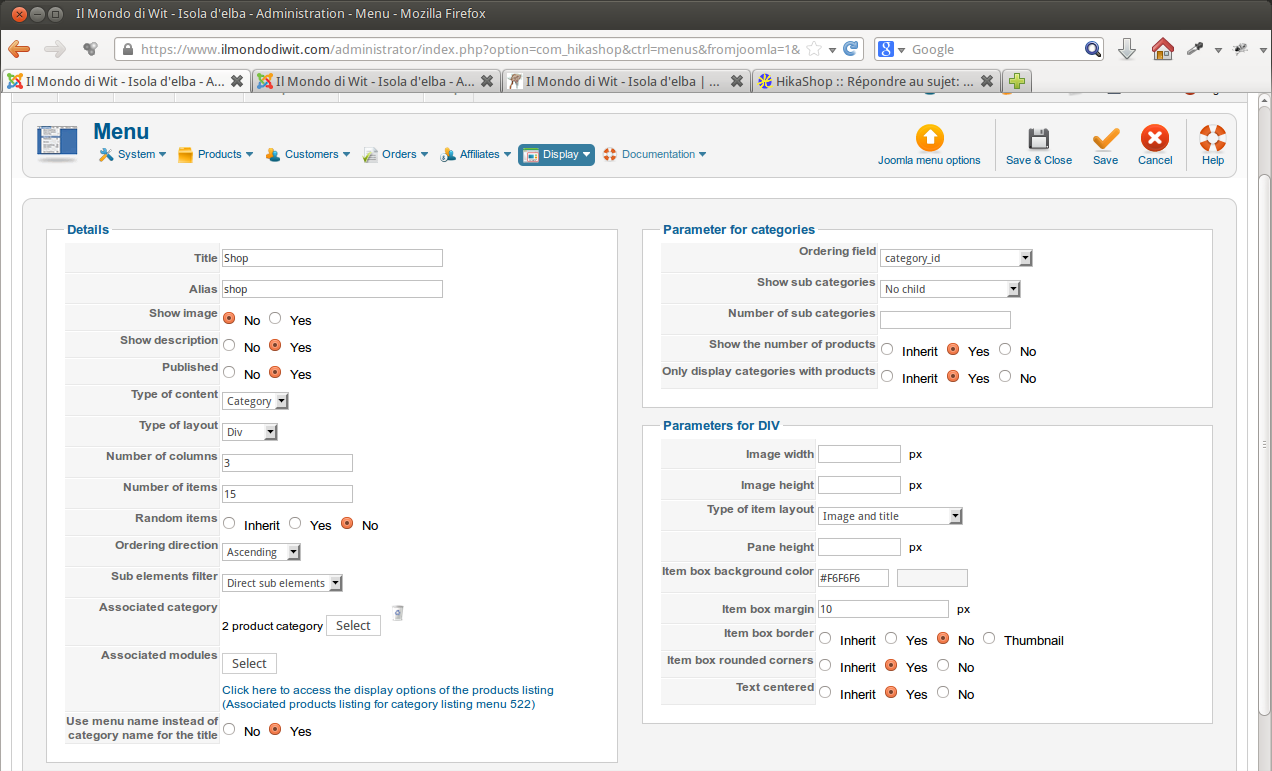
save them and then go to the associated module
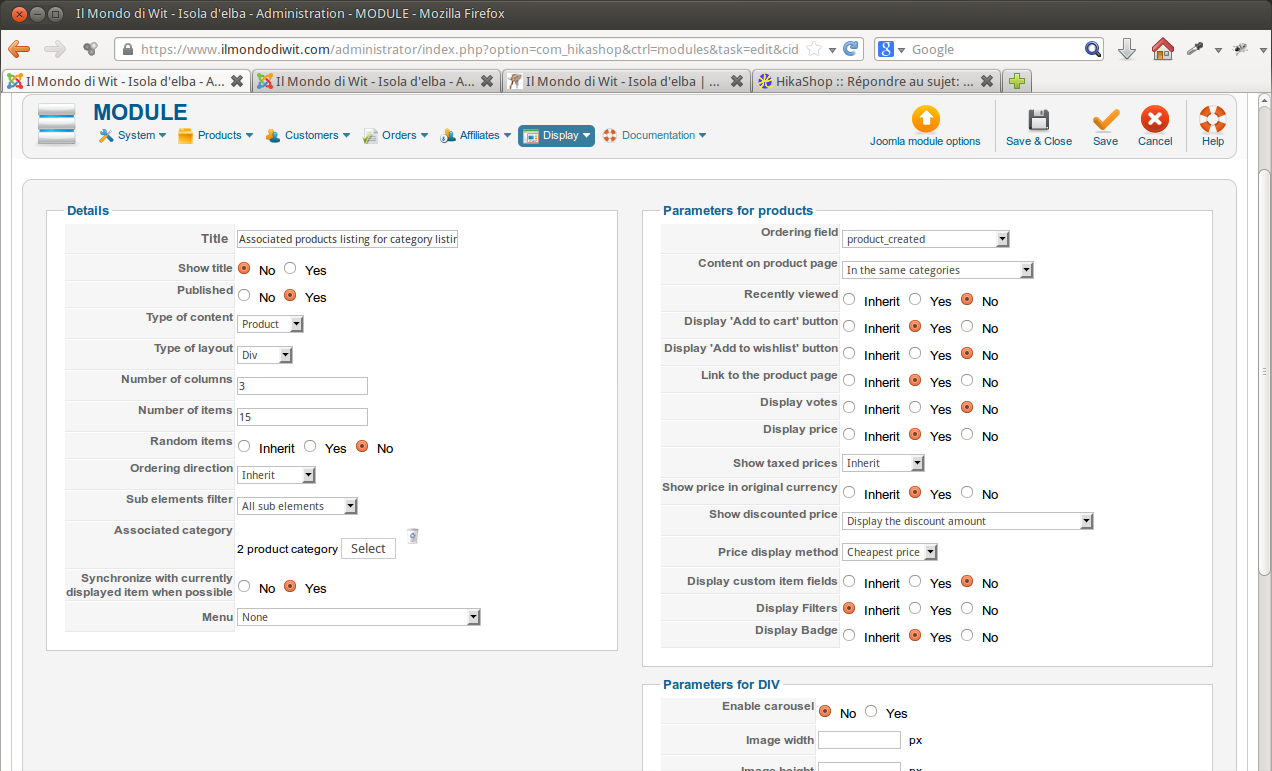 .
.
Now i have a more basic problem !
1. the menu shows casual category items and also the subcategories.
I would like to have the alphabetic order and no subcategorys.
2. No products are shown !
what did i mess up ?? could you please check my atteched settings
Thank you
i'm getting a little crazy.
I tried to rebuild my shop menu new cancelling what i did before (and maybe more !?!)
So here is what id did.
Created new menu:
save and click hikashop options on the upper right
save them and then go to the associated module
Now i have a more basic problem !
1. the menu shows casual category items and also the subcategories.
I would like to have the alphabetic order and no subcategorys.
2. No products are shown !
what did i mess up ?? could you please check my atteched settings
Thank you
Please Log in or Create an account to join the conversation.
13 years 4 months ago #107774
by kubwit
Replied by kubwit on topic navigation problem
i attach also modules and menus
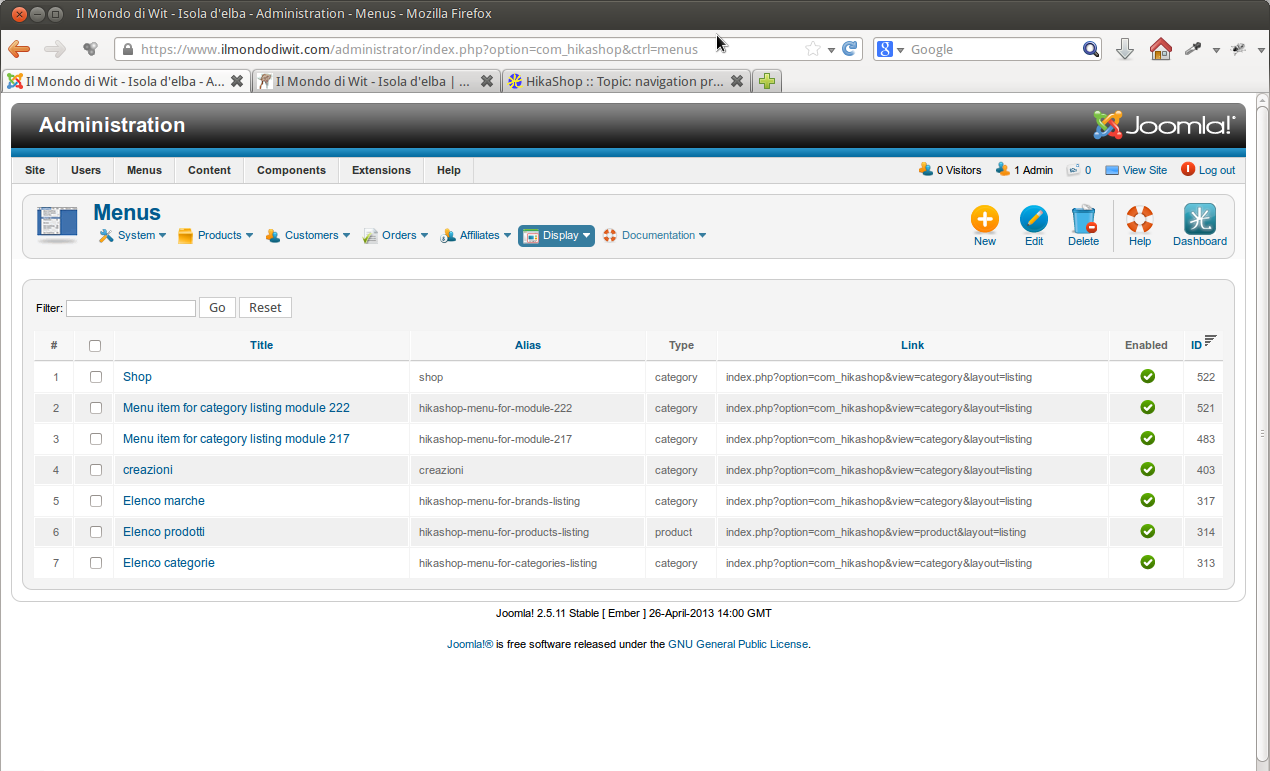
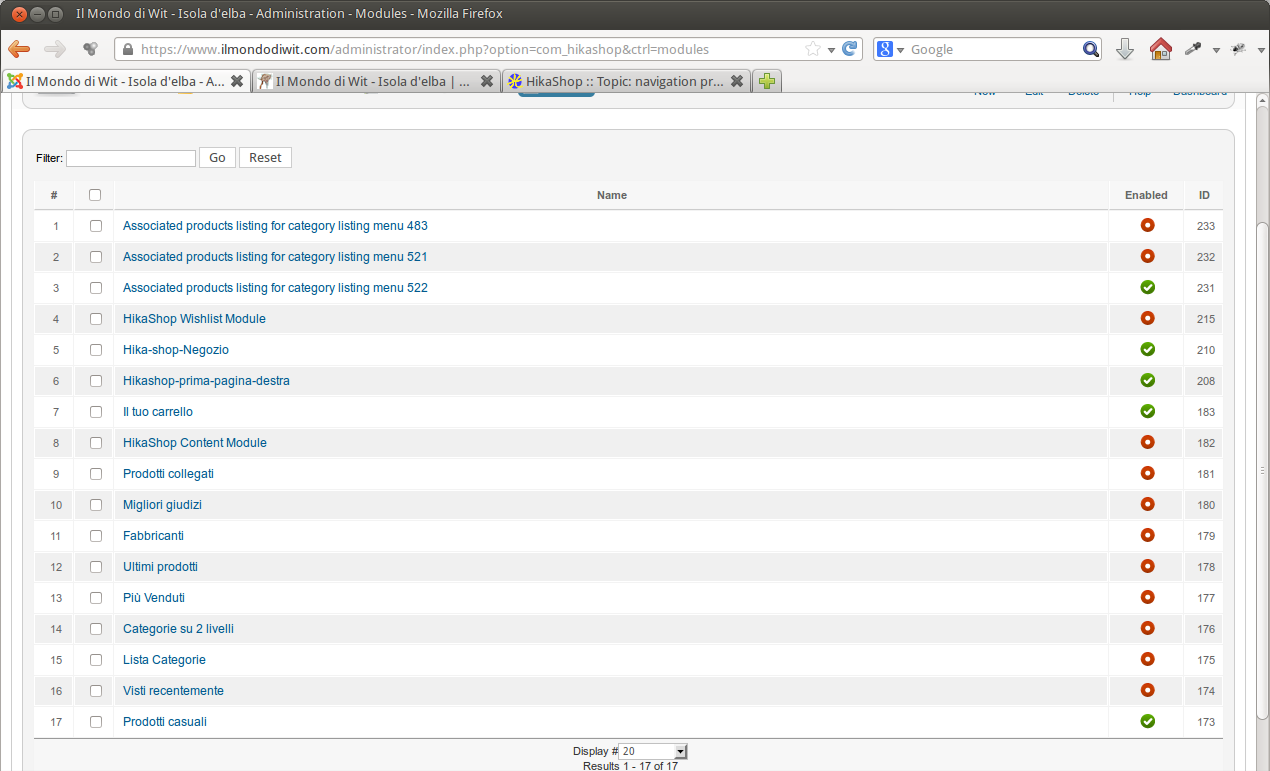
Please Log in or Create an account to join the conversation.
13 years 4 months ago #107775
by kubwit
Replied by kubwit on topic navigation problem
:blink: :blink: Any idea? I looked also extension manager -> modules-> Associated products listing for category listing menu 522 to enable on all pages but nothing?
I don't know why there is no product showing and in which module or menu ichange for example the casual products to no the casual category ordering is still casual. so i cannot understand which element is called by the menu
:sick:
I don't know why there is no product showing and in which module or menu ichange for example the casual products to no the casual category ordering is still casual. so i cannot understand which element is called by the menu
:sick:
Please Log in or Create an account to join the conversation.
13 years 4 months ago #107804
by Eliot
Replied by Eliot on topic navigation problem
Hi,
According to your screenshots your menu shouldn't show the subcategories since you selected the option "direct element".
Could you give me a link to your website please? I'd like to be sure you are looking at the right menu
According to your screenshots your menu shouldn't show the subcategories since you selected the option "direct element".
Could you give me a link to your website please? I'd like to be sure you are looking at the right menu
Please Log in or Create an account to join the conversation.
13 years 4 months ago #107809
by kubwit
Replied by kubwit on topic navigation problem
Please Log in or Create an account to join the conversation.
13 years 4 months ago #107810
by kubwit
Replied by kubwit on topic navigation problem
it should be menu id 522 isn't it?
Please Log in or Create an account to join the conversation.
13 years 4 months ago #107829
by Eliot
Replied by Eliot on topic navigation problem
It looks like your menu doesn't have any ID...
Maybe you deleted the joomla's menu related to the Hikashop one, well it's quite strange.
Try to create a new Joomla menu and a new hikashop menu in it. I never saw this problem before so it should happen again.
Maybe you deleted the joomla's menu related to the Hikashop one, well it's quite strange.
Try to create a new Joomla menu and a new hikashop menu in it. I never saw this problem before so it should happen again.
The following user(s) said Thank You: kubwit
Please Log in or Create an account to join the conversation.
13 years 4 months ago #107838
by kubwit
Replied by kubwit on topic navigation problem
ok. no it seems to work. strange it was exctly the same i did to make a new menu.
Now it remains the problem with sorting of the category in alphabetical order.
in System -> configuration -> display -> Default parameters for categories -> ordering field i put the value category_name
And also in the hikashop menu setting but it goes by category_id
Now it remains the problem with sorting of the category in alphabetical order.
in System -> configuration -> display -> Default parameters for categories -> ordering field i put the value category_name
And also in the hikashop menu setting but it goes by category_id
Please Log in or Create an account to join the conversation.
13 years 4 months ago #107840
by kubwit
Replied by kubwit on topic navigation problem
ok now i got also the ordering issue.
Thanks for your patience.
The modules have to be unpublished right?
With my testing around i have a lot associated and menu modules. Should i leave the or can i cancel some of them? if yes for cancel what do i have to control?
Thanks
Thanks for your patience.
The modules have to be unpublished right?
With my testing around i have a lot associated and menu modules. Should i leave the or can i cancel some of them? if yes for cancel what do i have to control?
Thanks
Please Log in or Create an account to join the conversation.
13 years 4 months ago #107845
by kubwit
Replied by kubwit on topic navigation problem
when i continued testing i recognised that i was browsing with new menu created after you asked me to. although it was cancelled. I went to the sh404sef component and i checked if i have the urls of the new menu strored. I cancelled all of them and then i was able to browse with the old urls and i had all problems like before. No changes i do have effect ecc. :woohoo:
I cancelled all urls of the old menu also and now it seems to work and react on changes.
i hope this can be useful for you
regards
I cancelled all urls of the old menu also and now it seems to work and react on changes.
i hope this can be useful for you
regards
Please Log in or Create an account to join the conversation.
Time to create page: 0.126 seconds