
- Posts: 9
- Thank you received: 0
Change the order of product info around
- tungmai417
-
 Topic Author
- Offline
Less
More
13 years 4 months ago #109982
by tungmai417
Change the order of product info around was created by tungmai417
The default setting have the image of the product first, then characteristic, then option then price, and last is the description. I want to move the description of the product to right under the image and before its characteristic.
Please help.
Thank you
Please help.
Thank you
Please Log in or Create an account to join the conversation.

13 years 4 months ago #109996
by Eliot
Replied by Eliot on topic Change the order of product info around
Hello there,
Are you talking about the product listing or product page?
In the first case, you can change the layout in your module/menu configuration with the option "Type of item layout". If you you don't find something good for you among the possibilities, you can still find the related views and edit it (for example listing_img_desc of product in Display>Views).
If you are talking about the product page, you can go in the main configuration (System>Configuration>DIsplay) and change this option: "Layout on product page".
Same as the other one, you can edit this layout to make it fit your needs.
I hope it's clear enough .
Are you talking about the product listing or product page?
In the first case, you can change the layout in your module/menu configuration with the option "Type of item layout". If you you don't find something good for you among the possibilities, you can still find the related views and edit it (for example listing_img_desc of product in Display>Views).
If you are talking about the product page, you can go in the main configuration (System>Configuration>DIsplay) and change this option: "Layout on product page".
Same as the other one, you can edit this layout to make it fit your needs.
I hope it's clear enough
. Please Log in or Create an account to join the conversation.
- tungmai417
-
Topic Author
- Offline
Less
More
- Posts: 9
- Thank you received: 0
13 years 4 months ago #110116
by tungmai417
Replied by tungmai417 on topic Change the order of product info around
Hi,
I think i might have confused you. Please see picture to know exactly what I'm trying to get at.
thank you
I think i might have confused you. Please see picture to know exactly what I'm trying to get at.
thank you
Please Log in or Create an account to join the conversation.

13 years 4 months ago #110133
by nicolas
Replied by nicolas on topic Change the order of product info around
Hi,
To do that, you can edit the file "show_default" via the menu Display->Views and move the block of code handling the description below the block of code handling the image display.
To do that, you can edit the file "show_default" via the menu Display->Views and move the block of code handling the description below the block of code handling the image display.
The following user(s) said Thank You: tungmai417
Please Log in or Create an account to join the conversation.
- tungmai417
-
Topic Author
- Offline
Less
More
- Posts: 9
- Thank you received: 0
13 years 4 months ago #110142
by tungmai417
Replied by tungmai417 on topic Change the order of product info around
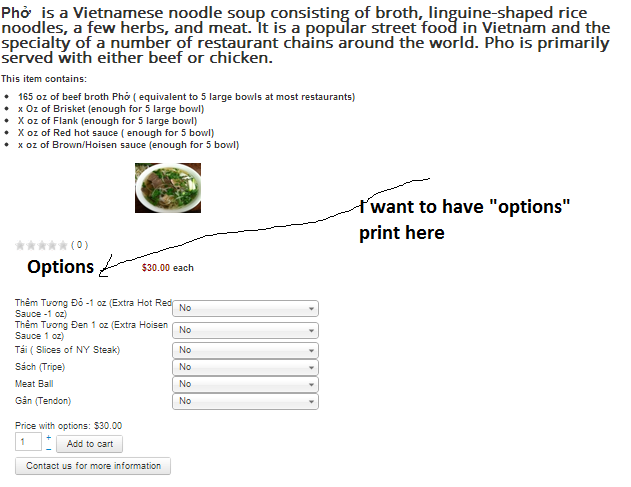
Thank you very much Nicolas. It works. Now I want have a label "options" printed above all the options... Please see picture for clarification.
thank you
thank you
Please Log in or Create an account to join the conversation.

13 years 4 months ago #110183
by Xavier
Replied by Xavier on topic Change the order of product info around
Hi,
This can be added too in the view "product / show_default", you can place it before the code:
This can be added too in the view "product / show_default", you can place it before the code:
Code:
<div id="hikashop_product_options" class="hikashop_product_options">
The following user(s) said Thank You: tungmai417
Please Log in or Create an account to join the conversation.
- tungmai417
-
Topic Author
- Offline
Less
More
- Posts: 9
- Thank you received: 0
13 years 4 months ago #110210
by tungmai417
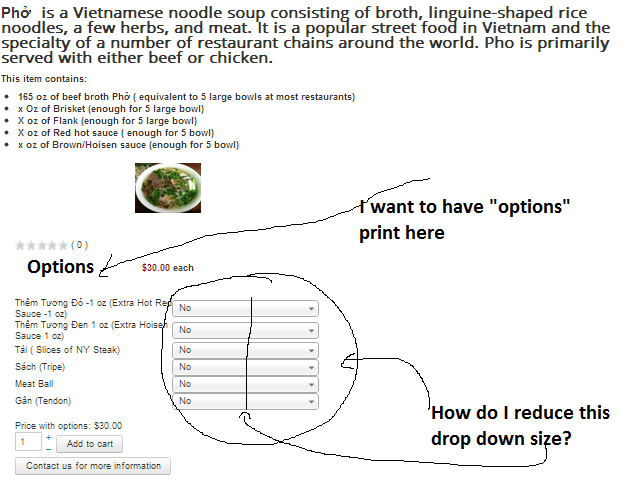
Where do I go to reduce the option drop down size?
thank you
Replied by tungmai417 on topic Change the order of product info around
Where do I go to reduce the option drop down size?
thank you
Please Log in or Create an account to join the conversation.

Less
More
- Posts: 12953
- Thank you received: 1778
13 years 4 months ago #110235
by Mohamed Thelji
Replied by Mohamed Thelji on topic Change the order of product info around
Hi,
Can you give me a link to your product page, then I'll probably be able to know what will be the code that you'll have to use ? Thanks.
Can you give me a link to your product page, then I'll probably be able to know what will be the code that you'll have to use ? Thanks.
Please Log in or Create an account to join the conversation.
13 years 4 months ago #110236
by Eliot
Replied by Eliot on topic Change the order of product info around
Hi there,
Just add this rule in your front end css file:
Just add this rule in your front end css file:
Code:
.hikashop_product_options select{
width: 100px;
}
The following user(s) said Thank You: tungmai417
Please Log in or Create an account to join the conversation.
- tungmai417
-
Topic Author
- Offline
Less
More
- Posts: 9
- Thank you received: 0
13 years 4 months ago #110245
by tungmai417
Replied by tungmai417 on topic Change the order of product info around
Eliot, you're the man.. thank you..
Please Log in or Create an account to join the conversation.
- tungmai417
-
Topic Author
- Offline
Less
More
- Posts: 9
- Thank you received: 0
13 years 4 months ago #110328
by tungmai417
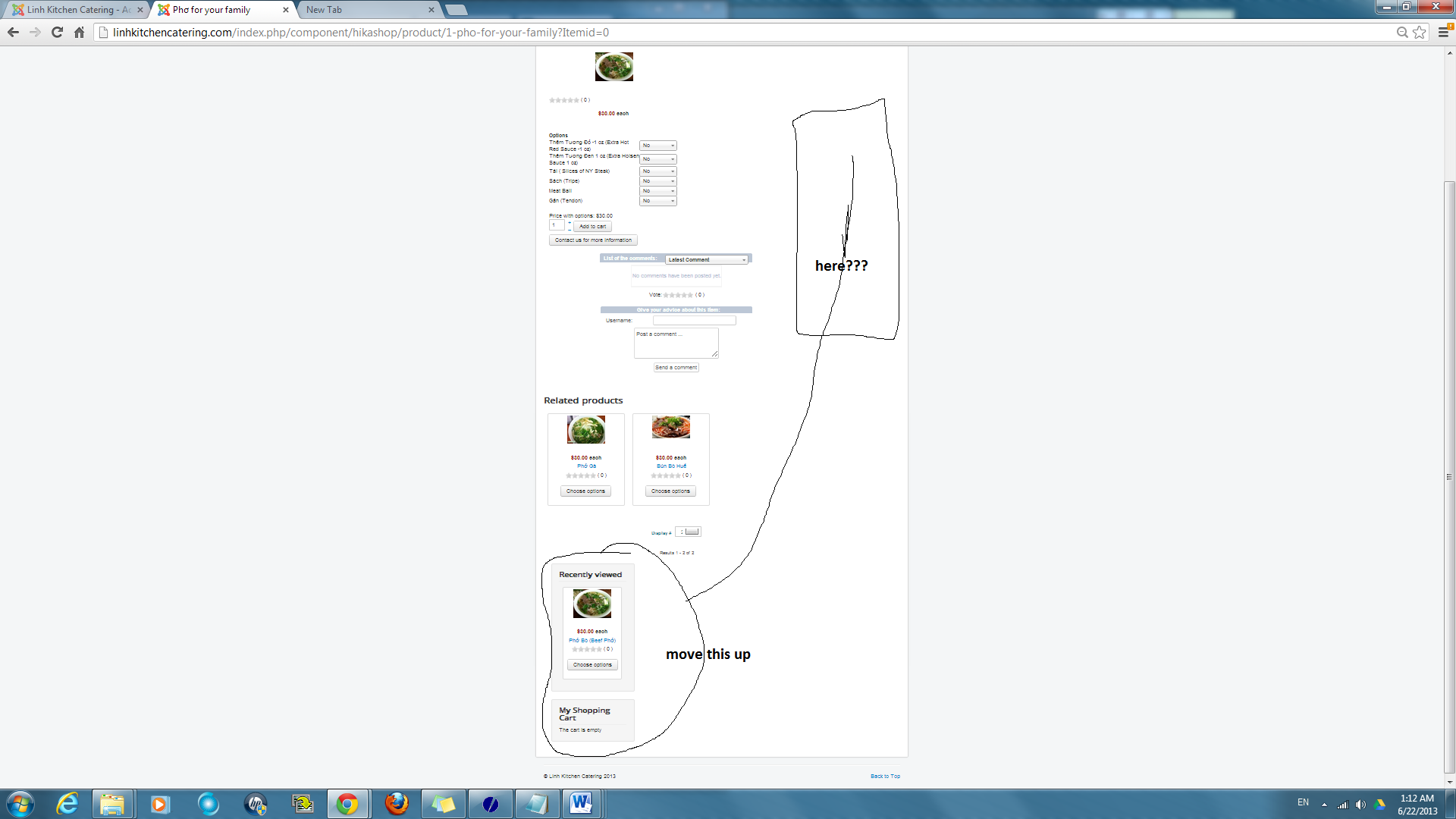
It's appear that the product info display in a single column. I want to take the recent view and shopping cart module display on the right column. Is it possible?
Please help.
Replied by tungmai417 on topic Change the order of product info around
It's appear that the product info display in a single column. I want to take the recent view and shopping cart module display on the right column. Is it possible?
Please help.
Please Log in or Create an account to join the conversation.
13 years 4 months ago #110341
by nicolas
Replied by nicolas on topic Change the order of product info around
Edit the file "show_default" of the view "product" via the menu Display->Views and try to add the tag <div> at the beginning of the file. That might help.
The following user(s) said Thank You: tungmai417
Please Log in or Create an account to join the conversation.
- tungmai417
-
Topic Author
- Offline
Less
More
- Posts: 9
- Thank you received: 0
13 years 4 months ago #110409
by tungmai417
Replied by tungmai417 on topic Change the order of product info around
It works like a charm..
Thank you Nicolas
Thank you Nicolas
Please Log in or Create an account to join the conversation.
Time to create page: 0.098 seconds