

- Posts: 6
- Thank you received: 0
Change order of information - product listing
13 years 4 months ago - 13 years 4 months ago #110382
by DocSnyder
Change order of information - product listing was created by DocSnyder
Hello,
1. I would like to change the order of the information on the product listing page.
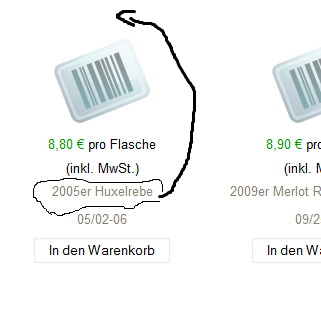
2. I want that the button "In den Warenkorb" change the colour by hovering over it.
Thank you very much for your help
1. I would like to change the order of the information on the product listing page.
2. I want that the button "In den Warenkorb" change the colour by hovering over it.
Thank you very much for your help
Last edit: 13 years 4 months ago by DocSnyder.
Please Log in or Create an account to join the conversation.

13 years 4 months ago #110391
by nicolas
Replied by nicolas on topic Change order of information - product listing
Hi,
1. You can do that by editing the file "listing_img_title" of the view product via the menu Display>Views and swaping the block for the display of the product name.
2. You can do that with CSS:
www.hikashop.com/en/forum/2-general-talk...t-graphic.html#40211
1. You can do that by editing the file "listing_img_title" of the view product via the menu Display>Views and swaping the block for the display of the product name.
2. You can do that with CSS:
www.hikashop.com/en/forum/2-general-talk...t-graphic.html#40211
Please Log in or Create an account to join the conversation.
13 years 4 months ago #110434
by DocSnyder
Replied by DocSnyder on topic Change order of information - product listing
1. Works fine. Thank you
2. Unfortunately I can not change the color of the text of the button. I copied your code and added the "hover" effect. The bg-color changes but not the text color.
.hikashop_product_quantity_main .hikashop_product_stock .button:hover {
background-repeat: no-repeat;
background-position: right;
text-align:center;
color:#ffffff;
background-color:#8c8170;
cursor: pointer;
}
2. Unfortunately I can not change the color of the text of the button. I copied your code and added the "hover" effect. The bg-color changes but not the text color.
.hikashop_product_quantity_main .hikashop_product_stock .button:hover {
background-repeat: no-repeat;
background-position: right;
text-align:center;
color:#ffffff;
background-color:#8c8170;
cursor: pointer;
}
Please Log in or Create an account to join the conversation.

Less
More
- Posts: 12953
- Thank you received: 1778
13 years 4 months ago - 13 years 4 months ago #110435
by Mohamed Thelji
Replied by Mohamed Thelji on topic Change order of information - product listing
Hi,
And if you configure the color property like this :
And if you configure the color property like this :
Code:
color:#ffffff!important;
Last edit: 13 years 4 months ago by Mohamed Thelji.
Please Log in or Create an account to join the conversation.
13 years 4 months ago #110438
by DocSnyder
Replied by DocSnyder on topic Change order of information - product listing
It´s unbelievable how fast you answer 
Now the text is white, but only in the detailed product description. In the product list (see picture 1. post question 1) nothing happens. How have I change the code?
Now the text is white, but only in the detailed product description. In the product list (see picture 1. post question 1) nothing happens. How have I change the code?
Please Log in or Create an account to join the conversation.
13 years 4 months ago #110440
by nicolas
Replied by nicolas on topic Change order of information - product listing
.hikashop_product_quantity_main .hikashop_product_stock .button:hover {
is for the product page.
If you want to change it everywhere, simply use:
.hikashop_product_stock .button:hover {
instead
is for the product page.
If you want to change it everywhere, simply use:
.hikashop_product_stock .button:hover {
instead
The following user(s) said Thank You: DocSnyder
Please Log in or Create an account to join the conversation.
13 years 4 months ago #110449
by DocSnyder
Replied by DocSnyder on topic Change order of information - product listing
I have another question related to the product listing. I try to change the text colour of the titel, for example "2005er Huxelrebe".
for that, I changed the code of this part. The background did change, but not the text colour.
span.hikashop_product_name{
background-color:#444444;
color:#000000;
text-align: center;
display:block;
margin-bottom:0px;
}
for that, I changed the code of this part. The background did change, but not the text colour.
span.hikashop_product_name{
background-color:#444444;
color:#000000;
text-align: center;
display:block;
margin-bottom:0px;
}
Please Log in or Create an account to join the conversation.
13 years 4 months ago #110450
by nicolas
Replied by nicolas on topic Change order of information - product listing
It's probably because of your template which overrides your CSS on the a tag.
Try like that:
span.hikashop_product_name a{
color:#000000 !important;
}
Try like that:
span.hikashop_product_name a{
color:#000000 !important;
}
Please Log in or Create an account to join the conversation.
13 years 4 months ago #110451
by DocSnyder
Replied by DocSnyder on topic Change order of information - product listing
it works. thank you
Please Log in or Create an account to join the conversation.
Time to create page: 0.115 seconds