

- Posts: 17
- Thank you received: 2
Affiliate program basic setup
13 years 3 months ago #110919
by ming
Affiliate program basic setup was created by ming
Hello,
I have the business version of Hika and problems setting up the affiliate program. I have read through the documentation and searched the forum and it seems that nobody else has any problems.
After test-login using the affiliate-program menu button, I only get to a messed up page with basic information. The messiness is probably just CSS, but one button is hovering above the site and there is no spot where the partner-affiliate is shown in full, nor any banner-section, or proper stats-section. (image attatched)
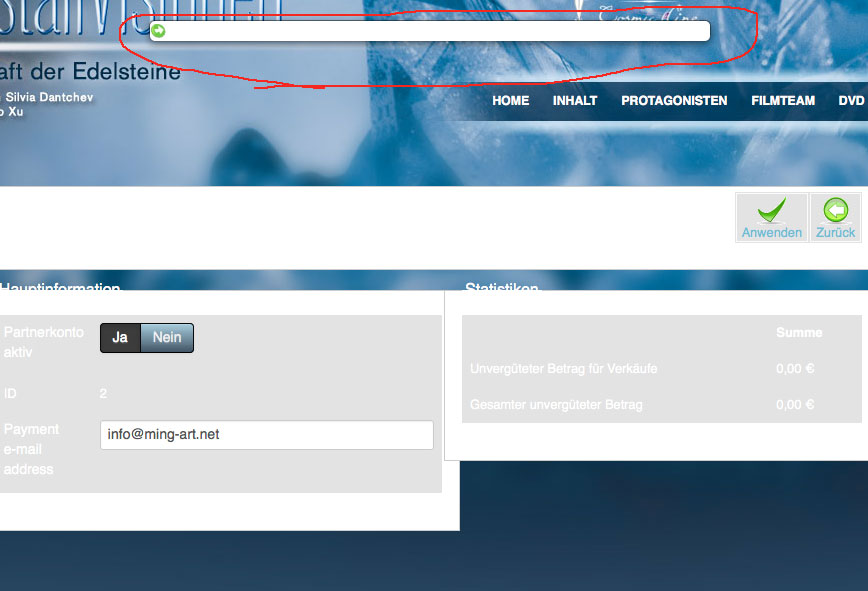
Is there anywhere a step by step guide, how to setup the affiliate program with full functionality and all basic features and stats that an affiliate would look for?
Help would much appreciated.
Thank you very much
I have the business version of Hika and problems setting up the affiliate program. I have read through the documentation and searched the forum and it seems that nobody else has any problems.
After test-login using the affiliate-program menu button, I only get to a messed up page with basic information. The messiness is probably just CSS, but one button is hovering above the site and there is no spot where the partner-affiliate is shown in full, nor any banner-section, or proper stats-section. (image attatched)
Is there anywhere a step by step guide, how to setup the affiliate program with full functionality and all basic features and stats that an affiliate would look for?
Help would much appreciated.
Thank you very much
Please Log in or Create an account to join the conversation.

13 years 3 months ago #110926
by nicolas
Replied by nicolas on topic Affiliate program basic setup
That's a bug of your template CSS.
It has CSS to tranform all the elements with the class "modal" into a modal instead of only the divs with the class modal.
Edit the CSS of your template, and change the .modal definition to div.modal and that will fix the problem.
Regarding the setup of the affiliate program, we have a documentation here:
www.hikashop.com/en/support/documentatio...l#features_affiliate
It has CSS to tranform all the elements with the class "modal" into a modal instead of only the divs with the class modal.
Edit the CSS of your template, and change the .modal definition to div.modal and that will fix the problem.
Regarding the setup of the affiliate program, we have a documentation here:
www.hikashop.com/en/support/documentatio...l#features_affiliate
Please Log in or Create an account to join the conversation.
13 years 3 months ago #110929
by ming
Replied by ming on topic Affiliate program basic setup
Hi and thanks for you quick response. I figured it is the CSS that messes things up and already am correcting it.
but still the documentation is no help.
I have seen another affiliate-hika shop, where I can see my affiliate link directly, where I can choose banners.
In the current version there are no further buttons to either of these. For example: where can the affiliate look up his link to include it for example in a email? How can I offer banners that the affiliate can pick and get the entire code (image link plus affiliate ID) that he can integrate into his html?
thank you.
but still the documentation is no help.
I have seen another affiliate-hika shop, where I can see my affiliate link directly, where I can choose banners.
In the current version there are no further buttons to either of these. For example: where can the affiliate look up his link to include it for example in a email? How can I offer banners that the affiliate can pick and get the entire code (image link plus affiliate ID) that he can integrate into his html?
thank you.
Please Log in or Create an account to join the conversation.
13 years 3 months ago #110932
by nicolas
Replied by nicolas on topic Affiliate program basic setup
The documentation already explains all that.
Additionally, to publish the Affiliate program dashboard of your users on the front end, you can follow these steps:
First, log in on the back-end and go to the menu "Menu", over one of your menu areas, click on "Add new menu item"
You will have to click on the menu Item Type HikaShop in order to display the list of menu types of HikaShop. Then, click on the Affiliate "Affiliate Program" link.
You will be able to set standard Joomla options for the menu. Additionally, you can configure some banners that your affiliates will be able t see on their affiliate program dashboard and easily reuse on their website in order to link to yours. You can access the banners area via the menu Affiliates->Banners.
Please Log in or Create an account to join the conversation.
13 years 3 months ago #110935
by ming
Replied by ming on topic Affiliate program basic setup
Thank you very much. I will read through that again and hope to find the right way to setup.
Best regards!
Best regards!
Please Log in or Create an account to join the conversation.
13 years 3 months ago #110936
by ming
Replied by ming on topic Affiliate program basic setup
Hello again,
I have done the instructions in the documentation and followed it step by step, but there is just no affiliate-dashboard. I created the menu-item "Hikashop->affiliate program"
When I login and click on it, I get to this page:
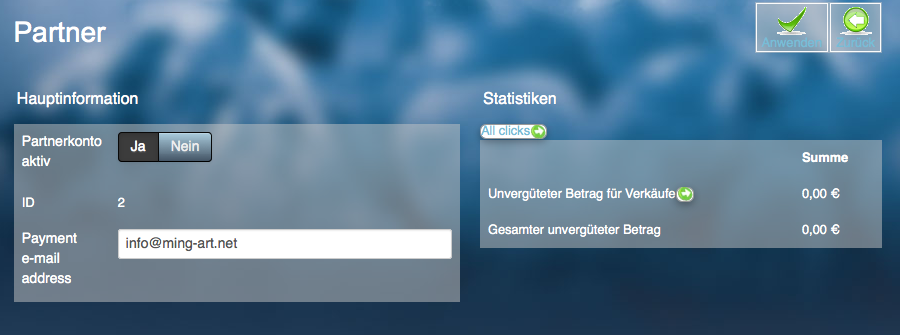
When I click "back" I get to the joomla/hika-dashboard, where I can change my profile and view my orders etc. but that is not the affiliate-dashboard. No link, no button no menu item that can get me to the affiliate-dashboard. No link, button or menu item that gets me to my affiliate link, banners etc.
What am I doing wrong?
I have done the instructions in the documentation and followed it step by step, but there is just no affiliate-dashboard. I created the menu-item "Hikashop->affiliate program"
When I login and click on it, I get to this page:
When I click "back" I get to the joomla/hika-dashboard, where I can change my profile and view my orders etc. but that is not the affiliate-dashboard. No link, no button no menu item that can get me to the affiliate-dashboard. No link, button or menu item that gets me to my affiliate link, banners etc.
What am I doing wrong?
Please Log in or Create an account to join the conversation.
13 years 3 months ago #110969
by nicolas
Replied by nicolas on topic Affiliate program basic setup
The banners display automatically on the same page of that screenshot, below the information and statistics.
So it sounds like you didn't create yet any banners via the Affiliates->Banners menu of the backend.
So it sounds like you didn't create yet any banners via the Affiliates->Banners menu of the backend.
Please Log in or Create an account to join the conversation.
13 years 3 months ago #111036
by ming
Replied by ming on topic Affiliate program basic setup
Ok thanks, I will do that as well. Where can I see and copy/paste my affiliate link directly as an affiliate?
Please Log in or Create an account to join the conversation.

13 years 3 months ago #111075
by Xavier
Replied by Xavier on topic Affiliate program basic setup
When you have created a banner (from backend), then in the frontend you can create a link type "user control panel" and when in this menu click on "Affiliate" and then the customer can see his affiliate link.
The link looks like:
http://localhost/j25/menu-link?partner_id=x
And x is the user id.
The link looks like:
http://localhost/j25/menu-link?partner_id=x
And x is the user id.
The following user(s) said Thank You: ming
Please Log in or Create an account to join the conversation.
13 years 3 months ago #111347
by ming
Replied by ming on topic Affiliate program basic setup
thanks for you replies. I think I figured all out now. Best regards
Please Log in or Create an account to join the conversation.
Time to create page: 0.241 seconds