

- Posts: 59
- Thank you received: 1
Is This Too Much To Ask? (Checkout Page)
13 years 4 months ago #111170
by G9Cap
Is This Too Much To Ask? (Checkout Page) was created by G9Cap
I won't get into how much the checkout page is just not good with the confusing popup etc!!!
I have to mention a website here, I hope that's OK
Look how simple stupid this checkout page is:
(NO, I have nothing to do with this product but their checkout page is EXACTLY what I want)
www.nutribullet.com
Click the big red "Order Now"
Look at that form!!
Look at that check box saying "My shipping address is the same as my billing address."
Look what happens when you uncheck it.....
Really, is that too much to ask????
That's what I want.
So a) Is it possible b) If so, how?
I'm so over the HS Business edition, sorry but it's true!
I have to mention a website here, I hope that's OK
Look how simple stupid this checkout page is:
(NO, I have nothing to do with this product but their checkout page is EXACTLY what I want)
www.nutribullet.com
Click the big red "Order Now"
Look at that form!!
Look at that check box saying "My shipping address is the same as my billing address."
Look what happens when you uncheck it.....
Really, is that too much to ask????
That's what I want.
So a) Is it possible b) If so, how?
I'm so over the HS Business edition, sorry but it's true!
The following user(s) said Thank You: Razavi
Please Log in or Create an account to join the conversation.
13 years 4 months ago #111173
by Razavi
Replied by Razavi on topic Is This Too Much To Ask? (Checkout Page)
I agree, the checkout page in Hikashop is not the best I have seen. The most important thing in a shop is actually a simple and easy checkout page.
Please Log in or Create an account to join the conversation.
13 years 4 months ago - 13 years 4 months ago #111176
by G9Cap
Replied by G9Cap on topic Is This Too Much To Ask? (Checkout Page)
Yep! There's a couple of other things I don't like too. There is NO simple picture of a shopping cart you can just turn on to show where you want AND there is no way to print shipping labels.
You would think these two simple shopping cart items would actually exist in a "shopping cart" !!!!!
I'm about to dump the whole thing and start over, we'll see if i get an answer to the first point. (Full Business vearsion owners DO NOT get any priority do they!
You would think these two simple shopping cart items would actually exist in a "shopping cart" !!!!!
I'm about to dump the whole thing and start over, we'll see if i get an answer to the first point. (Full Business vearsion owners DO NOT get any priority do they!
Last edit: 13 years 4 months ago by G9Cap.
Please Log in or Create an account to join the conversation.
13 years 4 months ago #111179
by Razavi
Replied by Razavi on topic Is This Too Much To Ask? (Checkout Page)
Actually I have good experience with the Hikashop people, they are always quick to respond to question and help.
I understand that we some times have some wishes and demands, they cannot live up to right away, but Hikashop has come a long way since I installed it the first time. I think Hikashop still needs to mature.
I understand that we some times have some wishes and demands, they cannot live up to right away, but Hikashop has come a long way since I installed it the first time. I think Hikashop still needs to mature.
Please Log in or Create an account to join the conversation.

13 years 4 months ago - 13 years 4 months ago #111190
by nicolas
Replied by nicolas on topic Is This Too Much To Ask? (Checkout Page)
Hi,
You can have almost the same checkout form with HikaShop. Here are the steps:
1. Remove the login/address/shipping views from the checkout workflow option of the configuration.
2. Create custom order fields for all the user information fields ( and you can do the checkbox effect with the "display limited to" option of the custom fields.
3. Configure a hosted payment gateway plugin like paypal PRO, or authorize.net in AIM mode.
What you won't have is the payment option in several installments as HikaShop doesn't store credit card information in your website database for security reasons.
If you want to display a picture of a shopping cart linking to your checkout, you can simply add a HTML link to the checkout with the image you want inside a custom HTML module for joomla in the position you want in your template. That sounds simple to me.
You indeed cannot print shipping labels directly in HikaShop. However, there are indirect ways to do it. Here is a thread which talks about that:
www.hikashop.com/en/forum/4-how-to/83401-shipping-labels.html
You can have almost the same checkout form with HikaShop. Here are the steps:
1. Remove the login/address/shipping views from the checkout workflow option of the configuration.
2. Create custom order fields for all the user information fields ( and you can do the checkbox effect with the "display limited to" option of the custom fields.
3. Configure a hosted payment gateway plugin like paypal PRO, or authorize.net in AIM mode.
What you won't have is the payment option in several installments as HikaShop doesn't store credit card information in your website database for security reasons.
If you want to display a picture of a shopping cart linking to your checkout, you can simply add a HTML link to the checkout with the image you want inside a custom HTML module for joomla in the position you want in your template. That sounds simple to me.
You indeed cannot print shipping labels directly in HikaShop. However, there are indirect ways to do it. Here is a thread which talks about that:
www.hikashop.com/en/forum/4-how-to/83401-shipping-labels.html
Last edit: 13 years 4 months ago by nicolas.
Please Log in or Create an account to join the conversation.
13 years 3 months ago #111409
by G9Cap
Replied by G9Cap on topic Is This Too Much To Ask? (Checkout Page)
Thank You
Can you tell me what I have to do with #2 above?
What am I doing with the "display limited to" area?
Can you tell me what I have to do with #2 above?
What am I doing with the "display limited to" area?
Please Log in or Create an account to join the conversation.
13 years 3 months ago #111514
by nicolas
Replied by nicolas on topic Is This Too Much To Ask? (Checkout Page)
You need to go in the menu Display->Views and create one order custom field per field you want.
Also, create one checkbox field for the "same address" checkbox.
And in each custom field of the shipping address, set the "Display limited to" option to the "no" value of the "same address" custom field.
Also, create one checkbox field for the "same address" checkbox.
And in each custom field of the shipping address, set the "Display limited to" option to the "no" value of the "same address" custom field.
Please Log in or Create an account to join the conversation.
13 years 3 months ago #111695
by G9Cap
Replied by G9Cap on topic Is This Too Much To Ask? (Checkout Page)
What is the average wait time for business version owners to get a response?
Please Log in or Create an account to join the conversation.
13 years 3 months ago #111697
by nicolas
Replied by nicolas on topic Is This Too Much To Ask? (Checkout Page)
A few hours. It depends on the complexity/length of the question/answer.
Please Log in or Create an account to join the conversation.
Less
More
- Posts: 5
- Thank you received: 0
13 years 3 months ago #111841
by avantmedia
Replied by avantmedia on topic Is This Too Much To Ask? (Checkout Page)
What about an email field? I removed login and address because i agree its confusing for the user. Then i created custom fields for the address but currently have problems with email field. How can i add it to custom fields so that it can be used in orders?
If you add login to chekout workflow it doesnt show without the address workflow option. If you add address workflow option you get that send button again, send button and invoice step again.
Simple chekout would be welcome. Three steps max:
1.Cart
2.Email, Address, Payment
3.Review status page with all the data, including filled address fields from the previous step and complete button order.
If you add login to chekout workflow it doesnt show without the address workflow option. If you add address workflow option you get that send button again, send button and invoice step again.
Simple chekout would be welcome. Three steps max:
1.Cart
2.Email, Address, Payment
3.Review status page with all the data, including filled address fields from the previous step and complete button order.
Please Log in or Create an account to join the conversation.
13 years 3 months ago #111893
by nicolas
Replied by nicolas on topic Is This Too Much To Ask? (Checkout Page)
Hi,
What send button are you talking about ? There is no send button in the checkout. There are new/edit/next/add/register buttons. That's
all.
Could you do some screenshots of what you're talking about ?
What send button are you talking about ? There is no send button in the checkout. There are new/edit/next/add/register buttons. That's
all.
Could you do some screenshots of what you're talking about ?
Please Log in or Create an account to join the conversation.
Less
More
- Posts: 5
- Thank you received: 0
13 years 3 months ago #111897
by avantmedia
Replied by avantmedia on topic Is This Too Much To Ask? (Checkout Page)
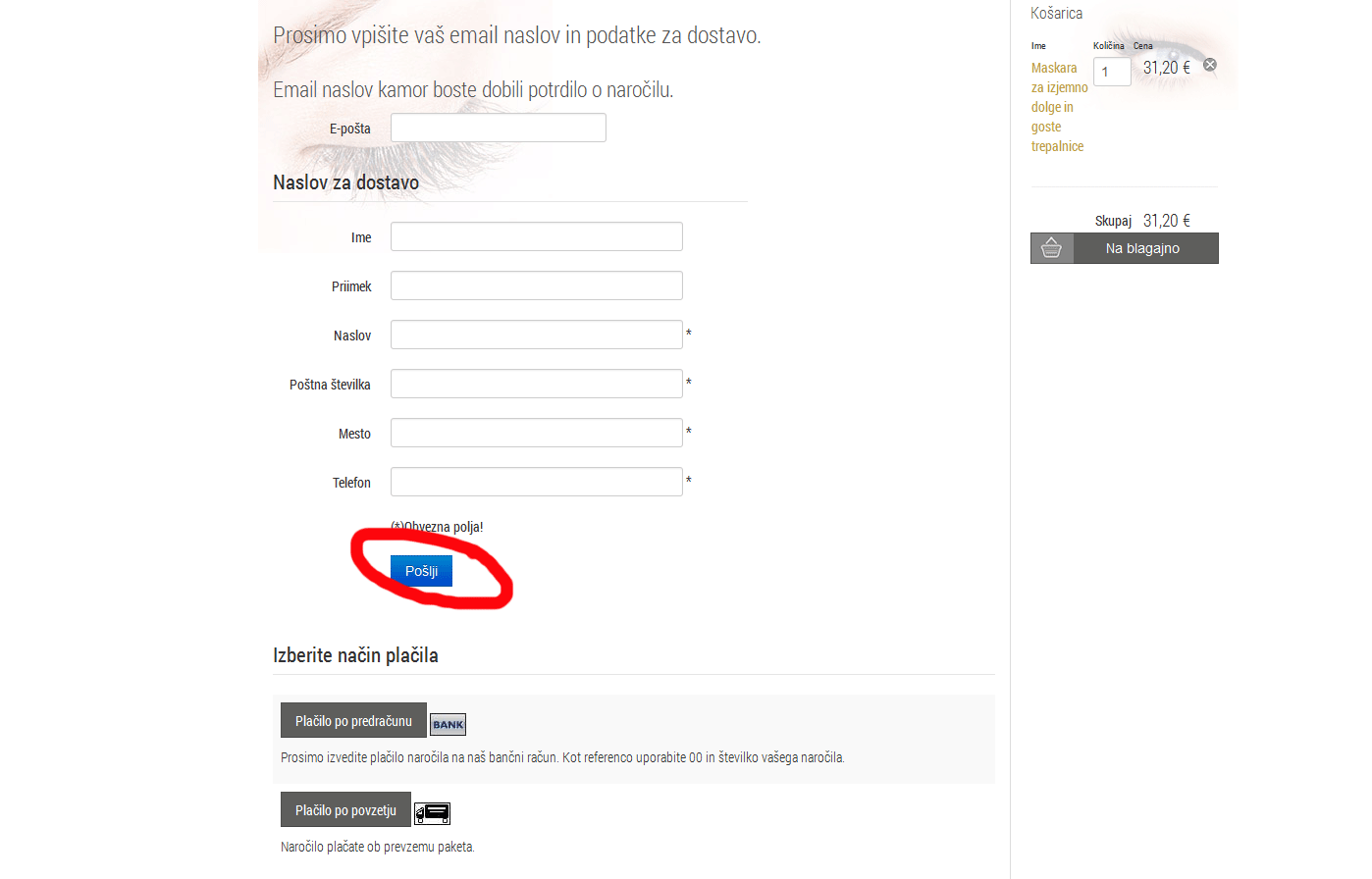
Different translation on our end. Button is Register. I already found that you can set to show the next button in login page. If you also remove address box from the chekout field and leave only login there is no step with the invoice and popup shown.
Picture 1: Button
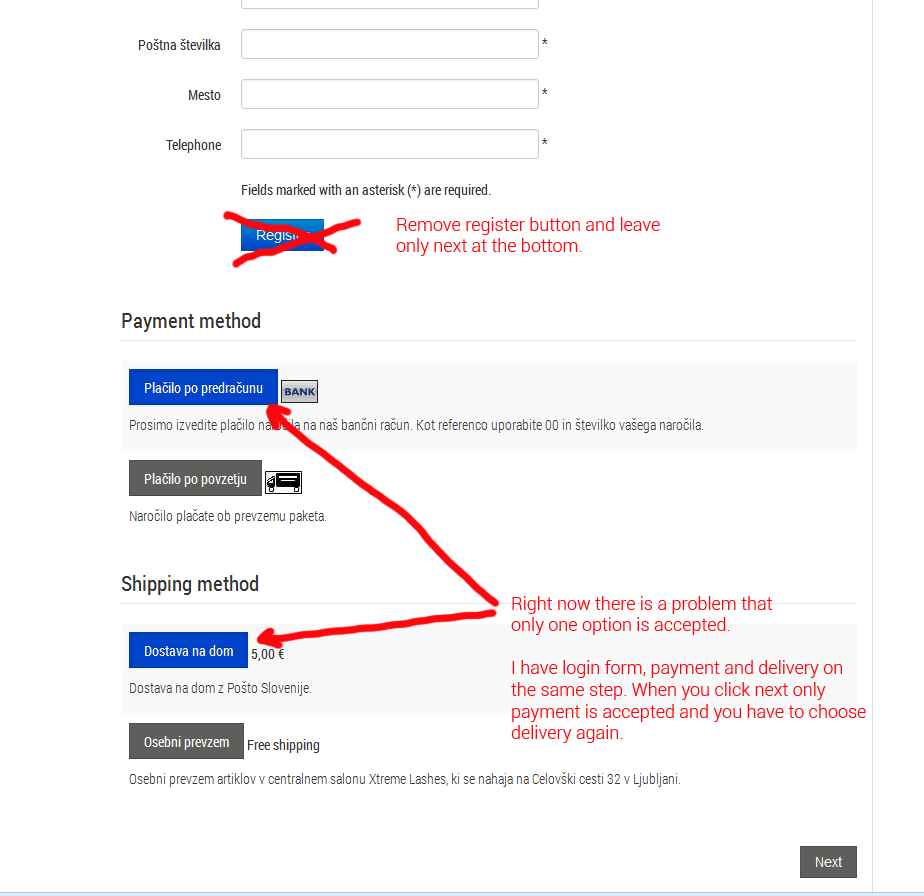
Picture 2: Single step chekout. The problem right now is that when you click next only payment option is accepted and you have to choose delivery again. Can it be done that both options are accepted?
Picture 3: Chekout flow in administration
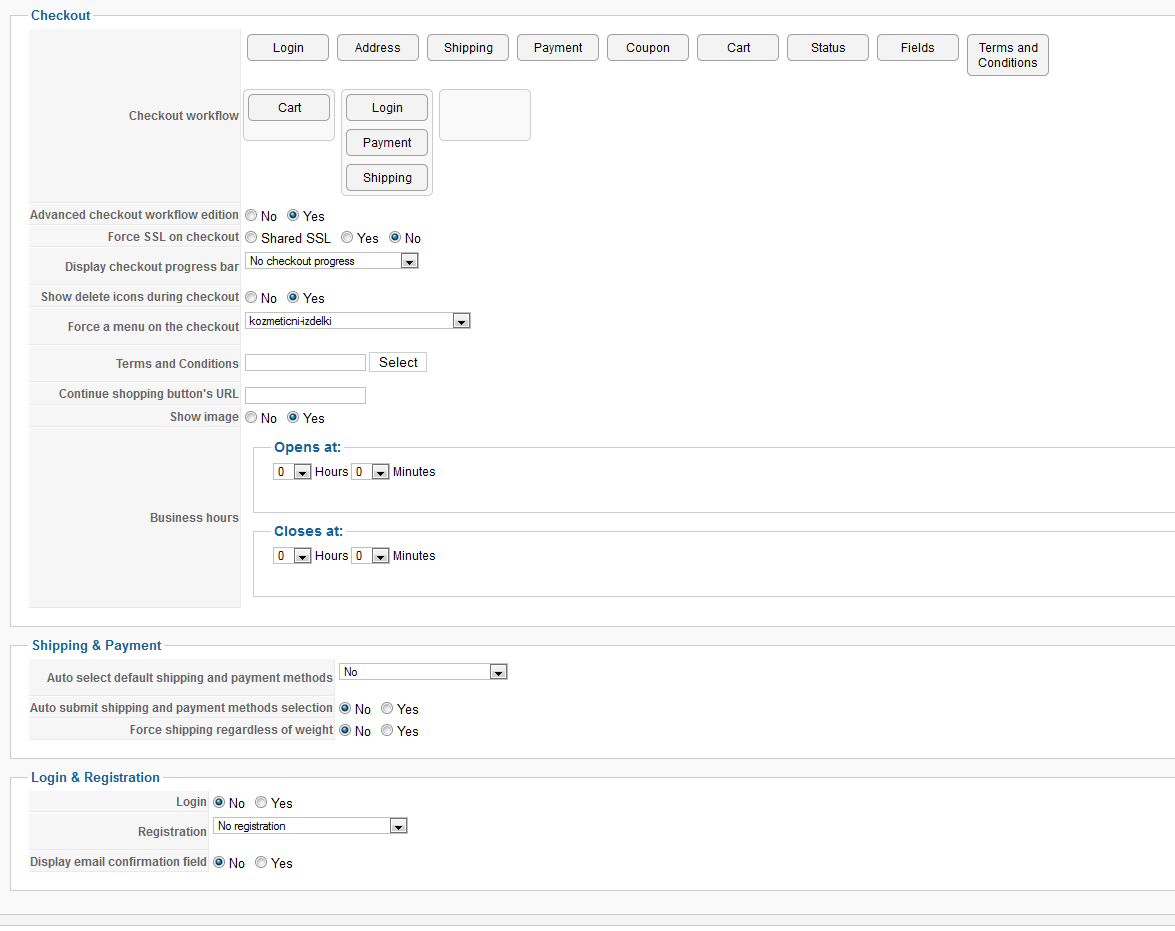
Picture 1: Button
Picture 2: Single step chekout. The problem right now is that when you click next only payment option is accepted and you have to choose delivery again. Can it be done that both options are accepted?
Picture 3: Chekout flow in administration
Please Log in or Create an account to join the conversation.
13 years 3 months ago #111947
by G9Cap
Replied by G9Cap on topic Is This Too Much To Ask? (Checkout Page)
Nicolas, please see your PM
Please see attached........ can you help?!
Please see attached........ can you help?!
Please Log in or Create an account to join the conversation.
13 years 3 months ago #111951
by nicolas
Replied by nicolas on topic Is This Too Much To Ask? (Checkout Page)
You need to do three things for that:
1. Edit the file "login" of the view "checkout" via the menu Display>Views and remove the line:
$this->nextButton = false;
2. Edit the file "registration" of the view "user" via the menu Display>Views and remove the line:
echo $this->cartClass->displayButton(JText::_('HIKA_REGISTER'),'register',$this->params,'','if(hikashopCheckChangeForm(\'register\',\''.$this->form_name.'\') && hikashopCheckChangeForm(\'user\',\''.$this->form_name.'\') && hikashopCheckChangeForm(\'address\',\''.$this->form_name.'\')'.$additional_check.'){ var button = document.getElementById(\'login_view_action\'); if(button) button.value=\'register\'; document.'.$this->form_name.'.submit();} return false;');
3. Turn on the option "auto submit shipping and payment methods selection".
That should meet your needs.
1. Edit the file "login" of the view "checkout" via the menu Display>Views and remove the line:
$this->nextButton = false;
2. Edit the file "registration" of the view "user" via the menu Display>Views and remove the line:
echo $this->cartClass->displayButton(JText::_('HIKA_REGISTER'),'register',$this->params,'','if(hikashopCheckChangeForm(\'register\',\''.$this->form_name.'\') && hikashopCheckChangeForm(\'user\',\''.$this->form_name.'\') && hikashopCheckChangeForm(\'address\',\''.$this->form_name.'\')'.$additional_check.'){ var button = document.getElementById(\'login_view_action\'); if(button) button.value=\'register\'; document.'.$this->form_name.'.submit();} return false;');
3. Turn on the option "auto submit shipping and payment methods selection".
That should meet your needs.
The following user(s) said Thank You: avantmedia
Please Log in or Create an account to join the conversation.
13 years 3 months ago #111961
by G9Cap
Replied by G9Cap on topic Is This Too Much To Ask? (Checkout Page)
see pm please
Please Log in or Create an account to join the conversation.
13 years 3 months ago #111967
by G9Cap
Replied by G9Cap on topic Is This Too Much To Ask? (Checkout Page)
Oops!!! heeeeeelp
Please Log in or Create an account to join the conversation.
13 years 3 months ago #111971
by G9Cap
Replied by G9Cap on topic Is This Too Much To Ask? (Checkout Page)
I think i got it!
Please Log in or Create an account to join the conversation.
Less
More
- Posts: 5
- Thank you received: 0
13 years 3 months ago #111972
by avantmedia
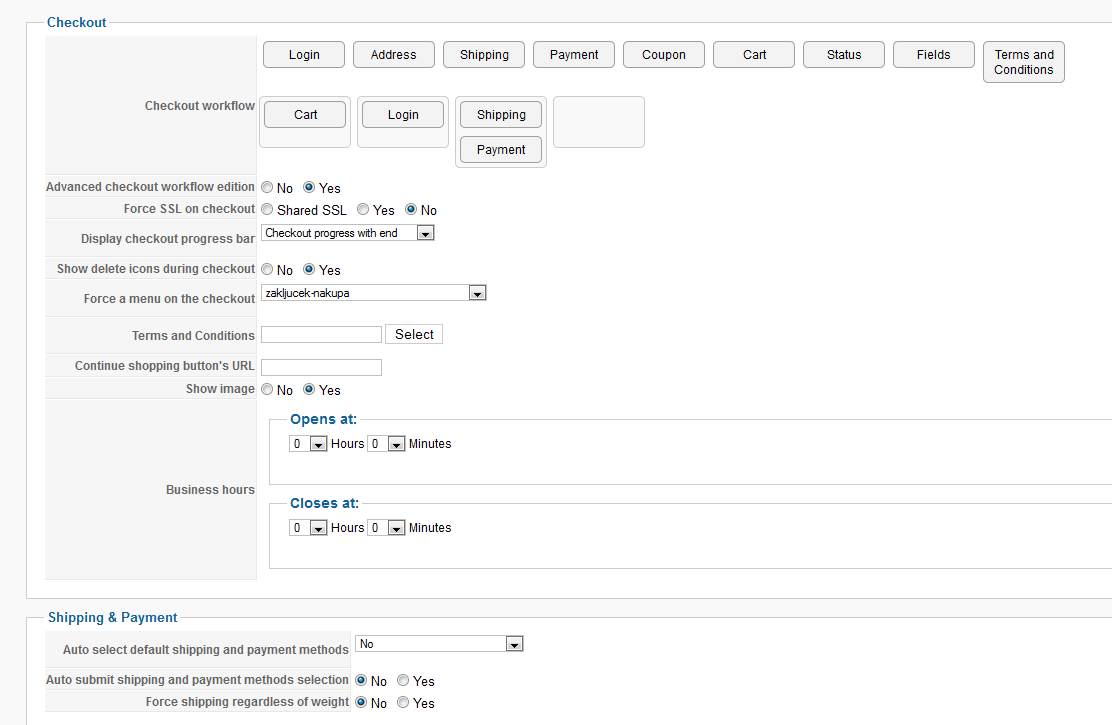
Thanks for that it help. Im almost there. I had to divide the login and shiping/payment step because it didnt work ok with auto submit. Right now i have two steps which is still ok but having some problems with login form. Once you insert your data it dissapers and you cant access it again. If you go back to step 1 there is no form. Would it be possible that if you would want to go back to step 1 that the form would still be there?
Picture of my current flow:
Replied by avantmedia on topic Is This Too Much To Ask? (Checkout Page)
nicolas wrote: You need to do three things for that:
1. Edit the file "login" of the view "checkout" via the menu Display>Views and remove the line:
$this->nextButton = false;
2. Edit the file "registration" of the view "user" via the menu Display>Views and remove the line:
echo $this->cartClass->displayButton(JText::_('HIKA_REGISTER'),'register',$this->params,'','if(hikashopCheckChangeForm(\'register\',\''.$this->form_name.'\') && hikashopCheckChangeForm(\'user\',\''.$this->form_name.'\') && hikashopCheckChangeForm(\'address\',\''.$this->form_name.'\')'.$additional_check.'){ var button = document.getElementById(\'login_view_action\'); if(button) button.value=\'register\'; document.'.$this->form_name.'.submit();} return false;');
3. Turn on the option "auto submit shipping and payment methods selection".
That should meet your needs.
Thanks for that it help. Im almost there. I had to divide the login and shiping/payment step because it didnt work ok with auto submit. Right now i have two steps which is still ok but having some problems with login form. Once you insert your data it dissapers and you cant access it again. If you go back to step 1 there is no form. Would it be possible that if you would want to go back to step 1 that the form would still be there?
Picture of my current flow:
Please Log in or Create an account to join the conversation.
Less
More
- Posts: 5
- Thank you received: 0
13 years 3 months ago #111974
by avantmedia
Replied by avantmedia on topic Is This Too Much To Ask? (Checkout Page)
The funny thing is that when you complete the order and you ad another one, the form remembers the data you entered, except email. Once you insert email and go to next step it disapers again if you want to go back. This is probably email login thing?
Please Log in or Create an account to join the conversation.
13 years 3 months ago #112008
by G9Cap
Replied by G9Cap on topic Is This Too Much To Ask? (Checkout Page)
Final PM sent Nicolas! Thanks!
Please Log in or Create an account to join the conversation.
Time to create page: 0.657 seconds