

- Posts: 85
- Thank you received: 1
Display of the CSS edit window
13 years 3 months ago - 13 years 3 months ago #112566
by Kaffeman
Display of the CSS edit window was created by Kaffeman
Hi
When I want to look on the CSS for Hikashop this pops up:
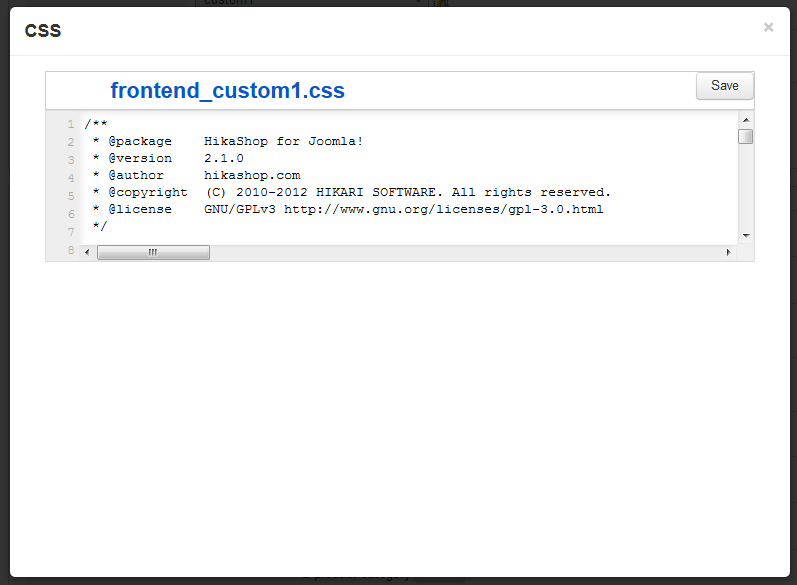
I think that the field for displaying the CSS is way to small and would like to know if there is a way to edit the size of it or something?
When I want to look on the CSS for Hikashop this pops up:
I think that the field for displaying the CSS is way to small and would like to know if there is a way to edit the size of it or something?
Last edit: 13 years 3 months ago by Kaffeman.
Please Log in or Create an account to join the conversation.

13 years 3 months ago #112591
by Eliot
Replied by Eliot on topic Display of the CSS edit window
Hi there,
Could you give us more informations about your Hikashop version, Joomla's version and browser. because the CSS editor is not supposed to be displayed like that.
You can also go on our demo website and try in the backend to see if it's displayed the same way: demo.hikashop.com
Could you give us more informations about your Hikashop version, Joomla's version and browser. because the CSS editor is not supposed to be displayed like that.
You can also go on our demo website and try in the backend to see if it's displayed the same way: demo.hikashop.com
Please Log in or Create an account to join the conversation.
13 years 3 months ago #112612
by Kaffeman
Replied by Kaffeman on topic Display of the CSS edit window
Ok
It says that I'm using the latest Hikashop 2.2.0 and Joomla 3.1.1 so that should be fine I think.
It says that I'm using the latest Hikashop 2.2.0 and Joomla 3.1.1 so that should be fine I think.
Please Log in or Create an account to join the conversation.

13 years 3 months ago #112614
by nicolas
Replied by nicolas on topic Display of the CSS edit window
Hi,
On joomla 3, it sounds like the template is forcing the height where it shouldn't.
Remove the code:
.CodeMirror-wrapping {
height: auto !important;
}
from the template CSS of the backend : http://localhost/joomla30/administrator/templates/isis/css/template.css and that should fix the height.
Otherwise, you can disable the codemirror plugin and it should display fine too.
On joomla 3, it sounds like the template is forcing the height where it shouldn't.
Remove the code:
.CodeMirror-wrapping {
height: auto !important;
}
from the template CSS of the backend : http://localhost/joomla30/administrator/templates/isis/css/template.css and that should fix the height.
Otherwise, you can disable the codemirror plugin and it should display fine too.
The following user(s) said Thank You: Kaffeman
Please Log in or Create an account to join the conversation.
13 years 3 months ago #112634
by Kaffeman
Replied by Kaffeman on topic Display of the CSS edit window
Disabling Code Mirror did it, will have to manage without numbered rows but that's fine, thank you.
Please Log in or Create an account to join the conversation.
Time to create page: 0.328 seconds