

- Posts: 8
- Thank you received: 0
Fade Effect
13 years 3 months ago #114400
by rgfuchs
Fade Effect was created by rgfuchs
Hi,
I truly love fade effect, amazing feature in Hikashop!
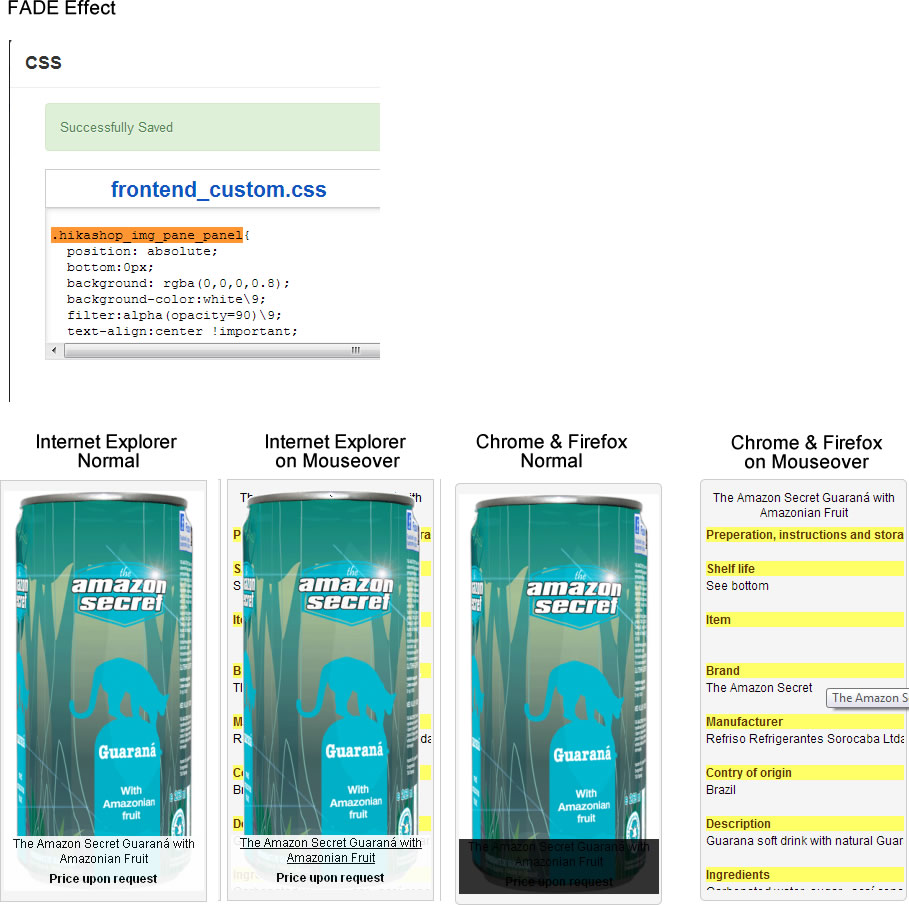
But something seems odd, please see attached picture I put together from various Print Screens.
I changed the black overlay into white (background-color) and it works on Internet Explorer, but not on Chrome or Firefox (deleted browser history/cache many times - no change)
Also on Internet Explorer on Mouseover the text appears in the back, while the image stays in front on Chrome/Firefox it is fine, all fades away into description of product.
Any idea what is going on or needs to be done to work correctly on all browsers?
Thanks for help!
Robert
I truly love fade effect, amazing feature in Hikashop!
But something seems odd, please see attached picture I put together from various Print Screens.
I changed the black overlay into white (background-color) and it works on Internet Explorer, but not on Chrome or Firefox (deleted browser history/cache many times - no change)
Also on Internet Explorer on Mouseover the text appears in the back, while the image stays in front on Chrome/Firefox it is fine, all fades away into description of product.
Any idea what is going on or needs to be done to work correctly on all browsers?
Thanks for help!
Robert
Please Log in or Create an account to join the conversation.
13 years 3 months ago #114401
by rgfuchs
Replied by rgfuchs on topic Fade Effect
Please Log in or Create an account to join the conversation.

13 years 3 months ago #114403
by Jerome
Jerome - Obsidev.com
HikaMarket & HikaSerial developer / HikaShop core dev team.
Replied by Jerome on topic Fade Effect
Jerome - Obsidev.com
HikaMarket & HikaSerial developer / HikaShop core dev team.
Please Log in or Create an account to join the conversation.
13 years 3 months ago #114514
by rgfuchs
Replied by rgfuchs on topic Fade Effect
Thanks for this!
Is there a way to customize the mouseovered description with a button or read more click here information without having to do this in the main description ? I realise it is taking it from the product description page, but I would love to differentiate (sort of short description with link to long description).
Thanks for any hint ...
Robert
Is there a way to customize the mouseovered description with a button or read more click here information without having to do this in the main description ? I realise it is taking it from the product description page, but I would love to differentiate (sort of short description with link to long description).
Thanks for any hint ...
Robert
Please Log in or Create an account to join the conversation.

13 years 3 months ago #114531
by Eliot
Replied by Eliot on topic Fade Effect
Hi Robert,
You can edit this view in Display>View, the file is listing_fade for product.
You will then be able to add or delete some of the displayed information.
It is this part of the code which display the hidden stuff:
You could add your button here with a simple link (stocked in $link) or add specific informations of your product.
Note that if you use the readmore tag in your product description, then the description displayed will stop at this tag and display a "read more" with a link
You can edit this view in Display>View, the file is listing_fade for product.
You will then be able to add or delete some of the displayed information.
It is this part of the code which display the hidden stuff:
Code:
<!-- PRODUCT NAME -->
<span class="hikashop_product_name">
<?php if($this->params->get('link_to_product_page',1)){ ?>
<a href="<?php echo $link;?>">
<?php }
echo $this->row->product_name;
if($this->params->get('link_to_product_page',1)){ ?>
</a>
<?php } ?>
</span>
<!-- EO PRODUCT NAME -->
<!-- PRODUCT DESCRIPTION -->
<div style="height=<?php echo $height; ?>px; text-align:<?php echo $this->align; ?>; overflow:hidden">
<?php
echo preg_replace('#<hr *id="system-readmore" */>.*#is','',$this->row->product_description);
?>
</div>
<!-- EO PRODUCT DESCRIPTION -->
<!-- PRODUCT VOTE -->
<?php
if($this->params->get('show_vote')){
$this->setLayout('listing_vote');
echo $this->loadTemplate();
}
?>
<!-- EO PRODUCT VOTE -->
<!-- ADD TO CART BUTTON AREA -->
<?php
if($this->params->get('add_to_cart') || $this->params->get('add_to_wishlist')){
$this->setLayout('add_to_cart_listing');
echo $this->loadTemplate();
}?>
<!-- EO ADD TO CART BUTTON AREA -->
<!-- COMPARISON AREA -->
<?php
if(JRequest::getVar('hikashop_front_end_main',0) && JRequest::getVar('task')=='listing' && $this->params->get('show_compare')) { ?>
<br/><?php
if( $this->params->get('show_compare') == 1 ) {
?>
<a class="hikashop_compare_button" href="<?php echo $link;?>" onclick="setToCompareList(<?php echo $this->row->product_id;?>,'<?php echo $this->escape($this->row->product_name); ?>',this); return false;"><?php echo JText::_('ADD_TO_COMPARE_LIST'); ?></a>
<?php } else { ?>
<input type="checkbox" class="hikashop_compare_checkbox" id="hikashop_listing_chk_<?php echo $this->row->product_id;?>" onchange="setToCompareList(<?php echo $this->row->product_id;?>,'<?php echo $this->escape($this->row->product_name); ?>',this);"><label for="hikashop_listing_chk_<?php echo $this->row->product_id;?>"><?php echo JText::_('ADD_TO_COMPARE_LIST'); ?></label>
<?php }
} ?>
<!-- EO COMPARISON AREA -->
You could add your button here with a simple link (stocked in $link) or add specific informations of your product.
Note that if you use the readmore tag in your product description, then the description displayed will stop at this tag and display a "read more" with a link
Please Log in or Create an account to join the conversation.
13 years 3 months ago #114662
by rgfuchs
Replied by rgfuchs on topic Fade Effect
sorry my ignorance (doing this for the first time) how/where do I access the listing_fade file ?
.. clicking on hagane brings me to the template page
.. clicking on hagane brings me to the template page
Please Log in or Create an account to join the conversation.

13 years 3 months ago #114664
by Xavier
Replied by Xavier on topic Fade Effect
You have to use the menu Display > Views (from hikashop component) and then search for the file "listing_fade".
Please Log in or Create an account to join the conversation.
13 years 3 months ago #114665
by rgfuchs
Replied by rgfuchs on topic Fade Effect
I see, I did not realise one could click also on listing_fade !
Thank you!
Thank you!
Please Log in or Create an account to join the conversation.
12 years 9 months ago #139634
by glazweb
Replied by glazweb on topic Fade Effect
Hello.
Something wrong with me with the fade effect.
When I set the "Add to cart" button in slide effect, it is really active and do add a product in the cart.
When I select the fade effect, The "Add to cart" is inactive, seems to be embedded in a div, and link to the product page when I click on it.
Could someone explain to me a possible reason ?
See the code of listing_fade.php file in the attachment.
Many Thanks
Something wrong with me with the fade effect.
When I set the "Add to cart" button in slide effect, it is really active and do add a product in the cart.
When I select the fade effect, The "Add to cart" is inactive, seems to be embedded in a div, and link to the product page when I click on it.
Could someone explain to me a possible reason ?
See the code of listing_fade.php file in the attachment.
Many Thanks
Please Log in or Create an account to join the conversation.

Less
More
- Posts: 12953
- Thank you received: 1778
12 years 9 months ago #139647
by Mohamed Thelji
Replied by Mohamed Thelji on topic Fade Effect
Hi,
Can you give us a link to the page where you are having your issue so that we can directly test it ?
Can you give us a link to the page where you are having your issue so that we can directly test it ?
Please Log in or Create an account to join the conversation.
12 years 9 months ago - 12 years 9 months ago #139649
by glazweb
Replied by glazweb on topic Fade Effect
Thank you for helping, Mohammed.
Here's the link : xx.xx.xx.xx/anoverdoseoflife/index.php/c...terie-et-conserverie
The concerned block with fade effect is on top, called "Charcuterie".
Thanks once again.
Here's the link : xx.xx.xx.xx/anoverdoseoflife/index.php/c...terie-et-conserverie
The concerned block with fade effect is on top, called "Charcuterie".
Thanks once again.
Last edit: 12 years 9 months ago by glazweb. Reason: masquing server IP
Please Log in or Create an account to join the conversation.
12 years 9 months ago #139878
by Xavier
Replied by Xavier on topic Fade Effect
Hi,
Indeed I have reproduced that bug on my end, I have added it on our todo list.
It's a css issue, there is probably a z-index to set on the button to put it over the the div content.
Actually we have a lot of support, so I will fix it as soon as possible.
Indeed I have reproduced that bug on my end, I have added it on our todo list.
It's a css issue, there is probably a z-index to set on the button to put it over the the div content.
Actually we have a lot of support, so I will fix it as soon as possible.
Please Log in or Create an account to join the conversation.
12 years 9 months ago - 12 years 9 months ago #139935
by glazweb
Replied by glazweb on topic Fade Effect
Hello Xavier.
Thank you for having a look.
I'll try to fix that on my side with z-index.
Thank you for posting a solution in this post when you find out the point.
Regards.
EDIT : I'm facing another problem with displaying:
I've set all Hika products modules with 5 columns and 20 products.
On the page xx.xx.xx.xx/anoverdoseoflife/index.php/huiles-et-condiments , which contains actually 15 products, the first row shows 5 products but the next 4 rows show 4 products only. I doesn't change anything when I set exactly 15 products in module parameters.
I can't figure out why.
Thank you
Thank you for having a look.
I'll try to fix that on my side with z-index.
Thank you for posting a solution in this post when you find out the point.
Regards.
EDIT : I'm facing another problem with displaying:
I've set all Hika products modules with 5 columns and 20 products.
On the page xx.xx.xx.xx/anoverdoseoflife/index.php/huiles-et-condiments , which contains actually 15 products, the first row shows 5 products but the next 4 rows show 4 products only. I doesn't change anything when I set exactly 15 products in module parameters.
I can't figure out why.
Thank you
Last edit: 12 years 9 months ago by glazweb.
Please Log in or Create an account to join the conversation.

12 years 9 months ago #140275
by nicolas
Replied by nicolas on topic Fade Effect
Hi,
That's because of the margin-left applied to your li attributes by your template.
Add such CSS to force it to 0 and it will display properly:
.hikashop_products li{ margin-left: 0px !important; }
That's because of the margin-left applied to your li attributes by your template.
Add such CSS to force it to 0 and it will display properly:
.hikashop_products li{ margin-left: 0px !important; }
The following user(s) said Thank You: glazweb
Please Log in or Create an account to join the conversation.
12 years 9 months ago #140369
by glazweb
Replied by glazweb on topic Fade Effect
Hi Nicolas !
Many thanks for the solution.
Firebug probably showed me the point, I was looking somewhere else.
Thank you !
Many thanks for the solution.
Firebug probably showed me the point, I was looking somewhere else.
Thank you !
Please Log in or Create an account to join the conversation.
Time to create page: 0.108 seconds