

- Posts: 12
- Thank you received: 0
no checkout end screen
13 years 3 months ago #114477
by konkrete8
no checkout end screen was created by konkrete8
I just bought Hikashop business edition but am running into a problem with the checkout flow.
In the (working) free version, when you chose 'bank transfer' as payment method and then click 'next' , you get a screen showing the bank details (from the bank transfer payment plugin) and a 'thank you for ordering'. The url is: /webshop/checkout/checkout/step/step-1.html
But with the business edition, I get taken to the product category. No idea why, because no menu is forced after checkout. The url is slightly different: webshop/checkout/task-step/step-1.html (no idea why)
I must be missing something, but have really exhausted my options. Does anybody know how to fix this?
Thanks in advance
In the (working) free version, when you chose 'bank transfer' as payment method and then click 'next' , you get a screen showing the bank details (from the bank transfer payment plugin) and a 'thank you for ordering'. The url is: /webshop/checkout/checkout/step/step-1.html
But with the business edition, I get taken to the product category. No idea why, because no menu is forced after checkout. The url is slightly different: webshop/checkout/task-step/step-1.html (no idea why)
I must be missing something, but have really exhausted my options. Does anybody know how to fix this?
Thanks in advance
Please Log in or Create an account to join the conversation.

Less
More
- Posts: 12953
- Thank you received: 1778
13 years 3 months ago #114484
by Mohamed Thelji
Replied by Mohamed Thelji on topic no checkout end screen
Hi,
Upgrading your Hikashop version shouldn't cause this kind of issue, so can you give me a link to your website for testing purpose ?
Upgrading your Hikashop version shouldn't cause this kind of issue, so can you give me a link to your website for testing purpose ?
Please Log in or Create an account to join the conversation.
13 years 3 months ago #114488
by konkrete8
Replied by konkrete8 on topic no checkout end screen
Hi Mohamed,
Sure, it's: puzzelhoorn[dot]nl (since it's a test site, I want to avoid posting an actual link)
Thanks in advance
Sure, it's: puzzelhoorn[dot]nl (since it's a test site, I want to avoid posting an actual link)
Thanks in advance
Please Log in or Create an account to join the conversation.
Less
More
- Posts: 12953
- Thank you received: 1778
13 years 3 months ago #114494
by Mohamed Thelji
Replied by Mohamed Thelji on topic no checkout end screen
It seems to be working fine with me :
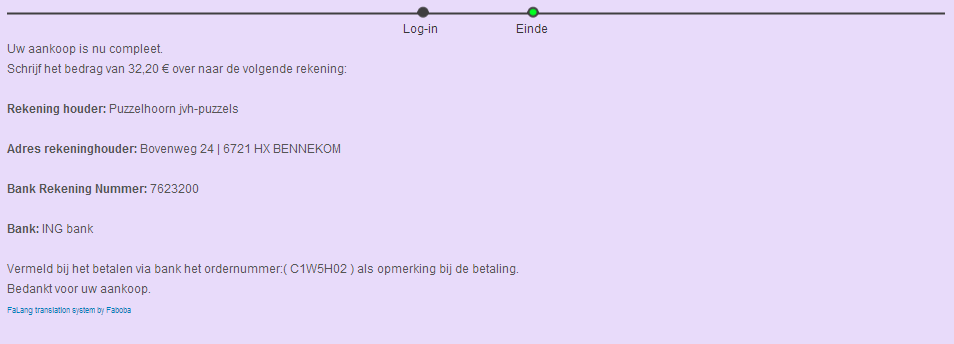
Please Log in or Create an account to join the conversation.
13 years 3 months ago - 13 years 3 months ago #114509
by konkrete8
Replied by konkrete8 on topic no checkout end screen
That is the screen that should appear - and with you it apparently does, but not with me. I get the screen shown below (it is a page listing the product categories):
Can it have anything to do with multi site component 'Falang'? Although I did try to buy something both in German, Dutch and English.
Can you tell me which language preference you used and what steps you took, so I can try and reproduce your result?
Can it have anything to do with multi site component 'Falang'? Although I did try to buy something both in German, Dutch and English.
Can you tell me which language preference you used and what steps you took, so I can try and reproduce your result?
Last edit: 13 years 3 months ago by konkrete8.
Please Log in or Create an account to join the conversation.
13 years 3 months ago #114607
by konkrete8
Replied by konkrete8 on topic no checkout end screen
Someone else tested it and experienced the same problem I did.
Very curious what you did to get to the correct end screen. Of course if some users get the correct screen but some don't, that would still be a major problem of course.
Very curious what you did to get to the correct end screen. Of course if some users get the correct screen but some don't, that would still be a major problem of course.
Please Log in or Create an account to join the conversation.
Less
More
- Posts: 12953
- Thank you received: 1778
13 years 3 months ago #114716
by Mohamed Thelji
Replied by Mohamed Thelji on topic no checkout end screen
Ok, It's actually working through Chrome, but not with Firefox, can you download and install the last version of Hikashop and test it again please ?  .
. Please Log in or Create an account to join the conversation.
13 years 3 months ago #114733
by konkrete8
Replied by konkrete8 on topic no checkout end screen
Thanks for your reply.
I downloaded the business version this week, on July 15. It says version 2.2.0. I couldn't find a later version?
(with me it also works in Chrome)
I downloaded the business version this week, on July 15. It says version 2.2.0. I couldn't find a later version?
(with me it also works in Chrome)
Please Log in or Create an account to join the conversation.

13 years 3 months ago #114762
by Jerome
Jerome - Obsidev.com
HikaMarket & HikaSerial developer / HikaShop core dev team.
Replied by Jerome on topic no checkout end screen
Hi,
You can force a menu for your checkout. It is an option in the HikaShop configuration.
With this option you will force the checkout on a specific menu so, the url will be always the same.
Regards,
You can force a menu for your checkout. It is an option in the HikaShop configuration.
With this option you will force the checkout on a specific menu so, the url will be always the same.
Regards,
Jerome - Obsidev.com
HikaMarket & HikaSerial developer / HikaShop core dev team.
Please Log in or Create an account to join the conversation.
13 years 3 months ago #114807
by konkrete8
Replied by konkrete8 on topic no checkout end screen
Thanks for your reply Jerome.
Not sure if I understand what you mean though. I found the option to force a menu on the checkout, but not sure how it would help, as the url's are already the same:
Safari checkout url: /webshop/checkout/task-step/step-1.html
firefox checkout url: /webshop/checkout/task-step/step-1.html
chrome checkout url: /webshop/checkout/task-step/step-1.html --> only one that works
We also tested it with IE 10, doesn't work either.
Not sure if I understand what you mean though. I found the option to force a menu on the checkout, but not sure how it would help, as the url's are already the same:
Safari checkout url: /webshop/checkout/task-step/step-1.html
firefox checkout url: /webshop/checkout/task-step/step-1.html
chrome checkout url: /webshop/checkout/task-step/step-1.html --> only one that works
We also tested it with IE 10, doesn't work either.
Please Log in or Create an account to join the conversation.
13 years 3 months ago #114886
by Jerome
Jerome - Obsidev.com
HikaMarket & HikaSerial developer / HikaShop core dev team.
Replied by Jerome on topic no checkout end screen
Hi,
There is a javascript error in the page.
I have upload a new package which fix the problem. Please re-download HikaShop 2.2.0
Sorry for the inconvenient.
Regards,
There is a javascript error in the page.
I have upload a new package which fix the problem. Please re-download HikaShop 2.2.0
Sorry for the inconvenient.
Regards,
Jerome - Obsidev.com
HikaMarket & HikaSerial developer / HikaShop core dev team.
Please Log in or Create an account to join the conversation.
13 years 3 months ago #115032
by konkrete8
Replied by konkrete8 on topic no checkout end screen
Hi Jerome,
I've redownloaded and installed Hikashop 2.2.0
Joomla extension manager confirmed 'Plugin Hikashop USPS shipping plugin installed successfully.
I then ordered something on the webshop and tried to go to checkout with Safari and Firefox, but it still did not work (Chrome did, as before)
I then switched on the USPS shipping plugin, emptied the browser cache and tried again, but no dice.
Did it work with you guys? And if so, what did you do differently?
I've redownloaded and installed Hikashop 2.2.0
Joomla extension manager confirmed 'Plugin Hikashop USPS shipping plugin installed successfully.
I then ordered something on the webshop and tried to go to checkout with Safari and Firefox, but it still did not work (Chrome did, as before)
I then switched on the USPS shipping plugin, emptied the browser cache and tried again, but no dice.
Did it work with you guys? And if so, what did you do differently?
Please Log in or Create an account to join the conversation.
13 years 3 months ago #115206
by konkrete8
Replied by konkrete8 on topic no checkout end screen
It seems there are others with the same issue
payment methods after upgrade to 2.2.0
redirect to category listing at checkout
If the 2.2.0 version is the problem, could reverting to an earlier version solve the problem?
payment methods after upgrade to 2.2.0
redirect to category listing at checkout
If the 2.2.0 version is the problem, could reverting to an earlier version solve the problem?
Please Log in or Create an account to join the conversation.
13 years 3 months ago #115303
by Jerome
Jerome - Obsidev.com
HikaMarket & HikaSerial developer / HikaShop core dev team.
Replied by Jerome on topic no checkout end screen
Hi,
Please edit the file: "components/com_hikashop/views/checkout/view.html.php" and replace the code
By:
Regards,
Please edit the file: "components/com_hikashop/views/checkout/view.html.php" and replace the code
Code:
if(typeof varform.elements["hikashop_shipping"] != "undefined") {
var shippings = varform.elements["hikashop_shipping"];
Code:
if(typeof varform.elements["hikashop_shippings"] != "undefined") {
var shippings = varform.elements["hikashop_shippings"];
Jerome - Obsidev.com
HikaMarket & HikaSerial developer / HikaShop core dev team.
The following user(s) said Thank You: konkrete8
Please Log in or Create an account to join the conversation.
13 years 3 months ago #115415
by konkrete8
Replied by konkrete8 on topic no checkout end screen
Yes, that did the trick!
Thanks!
Thanks!
Please Log in or Create an account to join the conversation.
Time to create page: 0.092 seconds