
- Posts: 259
- Thank you received: 22
Tax on Custom Price
- rodfarrell
-
 Topic Author
- Offline
Less
More
13 years 3 months ago #115388
by rodfarrell
Tax on Custom Price was created by rodfarrell
When using the custom price plugin tax is not recalculated when the amount is entered. How should taxes be configured to work for this plugin?
Please Log in or Create an account to join the conversation.

Less
More
- Posts: 12953
- Thank you received: 1778
13 years 3 months ago #115417
by Mohamed Thelji
Replied by Mohamed Thelji on topic Tax on Custom Price
Hi,
Can you explain me exactly how are you using the custom price plugin and how do you expect it to work ?
Can you explain me exactly how are you using the custom price plugin and how do you expect it to work ?
Please Log in or Create an account to join the conversation.
- rodfarrell
-
Topic Author
- Offline
Less
More
- Posts: 259
- Thank you received: 22
13 years 3 months ago #115577
by rodfarrell
Replied by rodfarrell on topic Tax on Custom Price
On
www.trueerp.co.uk/licenses/
we have created a Fabrik form for calculating the price of a product (software licenses) and pass that value into a product with the custom price plugin. What we find however is that whatever price is set in the product as a default has tax calculated at the default 20% rate and that is added to the shopping cart as a fixed amount.
What we need to do is pass the price into the product and have the tax calculated at 20%. I've tried to do this by adding a calculation in the plugin php however the tax amount is then not passed to the total of the checkout as you can see at the link above.
What we need to do is pass the price into the product and have the tax calculated at 20%. I've tried to do this by adding a calculation in the plugin php however the tax amount is then not passed to the total of the checkout as you can see at the link above.
Please Log in or Create an account to join the conversation.

13 years 3 months ago #115583
by nicolas
Replied by nicolas on topic Tax on Custom Price
That will indeed require to modify the plugin to recalculate the tax in the plugin php code.
So it's probably that the changes you made in the plugin are not correct.
Did you defined the taxes array of the price with the necessary tax object ?
That is necessary if you have the "show detailed taxes" option of the configuration turned on (which you probably don't need in your case since you only have one tax rate).
So it's probably that the changes you made in the plugin are not correct.
Did you defined the taxes array of the price with the necessary tax object ?
That is necessary if you have the "show detailed taxes" option of the configuration turned on (which you probably don't need in your case since you only have one tax rate).
Please Log in or Create an account to join the conversation.
- rodfarrell
-
Topic Author
- Offline
Less
More
- Posts: 259
- Thank you received: 22
13 years 3 months ago #115617
by rodfarrell
Replied by rodfarrell on topic Tax on Custom Price
Thanks for the quick response Nicolas. I have put the original plugin code back. I'm not sure what you mean by taxes array. Only one tax rate applies and it applies to all regions.
Should the plugin handle tax calculations or is this something that we need to code ourselves?
Should the plugin handle tax calculations or is this something that we need to code ourselves?
Please Log in or Create an account to join the conversation.
13 years 3 months ago #115685
by nicolas
Replied by nicolas on topic Tax on Custom Price
Well, this plugin a is really simple plugin to just get the price entered by the user in it and then replace the product price by it.
If you want to add the taxes support for it, you'll have to modify the code to handle it. But it should be really simple.
Here is the line for the price with taxes in the plugin:
$product->prices[$k]->price_value_with_tax = $product->amount;
If you want to add a 20% tax on it, you can change it to:
$product->prices[$k]->price_value_with_tax = $product->amount*1.2;
But for that change to work properly you will need to turn off the "show detailed taxes option of the configuration as I already said.
If you want to add the taxes support for it, you'll have to modify the code to handle it. But it should be really simple.
Here is the line for the price with taxes in the plugin:
$product->prices[$k]->price_value_with_tax = $product->amount;
If you want to add a 20% tax on it, you can change it to:
$product->prices[$k]->price_value_with_tax = $product->amount*1.2;
But for that change to work properly you will need to turn off the "show detailed taxes option of the configuration as I already said.
Please Log in or Create an account to join the conversation.
- rodfarrell
-
Topic Author
- Offline
Less
More
- Posts: 259
- Thank you received: 22
13 years 3 months ago #115754
by rodfarrell
Replied by rodfarrell on topic Tax on Custom Price
I have already made that change and I've turned off the "show detailed taxes" option but while the line item now includes taxes, the total in the cart is still the net amount.
Please Log in or Create an account to join the conversation.
13 years 3 months ago #115853
by nicolas
Replied by nicolas on topic Tax on Custom Price
When I try on your website the amount of the product is not used at all:
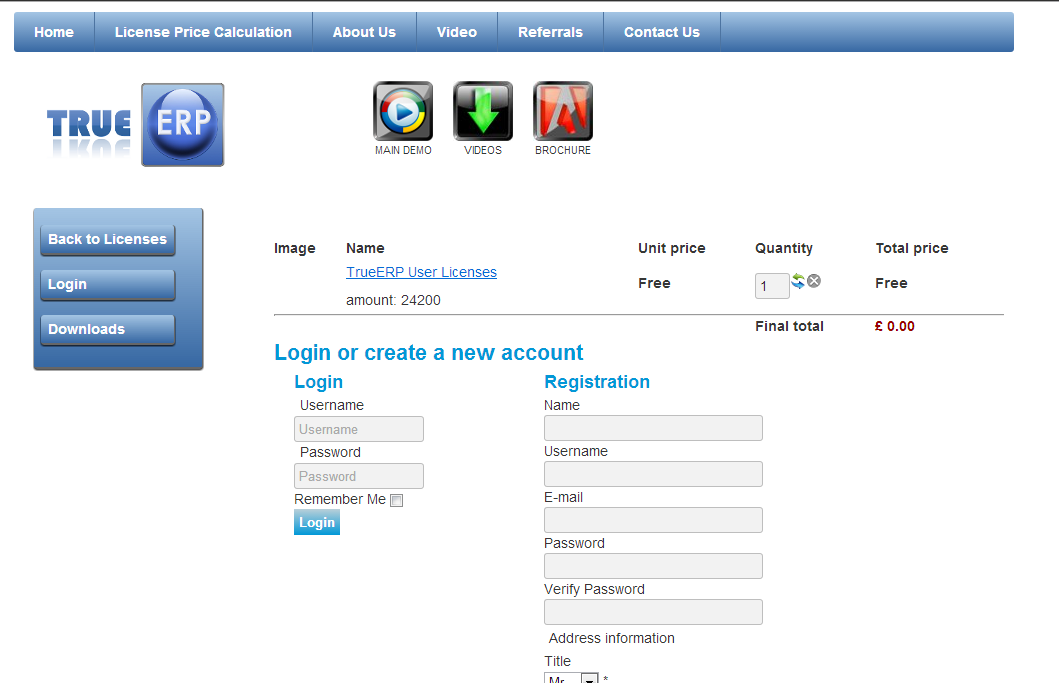
So I'm not sure what you did but it looks different from what you're describing.
So I'm not sure what you did but it looks different from what you're describing.
Please Log in or Create an account to join the conversation.
- rodfarrell
-
Topic Author
- Offline
Less
More
- Posts: 259
- Thank you received: 22
13 years 3 months ago #116134
by rodfarrell
Replied by rodfarrell on topic Tax on Custom Price
I upgraded to Joomla 2.5.13 on Friday and ended with a lot of SQL errors and broken functionality. I will be restoring the backup today.
Please Log in or Create an account to join the conversation.
- rodfarrell
-
Topic Author
- Offline
Less
More
- Posts: 259
- Thank you received: 22
13 years 3 months ago - 13 years 3 months ago #116882
by rodfarrell
Replied by rodfarrell on topic Tax on Custom Price
The site is restored now but back to no tax in the cart total - I really need some help here - please let me know what information I need to provide for you to be able to help.
I've moved the test site to test1.trueerp.co.uk
I've moved the test site to test1.trueerp.co.uk
Last edit: 13 years 3 months ago by rodfarrell.
Please Log in or Create an account to join the conversation.
13 years 3 months ago #117010
by nicolas
Replied by nicolas on topic Tax on Custom Price
All I can think of is that the option "show detailed taxes" is turned on.
Can you double check it ?
Otherwise, add the line:
if(isset($price->taxes)) unset($product->prices[$k]->taxes);
after the line:
foreach($product->prices as $k => $price){
and that should help force the system to display the tax for the full total.
Can you double check it ?
Otherwise, add the line:
if(isset($price->taxes)) unset($product->prices[$k]->taxes);
after the line:
foreach($product->prices as $k => $price){
and that should help force the system to display the tax for the full total.
Please Log in or Create an account to join the conversation.
- rodfarrell
-
Topic Author
- Offline
Less
More
- Posts: 259
- Thank you received: 22
13 years 3 months ago - 13 years 3 months ago #117099
by rodfarrell
Replied by rodfarrell on topic Tax on Custom Price
"Show detailed taxes" is definitely off. Adding the line of code also makes no difference. As far as I can see the tax amount is extracted from the product file and not recalculated in the cart. If I set a default value of $1 for the product the tax will show as 0.20 regardless of the value added by the custom price plugin.
Unless I'm missing something this means that unsetting the value of $product->prices[$k]->taxes results in no value in the cart total because it never gets reset.
Unless I'm missing something this means that unsetting the value of $product->prices[$k]->taxes results in no value in the cart total because it never gets reset.
Last edit: 13 years 3 months ago by rodfarrell.
Please Log in or Create an account to join the conversation.
13 years 3 months ago #117342
by nicolas
Replied by nicolas on topic Tax on Custom Price
Hi,
I don't know what you did but it's working fine for me.
I've made it an option of the plugin so that you can activate the tax handling on the amount.
I've also made it compatible with both tax mode.
Please install that plugin and activate the tax handling and it will work.
I don't know what you did but it's working fine for me.
I've made it an option of the plugin so that you can activate the tax handling on the amount.
I've also made it compatible with both tax mode.
Please install that plugin and activate the tax handling and it will work.
Please Log in or Create an account to join the conversation.
- rodfarrell
-
Topic Author
- Offline
Less
More
- Posts: 259
- Thank you received: 22
13 years 3 months ago #117602
by rodfarrell
Replied by rodfarrell on topic Tax on Custom Price
Thank you, thank you, thank you Nicolas, this works beautifully now.
I have a Fabrik form that calculates field values, passing those values to the shopping cart via the custom price plugin where the tax calculations are done.
Live site is www.trueerp.co.uk/licenses
When I get a few minutes I will create and post a tutorial video on how this is achieved for anyone else that wants this kind of functionality. The only downside is that currently Fabrik is not stable on Joomla 3 so I had to use 2.5
I have a Fabrik form that calculates field values, passing those values to the shopping cart via the custom price plugin where the tax calculations are done.
Live site is www.trueerp.co.uk/licenses
When I get a few minutes I will create and post a tutorial video on how this is achieved for anyone else that wants this kind of functionality. The only downside is that currently Fabrik is not stable on Joomla 3 so I had to use 2.5
Please Log in or Create an account to join the conversation.
Time to create page: 0.083 seconds