

- Posts: 87
- Thank you received: 2
Cart showing different prices in different browser
15 years 7 months ago - 15 years 7 months ago #8576
by agrfoto
Cart showing different prices in different browser was created by agrfoto
This is for anyone not understanding why the prices, next to products or in the cart, show the same figures for with tax or without tax.
First thing I learned (in another thread) is that if your site was working OK, showing both the (differing) with tax and without tax prices, then all of a sudden they start showing as the same, then the only thing you can do is log out of your back end (and anyone else that's logged in too) and log in again.
Usually this solves the issue. Why it happens in the first place I cannot tell you, however today I enabled the Hika Shop Cart module so that it appears below my main menu. It works fine except after adding it I no longer had the with tax price.
I did, as I suggested above, but also logged out of the front end too, cleared all local browser cache (Firefox) before closing it and relaunching. On logging in to the front end, nothing had changed.
Opening another browser, in this case Safari, all was correct, and showing the correct price.
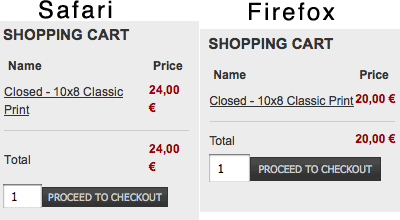
I continued working with the back end using Safari and then refreshing the front end in Firefox. Weirdly, this corrected the prices in Firefox.
The only thing I did was to change to the session settings from 30 mins to 10 mins (Joomla Global Config/ System. So maybe there was an older session still not logged out of it's session?
I have heard it said that Firefox is not that stable with Flash (which I use in my header), maybe there are other issues with it too.
My concern is whether public users/customers using FireFox may at some point encounter my site showing the wrong prices.
A later addition:
I have since found that it also happens in Safari. It was after clicking an "add to cart" text link in an article on the front page.
The figure in the cart module said 24.00 before clicking this link, after it changed to 20.00 but didn't add the new product. I can only deduce that this link is the problem and I shall remove it and refrain from using "add to cart" anywhere other than on the product pages themselves.
This link now removed. Cache cleared, logged out all sessions, cleared browser cache, closed and relaunched. The cart module on each page shows correctly 24.00 for 1 product but if I "proceed to cart" then it shows as 20.00 and the module then also shows 20.00.
Basically if you are logged into the front end then click on the "proceed to cart" button, you cancel any tax calculation. If you are not logged in it doesn't happen.
I've obviously set something incorrectly somewhere but as yet I have not found it. If anyone knows of any other solutions I'd be very happy to read them
First thing I learned (in another thread) is that if your site was working OK, showing both the (differing) with tax and without tax prices, then all of a sudden they start showing as the same, then the only thing you can do is log out of your back end (and anyone else that's logged in too) and log in again.
Usually this solves the issue. Why it happens in the first place I cannot tell you, however today I enabled the Hika Shop Cart module so that it appears below my main menu. It works fine except after adding it I no longer had the with tax price.
I did, as I suggested above, but also logged out of the front end too, cleared all local browser cache (Firefox) before closing it and relaunching. On logging in to the front end, nothing had changed.
Opening another browser, in this case Safari, all was correct, and showing the correct price.
I continued working with the back end using Safari and then refreshing the front end in Firefox. Weirdly, this corrected the prices in Firefox.
The only thing I did was to change to the session settings from 30 mins to 10 mins (Joomla Global Config/ System. So maybe there was an older session still not logged out of it's session?
I have heard it said that Firefox is not that stable with Flash (which I use in my header), maybe there are other issues with it too.
My concern is whether public users/customers using FireFox may at some point encounter my site showing the wrong prices.
A later addition:
I have since found that it also happens in Safari. It was after clicking an "add to cart" text link in an article on the front page.
Code:
<a class="hikashop_html_add_to_cart_link" href="index.php?option=com_hikashop&ctrl=product&task=updatecart&quantity=1&checkout=1&product_id=28">Add to cart</a>
The figure in the cart module said 24.00 before clicking this link, after it changed to 20.00 but didn't add the new product. I can only deduce that this link is the problem and I shall remove it and refrain from using "add to cart" anywhere other than on the product pages themselves.
This link now removed. Cache cleared, logged out all sessions, cleared browser cache, closed and relaunched. The cart module on each page shows correctly 24.00 for 1 product but if I "proceed to cart" then it shows as 20.00 and the module then also shows 20.00.
Basically if you are logged into the front end then click on the "proceed to cart" button, you cancel any tax calculation. If you are not logged in it doesn't happen.
I've obviously set something incorrectly somewhere but as yet I have not found it. If anyone knows of any other solutions I'd be very happy to read them
Last edit: 15 years 7 months ago by agrfoto.
Please Log in or Create an account to join the conversation.

15 years 7 months ago #8590
by nicolas
Replied by nicolas on topic Re: Cart showing different prices in different browser
Could you do some screenshots so that we can see how you configured hikashop ?
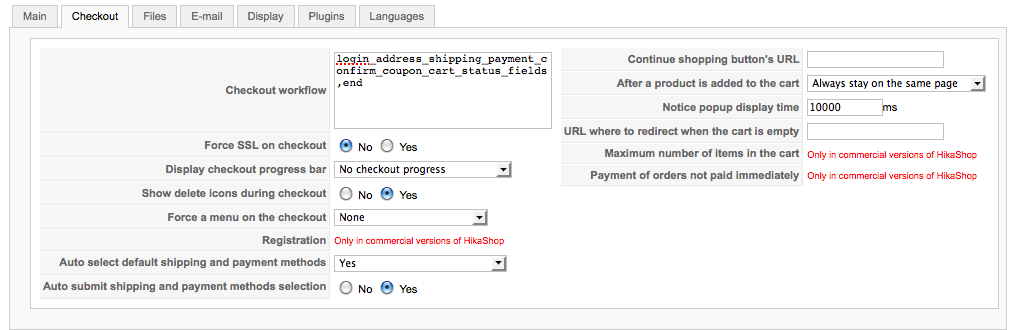
A screenshot of your System->Taxation page, one of the main tab of your configuration and one of your checkout with your address and cart views.
A screenshot of your System->Taxation page, one of the main tab of your configuration and one of your checkout with your address and cart views.
Please Log in or Create an account to join the conversation.
15 years 7 months ago #8593
by agrfoto
Replied by agrfoto on topic Re: Cart showing different prices in different browser
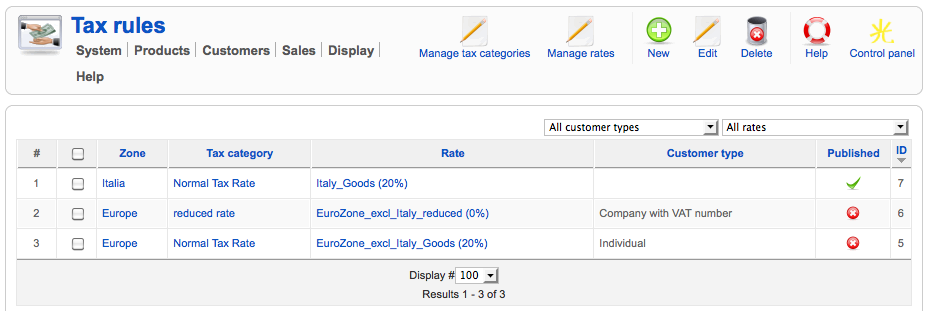
Here you go, 1 of 4
Please Log in or Create an account to join the conversation.
15 years 7 months ago #8594
by agrfoto
Replied by agrfoto on topic Re: Cart showing different prices in different browser
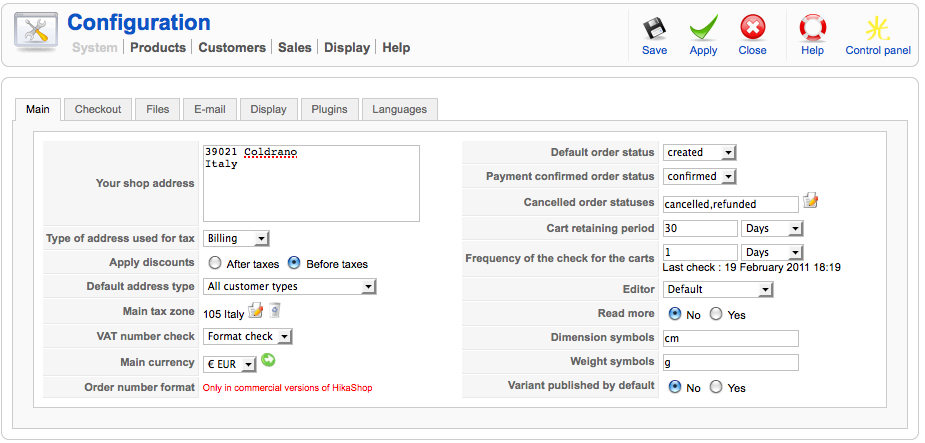
2 of 4
Please Log in or Create an account to join the conversation.
15 years 7 months ago #8595
by agrfoto
Replied by agrfoto on topic Re: Cart showing different prices in different browser
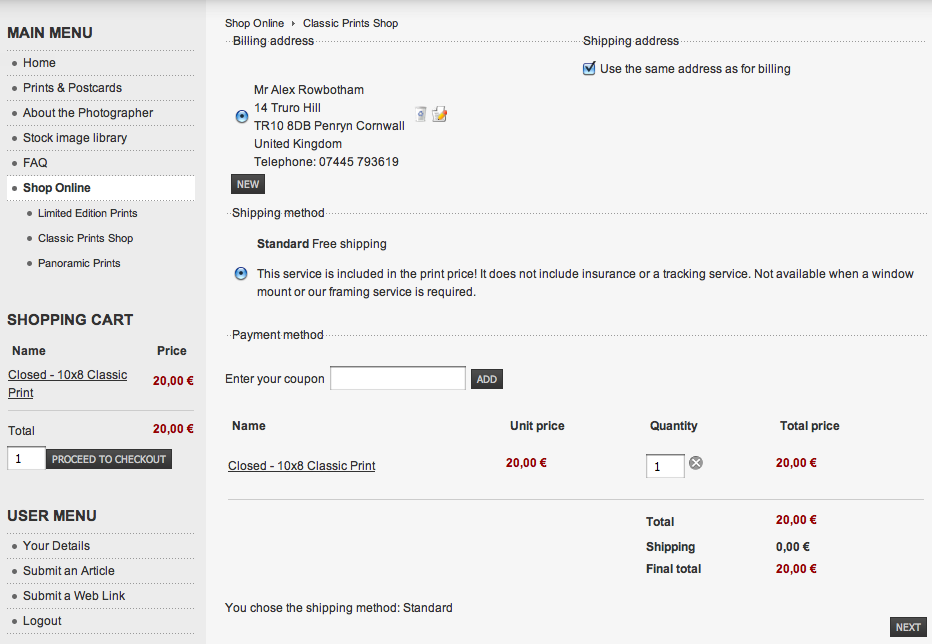
3 of 4
Please Log in or Create an account to join the conversation.
15 years 7 months ago #8596
by agrfoto
Replied by agrfoto on topic Re: Cart showing different prices in different browser
4 of 4
Please Log in or Create an account to join the conversation.
15 years 7 months ago #8609
by nicolas
Replied by nicolas on topic Re: Cart showing different prices in different browser
So, from your settings, here is what happens:
When you display prices before the checkout, the prices are displayed based on your tax zone being the main tax zone of your store (Italy) and since you have a tax rule for Italy,you have the prices displayed with the tax. Once you display the checkout, the zone of your address is taken into account by the system and you see the prices based on the tax in UK. Since you don't have any tax rule for UK, you don't see any tax applied on prices after that.
When you display prices before the checkout, the prices are displayed based on your tax zone being the main tax zone of your store (Italy) and since you have a tax rule for Italy,you have the prices displayed with the tax. Once you display the checkout, the zone of your address is taken into account by the system and you see the prices based on the tax in UK. Since you don't have any tax rule for UK, you don't see any tax applied on prices after that.
Please Log in or Create an account to join the conversation.
15 years 7 months ago #8653
by agrfoto
Replied by agrfoto on topic Re: Cart showing different prices in different browser
Ok, thanks for explaining that. I think I now understand what I have done (or not done) and to test this theory I am trying to register as a new user in Italy. However the drop down box in the form does not include Italy in the country list.

Please Log in or Create an account to join the conversation.
15 years 7 months ago #8654
by nicolas
Replied by nicolas on topic Re: Cart showing different prices in different browser
Could you go in the menu System->Zones menu and check that Italy is published ?
Please Log in or Create an account to join the conversation.
15 years 7 months ago #8655
by agrfoto
Replied by agrfoto on topic Re: Cart showing different prices in different browser
Yes it is.

Please Log in or Create an account to join the conversation.
15 years 7 months ago #8656
by nicolas
Replied by nicolas on topic Re: Cart showing different prices in different browser
I see that you changed it's type to tax instead of country. Please put it back to country, otherwise, it won't be in the dropdown of countries...
Please Log in or Create an account to join the conversation.
15 years 7 months ago #8658
by agrfoto
Replied by agrfoto on topic Re: Cart showing different prices in different browser
Ahhh. That's it.
What then is the Type field used for, I mean in what instance would you set it to state, tax, ship, payment or discount?
Sorry, but there is much I need to understand
What then is the Type field used for, I mean in what instance would you set it to state, tax, ship, payment or discount?
Sorry, but there is much I need to understand
Please Log in or Create an account to join the conversation.
15 years 7 months ago #8659
by nicolas
Replied by nicolas on topic Re: Cart showing different prices in different browser
If you add new zones...
For example, if you want to change the states in your country, you would use the type state.
If you want to add tax zones, you would use the tax type (like the Europe zone which is neither a state nor a country), etc.
For example, if you want to change the states in your country, you would use the type state.
If you want to add tax zones, you would use the tax type (like the Europe zone which is neither a state nor a country), etc.
Please Log in or Create an account to join the conversation.
15 years 7 months ago #8661
by agrfoto
Replied by agrfoto on topic Re: Cart showing different prices in different browser
Gotcha!
Thanks again!
Thanks again!
Please Log in or Create an account to join the conversation.
Time to create page: 0.282 seconds