

- Posts: 73
- Thank you received: 0
Product images not showing on page
13 years 2 months ago #116234
by soncis
Product images not showing on page was created by soncis
I placed all my images in /media/com_hikashop/upload where I read is the default place for hikashop to go look for images. But they dont show up, should I place the images somewhere else? or do I have to upload them to Joomla! first using the media manager?
Please Log in or Create an account to join the conversation.

Less
More
- Posts: 12953
- Thank you received: 1778
13 years 2 months ago - 13 years 2 months ago #116241
by Mohamed Thelji
Replied by Mohamed Thelji on topic Product images not showing on page
Hi,
I placed my images through the "media\com_hikashop\upload" file and they are correctly showing through the select button pop-pup, Can you download the last version of Hikashop and install it.
I placed my images through the "media\com_hikashop\upload" file and they are correctly showing through the select button pop-pup, Can you download the last version of Hikashop and install it.
Last edit: 13 years 2 months ago by Mohamed Thelji.
Please Log in or Create an account to join the conversation.
13 years 2 months ago - 13 years 2 months ago #116242
by soncis
Replied by soncis on topic Product images not showing on page
so the "media\com_hikashop\upload" is a file which I publish my images through? I do not get it. And I do have the last version of Hikashop installed,
Last edit: 13 years 2 months ago by soncis.
Please Log in or Create an account to join the conversation.

13 years 2 months ago #116352
by Xavier
Replied by Xavier on topic Product images not showing on page
Hi,
You probably have a permissions problem. Thanks to check if access right of the parent folder is 775 or 755, else HikaShop can not create the directory.
You probably have a permissions problem. Thanks to check if access right of the parent folder is 775 or 755, else HikaShop can not create the directory.
Please Log in or Create an account to join the conversation.
13 years 2 months ago #116565
by soncis
Replied by soncis on topic Product images not showing on page
Ok so exactly which folder should I check premission for?
Please Log in or Create an account to join the conversation.

13 years 2 months ago #116581
by Eliot
Replied by Eliot on topic Product images not showing on page
"media\com_hikashop\upload".
You can also check your images permissions.
You can also check your images permissions.
Please Log in or Create an account to join the conversation.
13 years 2 months ago #116584
by soncis
Replied by soncis on topic Product images not showing on page
500 'SITE CHMOD 775 upload': command not understood is all I get from filezilla 
Please Log in or Create an account to join the conversation.
13 years 2 months ago #116624
by Xavier
Replied by Xavier on topic Product images not showing on page
Hi,
You can read that tutorial, it explain in few words how to use filezilla, with this you will be able to see/change the folder permissions.
You can read that tutorial, it explain in few words how to use filezilla, with this you will be able to see/change the folder permissions.
Please Log in or Create an account to join the conversation.
13 years 2 months ago #116626
by soncis
Replied by soncis on topic Product images not showing on page
no Im good I think I got the hang of the pictures in the end thou it took like 3 days 
Please Log in or Create an account to join the conversation.
12 years 5 months ago #157258
by BarbMc1
Replied by BarbMc1 on topic Product images not showing on page
None of my pictures are showing up. Using FileZilla, I know all of the images are in the "media\com_hikashop\upload". folder, and the permissions are 755. Any other ideas?
Please Log in or Create an account to join the conversation.
Less
More
- Posts: 12953
- Thank you received: 1778
12 years 5 months ago #157352
by Mohamed Thelji
Replied by Mohamed Thelji on topic Product images not showing on page
Hi,
Can you check that your images are showing for example through your product configuration page by using the "Select" button of the "Image" tab ?
Can you check that your images are showing for example through your product configuration page by using the "Select" button of the "Image" tab ?
Please Log in or Create an account to join the conversation.
12 years 5 months ago #157420
by BarbMc1
Replied by BarbMc1 on topic Product images not showing on page
In the HikiShop interface, when I go to the products tab, I do not see the images. One thought I had falling in and out of sleep last night, is that I remember reading something about Joomla not creating thumbnails. Going through FileZilla, there are no images in any of the thumbnail folders. In my configuration, I did check "Yes" for thumbnails, "Yes" for maintain ratio, but no images were created.
Is there a way for Hiki to generate the thumbnails? I have over 14,000 product images right now.
Is there a way for Hiki to generate the thumbnails? I have over 14,000 product images right now.
Please Log in or Create an account to join the conversation.
12 years 5 months ago #157437
by Xavier
Replied by Xavier on topic Product images not showing on page
Hi,
Yes HikaShop should generate the images, can you give us a screenshot of the image part of your configuration ?
Thanks to set the Joomla error reporting to maximum and see if any error is returned.
ps: the thumbnails are generated when displaying the content in the frontend.
Yes HikaShop should generate the images, can you give us a screenshot of the image part of your configuration ?
Thanks to set the Joomla error reporting to maximum and see if any error is returned.
ps: the thumbnails are generated when displaying the content in the frontend.
Please Log in or Create an account to join the conversation.
12 years 5 months ago #157496
by BarbMc1
Replied by BarbMc1 on topic Product images not showing on page
Here is a scene shot you asked for.
Thanks,
Barbara
Thanks,
Barbara
Please Log in or Create an account to join the conversation.
12 years 4 months ago #157718
by Xavier
Replied by Xavier on topic Product images not showing on page
Hi,
The settings seems to be correct. When setting the error reporting to maximum and going on the frontend to see a product page, do you have errors displayed ?
The settings seems to be correct. When setting the error reporting to maximum and going on the frontend to see a product page, do you have errors displayed ?
Please Log in or Create an account to join the conversation.
12 years 4 months ago #157902
by BarbMc1
Replied by BarbMc1 on topic Product images not showing on page
Hi,
Sorry it took me awhile to find where to turn on the error settings.
URL: www.mcgheesminiatures.com/index.php/shop/product/49-50-
This link is to a page that has an individual product on it. There is still no image.
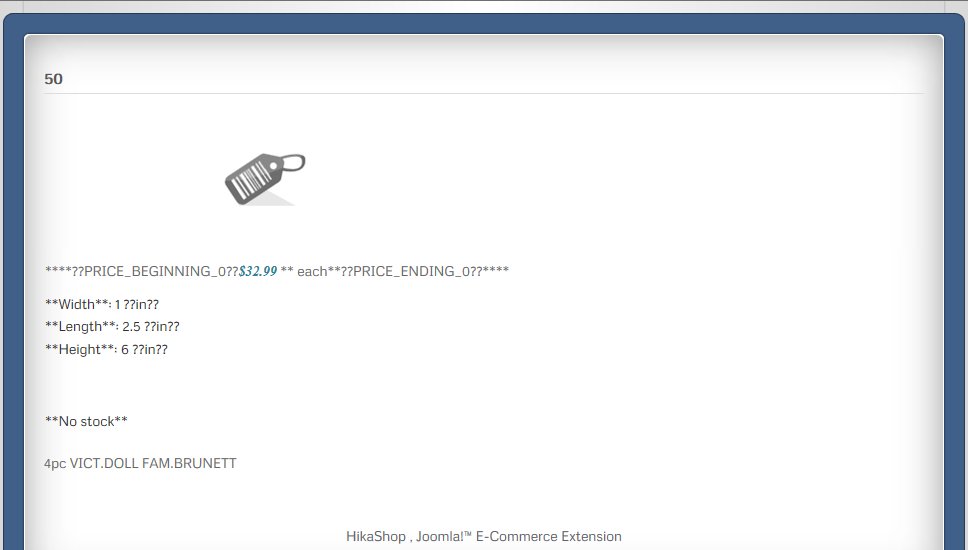
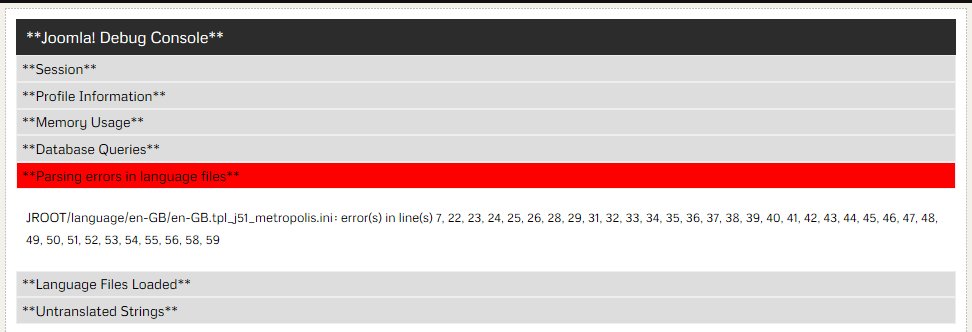
he parsing errors seem to indicate that Hika does not like my product_dimension_unit of in for inch. Other than that, it does not appear to show any error in regard to the image. When I, on the front end, copy and paste the what is shown in attachment Product ScreenShot-01.jpg I get this:
50
00050
****??PRICE_BEGINNING_0??$32.99 ** each**??PRICE_ENDING_0??****
**Width**: 1 ??in??
**Length**: 2.5 ??in??
**Height**: 6 ??in??
**No stock**
4pc VICT.DOLL FAM.BRUNETT
HikaShop , Joomla!™ E-Commerce Extension
Note that where the image appears, in the copy & paste is 00050. This is the mane of the image. However, note that there is no .jpg at the end of the name.
I am very confused.
When I right click on the barcode image & look at the properties, it does not give me the expected image properties, it says that it is a protocol. I am able to click on the barcode image, and a pop-up image, of the barcode appears. It's properties are again a protocol.
I'm very confused. I am leaving the error reporting on in case you would like to view it yourself. Any help you can offer would be SOOOOO welcome.
Thanks,
Barbara
Sorry it took me awhile to find where to turn on the error settings.
URL: www.mcgheesminiatures.com/index.php/shop/product/49-50-
This link is to a page that has an individual product on it. There is still no image.
he parsing errors seem to indicate that Hika does not like my product_dimension_unit of in for inch. Other than that, it does not appear to show any error in regard to the image. When I, on the front end, copy and paste the what is shown in attachment Product ScreenShot-01.jpg I get this:
50
00050
****??PRICE_BEGINNING_0??$32.99 ** each**??PRICE_ENDING_0??****
**Width**: 1 ??in??
**Length**: 2.5 ??in??
**Height**: 6 ??in??
**No stock**
4pc VICT.DOLL FAM.BRUNETT
HikaShop , Joomla!™ E-Commerce Extension
Note that where the image appears, in the copy & paste is 00050. This is the mane of the image. However, note that there is no .jpg at the end of the name.
I am very confused.
When I right click on the barcode image & look at the properties, it does not give me the expected image properties, it says that it is a protocol. I am able to click on the barcode image, and a pop-up image, of the barcode appears. It's properties are again a protocol.
I'm very confused. I am leaving the error reporting on in case you would like to view it yourself. Any help you can offer would be SOOOOO welcome.
Thanks,
Barbara
Please Log in or Create an account to join the conversation.
12 years 4 months ago #157908
by BarbMc1
Replied by BarbMc1 on topic Product images not showing on page
Update I just found.
When going into FileZilla, for whatever reason, I do now have a new folder under the thumbnails sub-folder, which does contain images of my products.
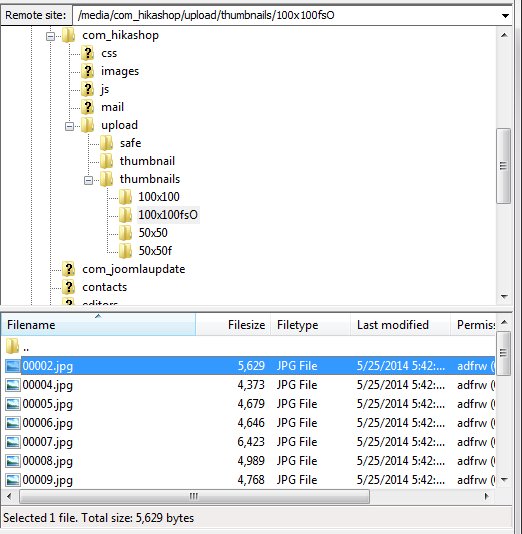
This folder was not present when I began working on this issue. However, even with the thumbnails there, they still do not show up on the web page. I can only assume that Hika created the new folder with all the images, so I can't believe that there would be a permissions issue.
Thanks,
Barbara
When going into FileZilla, for whatever reason, I do now have a new folder under the thumbnails sub-folder, which does contain images of my products.
This folder was not present when I began working on this issue. However, even with the thumbnails there, they still do not show up on the web page. I can only assume that Hika created the new folder with all the images, so I can't believe that there would be a permissions issue.
Thanks,
Barbara
Please Log in or Create an account to join the conversation.

12 years 4 months ago #157981
by Jerome
Jerome - Obsidev.com
HikaMarket & HikaSerial developer / HikaShop core dev team.
Replied by Jerome on topic Product images not showing on page
Hi,
Regarding the thumbnails folder, some thumbnails are generated by HikaShop (the folder "fs0" is for "force size", so it isn't the right folder for the product page regarding you current configuration).
But it is possible that there is another problem than just generation.
If we take a look at your website page, we can see the the link for the barcode image is not right, there is a double "/" in the URL which is not normal.
And I guess that having some access to your website will help us to put the finger on it.
Regards,
Regarding the thumbnails folder, some thumbnails are generated by HikaShop (the folder "fs0" is for "force size", so it isn't the right folder for the product page regarding you current configuration).
But it is possible that there is another problem than just generation.
If we take a look at your website page, we can see the the link for the barcode image is not right, there is a double "/" in the URL which is not normal.
And I guess that having some access to your website will help us to put the finger on it.
Regards,
Jerome - Obsidev.com
HikaMarket & HikaSerial developer / HikaShop core dev team.
Please Log in or Create an account to join the conversation.
12 years 4 months ago #158159
by BarbMc1
Replied by BarbMc1 on topic Product images not showing on page
Thanks for working so hard on this.
Update: I went onto FileZilla to look at the file structure after seeing the double //barcode.png you mentioned. I noticed in folder /media/com_hikashop/upload/thumbnails/100x100 there is the barcode.png, but now there are 4 other images also.
This url is to a page showing "houses & structures". scroll down a bit to product HW9044 and the image is there.
www.mcgheesminiatures.com/index.php/shop...65-houses-structures
Click on the image, and its product page appears with correct image. And clicking on the image on the product page does pop up a larger picture of the item. (Correct picture).
So out of 14,000+ products, 4 are working correctly. So now the question is why are 4 working, and the rest are not?
Thanks
Barbara
Update: I went onto FileZilla to look at the file structure after seeing the double //barcode.png you mentioned. I noticed in folder /media/com_hikashop/upload/thumbnails/100x100 there is the barcode.png, but now there are 4 other images also.
This url is to a page showing "houses & structures". scroll down a bit to product HW9044 and the image is there.
www.mcgheesminiatures.com/index.php/shop...65-houses-structures
Click on the image, and its product page appears with correct image. And clicking on the image on the product page does pop up a larger picture of the item. (Correct picture).
So out of 14,000+ products, 4 are working correctly. So now the question is why are 4 working, and the rest are not?
Thanks
Barbara
Please Log in or Create an account to join the conversation.
12 years 4 months ago #158161
by Jerome
Jerome - Obsidev.com
HikaMarket & HikaSerial developer / HikaShop core dev team.
Replied by Jerome on topic Product images not showing on page
Hi,
I don't know the image configuration of your 14000 products so it will be difficult to say.
Does the images right exist in the HikaShop upload image folder ?
Maybe you have some kind of folder structure that is not correct in the database, maybe something linked to the case (lowercase/uppercase) or to the encoding..
It could be so much things that we can't tell you without having one bit of information about your website.
Regards,
I don't know the image configuration of your 14000 products so it will be difficult to say.
Does the images right exist in the HikaShop upload image folder ?
Maybe you have some kind of folder structure that is not correct in the database, maybe something linked to the case (lowercase/uppercase) or to the encoding..
It could be so much things that we can't tell you without having one bit of information about your website.
Regards,
Jerome - Obsidev.com
HikaMarket & HikaSerial developer / HikaShop core dev team.
Please Log in or Create an account to join the conversation.
Time to create page: 0.710 seconds