

- Posts: 29
- Thank you received: 0
empty shoppig cart after log in
13 years 2 months ago #116597
by peters
empty shoppig cart after log in was created by peters
I have a problem with the cart plugin:
If I log in, the cart modul will not be refreshed. (shopping cart is empty)
only when I refreshe the page or I click on a menu, the module will refreshed (cart is filled from the last time)
If I log out the module refresh (cart is empty)
I use the default login module, which reload the page after the log in
this works fine at the demo.hikashop.com page - any idea?
If I log in, the cart modul will not be refreshed. (shopping cart is empty)
only when I refreshe the page or I click on a menu, the module will refreshed (cart is filled from the last time)
If I log out the module refresh (cart is empty)
I use the default login module, which reload the page after the log in
this works fine at the demo.hikashop.com page - any idea?
Please Log in or Create an account to join the conversation.

13 years 2 months ago #116625
by Xavier
Replied by Xavier on topic empty shoppig cart after log in
Hi,
You probably have a cache issue, thanks to disable the joomla cache plugin, and the cache from the parameters of Joomla, and probably in your template.
You probably have a cache issue, thanks to disable the joomla cache plugin, and the cache from the parameters of Joomla, and probably in your template.
Please Log in or Create an account to join the conversation.
13 years 2 months ago #116637
by peters
Replied by peters on topic empty shoppig cart after log in
the Joomla system cache is already disabled and the cache plugin is not used
Please Log in or Create an account to join the conversation.

13 years 2 months ago #116648
by nicolas
Replied by nicolas on topic empty shoppig cart after log in
Can you try to change the session handler option of the joomla configuration and see if that helps ?
Please Log in or Create an account to join the conversation.
13 years 2 months ago #116738
by peters
Replied by peters on topic empty shoppig cart after log in
nothing changes if I set the session handler to "None"
Please Log in or Create an account to join the conversation.
13 years 2 months ago #116791
by nicolas
Replied by nicolas on topic empty shoppig cart after log in
It's usually either the caching or the session handler of the website which causes such issues.
It can also happen if you unpublished the user synchronization plugin of HikaShop. Can you check if that's the case ?
Can you provide a link to your shop so that we can see the issue ?
It can also happen if you unpublished the user synchronization plugin of HikaShop. Can you check if that's the case ?
Can you provide a link to your shop so that we can see the issue ?
Please Log in or Create an account to join the conversation.
13 years 2 months ago #116796
by peters
Replied by peters on topic empty shoppig cart after log in
HikaShop user synchronization plugin is enabled
you have pm
you have pm
Please Log in or Create an account to join the conversation.

Less
More
- Posts: 12953
- Thank you received: 1778
13 years 2 months ago #116999
by Mohamed Thelji
Replied by Mohamed Thelji on topic empty shoppig cart after log in
I tested it on my end, and it seems to be working fine, I :
- Added a product to my cart
- Logged in
- And the product is still in my cart.
- Added a product to my cart
- Logged in
- And the product is still in my cart.
Please Log in or Create an account to join the conversation.
13 years 2 months ago #117061
by peters
Replied by peters on topic empty shoppig cart after log in
Please Log in or Create an account to join the conversation.

13 years 2 months ago #117220
by Jerome
Jerome - Obsidev.com
HikaMarket & HikaSerial developer / HikaShop core dev team.
Replied by Jerome on topic empty shoppig cart after log in
Hi,
You have the "multi-cart" option activated.
When you are log-in, the session cart is used as your default cart. And the old cart is stored in the database.
After that, when a cart is emptied, HikaShop load an old cart from the database.
That's why when you log-in with an empty cart and you change the page, HikaShop considered that the cart is now empty and it loads a cart from the database.
But it is weird that it didn't find it during the login process and we will investigate on this specific point.
You can try to deactivate the mult-cart feature in HikaShop.
Regards,
You have the "multi-cart" option activated.
When you are log-in, the session cart is used as your default cart. And the old cart is stored in the database.
After that, when a cart is emptied, HikaShop load an old cart from the database.
That's why when you log-in with an empty cart and you change the page, HikaShop considered that the cart is now empty and it loads a cart from the database.
But it is weird that it didn't find it during the login process and we will investigate on this specific point.
You can try to deactivate the mult-cart feature in HikaShop.
Regards,
Jerome - Obsidev.com
HikaMarket & HikaSerial developer / HikaShop core dev team.
Please Log in or Create an account to join the conversation.
13 years 2 months ago #117238
by peters
Replied by peters on topic empty shoppig cart after log in
No, multi cart is not activated (see attachment).
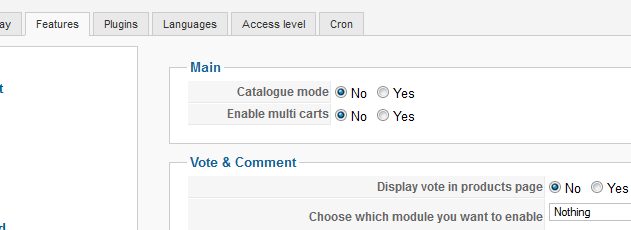
Please Log in or Create an account to join the conversation.
13 years 2 months ago #117327
by Xavier
Replied by Xavier on topic empty shoppig cart after log in
Hi,
We are not able to reproduce the problem on our end, thanks to give us a backend access to your website in order to check the configuration and see from what the problem can come ?
It could be another component which is using cache or something else.
We are not able to reproduce the problem on our end, thanks to give us a backend access to your website in order to check the configuration and see from what the problem can come ?
It could be another component which is using cache or something else.
Please Log in or Create an account to join the conversation.
13 years 2 months ago #121122
by peters
Replied by peters on topic empty shoppig cart after log in
have you new information to my problem?
Please Log in or Create an account to join the conversation.
13 years 2 months ago #121184
by Xavier
Replied by Xavier on topic empty shoppig cart after log in
Hi,
Thanks to try to update to the latest version of HikaShop (2.2.1).
Thanks to try to update to the latest version of HikaShop (2.2.1).
Please Log in or Create an account to join the conversation.
13 years 2 months ago #121275
by peters
Replied by peters on topic empty shoppig cart after log in
thank you, some problems are solved.
unfortunately not the chache problem. after login, the cart is not updated immediately.
until after another page refresh it is displayed correctly.
unfortunately not the chache problem. after login, the cart is not updated immediately.
until after another page refresh it is displayed correctly.
Please Log in or Create an account to join the conversation.
13 years 1 month ago #121600
by nicolas
Replied by nicolas on topic empty shoppig cart after log in
Hi,
I just did several tests on your website and I don't loose the cart after registration or login on your website anymore.
I don't need to refresh to get it.
Did you change something since your last message ?
Or maybe you want to try with another user account ?
I just did several tests on your website and I don't loose the cart after registration or login on your website anymore.
I don't need to refresh to get it.
Did you change something since your last message ?
Or maybe you want to try with another user account ?
Please Log in or Create an account to join the conversation.
Time to create page: 0.155 seconds