

- Posts: 78
- Thank you received: 0
Product show view - displaying height/width etc
15 years 7 months ago #8606
by jasonm
Product show view - displaying height/width etc was created by jasonm
I have the following code
displaying the dimension on the product_show view like this
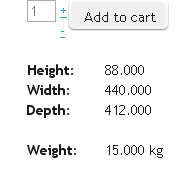
What changes would I need to make to stop displaying these properties when their value is zero?
Code:
<table>
<tr><td>
<span id="hikashop_product_height_main" class="hikashop_product_height_main">
<?php echo '<strong>Height: </strong></td><td> '.($this->element->product_height).' '.$this->element->product_dimension_unit; ?>
</span></td></tr>
<tr><td>
<span id="hikashop_product_width_main" class="hikashop_product_width_main">
<?php echo '<strong>Width: </strong></td><td> '.($this->element->product_width).' '.$this->element->product_dimension_unit; ?>
</span></td></tr>
<tr><td>
<span id="hikashop_product_length_main" class="hikashop_product_length_main">
<?php echo '<strong>Depth: </strong></td><td> '.($this->element->product_length).' '.$this->element->product_dimension_unit; ?>
</span></td></tr>
<tr><td> </td></tr>
<tr><td>
<span id="hikashop_product_length_main" class="hikashop_product_length_main">
<?php echo '<strong>Weight: </strong></td><td> '.($this->element->product_weight).' '.$this->element->product_weight_unit; ?>
</span></td></tr>
</table>
displaying the dimension on the product_show view like this
What changes would I need to make to stop displaying these properties when their value is zero?
Please Log in or Create an account to join the conversation.

15 years 7 months ago #8619
by nicolas
Replied by nicolas on topic Re: Product show view - displaying height/width etc
For example, instead of :
echo '<strong>Height: </strong></td><td> '.($this->element->product_height).' '.$this->element->product_dimension_unit;
you should write:
if(bccomp($this->element->product_height,0,3)>0){
echo '<strong>Height: </strong></td><td> '.($this->element->product_height).' '.$this->element->product_dimension_unit;
}
echo '<strong>Height: </strong></td><td> '.($this->element->product_height).' '.$this->element->product_dimension_unit;
you should write:
if(bccomp($this->element->product_height,0,3)>0){
echo '<strong>Height: </strong></td><td> '.($this->element->product_height).' '.$this->element->product_dimension_unit;
}
Please Log in or Create an account to join the conversation.
15 years 7 months ago #8628
by jasonm
Replied by jasonm on topic Re: Product show view - displaying height/width etc
Perfect
Please Log in or Create an account to join the conversation.
Time to create page: 0.159 seconds