
- Posts: 159
- Thank you received: 0
How to change hikashop permalinks ?
- Shafan Hameed
-
 Topic Author
- Offline
Less
More
13 years 2 months ago #120882
by Shafan Hameed
How to change hikashop permalinks ? was created by Shafan Hameed
-- url of the page with the problem -- :
www.marthut.com
-- HikaShop version -- : HikaShop Starter 2.2.0
-- Joomla version -- : Joomla! 3.1.5 Stable
-- PHP version -- : 5.3.27
-- Browser(s) name and version -- : Chrome
-- Error-message(debug-mod must be tuned on) -- : Error_message
how to remove hikashop in the permalink ?
means it shows products and categories like this
www.mywebsite.com/index.php/hikashop-men...product/product-name
how to make it show like this
www.mywebsite.com/product-category/product-name
Got any solution about this ?
-- HikaShop version -- : HikaShop Starter 2.2.0
-- Joomla version -- : Joomla! 3.1.5 Stable
-- PHP version -- : 5.3.27
-- Browser(s) name and version -- : Chrome
-- Error-message(debug-mod must be tuned on) -- : Error_message
how to remove hikashop in the permalink ?
means it shows products and categories like this
www.mywebsite.com/index.php/hikashop-men...product/product-name
how to make it show like this
www.mywebsite.com/product-category/product-name
Got any solution about this ?
Please Log in or Create an account to join the conversation.

13 years 2 months ago #120894
by Eliot
Replied by Eliot on topic How to change hikashop permalinks ?
Hi there,
I think you can modify this link by editing the Joomla menu and changing the option "Link" to whatever you want
I think you can modify this link by editing the Joomla menu and changing the option "Link" to whatever you want
Please Log in or Create an account to join the conversation.
- Shafan Hameed
-
Topic Author
- Offline
Less
More
- Posts: 159
- Thank you received: 0
13 years 2 months ago #120898
by Shafan Hameed
Replied by Shafan Hameed on topic How to change hikashop permalinks ?
Hi. i tried to change that "Link" thing. but its not allowing me to edit it :S
Please Log in or Create an account to join the conversation.

13 years 2 months ago #120972
by Jerome
Jerome - Obsidev.com
HikaMarket & HikaSerial developer / HikaShop core dev team.
Replied by Jerome on topic How to change hikashop permalinks ?
Hi,
I guess you have to change the "Alias", not the "link".
demo.hikashop.com/administrator/index.ph...em&layout=edit&id=69
After that, in the SEF configuration in HikaShop (in the HikaShop main configuration), you can change the names for the "/product/" which is inserted.
Depending on your joomla sef configuration, it could not work properly. Don't hesitate to read the HikaShop configuration documentation about it.
Regards,
I guess you have to change the "Alias", not the "link".
demo.hikashop.com/administrator/index.ph...em&layout=edit&id=69
After that, in the SEF configuration in HikaShop (in the HikaShop main configuration), you can change the names for the "/product/" which is inserted.
Depending on your joomla sef configuration, it could not work properly. Don't hesitate to read the HikaShop configuration documentation about it.
Regards,
Jerome - Obsidev.com
HikaMarket & HikaSerial developer / HikaShop core dev team.
Please Log in or Create an account to join the conversation.
Less
More
- Posts: 6
- Thank you received: 0
13 years 1 month ago - 13 years 1 month ago #121390
by seemsolutions
Replied by seemsolutions on topic How to change hikashop permalinks ?
Hello:
This is my first time using Joomla & attempted to find an answer in the documentation and forum. Forgive me if I overlooked it.
I'm trying to get SEF Urls for my product categories. I've adjusted my Global SEO setting, so my main menu items are fine (i.e. mydomain.com/contact)
However, my product categories look like this mydomain.com/store/category/19-Kitchen%20and%20Bathroom in IE and Chrome.
I'd like it to look something like mydomain.com/store/category/19-Kitchen-and-Bathroom
I'd prefer not to use a plugin/extension.
Here is some info:
Global Config
SEO Settings
Search Engine Friendly URLs Yes
Use URL rewriting Yes
Hikashop Config-Features
SEF url Options
Simplified breadcrumbs No
Activate smaller url Yes
Category SEF category
Product SEF product
Joomla! 2.5.9 Stable
Hikashop Essential 2.1.3
Hikamarket Frontedition 1.1.4
PHP Version 5.3.24
Web Server Apache
I've viewed www.hikashop.com/support/2013-08-08-00-1...ig.html#features_sef
I'm sure I'm missing something obvious. Thanks in advance for your help.
This is my first time using Joomla & attempted to find an answer in the documentation and forum. Forgive me if I overlooked it.
I'm trying to get SEF Urls for my product categories. I've adjusted my Global SEO setting, so my main menu items are fine (i.e. mydomain.com/contact)
However, my product categories look like this mydomain.com/store/category/19-Kitchen%20and%20Bathroom in IE and Chrome.
I'd like it to look something like mydomain.com/store/category/19-Kitchen-and-Bathroom
I'd prefer not to use a plugin/extension.
Here is some info:
Global Config
SEO Settings
Search Engine Friendly URLs Yes
Use URL rewriting Yes
Hikashop Config-Features
SEF url Options
Simplified breadcrumbs No
Activate smaller url Yes
Category SEF category
Product SEF product
Joomla! 2.5.9 Stable
Hikashop Essential 2.1.3
Hikamarket Frontedition 1.1.4
PHP Version 5.3.24
Web Server Apache
I've viewed www.hikashop.com/support/2013-08-08-00-1...ig.html#features_sef
I'm sure I'm missing something obvious. Thanks in advance for your help.
Last edit: 13 years 1 month ago by seemsolutions. Reason: Didn't figure it out
Please Log in or Create an account to join the conversation.

13 years 1 month ago #121469
by nicolas
Replied by nicolas on topic How to change hikashop permalinks ?
Hi,
In order to do that you need to enter the text Kitchen-and-Bathroom in the alias field of your category when you edit it in the backend of HikaShop.
In order to do that you need to enter the text Kitchen-and-Bathroom in the alias field of your category when you edit it in the backend of HikaShop.
The following user(s) said Thank You: seemsolutions
Please Log in or Create an account to join the conversation.
Less
More
- Posts: 6
- Thank you received: 0
13 years 1 month ago #121472
by seemsolutions
Replied by seemsolutions on topic How to change hikashop permalinks ?
Thank you nicolas. The "-" shows up in the menu text. I assume there is no other way without using a plugin/extension? If there isn't, this still help accomplish my most important goal. Have a great day.
Please Log in or Create an account to join the conversation.
13 years 1 month ago #121502
by nicolas
Replied by nicolas on topic How to change hikashop permalinks ?
What do you mean by "the menu text" ?
Please Log in or Create an account to join the conversation.
Less
More
- Posts: 6
- Thank you received: 0
13 years 1 month ago #121523
by seemsolutions
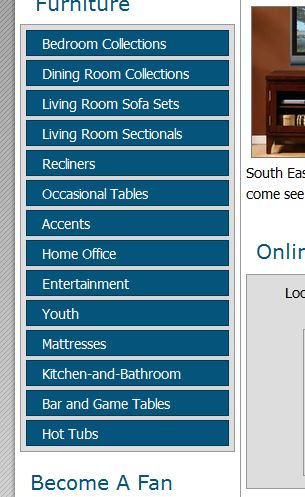
The categories are set up as menu items in the sidebar on the home page. See image. Thanks again.
Replied by seemsolutions on topic How to change hikashop permalinks ?
The categories are set up as menu items in the sidebar on the home page. See image. Thanks again.
Please Log in or Create an account to join the conversation.

Less
More
- Posts: 12953
- Thank you received: 1778
13 years 1 month ago #121564
by Mohamed Thelji
Replied by Mohamed Thelji on topic How to change hikashop permalinks ?
Hi,
The solution will be to set the "Alias" option of this menu to Kitchen-and-Bathroom and the "Menu Title" option to Kitchen and Bathroom.
The solution will be to set the "Alias" option of this menu to Kitchen-and-Bathroom and the "Menu Title" option to Kitchen and Bathroom.
Please Log in or Create an account to join the conversation.
Less
More
- Posts: 6
- Thank you received: 0
13 years 1 month ago #121676
by seemsolutions
Replied by seemsolutions on topic How to change hikashop permalinks ?
Mohamed: Thanks for your help. Please see images to verify if I did this correctly. Your recommendation does remove the "-" from Kitchen-and-Bathroom on the sidebar menu. However, it results in my url looking like this
store/category/19-Kitchen and Bathroom and not store/category/19-Kitchen-and-Bathroom.
store/category/19-Kitchen and Bathroom and not store/category/19-Kitchen-and-Bathroom.
Please Log in or Create an account to join the conversation.
13 years 1 month ago #121699
by nicolas
Replied by nicolas on topic How to change hikashop permalinks ?
Can you provide an access to your website so that we can see that as we don't have the problem on our end ?
Please Log in or Create an account to join the conversation.
Less
More
- Posts: 6
- Thank you received: 0
13 years 1 month ago #121726
by seemsolutions
Replied by seemsolutions on topic How to change hikashop permalinks ?
Sure Nicolas. cincinnatifurnitureoutlet.com
Please Log in or Create an account to join the conversation.
13 years 1 month ago #121736
by nicolas
Replied by nicolas on topic How to change hikashop permalinks ?
I mean a backend access.
You can send the credentials via our contact form:
www.hikashop.com/contact-us.html
Make sure that you give a link to this thread in your contact request.
You can send the credentials via our contact form:
www.hikashop.com/contact-us.html
Make sure that you give a link to this thread in your contact request.
Please Log in or Create an account to join the conversation.
13 years 1 month ago #121994
by nicolas
Replied by nicolas on topic How to change hikashop permalinks ?
The issue came from your custom code in the module
www.cincinnatifurnitureoutlet.com/admini...e&layout=edit&id=127
which only used the category name and not the category alias for the links of your menu.
So it was actually not a problem in HikaShop.
I've fixed it for you.
So it was actually not a problem in HikaShop.
I've fixed it for you.
The following user(s) said Thank You: seemsolutions
Please Log in or Create an account to join the conversation.
Less
More
- Posts: 6
- Thank you received: 0
13 years 1 month ago #122001
by seemsolutions
Replied by seemsolutions on topic How to change hikashop permalinks ?
Thank you very much!!! Hikashop went above and beyond the call of duty to help me with something that was user error. 
Please Log in or Create an account to join the conversation.
Time to create page: 0.147 seconds