

- Posts: 51
- Thank you received: 0
address_country default value/Align bullet points
13 years 3 weeks ago #127498
by IanK
address_country default value/Align bullet points was created by IanK
Hi
I've just upgraded to Business, and will have a few questions to ask over the next few weeks.
I will always try to find the answer before I post. Forgive me if I miss some answers in the forum - this has been a VERY long project!
1)
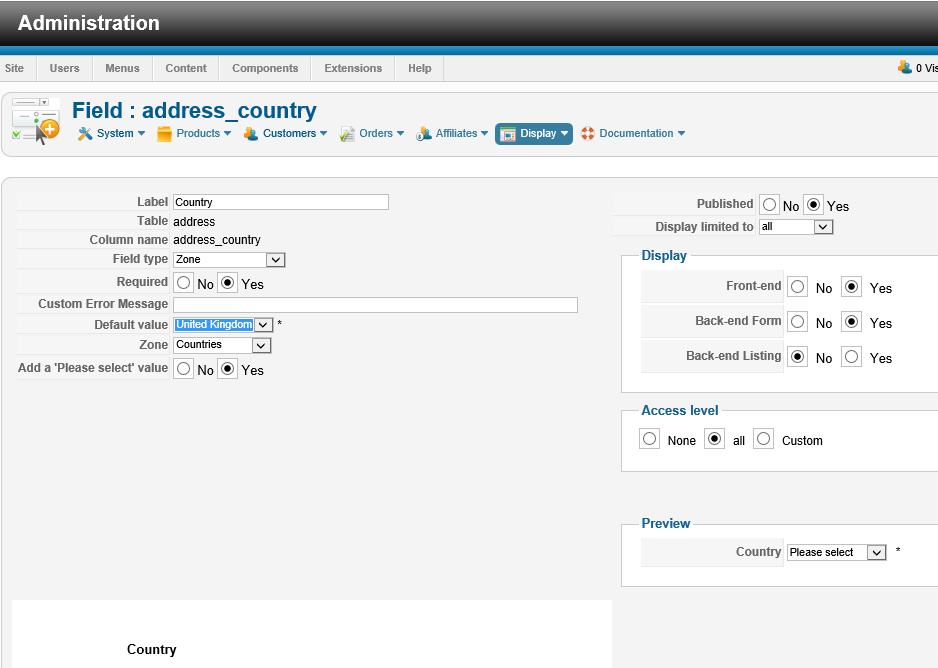
I've asked for a 'Please select' value to be listed - but always one country is selected
as default. Can this field show a 'Please select' option?
2)
Can you tell me how to layout this page so the bullet points are in line. Visually this would look better.
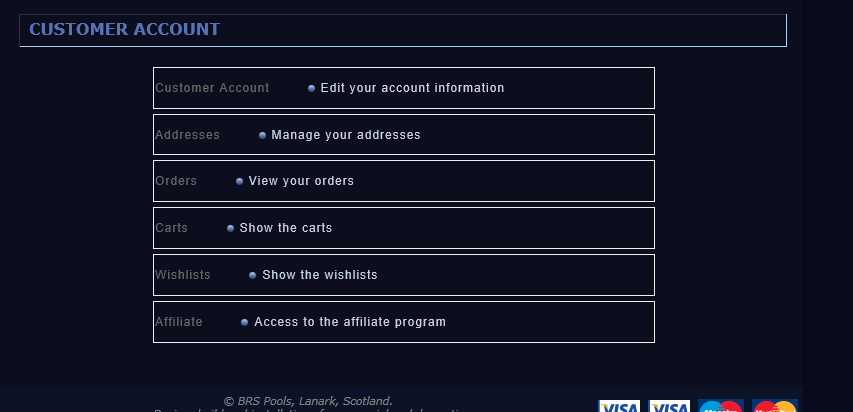
-- brspools.co.uk/_testing_site/index.php/shop/your-account/user
-- HikaShop version -- : 2.2.2 Business
-- Joomla version -- : 2.5.14
I've just upgraded to Business, and will have a few questions to ask over the next few weeks.
I will always try to find the answer before I post. Forgive me if I miss some answers in the forum - this has been a VERY long project!
1)
I've asked for a 'Please select' value to be listed - but always one country is selected
as default. Can this field show a 'Please select' option?
2)
Can you tell me how to layout this page so the bullet points are in line. Visually this would look better.
-- brspools.co.uk/_testing_site/index.php/shop/your-account/user
-- HikaShop version -- : 2.2.2 Business
-- Joomla version -- : 2.5.14
Please Log in or Create an account to join the conversation.

Less
More
- Posts: 12953
- Thank you received: 1778
13 years 3 weeks ago #127523
by Mohamed Thelji
Replied by Mohamed Thelji on topic address_country default value/Align bullet points
Hi,
1. If you want the "please select" value to be the default one, you should set the "Default value" option of your address_country custom field to "please select".
2. I think that some CSS code customization will probably do the job :
1. If you want the "please select" value to be the default one, you should set the "Default value" option of your address_country custom field to "please select".
2. I think that some CSS code customization will probably do the job :
Code:
.hikashop_cpanel_icon_image {
width: 100px;
}
Please Log in or Create an account to join the conversation.
13 years 3 weeks ago #127527
by IanK
Replied by IanK on topic address_country default value/Align bullet points
Hi Mohamed - thank you.
Selecting 'Please Select' as the default does not work. After I click save and close, and re-open - it defaults back to the last country selected.
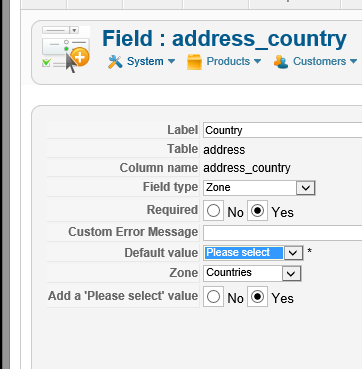
Your tip for applying the css worked perfectly!
Selecting 'Please Select' as the default does not work. After I click save and close, and re-open - it defaults back to the last country selected.
Your tip for applying the css worked perfectly!
Please Log in or Create an account to join the conversation.
Less
More
- Posts: 12953
- Thank you received: 1778
13 years 3 weeks ago #127552
by Mohamed Thelji
Replied by Mohamed Thelji on topic address_country default value/Align bullet points
I think that we already fixed this issue, can you download the last Hikashop version through our website, install it and test it again ?
Thanks .
Thanks
.
The following user(s) said Thank You: IanK
Please Log in or Create an account to join the conversation.
13 years 3 weeks ago #127558
by IanK
Replied by IanK on topic address_country default value/Align bullet points
Sorry Mohamed, this doesn't work. I'm on version 2.2.2. Still if I change the country to 'Please select ' then save and close then reopen, it has defaulted back to the country last selected. I have two countries to choose from - United Kingdom and Ireland (Eire).
Please Log in or Create an account to join the conversation.

13 years 3 weeks ago #127569
by Jerome
Jerome - Obsidev.com
HikaMarket & HikaSerial developer / HikaShop core dev team.
Replied by Jerome on topic address_country default value/Align bullet points
Hi,
Your field is "required" so you can't save an empty value.
Set "please select" and remove the required in the same time.
Save.
Re-set the required to "yes".
Save again.
Regards,
Your field is "required" so you can't save an empty value.
Set "please select" and remove the required in the same time.
Save.
Re-set the required to "yes".
Save again.
Regards,
Jerome - Obsidev.com
HikaMarket & HikaSerial developer / HikaShop core dev team.
The following user(s) said Thank You: IanK
Please Log in or Create an account to join the conversation.
13 years 3 weeks ago #127582
by IanK
Replied by IanK on topic address_country default value/Align bullet points
Thank you Jerome. It's easy when you know!
Please Log in or Create an account to join the conversation.
Time to create page: 0.066 seconds