
- Posts: 20
- Thank you received: 0
How to disable Affiliate Program in User Overview?
- ronsnijder
-
 Topic Author
- Offline
Less
More
12 years 8 months ago #145040
by ronsnijder
How to disable Affiliate Program in User Overview? was created by ronsnijder
-- url of the page with the problem -- : under development
-- HikaShop version -- : 2.3.0
-- Joomla version -- : 2.5.18
-- PHP version -- : 5.4.16
-- Browser(s) name and version -- : Safari 7.0.1
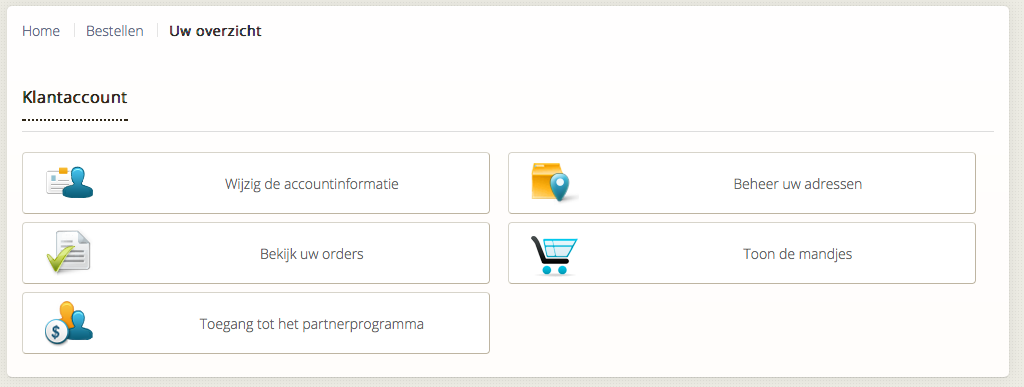
How can I disable the button Partner Program in the account maintenance menu option? (see attached file)
I am no programmer, so would someone please explain this in detail to me?
Thanxx very much
-- HikaShop version -- : 2.3.0
-- Joomla version -- : 2.5.18
-- PHP version -- : 5.4.16
-- Browser(s) name and version -- : Safari 7.0.1
How can I disable the button Partner Program in the account maintenance menu option? (see attached file)
I am no programmer, so would someone please explain this in detail to me?
Thanxx very much
Please Log in or Create an account to join the conversation.

12 years 8 months ago #145091
by nicolas
Replied by nicolas on topic How to disable Affiliate Program in User Overview?
Hi,
You can disable the HikaShop Affiliate plugin via the joomla plugins manager for that.
You can disable the HikaShop Affiliate plugin via the joomla plugins manager for that.
The following user(s) said Thank You: PioneerDesign
Please Log in or Create an account to join the conversation.
Time to create page: 0.084 seconds