
- Posts: 19
- Thank you received: 0
Cart Position
- silentblood
-
 Topic Author
- Offline
Less
More
15 years 11 months ago #869
by silentblood
Cart Position was created by silentblood
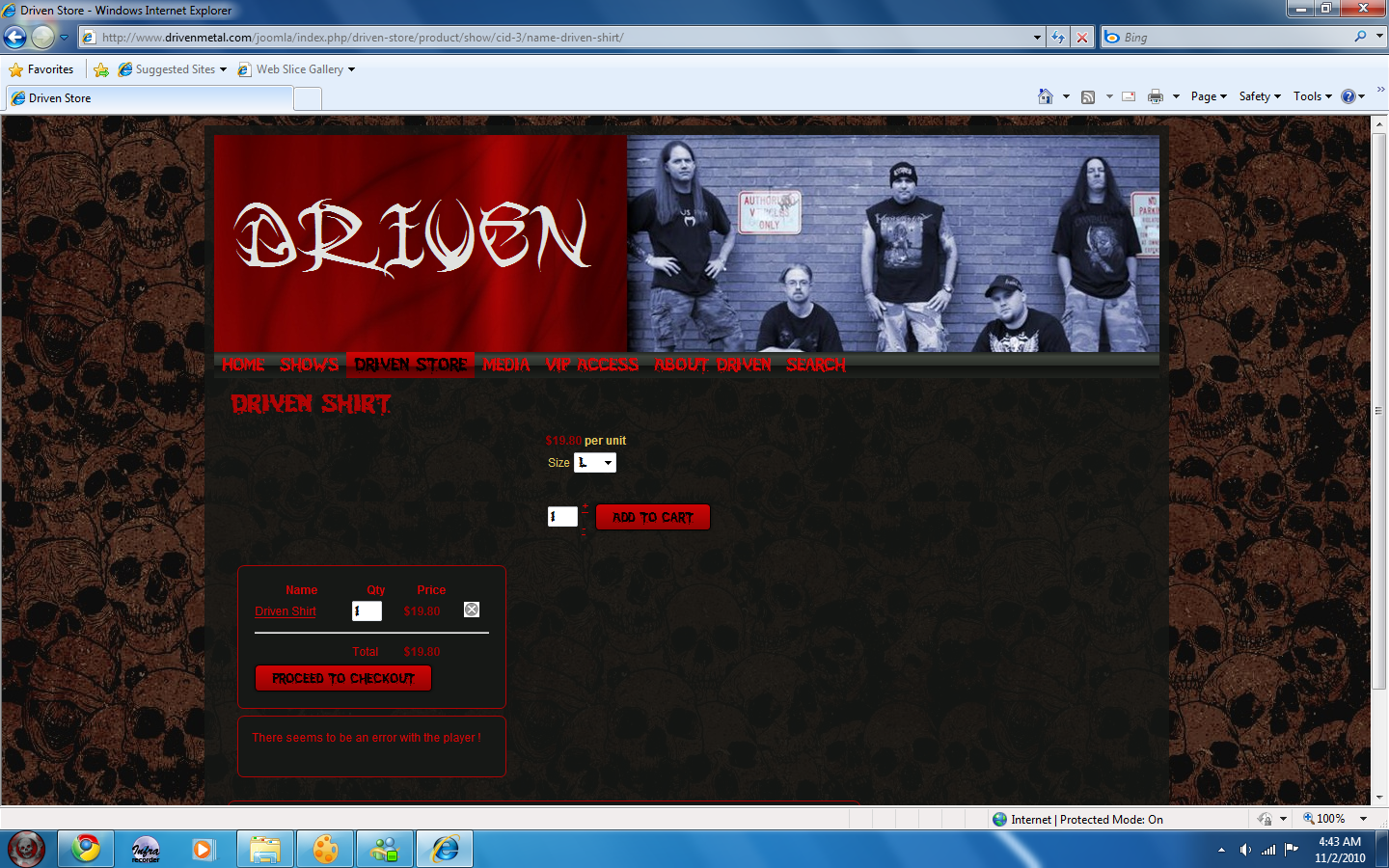
I have 1.3.2 installed on my joomla website. My problem is while having the cart set to posistion right, once i add something to the cart all modules on the right and the cart goes to a bottom position. If i place the cart say on the left side and add something the right module will go to the bottom but not the cart. Any thoughts?
Please Log in or Create an account to join the conversation.

15 years 11 months ago #871
by nicolas
Replied by nicolas on topic Re: Cart Position
Hi,
It's probably because of the way your template is done. When a product is added, the width of the module is bigger than the possible width of the column and all the modules move below the content, where there is enough width.
The solution is probably to increase a bit the width of your column in the template.
If you provide the URL of the website, we could look at the problem and tell you more precisely what to modify.
It's probably because of the way your template is done. When a product is added, the width of the module is bigger than the possible width of the column and all the modules move below the content, where there is enough width.
The solution is probably to increase a bit the width of your column in the template.
If you provide the URL of the website, we could look at the problem and tell you more precisely what to modify.
Please Log in or Create an account to join the conversation.
- silentblood
-
Topic Author
- Offline
Less
More
- Posts: 19
- Thank you received: 0
15 years 11 months ago #873
by silentblood
Replied by silentblood on topic Re: Cart Position
Please Log in or Create an account to join the conversation.
15 years 11 months ago #875
by nicolas
Replied by nicolas on topic Re: Cart Position
I just tried on FireFox, IE8 and Google Chrome and the cart module didn't go the bottom.
Please Log in or Create an account to join the conversation.
- silentblood
-
Topic Author
- Offline
Less
More
- Posts: 19
- Thank you received: 0
15 years 11 months ago #877
by silentblood
Replied by silentblood on topic Re: Cart Position
How do i capture my screen on windows 7 been a while sense i had to do it.
Please Log in or Create an account to join the conversation.
- silentblood
-
Topic Author
- Offline
Less
More
- Posts: 19
- Thank you received: 0
15 years 11 months ago #879
by silentblood
Replied by silentblood on topic Re: Cart Position
I guess a more accurate explanation would be when i click a product and go to the page where it says add to cart everything is at the bottom then, and sense updating to the new version it seems i have to click twice to get it into my cart.
Please Log in or Create an account to join the conversation.
- silentblood
-
Topic Author
- Offline
Less
More
- Posts: 19
- Thank you received: 0
15 years 11 months ago #880
by silentblood
Replied by silentblood on topic Re: Cart Position
It stays at the bottom until i navigate away from the page with the add to cart button. I am using chrome.
Please Log in or Create an account to join the conversation.
- silentblood
-
Topic Author
- Offline
Less
More
- Posts: 19
- Thank you received: 0
15 years 11 months ago #882
by silentblood
Replied by silentblood on topic Re: Cart Position
It behaves this way on the computers at work, and a brand new computer i built for a friend. I tried another template earlier to night and it did the same on there. So far this is a great piece of software.
Please Log in or Create an account to join the conversation.
15 years 11 months ago #883
by nicolas
Replied by nicolas on topic Re: Cart Position
I can't reproduce both of the problems. If you use seven, it seems you also have IE8, so I don't know why I don't have the same problems as you.
Please Log in or Create an account to join the conversation.
- silentblood
-
Topic Author
- Offline
Less
More
- Posts: 19
- Thank you received: 0
15 years 11 months ago #885
by silentblood
Replied by silentblood on topic Re: Cart Position
Here is a screen shot
Please Log in or Create an account to join the conversation.
15 years 11 months ago #886
by nicolas
Replied by nicolas on topic Re: Cart Position
Like I said, I don't see the problem. Even when I try with chrome.
How to take screenshots on windows : www.wikihow.com/Take-a-Screenshot-in-Microsoft-Windows
How to take screenshots on windows : www.wikihow.com/Take-a-Screenshot-in-Microsoft-Windows
Please Log in or Create an account to join the conversation.
- silentblood
-
Topic Author
- Offline
Less
More
- Posts: 19
- Thank you received: 0
15 years 11 months ago #887
by silentblood
Replied by silentblood on topic Re: Cart Position
It looks the same as the screen shot with google chrome except that the player works there.
Please Log in or Create an account to join the conversation.
15 years 11 months ago #888
by nicolas
Replied by nicolas on topic Re: Cart Position
Here is what I have:

Please Log in or Create an account to join the conversation.
- silentblood
-
Topic Author
- Offline
Less
More
- Posts: 19
- Thank you received: 0
15 years 11 months ago #889
by silentblood
Replied by silentblood on topic Re: Cart Position
Well if your stumped, i am sure stumped i made my template bigger on the side, and tried a different template, i will try anything cause this really is kinda annoying. Any ideas at all?
Please Log in or Create an account to join the conversation.
- silentblood
-
Topic Author
- Offline
Less
More
- Posts: 19
- Thank you received: 0
15 years 11 months ago #890
by silentblood
Replied by silentblood on topic Re: Cart Position
Ok it didn't do it when i added the mp3 download your using. Try the Driven T shirt.
Please Log in or Create an account to join the conversation.
- silentblood
-
Topic Author
- Offline
Less
More
- Posts: 19
- Thank you received: 0
15 years 11 months ago #891
by silentblood
Replied by silentblood on topic Re: Cart Position
Thats the only item i have Variants on atm. That help you any?
Please Log in or Create an account to join the conversation.
15 years 11 months ago - 15 years 11 months ago #893
by nicolas
Replied by nicolas on topic Re: Cart Position
Yes, that's probably the problem.
I think that when there are variants and that there is no image displayed, there is a div missing an end tag.
please replace the file components/com_hikashop/views/product/tmpl/show.php with the file in the archive enclosed
This attachment is hidden for guests.
I think that when there are variants and that there is no image displayed, there is a div missing an end tag.
please replace the file components/com_hikashop/views/product/tmpl/show.php with the file in the archive enclosed
This attachment is hidden for guests.
Please log in or register to see it.
Last edit: 15 years 11 months ago by nicolas.
Please Log in or Create an account to join the conversation.
- silentblood
-
Topic Author
- Offline
Less
More
- Posts: 19
- Thank you received: 0
15 years 11 months ago #896
by silentblood
Replied by silentblood on topic Re: Cart Position
Fixed. Thanks dude. Very good support.
Please Log in or Create an account to join the conversation.
Time to create page: 0.488 seconds