
- Posts: 2
- Thank you received: 0
Remove cart button and replace with own style
- polarskelti
-
 Topic Author
- Offline
Less
More
12 years 1 week ago #179700
by polarskelti
Remove cart button and replace with own style was created by polarskelti
-- HikaShop version -- : 2.3.4
-- Joomla version -- : 3.3.6
-- PHP version -- : 5.5.9
-- Browser(s) name and version -- : Chrome - latest
How can I remove the cart button - and replace it with an image, or style it in the 2.3.4 version of Hikashop?
I can style it a bit - but the button-image (the grey button with shadows and radius) won't go away.
What style class should i look after to completely remove the button-style cart and replace it with my own background color - both link and hover - and own font-size style (see attached file)
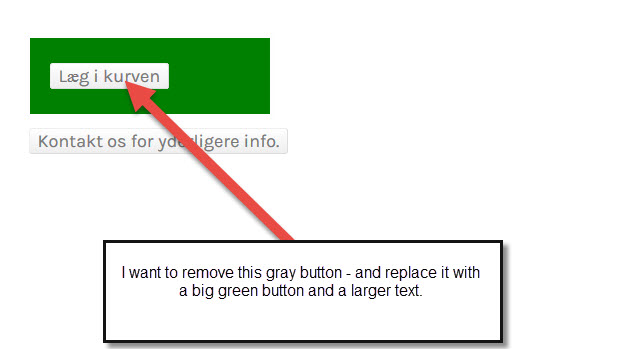
Kind regards
Thomas
-- Joomla version -- : 3.3.6
-- PHP version -- : 5.5.9
-- Browser(s) name and version -- : Chrome - latest
How can I remove the cart button - and replace it with an image, or style it in the 2.3.4 version of Hikashop?
I can style it a bit - but the button-image (the grey button with shadows and radius) won't go away.
What style class should i look after to completely remove the button-style cart and replace it with my own background color - both link and hover - and own font-size style (see attached file)
Kind regards
Thomas
Please Log in or Create an account to join the conversation.

12 years 6 days ago #179745
by Jerome
Jerome - Obsidev.com
HikaMarket & HikaSerial developer / HikaShop core dev team.
Replied by Jerome on topic Remove cart button and replace with own style
Hi,
Depending the HikaShop option "Button style" you're using, the button will be "HTML button" or "HTML link" (a tag).
www.hikashop.com/support/support/documen...html#display_general
Using "a" button, it will be easier for you to customize ; to use CSS in order to put an image.
www.hikashop.com/support/support/documen...ize-the-display.html
Otherwise, you can use view override in order to change one specific button.
But depending the type of the button, some are not accessible in the views and might require plugin override (like the "add to cart" button).
www.hikashop.com/support/support/documen...tation.html#override
Regards,
Depending the HikaShop option "Button style" you're using, the button will be "HTML button" or "HTML link" (a tag).
www.hikashop.com/support/support/documen...html#display_general
Using "a" button, it will be easier for you to customize ; to use CSS in order to put an image.
www.hikashop.com/support/support/documen...ize-the-display.html
Otherwise, you can use view override in order to change one specific button.
But depending the type of the button, some are not accessible in the views and might require plugin override (like the "add to cart" button).
www.hikashop.com/support/support/documen...tation.html#override
Regards,
Jerome - Obsidev.com
HikaMarket & HikaSerial developer / HikaShop core dev team.
Please Log in or Create an account to join the conversation.
Time to create page: 0.069 seconds