

- Posts: 8
- Thank you received: 0
Mass add characteristics to all products within specific category
11 years 8 months ago #190216
by DURAN
-- HikaShop version -- : 2.3.5
-- Joomla version -- : 336
-- PHP version -- : 5.4.19
-- Browser(s) name and version -- : Safari 8.0.3, FireFox 35.0.1
-- Error-message(debug-mod must be tuned on) -- : NO ERROR
Hi,
Im newbie at Hikashop :oops: , currently using Business Version.
My shop is about Jewerly :whistle: ,
1.-The first question: Is there any way to mass assign a specific characteristic to all products within a specific category?
I want to add my already created characteristic "ring size" (5,6,7,8,9,10,11,12) to all products within "rings" categories, I have one rings subcategory for silver, one subcategory for gold, etc.
I know you can reach the results by importing CSV file, but its a lot of work to create 8 rows of each ring product to assign them, more if we are talking for about 1500 "rings" products.
2.- Is there any way to automatic add to cart a priced product ($1 - Catalog) when cart reach over $50?
3.- Is there any way to automatic add to cart a downloadable product (Free Catalog) when you add something to cart?
Can you please help me?
Thanks in advance
sduran.
-- Joomla version -- : 336
-- PHP version -- : 5.4.19
-- Browser(s) name and version -- : Safari 8.0.3, FireFox 35.0.1
-- Error-message(debug-mod must be tuned on) -- : NO ERROR
Hi,
Im newbie at Hikashop :oops: , currently using Business Version.
My shop is about Jewerly :whistle: ,
1.-The first question: Is there any way to mass assign a specific characteristic to all products within a specific category?
I want to add my already created characteristic "ring size" (5,6,7,8,9,10,11,12) to all products within "rings" categories, I have one rings subcategory for silver, one subcategory for gold, etc.
I know you can reach the results by importing CSV file, but its a lot of work to create 8 rows of each ring product to assign them, more if we are talking for about 1500 "rings" products.
2.- Is there any way to automatic add to cart a priced product ($1 - Catalog) when cart reach over $50?
3.- Is there any way to automatic add to cart a downloadable product (Free Catalog) when you add something to cart?
Can you please help me?
Thanks in advance
sduran.
Please Log in or Create an account to join the conversation.

11 years 8 months ago #190217
by Xavier
Replied by Xavier on topic Mass add characteristics to all products within specific category
Hi,
1. Yes, you can set it up like that: take.ms/fZyL0
2. Not by default, but with a plugin this can be possible (plugin to make)
www.hikashop.com/support/support/documen...l#onBeforeCartUpdate
3. Same as the point 2, it will require the creation of a plugin.
1. Yes, you can set it up like that: take.ms/fZyL0
2. Not by default, but with a plugin this can be possible (plugin to make)
www.hikashop.com/support/support/documen...l#onBeforeCartUpdate
3. Same as the point 2, it will require the creation of a plugin.
Please Log in or Create an account to join the conversation.
11 years 8 months ago #190265
by DURAN
Replied by DURAN on topic Mass add characteristics to all products within specific category
Thanks for your prompt answer!!
Since Im not a coder, do you offer such development?
how much?
Thanks In advance, and BR
sduran
Since Im not a coder, do you offer such development?
how much?
Thanks In advance, and BR
sduran
Please Log in or Create an account to join the conversation.
11 years 8 months ago #190272
by Xavier
Replied by Xavier on topic Mass add characteristics to all products within specific category
Hi,
For the custom developments I recommend to post a request in the commercial jobs section of this forum
For the custom developments I recommend to post a request in the commercial jobs section of this forum
Please Log in or Create an account to join the conversation.
11 years 8 months ago #190422
by DURAN
Replied by DURAN on topic Mass add characteristics to all products within specific category
Thanks for No 1 Solution, but is there any other step I have to do after run it?
I mean... If i take a look inside products from backend, I saw they have the characteristic assigned (which is perfect)
But... At Front end, I can only see the characteristic (Ring Size/Medidas de Anillo) only on the products that I have assign by hand, and not on the once I have assigned by provided mass action (even at same category).
Hand assigned product characteristic : click here
Mass assigned product characteristic: click here
And also is there any way to mass define the "default" characteristic (Ring Size 7) ?
Thanks and BR
sduran
I mean... If i take a look inside products from backend, I saw they have the characteristic assigned (which is perfect)
But... At Front end, I can only see the characteristic (Ring Size/Medidas de Anillo) only on the products that I have assign by hand, and not on the once I have assigned by provided mass action (even at same category).
Hand assigned product characteristic : click here
Mass assigned product characteristic: click here
And also is there any way to mass define the "default" characteristic (Ring Size 7) ?
Thanks and BR
sduran
Please Log in or Create an account to join the conversation.
11 years 8 months ago #190431
by Xavier
Replied by Xavier on topic Mass add characteristics to all products within specific category
Hi,
In the backend, in the product edition page of a product with mass assigned characteristic, do you see the variants created via the button "Manage the variants" ?
Do you have the option "Variant published by default" enabled in Configuration > Main > Product ?
Regarding the default characteristic, it is not yet possible in the mass actions.
In the backend, in the product edition page of a product with mass assigned characteristic, do you see the variants created via the button "Manage the variants" ?
Do you have the option "Variant published by default" enabled in Configuration > Main > Product ?
Regarding the default characteristic, it is not yet possible in the mass actions.
Please Log in or Create an account to join the conversation.
11 years 8 months ago #190538
by DURAN
Replied by DURAN on topic Mass add characteristics to all products within specific category
Hi,
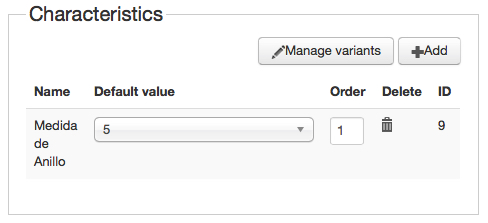
Yes, At backend, in all mass populated product pages, i can see at characteristics Panel that were added "Medida de Anillo"
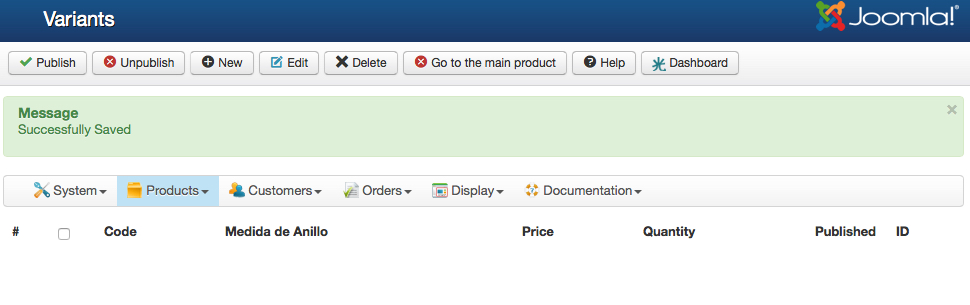
And when click on Manage Variant Products, there is nothing inside!; Is this supposed to be like this?
And Yes "Variant published by default" is ENABLE.
BR
Sduran
Yes, At backend, in all mass populated product pages, i can see at characteristics Panel that were added "Medida de Anillo"
And when click on Manage Variant Products, there is nothing inside!; Is this supposed to be like this?
And Yes "Variant published by default" is ENABLE.
BR
Sduran
Please Log in or Create an account to join the conversation.
11 years 8 months ago #190540
by DURAN
Replied by DURAN on topic Mass add characteristics to all products within specific category
While the hand assigned product characteristics, looks like this when click on "Manage Variants" button:
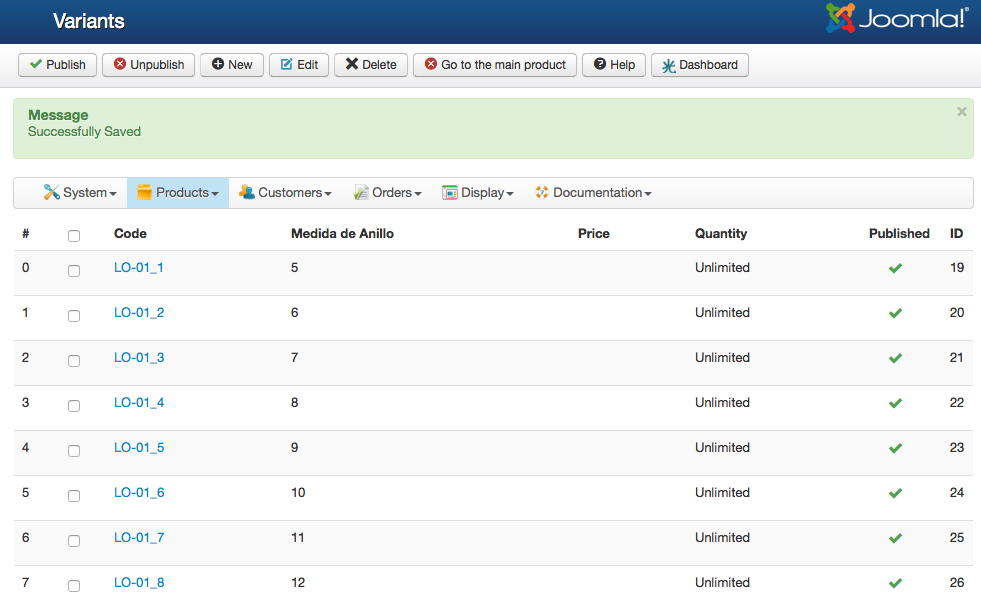
Please Log in or Create an account to join the conversation.
11 years 8 months ago #190572
by Xavier
Replied by Xavier on topic Mass add characteristics to all products within specific category
Hi,
Thanks for this report, I corrected the issue on our end and this will be available in the next release.
To correct it now on your end, please edit the file "plugins/hikashop/massaction_product/massaction_product.php" and in the function "onProcessProductMassActionupdateCharacteristics()" add:
After:
Thanks for this report, I corrected the issue on our end and this will be available in the next release.
To correct it now on your end, please edit the file "plugins/hikashop/massaction_product/massaction_product.php" and in the function "onProcessProductMassActionupdateCharacteristics()" add:
Code:
$keys = array();
$values = array();
foreach($element->characteristics as $characteristic){
$keys[] = $characteristic->characteristic_id;
$values[] = $characteristic;
}
$element->characteristics = array_combine($keys,$values);
Code:
$element->characteristics = array_merge($element->characteristics, $characteristics);
$element->characteristics = array_merge($element->characteristics, $oldCharacteristics);
Please Log in or Create an account to join the conversation.
11 years 8 months ago #190573
by DURAN
Replied by DURAN on topic Mass add characteristics to all products within specific category
I will try, and let you know..
But do I have to run the mass action again, right?
Or first run mass action to un-assing characteristics ?
Thanks and BR
sduran
But do I have to run the mass action again, right?
Or first run mass action to un-assing characteristics ?
Thanks and BR
sduran
Please Log in or Create an account to join the conversation.
11 years 8 months ago #190574
by Xavier
Replied by Xavier on topic Mass add characteristics to all products within specific category
Hi,
You will have to un-assign the characteristics first and then process the mass action to add them again.
You will have to un-assign the characteristics first and then process the mass action to add them again.
Please Log in or Create an account to join the conversation.
11 years 8 months ago #190575
by DURAN
Replied by DURAN on topic Mass add characteristics to all products within specific category
Perfect.. I will try and let you know...
Thanks for your support!
BR
sduran
Thanks for your support!
BR
sduran
Please Log in or Create an account to join the conversation.
11 years 8 months ago #190584
by DURAN
Replied by DURAN on topic Mass add characteristics to all products within specific category
Works just perfect!
Thanks for your support !
You can close this topic.
BR
sduran
Thanks for your support !
You can close this topic.
BR
sduran
Please Log in or Create an account to join the conversation.
Time to create page: 0.137 seconds