
- Posts: 23
- Thank you received: 2
ORDER_ADMIN_NOTIFICATION_SUBJECT_ORDERNUM
- olddirtret
-
 Topic Author
- Offline
Less
More
11 years 4 months ago #204154
by olddirtret
ORDER_ADMIN_NOTIFICATION_SUBJECT_ORDERNUM was created by olddirtret
-- url of the page with the problem -- :
www.compministry.org
-- HikaShop version -- : 2.4.0
-- Joomla version -- : 3.4.1
-- PHP version -- : 5.4.40
-- Browser(s) name and version -- : Mozilla Firefox 38.05
Custom fields will not display on this email. These custom fields will not display on the Request administrator notification email that is received with the order request. We are using the HTML version of the email.
Table Column Name Label
address organization_name Organization
address requestperson Request Reason
address personpickingupequipment Person Picking Up Equipment
The fields display on the web site order from and when they are submitted, the fields are saving in the database but will not print out.
-- HikaShop version -- : 2.4.0
-- Joomla version -- : 3.4.1
-- PHP version -- : 5.4.40
-- Browser(s) name and version -- : Mozilla Firefox 38.05
Custom fields will not display on this email. These custom fields will not display on the Request administrator notification email that is received with the order request. We are using the HTML version of the email.
Table Column Name Label
address organization_name Organization
address requestperson Request Reason
address personpickingupequipment Person Picking Up Equipment
The fields display on the web site order from and when they are submitted, the fields are saving in the database but will not print out.
Please Log in or Create an account to join the conversation.

11 years 4 months ago #204159
by Jerome
Jerome - Obsidev.com
HikaMarket & HikaSerial developer / HikaShop core dev team.
Replied by Jerome on topic ORDER_ADMIN_NOTIFICATION_SUBJECT_ORDERNUM
Hi,
If you have created an "address_template" override for your front-end template, you will need to do the same for the backend template.
That's the best way to change how the address is displayed.
Regards,
If you have created an "address_template" override for your front-end template, you will need to do the same for the backend template.
That's the best way to change how the address is displayed.
Regards,
Jerome - Obsidev.com
HikaMarket & HikaSerial developer / HikaShop core dev team.
Please Log in or Create an account to join the conversation.
- olddirtret
-
Topic Author
- Offline
Less
More
- Posts: 23
- Thank you received: 2
11 years 4 months ago #204216
by olddirtret
Replied by olddirtret on topic ORDER_ADMIN_NOTIFICATION_SUBJECT_ORDERNUM
I created three new fields to collect data. Organization, Requestreason & Personpickingupequipment. All of these custom fields are in the address table.
The shopping cart properly collects the data from the customer and I can see it displayed in the backend with the customer's request information. What I can't see is these three fields listed on the report.
I have attached a jpg file so that everyone can see what I'm trying to accomplish.
Thanks
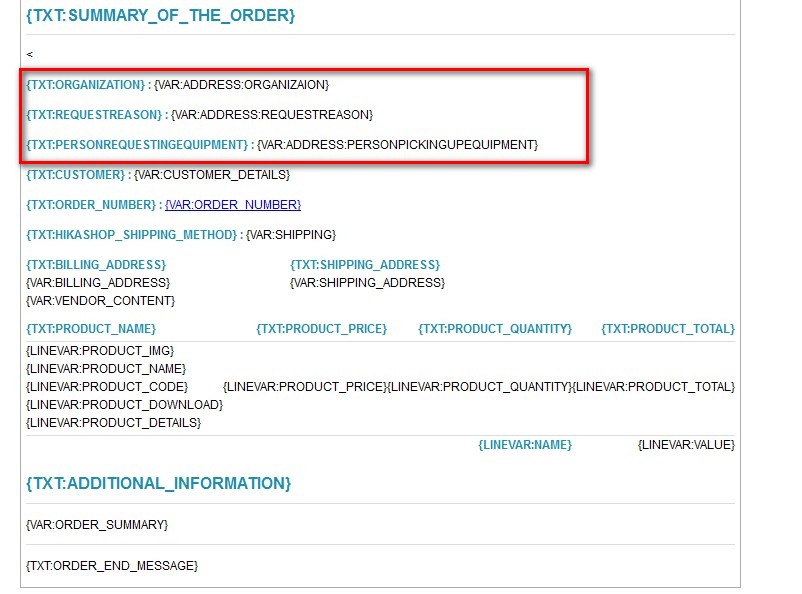
The shopping cart properly collects the data from the customer and I can see it displayed in the backend with the customer's request information. What I can't see is these three fields listed on the report.
I have attached a jpg file so that everyone can see what I'm trying to accomplish.
Thanks
Please Log in or Create an account to join the conversation.
11 years 4 months ago #204225
by Jerome
Jerome - Obsidev.com
HikaMarket & HikaSerial developer / HikaShop core dev team.
Replied by Jerome on topic ORDER_ADMIN_NOTIFICATION_SUBJECT_ORDERNUM
Hi,
Thanks, I see what you're trying to do.
To use the "address" vars, you have to use {VAR:shipping_address.Organization} or {VAR:biliing_address.Organization}
Please be careful with the namekey of your custom field, the system is case sensitive.
Regards,
Thanks, I see what you're trying to do.
To use the "address" vars, you have to use {VAR:shipping_address.Organization} or {VAR:biliing_address.Organization}
Please be careful with the namekey of your custom field, the system is case sensitive.
Regards,
Jerome - Obsidev.com
HikaMarket & HikaSerial developer / HikaShop core dev team.
Please Log in or Create an account to join the conversation.
- olddirtret
-
Topic Author
- Offline
Less
More
- Posts: 23
- Thank you received: 2
11 years 4 months ago #204291
by olddirtret
Replied by olddirtret on topic ORDER_ADMIN_NOTIFICATION_SUBJECT_ORDERNUM
Jerome
Thanks. That got it. I was using just "address" instead of "shipping_address" plus I wasn't watching my case sensitive names.
Tom
Thanks. That got it. I was using just "address" instead of "shipping_address" plus I wasn't watching my case sensitive names.
Tom
Please Log in or Create an account to join the conversation.
Time to create page: 0.088 seconds