

- Posts: 46
- Thank you received: 0
How to change thumbnail size in category list
15 years 8 months ago #8836
by meqrinda
How to change thumbnail size in category list was created by meqrinda
The thumbnail generated is to small for the box
www.infossa.dk/eboger.html
Where do i change the size?
www.infossa.dk/eboger.html
Where do i change the size?
Please Log in or Create an account to join the conversation.

15 years 8 months ago #8839
by nicolas
Replied by nicolas on topic Re: How to change thumbnail size in category list
You can change the thumbnails size in the config under the tab files. You will have to delete the thumbnails in the folder media/com_hikashop/upload/thumbnails so that hikashop recreates them once you change the size of the thumbnails.
Please Log in or Create an account to join the conversation.
Less
More
- Posts: 18
- Thank you received: 0
14 years 3 months ago #58466
by csanfilippo
Replied by csanfilippo on topic Re: How to change thumbnail size in category list
I would like to delete all the images in media/com_hikashop/upload/thumbnails and then reupload them to increase the thumbnail sizes.
Can I just delete all of the contents of this folder...
Or are there some files that I need to keep?
Thank you
Can I just delete all of the contents of this folder...
Or are there some files that I need to keep?
Thank you
Please Log in or Create an account to join the conversation.
14 years 3 months ago #58478
by nicolas
Replied by nicolas on topic Re: How to change thumbnail size in category list
You can safely delete them.
Please note that the thumbnails are regenerated automatically since a few releases of HikaShop when you change the thumbnails size options of the Files tab of the configuration or the image width/height options of your menus/modules via Display->Content menus/modules. So normally you don't have to do that.
Please note that the thumbnails are regenerated automatically since a few releases of HikaShop when you change the thumbnails size options of the Files tab of the configuration or the image width/height options of your menus/modules via Display->Content menus/modules. So normally you don't have to do that.
Please Log in or Create an account to join the conversation.
Less
More
- Posts: 18
- Thank you received: 0
14 years 3 months ago - 14 years 3 months ago #58535
by csanfilippo
Replied by csanfilippo on topic Re: How to change thumbnail size in category list
I tried adjusting the size in the locations you mentioned,
but the thumbnails did not change size.
phonequote.org/index.php/t-mobile/htc/product/529-sensation
I am trying to change the thumbnails below the main picture on the products page.
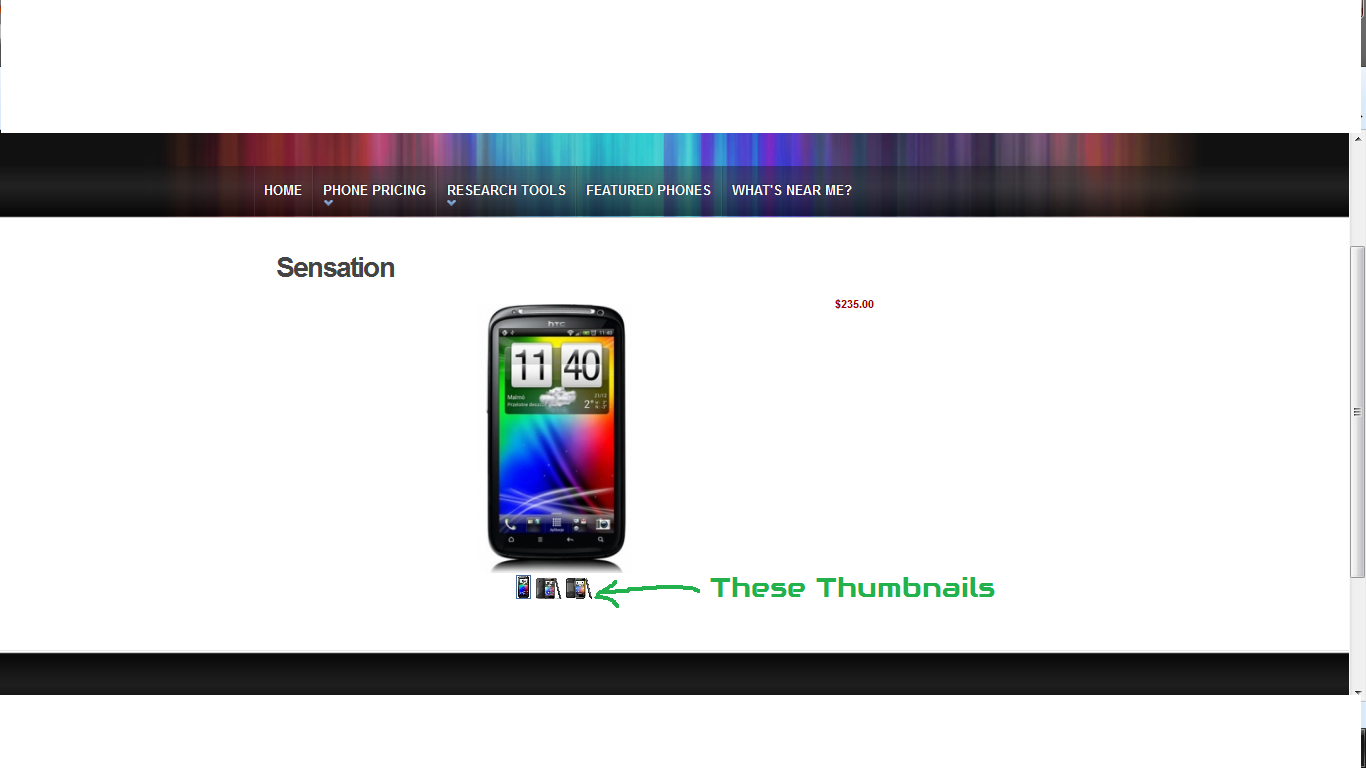
but the thumbnails did not change size.
phonequote.org/index.php/t-mobile/htc/product/529-sensation
I am trying to change the thumbnails below the main picture on the products page.
Last edit: 14 years 3 months ago by csanfilippo.
Please Log in or Create an account to join the conversation.
14 years 3 months ago #58597
by nicolas
Replied by nicolas on topic Re: How to change thumbnail size in category list
I'm talking about the thumbnails of listings.
The ones you're talking about can be changed with CSS:
www.hikashop.com/en/support/documentatio...ling.html#thumbnails
The ones you're talking about can be changed with CSS:
www.hikashop.com/en/support/documentatio...ling.html#thumbnails
Please Log in or Create an account to join the conversation.
8 years 6 months ago #291704
by 41global
Replied by 41global on topic Re: How to change thumbnail size in category list
Hey Nicolas,
Making that change in CSS, will those changes be wiped out when new Hikashop versions come out. Will I need to remember to go back and increase the thumbnail css height properties each update?
Making that change in CSS, will those changes be wiped out when new Hikashop versions come out. Will I need to remember to go back and increase the thumbnail css height properties each update?
Please Log in or Create an account to join the conversation.
8 years 6 months ago #291732
by nicolas
Replied by nicolas on topic Re: How to change thumbnail size in category list
Hi,
No, the changes done through the interface for the CSS as saved as overrides. So you won't loose them when you update.
You canr ead more about all that here:
www.hikashop.com/support/documentation/1...ize-the-display.html
No, the changes done through the interface for the CSS as saved as overrides. So you won't loose them when you update.
You canr ead more about all that here:
www.hikashop.com/support/documentation/1...ize-the-display.html
Please Log in or Create an account to join the conversation.
Time to create page: 0.113 seconds