

- Posts: 490
- Thank you received: 2
how to display category of product?
10 years 4 months ago #244039
by ronron
how to display category of product? was created by ronron
-- HikaShop version -- : 2.6.3
-- Joomla version -- : 3.4.3
-- PHP version -- : 5.5
-- Error-message(debug-mod must be tuned on) -- : none
hi guys
how can i display the product category on the product page?
thanks
-- Joomla version -- : 3.4.3
-- PHP version -- : 5.5
-- Error-message(debug-mod must be tuned on) -- : none
hi guys
how can i display the product category on the product page?
thanks
Please Log in or Create an account to join the conversation.

Less
More
- Posts: 12953
- Thank you received: 1778
10 years 4 months ago #244047
by Mohamed Thelji
Replied by Mohamed Thelji on topic how to display category of product?
Hello,
If you want to display a listing of categories, you can use an Hikashop category listing menu / module :
www.hikashop.com/support/documentation/3...splay-front-end.html
Else if you want to display it through your product page, you can actually add it through your product description.
If you want to display a listing of categories, you can use an Hikashop category listing menu / module :
www.hikashop.com/support/documentation/3...splay-front-end.html
Else if you want to display it through your product page, you can actually add it through your product description.
Please Log in or Create an account to join the conversation.
10 years 4 months ago #244127
by ronron
Replied by ronron on topic how to display category of product?
how do i add it to the product description?
what is the code?
thanks
what is the code?
thanks
Please Log in or Create an account to join the conversation.

10 years 4 months ago - 10 years 4 months ago #244153
by kyratn
Replied by kyratn on topic how to display category of product?
Hi,
If you want to show product categories/category name on product page you can add something like this to product ->show_default view file.
Please note that you should modify this code to your needs.
I hope this is what you are looking for?
Thanks
If you want to show product categories/category name on product page you can add something like this to product ->show_default view file.
Code:
<?php
$q = 'SELECT c.* '.
' FROM ' . hikashop_table('product_category').' as pc '.
' INNER JOIN '.hikashop_table('category').' AS c ON pc.category_id = c.category_id '.
' WHERE pc.product_id = '.hikashop_getCID('product_id');
$database->setQuery($q);
$product_categories = $database->loadObjectList();
$categories = array();
if($product_categories) { ?>
<div class=" gray-italic">
<span class=" margin-reset"><?php echo JText::_('CUSTOM_ITEM_PRODUCT_CATEGORIES'); ?> :</span>
<?php
foreach ($product_categories as $category) $categories[] = $category->category_name;
foreach($categories as $c) $c = '<span class="pull-left margin-reset">'.$c.'</span>';
echo implode(', ', $categories);
?>
Please note that you should modify this code to your needs.
I hope this is what you are looking for?
Thanks
Last edit: 10 years 4 months ago by kyratn.
The following user(s) said Thank You: ronron
Please Log in or Create an account to join the conversation.

10 years 4 months ago - 10 years 4 months ago #244150
by Philip
Replied by Philip on topic how to display category of product?
Hello,
I think Mohamed speak about add in your product description part, more precisely here :
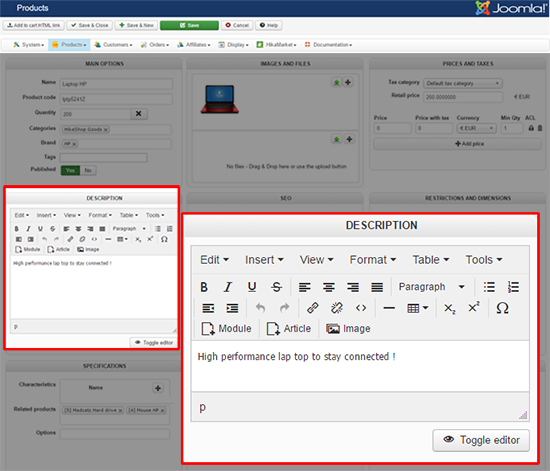
In order to go more far your custom your product/show.php, view and add where needed this code in order to display your product category.
Hope this will help you.
Regards
I think Mohamed speak about add in your product description part, more precisely here :
In order to go more far your custom your product/show.php, view and add where needed this code in order to display your product category.
Code:
foreach ($this->categories as $key => $value) {
?>
<div id="hikashop_product_category_<?php echo $value->category_id ?>">
<?php echo $value->category_name ?>
</div>
<?php
}
Hope this will help you.
Regards
Last edit: 10 years 4 months ago by Philip.
The following user(s) said Thank You: ronron
Please Log in or Create an account to join the conversation.

5 years 1 month ago #335683
by gerryna09
Replied by gerryna09 on topic how to display category of product?
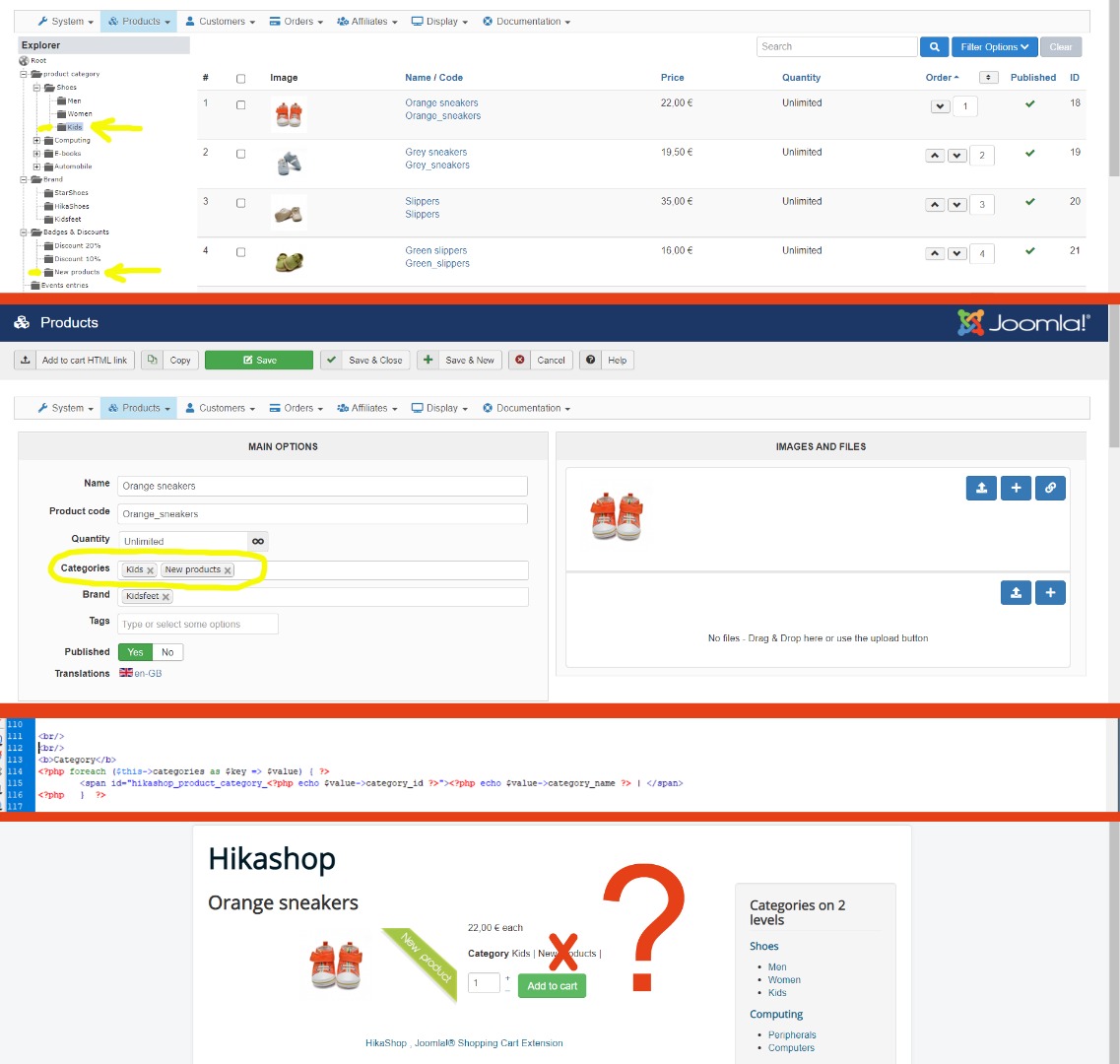
What if I want to see ONLY categories with the same category_parent_id ??
Please Log in or Create an account to join the conversation.

5 years 1 month ago #335691
by nicolas
Replied by nicolas on topic how to display category of product?
Hi,
We're talking here about displaying the categories directly linked to the current product, on the product details page.
A product doesn't have a category_parent_id so I don't see what you mean ?
Or are you talking about displaying a listing of the categories with the same parent as the categories linked to the product ? There is no easy way to do that. That would require some development to be able to do that. However, I don't see the point of doing that, so maybe you're talking about something else entirely ?
We're talking here about displaying the categories directly linked to the current product, on the product details page.
A product doesn't have a category_parent_id so I don't see what you mean ?
Or are you talking about displaying a listing of the categories with the same parent as the categories linked to the product ? There is no easy way to do that. That would require some development to be able to do that. However, I don't see the point of doing that, so maybe you're talking about something else entirely ?
Please Log in or Create an account to join the conversation.
5 years 1 month ago #335708
by gerryna09
Replied by gerryna09 on topic how to display category of product?
Please Log in or Create an account to join the conversation.
5 years 1 month ago #335725
by nicolas
Replied by nicolas on topic how to display category of product?
Hi,
Ok, that's much more clear.
So what you could do is add the code:
before the first ?> in your custom code. Make sure you replace xx with the id of the "Badges & discounts" category.
That way, your code won't display the children categories of that "Badges & discounts" category.
Ok, that's much more clear.
So what you could do is add the code:
Code:
if($value->category_parent_id != xx) continue;
That way, your code won't display the children categories of that "Badges & discounts" category.
Please Log in or Create an account to join the conversation.
5 years 1 month ago #335728
by gerryna09
Replied by gerryna09 on topic how to display category of product?
Thank you Nicolas for creating HikaShop and thank you for the assistance you give us 
Please Log in or Create an account to join the conversation.
4 years 11 months ago #337192
by Thrane
Hi, hope it's ok to ask here, since it's about this code!
I have insert
But now I ONLY see the categories from the parent with ID 140?
Replied by Thrane on topic how to display category of product?
nicolas wrote: Hi,
Ok, that's much more clear.
So what you could do is add the code:before the first ?> in your custom code. Make sure you replace xx with the id of the "Badges & discounts" category.Code:if($value->category_parent_id != xx) continue;
That way, your code won't display the children categories of that "Badges & discounts" category.
Hi, hope it's ok to ask here, since it's about this code!
I have insert
Code:
<?php
foreach ($this->categories as $key => $value) {
if($value->category_parent_id != 140) continue;
?>
<div id="hikashop_product_category_<?php echo $value->category_id ?>">
<?php echo $value->category_name ?>
</div>
<?php
}
?>
But now I ONLY see the categories from the parent with ID 140?
Please Log in or Create an account to join the conversation.
4 years 11 months ago #337213
by nicolas
Replied by nicolas on topic how to display category of product?
Hi,
My bad it should be == instead of != in the code I gave.
My bad it should be == instead of != in the code I gave.
Please Log in or Create an account to join the conversation.
4 years 11 months ago #337216
by Thrane
Replied by Thrane on topic how to display category of product?
Thank you
Please Log in or Create an account to join the conversation.
4 years 11 months ago #337218
by Thrane
Replied by Thrane on topic how to display category of product?
Would it be possible to have these categories linking to a listing?
Please Log in or Create an account to join the conversation.
4 years 11 months ago #337219
by Thrane
Replied by Thrane on topic how to display category of product?
Just found a solution ...
Please Log in or Create an account to join the conversation.
2 years 7 months ago #359661
by dvddvd
Replied by dvddvd on topic how to display category of product?
Hi
Is it possible to also show the category image?
Thanks
Is it possible to also show the category image?
Thanks
Please Log in or Create an account to join the conversation.
2 years 7 months ago #359665
by Philip
Replied by Philip on topic how to display category of product?
Hello,
Please can you precise where you want to display precisely your category image?
Regards
Please can you precise where you want to display precisely your category image?
Regards
Please Log in or Create an account to join the conversation.
2 years 7 months ago #359698
by dvddvd
Replied by dvddvd on topic how to display category of product?
Hello Philip,
I would like it to appear in the product view.
thank you so much
I would like it to appear in the product view.
thank you so much
Please Log in or Create an account to join the conversation.
2 years 7 months ago #359699
by nicolas
Replied by nicolas on topic how to display category of product?
Hi,
You would have to use such code :
You would have to use such code :
Code:
...
$categoryClass = hikashop_get('class.category');
$image_options = array('default' => true,'forcesize'=>$this->config->get('image_force_size',true),'scale'=>$this->config->get('image_scale_mode','inside'));
foreach ($this->categories as $key => $value) {
$data = $categoryClass->get($value->category_id, true);
$img = $this->image->getThumbnail($data->file_path, array('width' => 100 'height' => 100), $image_options);
if(@$img->success) {
echo '<img title="'.$this->escape((string)@$data->file_description).'" alt="'.$this->escape((string)@$data->file_name).'" src="'.$img->url.'"/>';
}
}
...
Please Log in or Create an account to join the conversation.
Time to create page: 0.140 seconds