

- Posts: 344
- Thank you received: 3
Make a custom field display in the PDF plugin invoice
9 years 10 months ago - 9 years 10 months ago #256795
by river
Make a custom field display in the PDF plugin invoice was created by river
-- HikaShop version -- : 2.6.4
-- Joomla version -- : 3.6.4
-- PHP version -- : 7
This is my custom field settings.
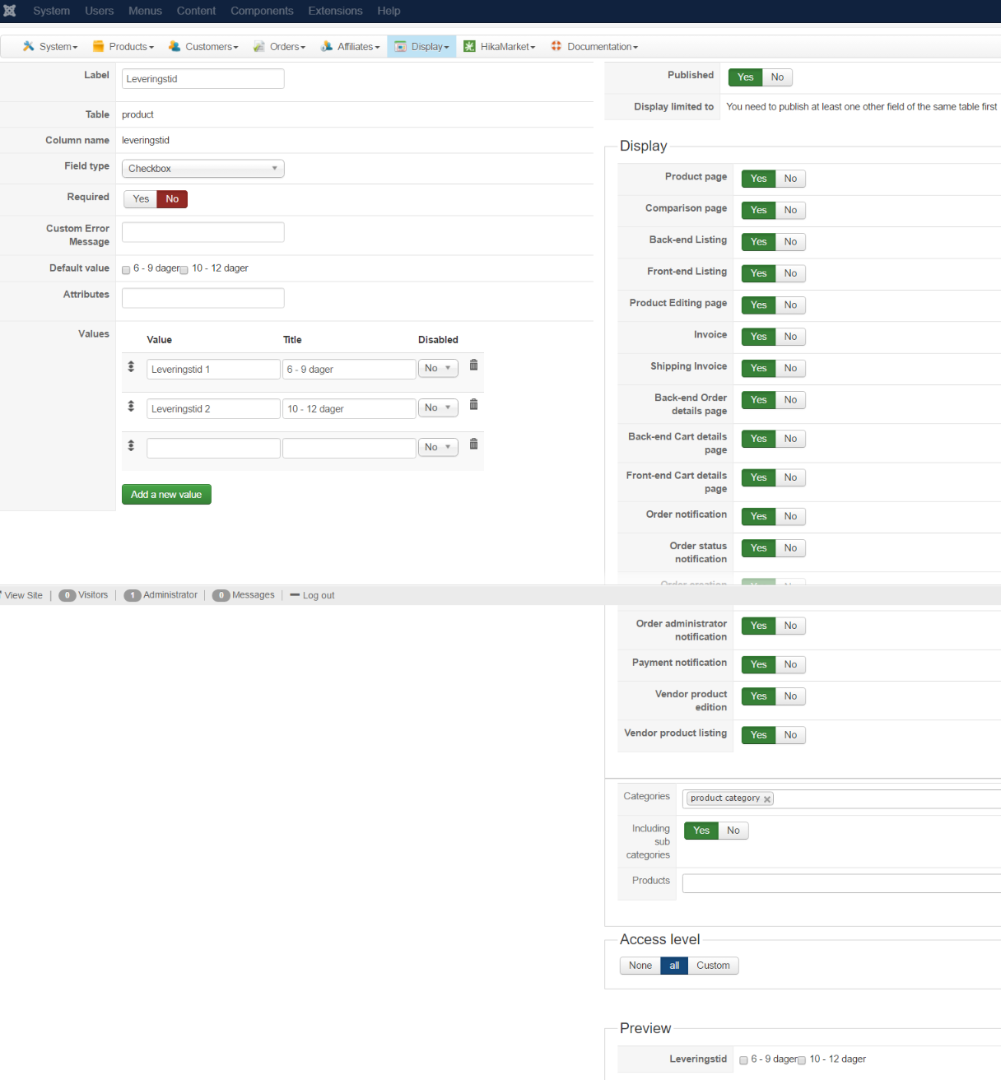
I've downloaded the latest version of the PDF and Hikashop business package. Like described in this thread.
This thread
If I disable the attach invoice PDF plugin the custom field is displaying fine in the standard invoice. It also displays fine in the order creation email.
Any advice on how to get it to display in the PDF invoice ?
-- Joomla version -- : 3.6.4
-- PHP version -- : 7
This is my custom field settings.
I've downloaded the latest version of the PDF and Hikashop business package. Like described in this thread.
This thread
If I disable the attach invoice PDF plugin the custom field is displaying fine in the standard invoice. It also displays fine in the order creation email.
Any advice on how to get it to display in the PDF invoice ?
Last edit: 9 years 10 months ago by river.
Please Log in or Create an account to join the conversation.

9 years 10 months ago #256818
by nicolas
Replied by nicolas on topic Make a custom field display in the PDF plugin invoice
Hi,
The thread you're linking to is about the display of custom item fields on the PDF invoice.
The PDF invoice plugin doesn't support yet the display of custom product fields, which is what you want.
So it's normal that it doesn't work.
Supporting it is a bit tricky as the PDF system requires giving a width for each column and thus it can't be standardized. With the HTML invoice, the table adapts itself to the available area so it's not a problem.
We couldn't think yet of a generic way to properly generate invoices with custom product fields.
So for now, I can only recommend to customize the file plugins/hikashop/attachinvoice/attachinvoice/invoice.php if you want to display the custom product fields there.
The thread you're linking to is about the display of custom item fields on the PDF invoice.
The PDF invoice plugin doesn't support yet the display of custom product fields, which is what you want.
So it's normal that it doesn't work.
Supporting it is a bit tricky as the PDF system requires giving a width for each column and thus it can't be standardized. With the HTML invoice, the table adapts itself to the available area so it's not a problem.
We couldn't think yet of a generic way to properly generate invoices with custom product fields.
So for now, I can only recommend to customize the file plugins/hikashop/attachinvoice/attachinvoice/invoice.php if you want to display the custom product fields there.
Please Log in or Create an account to join the conversation.
9 years 10 months ago #256825
by river
Replied by river on topic Make a custom field display in the PDF plugin invoice
OK that would work fine with me.
Could you please advice me what kind of code I need to implement in the invoice.php file in order to display my custom field ?
Tnx
Could you please advice me what kind of code I need to implement in the invoice.php file in order to display my custom field ?
Tnx
Please Log in or Create an account to join the conversation.
9 years 10 months ago #256838
by nicolas
Replied by nicolas on topic Make a custom field display in the PDF plugin invoice
Hi,
Something like that:
where XXX is the column name of the custom field.
Something like that:
Code:
$class = hikashop_get("class.product");
$data = $class->get($product->product_id);
echo $data->XXX;
Please Log in or Create an account to join the conversation.
9 years 9 months ago - 9 years 9 months ago #257148
by river
Replied by river on topic Make a custom field display in the PDF plugin invoice
Tnx it works great.
So I've added a text snippet in front of the code which says delivery
Not all my products use the above custom field.
So the problem now is that the text "Dilvery" is displaying in the pdf invoice even if the custom field is NOT filled out.
So I need to add an "If condition" so that the text "delivery" only displays when the custom field is filled out in the product and displayed in the invoice.
Any advice on how to write the if condition in the above code ?
tnx
So I've added a text snippet in front of the code which says delivery
Code:
echo "Delivery: "; $class = hikashop_get("class.product");
$data = $class->get($product->product_id);
echo $data->deliverytime;
Not all my products use the above custom field.
So the problem now is that the text "Dilvery" is displaying in the pdf invoice even if the custom field is NOT filled out.
So I need to add an "If condition" so that the text "delivery" only displays when the custom field is filled out in the product and displayed in the invoice.
Any advice on how to write the if condition in the above code ?
tnx
Last edit: 9 years 9 months ago by river.
Please Log in or Create an account to join the conversation.
9 years 9 months ago #257160
by nicolas
Replied by nicolas on topic Make a custom field display in the PDF plugin invoice
Hi,
It's quite easy:
It's quite easy:
Code:
$class = hikashop_get("class.product");
$data = $class->get($product->product_id);
if(!empty($data->deliverytime)){
echo "Delivery: ";
echo $data->deliverytime;
}
Please Log in or Create an account to join the conversation.
Time to create page: 0.194 seconds