
- Posts: 8
- Thank you received: 0
Cannot save price
- djendesign
-
 Topic Author
- Offline
Less
More
9 years 8 months ago #264132
by djendesign
Cannot save price was created by djendesign
-- url of the page with the problem -- :
www.rrdf.nl
-- HikaShop version -- : 3.0.1
-- Joomla version -- : 3.6.5
-- PHP version -- : 5.5.36
-- Browser(s) name and version -- : Chrome 56.0.2924.87
Hi all,
I just bought Hika Essential. Everything works great, except for one thing: I can't save any prices
When I add a new product, I can add images, characteristics, description etc. but when I add a price it does not show nor is saved. So all products are free now
Can you please help me?
Thanks! Janis
-- HikaShop version -- : 3.0.1
-- Joomla version -- : 3.6.5
-- PHP version -- : 5.5.36
-- Browser(s) name and version -- : Chrome 56.0.2924.87
Hi all,
I just bought Hika Essential. Everything works great, except for one thing: I can't save any prices
When I add a new product, I can add images, characteristics, description etc. but when I add a price it does not show nor is saved. So all products are free now
Can you please help me?
Thanks! Janis
Please Log in or Create an account to join the conversation.

9 years 8 months ago #264140
by nicolas
Replied by nicolas on topic Cannot save price
Hi,
We've changed the price edition interface with HikaShop 3.0.1.
Could you open your browser's javascript console and try again ? Do you get any error message in it when you use the price edition interface ? Could you provide these ?
We've changed the price edition interface with HikaShop 3.0.1.
Could you open your browser's javascript console and try again ? Do you get any error message in it when you use the price edition interface ? Could you provide these ?
Please Log in or Create an account to join the conversation.
- djendesign
-
Topic Author
- Offline
Less
More
- Posts: 8
- Thank you received: 0
9 years 8 months ago #264151
by djendesign
Replied by djendesign on topic Cannot save price
Indeed, I do. See attached. Thanks for the quick reply!
Please Log in or Create an account to join the conversation.
9 years 8 months ago #264161
by nicolas
Replied by nicolas on topic Cannot save price
Hi,
Great ! Thank you for that. We've added a patch for the problem.
Download again the install package on our website and install it on yours and that will fix the issue.
Great ! Thank you for that. We've added a patch for the problem.
Download again the install package on our website and install it on yours and that will fix the issue.
The following user(s) said Thank You: djendesign
Please Log in or Create an account to join the conversation.
- djendesign
-
Topic Author
- Offline
Less
More
- Posts: 8
- Thank you received: 0
9 years 8 months ago #264170
by djendesign
Replied by djendesign on topic Cannot save price
Works like a charm! You are amazing! Thanks a lot1
Please Log in or Create an account to join the conversation.
9 years 4 months ago - 9 years 4 months ago #272708
by Uriel
Replied by Uriel on topic Cannot save price
I am having the same issue.
Is Version 3.1.1 the one where this is supposed to be fixed?
If not can you please make the patch available to me?
Is Version 3.1.1 the one where this is supposed to be fixed?
If not can you please make the patch available to me?
Last edit: 9 years 4 months ago by Uriel.
Please Log in or Create an account to join the conversation.
9 years 4 months ago #272730
by nicolas
Replied by nicolas on topic Cannot save price
Hi,
It's even in the 3.1.0
So you should not have the problem if you have the 3.1.1
I'm thinking that it might be linked to a conflict with another extension.
Could you provide a backend access, the steps to reproduce and a link to this thread via our contact form so that we can analyze the situation ?
www.hikashop.com/support/contact-us.html
It's even in the 3.1.0
So you should not have the problem if you have the 3.1.1
I'm thinking that it might be linked to a conflict with another extension.
Could you provide a backend access, the steps to reproduce and a link to this thread via our contact form so that we can analyze the situation ?
www.hikashop.com/support/contact-us.html
Please Log in or Create an account to join the conversation.
9 years 4 months ago #272731
by Uriel
Replied by Uriel on topic Cannot save price
I sent the email via your contact Page as requested Nicolas.
Please Log in or Create an account to join the conversation.
9 years 4 months ago - 9 years 4 months ago #272740
by Philip
Replied by Philip on topic Cannot save price
Hello,
I just processed some tests on your backend, and I succeed to add some price to your product, see this screenshot :
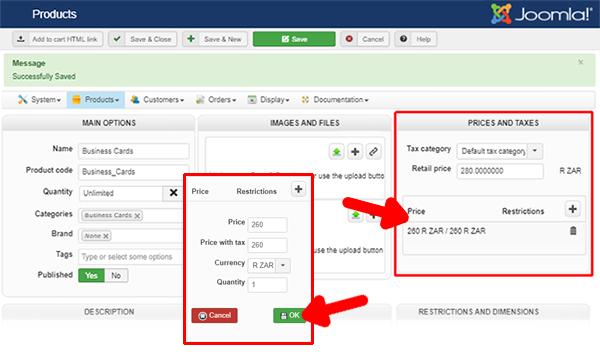
The point now is to understand why you don't succeed on your side.
- Maybe a little simple but, do you click on the button OK, in the little price window ? (see my screenshot)
- Do you change something on your website or even succeed to solve your issue ?
- Do you use a different Navigator ? And which one ?
Awaiting news from you.
Regards
I just processed some tests on your backend, and I succeed to add some price to your product, see this screenshot :
The point now is to understand why you don't succeed on your side.
- Maybe a little simple but, do you click on the button OK, in the little price window ? (see my screenshot)
- Do you change something on your website or even succeed to solve your issue ?
- Do you use a different Navigator ? And which one ?
Awaiting news from you.
Regards
Last edit: 9 years 4 months ago by Philip.
Please Log in or Create an account to join the conversation.
9 years 4 months ago #272831
by Uriel
Replied by Uriel on topic Cannot save price
Strangely its working as it should now.
I do what you did : Click the + sign to Add a Price, enter the Price with tax and clicked OK.
Nothing special.... I am in Chrome and you were probably too.
So it seems that something changed since I last tried
I do what you did : Click the + sign to Add a Price, enter the Price with tax and clicked OK.
Nothing special.... I am in Chrome and you were probably too.
So it seems that something changed since I last tried
Please Log in or Create an account to join the conversation.

9 years 4 months ago #272836
by Jerome
Jerome - Obsidev.com
HikaMarket & HikaSerial developer / HikaShop core dev team.
Replied by Jerome on topic Cannot save price
Hello Uriel,
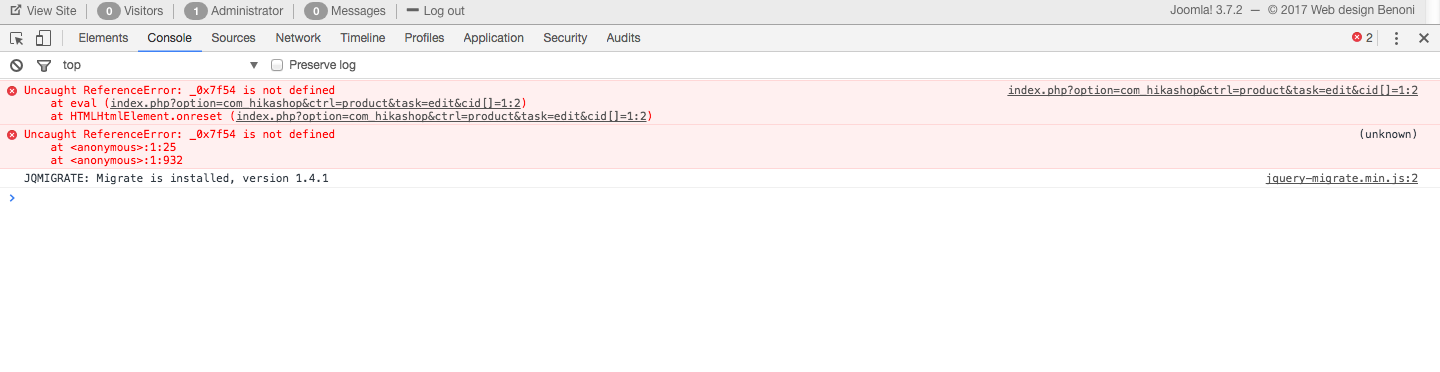
The JS issue from your previous post indicate something really weird.
The name of the variable and the fact that the error is in the second line of the page content indicates a potential virus.
Please check the security of your website.
Regards,
The JS issue from your previous post indicate something really weird.
The name of the variable and the fact that the error is in the second line of the page content indicates a potential virus.
Please check the security of your website.
Regards,
Jerome - Obsidev.com
HikaMarket & HikaSerial developer / HikaShop core dev team.
Please Log in or Create an account to join the conversation.
9 years 4 months ago #272868
by Uriel
Replied by Uriel on topic Cannot save price
I have had my entire site scanned by my host and this is their reply :
The website scans came back as clean, no suspicious or infected files were detected.
I've also scanned the website with Patchman that has not detected any known vulnerabilities within your website content.
The website scans came back as clean, no suspicious or infected files were detected.
I've also scanned the website with Patchman that has not detected any known vulnerabilities within your website content.
Please Log in or Create an account to join the conversation.
9 years 4 months ago #272870
by Jerome
Jerome - Obsidev.com
HikaMarket & HikaSerial developer / HikaShop core dev team.
Replied by Jerome on topic Cannot save price
Hello,
Good to know.
Sometimes it's better to be too much paranoid
Regards,
Good to know.
Sometimes it's better to be too much paranoid
Regards,
Jerome - Obsidev.com
HikaMarket & HikaSerial developer / HikaShop core dev team.
Please Log in or Create an account to join the conversation.
9 years 4 months ago #272871
by Uriel
Replied by Uriel on topic Cannot save price
Ok but this still doesn't give me a clear indication as to why it was not working and then all of a sudden it does.
Please Log in or Create an account to join the conversation.
9 years 4 months ago #272872
by Jerome
Jerome - Obsidev.com
HikaMarket & HikaSerial developer / HikaShop core dev team.
Replied by Jerome on topic Cannot save price
Hello,
Well, as explained briefly ; you got some JS issues from something external and the error it caused interfered with HikaShop.
Regards,
Well, as explained briefly ; you got some JS issues from something external and the error it caused interfered with HikaShop.
Regards,
Jerome - Obsidev.com
HikaMarket & HikaSerial developer / HikaShop core dev team.
Please Log in or Create an account to join the conversation.
Time to create page: 0.134 seconds