

- Posts: 490
- Thank you received: 2
how to configure user points?
7 years 10 months ago #300816
by ronron
how to configure user points? was created by ronron
-- HikaShop version -- : 3.5.0
-- Joomla version -- : 3.7
-- PHP version -- : 5.6
-- Error-message(debug-mod must be tuned on) -- : none
hi
i configured hike user points but i can't get it to appear on the front end. it shows that i can't earn point but it never displays how many points i have and if i can use it for payment.
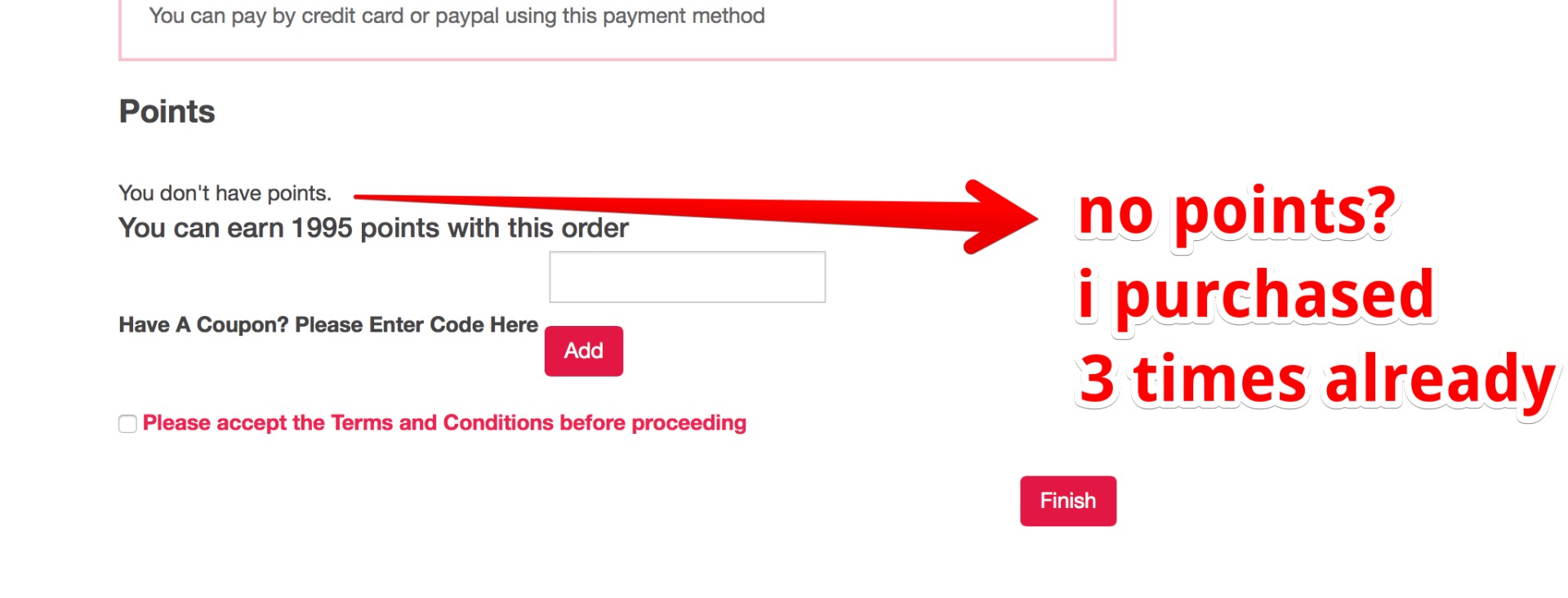
please help me with the configuration
user points configuration
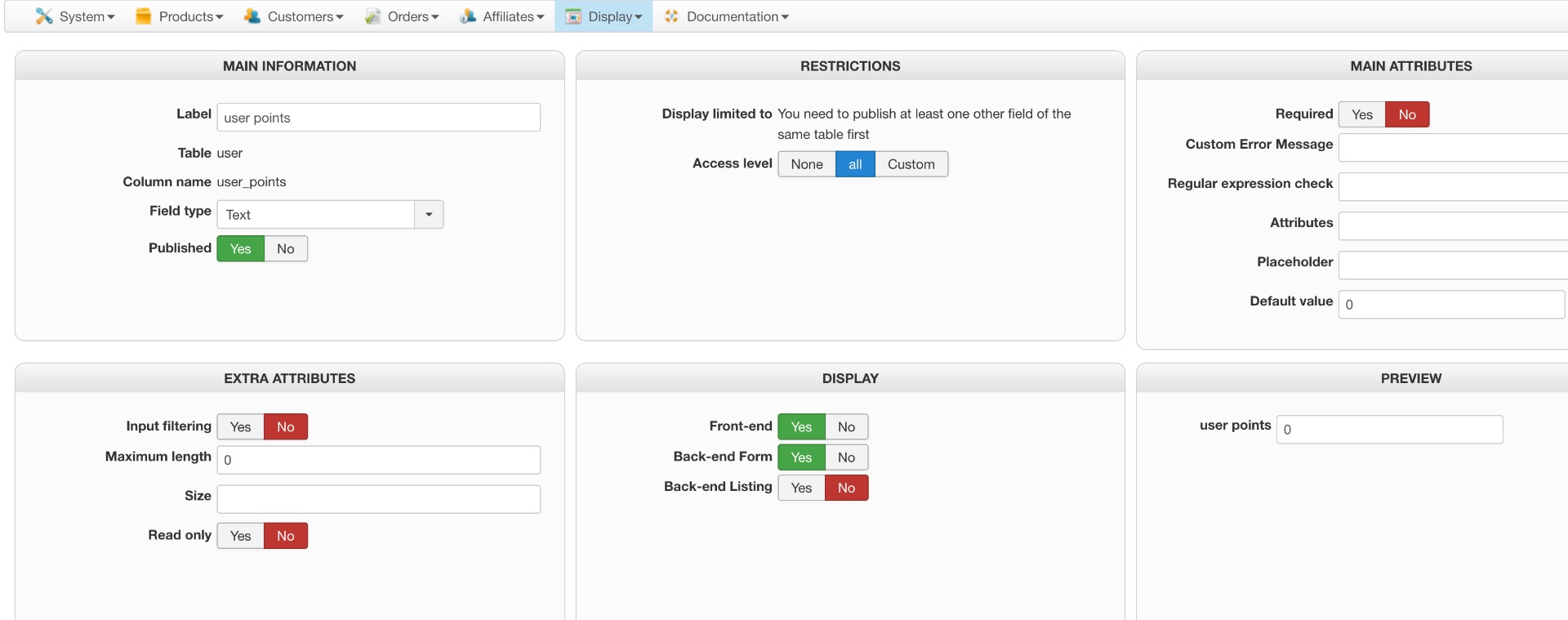
plugin
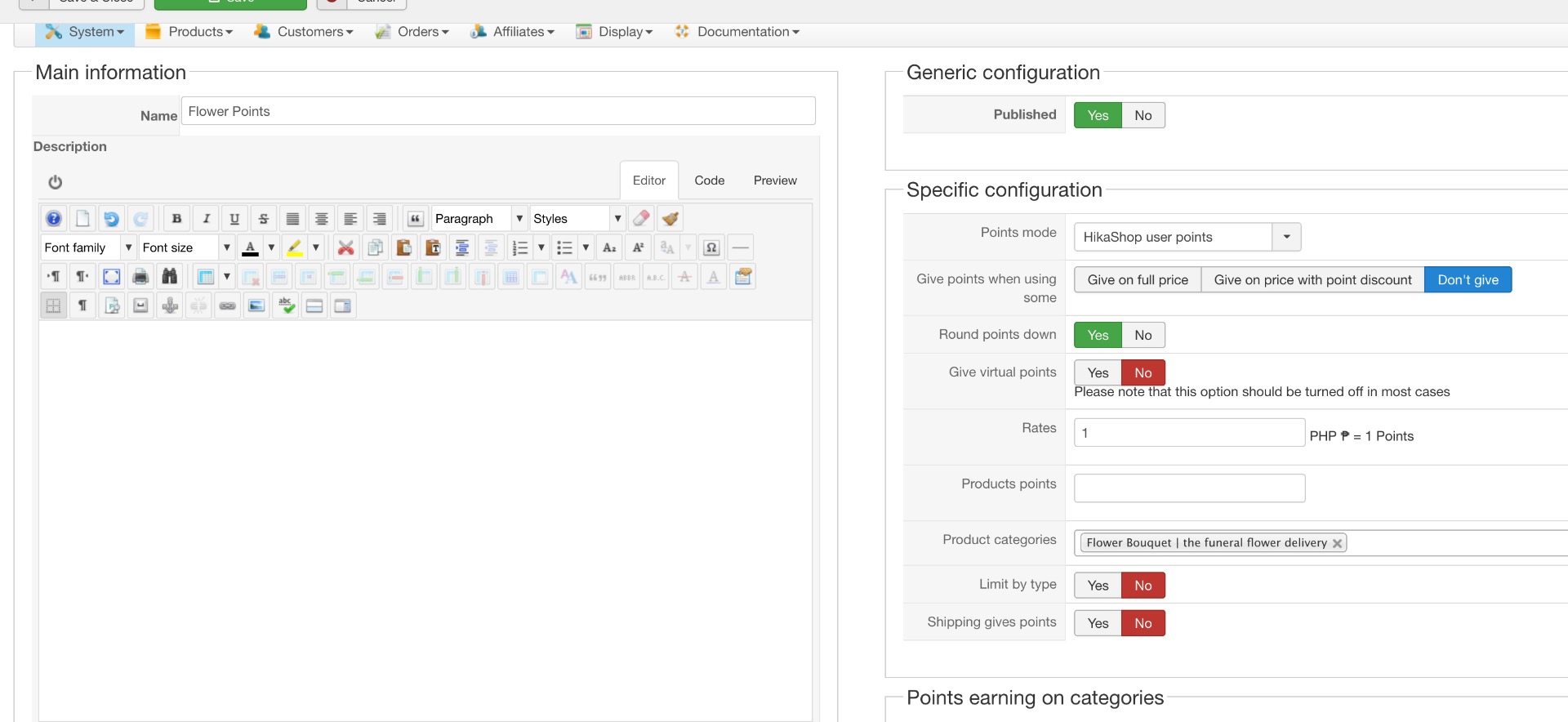
payment
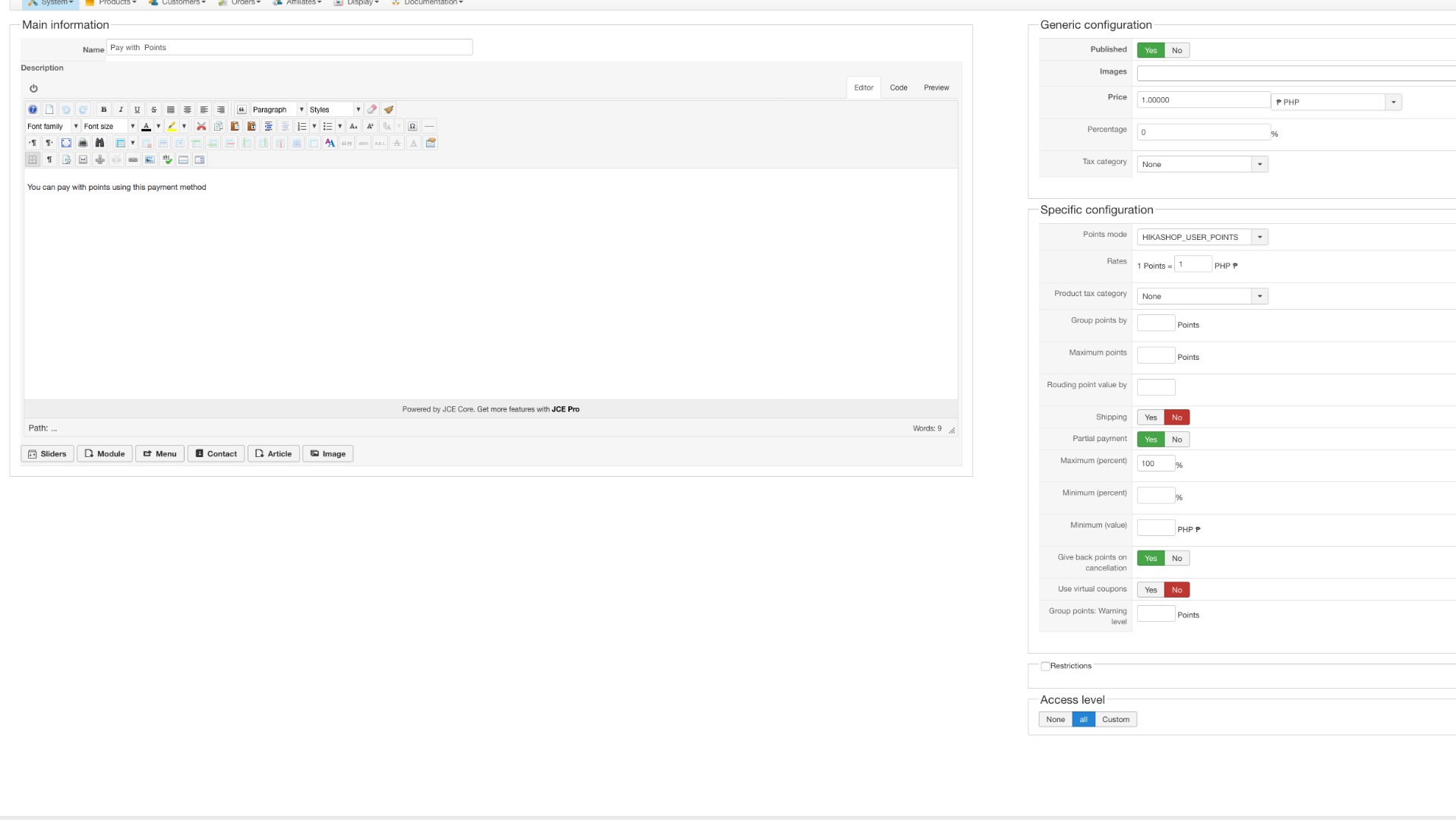
joomla plugin
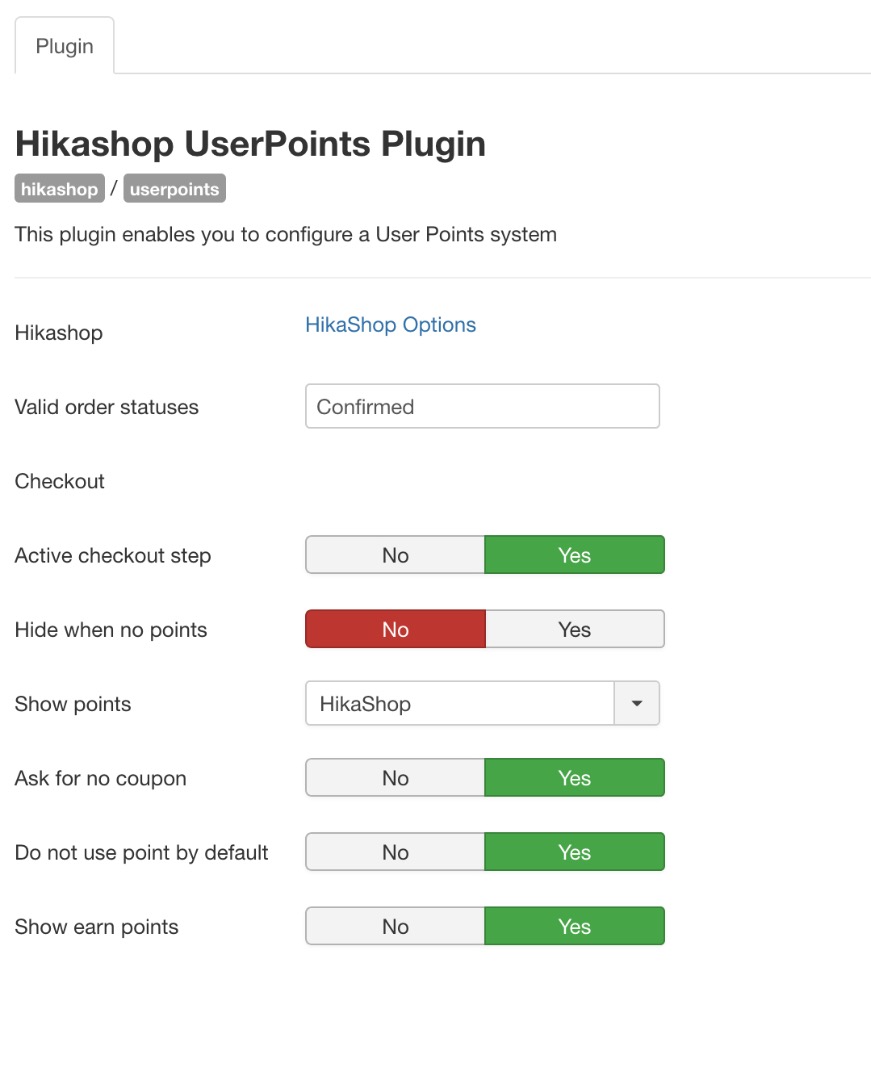
HikaShop User Points payment plugin is also enabled
thanks
-- Joomla version -- : 3.7
-- PHP version -- : 5.6
-- Error-message(debug-mod must be tuned on) -- : none
hi
i configured hike user points but i can't get it to appear on the front end. it shows that i can't earn point but it never displays how many points i have and if i can use it for payment.
please help me with the configuration
user points configuration
plugin
payment
joomla plugin
HikaShop User Points payment plugin is also enabled
thanks
Please Log in or Create an account to join the conversation.

7 years 10 months ago - 7 years 10 months ago #300833
by Philip
Replied by Philip on topic how to configure user points?
Hello,
Thanks for all your details and screenshot that give us a good view of your configuration, so far everything seems correct, but we will need to check the status configuration and relative order status :
- Provide your status listing screenshot (in Main HikaShop Configuration, System dropdown => Orders statuses)
- Check that your 3 orders status had be mute to "confirmed"
You have to know that to recieve points the order have to be "confirmed" (As I can see in your point plugin configuration).
Hope this will help you to move forward.
Regards
Thanks for all your details and screenshot that give us a good view of your configuration, so far everything seems correct, but we will need to check the status configuration and relative order status :
- Provide your status listing screenshot (in Main HikaShop Configuration, System dropdown => Orders statuses)
- Check that your 3 orders status had be mute to "confirmed"
You have to know that to recieve points the order have to be "confirmed" (As I can see in your point plugin configuration).
Hope this will help you to move forward.
Regards
Last edit: 7 years 10 months ago by Philip.
Please Log in or Create an account to join the conversation.
7 years 10 months ago - 7 years 10 months ago #300888
by ronron
Replied by ronron on topic how to configure user points?
hi
i have attached the order status
what do you mean 3?
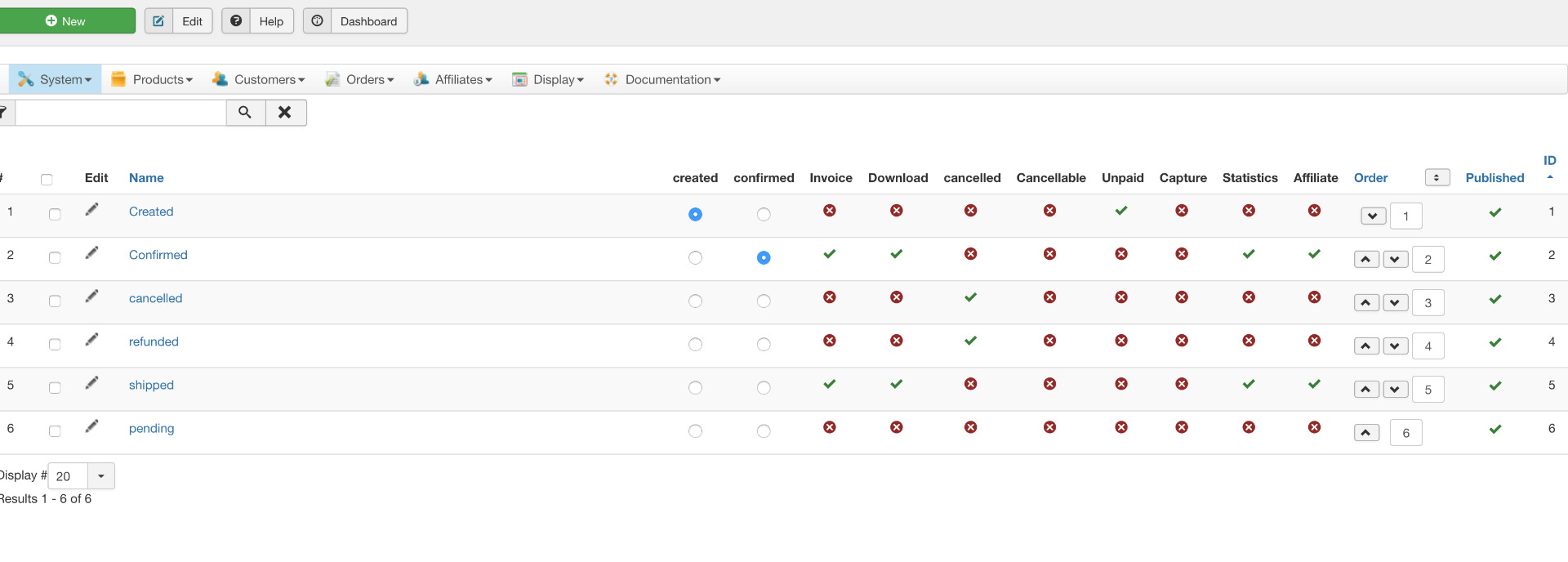
i have attached the order status
Check that your 3 orders status had be mute to "confirmed"
what do you mean 3?
Last edit: 7 years 10 months ago by ronron.
Please Log in or Create an account to join the conversation.
7 years 10 months ago #300899
by Philip
Replied by Philip on topic how to configure user points?
Hello,
Thanks for your element, I mean have a look on your Order listing to see if that your 3 "test" orders are in the confirmed status

Because, if your order status for a reason or another hadn't been changed, it's quite normal that you don't get points added.
Regards
Thanks for your element, I mean have a look on your Order listing to see if that your 3 "test" orders are in the confirmed status
Because, if your order status for a reason or another hadn't been changed, it's quite normal that you don't get points added.
Regards
Please Log in or Create an account to join the conversation.
7 years 10 months ago #301008
by ronron
Replied by ronron on topic how to configure user points?
how do i fix this?
it is not confirmed!
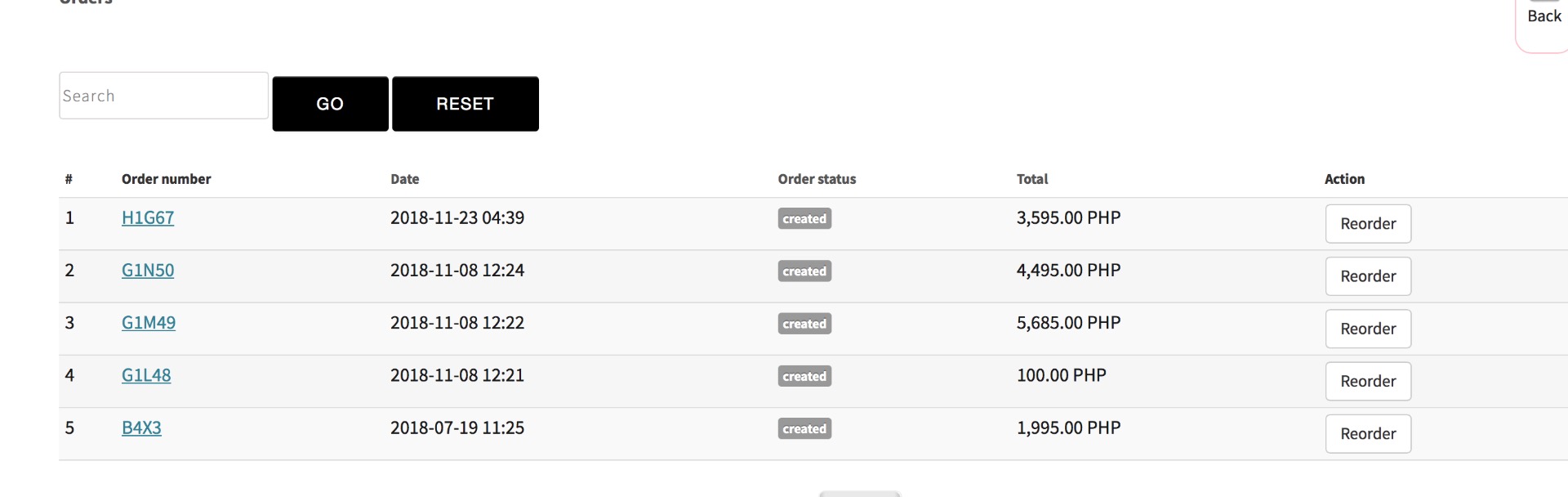
it is not confirmed!
Please Log in or Create an account to join the conversation.

7 years 10 months ago #301010
by Jerome
Jerome - Obsidev.com
HikaMarket & HikaSerial developer / HikaShop core dev team.
Replied by Jerome on topic how to configure user points?
Hello,
First, I would suggest you to let the field "Valid order statuses" empty in the UserPoint plugin (in the Joomla part, cf your screenshot).
As explained in the tooltip, by letting that field empty, it will use the order statuses marked as "invoice"
CF : message #300888
Afterwards, I don't know what payment plugin you're using or what is your workflow but an order must be confirmed when the paiement is made.
An order "created" is considered as not paid ; so you won't let the customer access to the download, give him points, etc ; if the order is not really paid.
You need to fix your payment workflow if you want the user point plugin to work as it should.
Regards,
First, I would suggest you to let the field "Valid order statuses" empty in the UserPoint plugin (in the Joomla part, cf your screenshot).
As explained in the tooltip, by letting that field empty, it will use the order statuses marked as "invoice"
CF : message #300888
Afterwards, I don't know what payment plugin you're using or what is your workflow but an order must be confirmed when the paiement is made.
An order "created" is considered as not paid ; so you won't let the customer access to the download, give him points, etc ; if the order is not really paid.
You need to fix your payment workflow if you want the user point plugin to work as it should.
Regards,
Jerome - Obsidev.com
HikaMarket & HikaSerial developer / HikaShop core dev team.
Please Log in or Create an account to join the conversation.

5 years 10 months ago #325882
by dvddvd
Replied by dvddvd on topic how to configure user points?
Hi,
I am using Hikashop's UserPoints system and everything has worked correctly, but today I have noticed the following error:
When using variants of the same product, it only assigned the points by all the variants as a single product.
In the explanations that I have found that there is the option:
"Limit by type when you're using points per product, that setting will account the variants of a product as one same product. So a product will be counted only once."
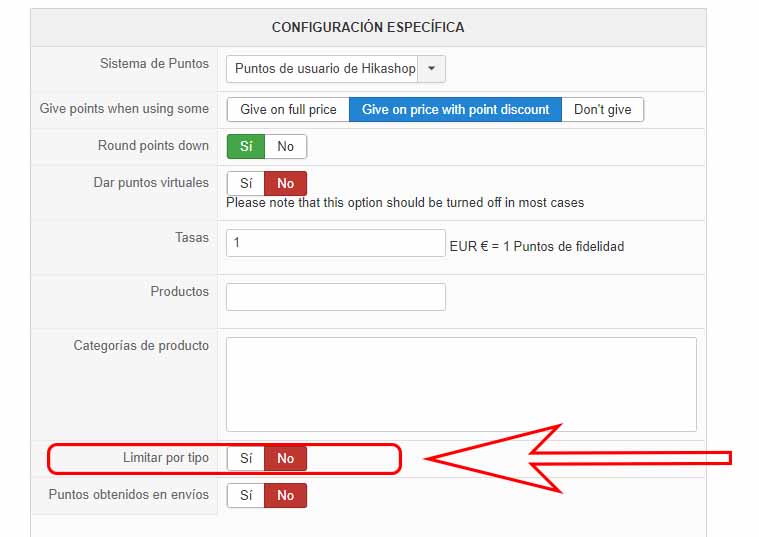
I have it set to NO, and it continues to apply the points as if it were a single product.
Thanks as always, for your help.
I am using Hikashop's UserPoints system and everything has worked correctly, but today I have noticed the following error:
When using variants of the same product, it only assigned the points by all the variants as a single product.
In the explanations that I have found that there is the option:
"Limit by type when you're using points per product, that setting will account the variants of a product as one same product. So a product will be counted only once."
I have it set to NO, and it continues to apply the points as if it were a single product.
Thanks as always, for your help.
Please Log in or Create an account to join the conversation.

5 years 10 months ago #326001
by nicolas
Replied by nicolas on topic how to configure user points?
Hi,
I was able to reproduce the problem and added a patch to the user points plugin for it.
Download the install package of the 4.4.0 on our website and install it on yours and it will add the patch for the issue.
I was able to reproduce the problem and added a patch to the user points plugin for it.
Download the install package of the 4.4.0 on our website and install it on yours and it will add the patch for the issue.
The following user(s) said Thank You: dvddvd
Please Log in or Create an account to join the conversation.
Time to create page: 0.236 seconds