

- Posts: 205
- Thank you received: 12
Empty categories message
5 years 7 months ago #330362
by liaskas
Empty categories message was created by liaskas
-- HikaShop version -- : 4.4.1
-- Joomla version -- : 3.9.25
-- PHP version -- : 7.4.14
Hello
Some of our product categories have not any products for sale yet.
Is there a way to show a message to visitors of these categories to inform them that there are no products in the parent category for the moment?
Something like.. "Currently there are no products in this category..."
Thank you
-- Joomla version -- : 3.9.25
-- PHP version -- : 7.4.14
Hello
Some of our product categories have not any products for sale yet.
Is there a way to show a message to visitors of these categories to inform them that there are no products in the parent category for the moment?
Something like.. "Currently there are no products in this category..."
Thank you
Please Log in or Create an account to join the conversation.

5 years 7 months ago #330369
by nicolas
Replied by nicolas on topic Empty categories message
Hi,
Could you provide more information on the situation ?
I checked on your link and tried to select about 15 different categories and they all had products in them.
So I also used the text search to reduce the results to 0 and I did get a "no products found" message:
i.imgur.com/BGiGqlJ.png
So if you just want to change that text, you could use a translation override, but I suspect that you're talking about something else...
Could you provide more information on the situation ?
I checked on your link and tried to select about 15 different categories and they all had products in them.
So I also used the text search to reduce the results to 0 and I did get a "no products found" message:
i.imgur.com/BGiGqlJ.png
So if you just want to change that text, you could use a translation override, but I suspect that you're talking about something else...
Please Log in or Create an account to join the conversation.
5 years 7 months ago - 5 years 7 months ago #330374
by liaskas
Replied by liaskas on topic Empty categories message
The screenshot that you send me shows the filter results page. This shows the message fine but we are talking about something else.
Please foollow the bellow link:
OUR_SITE.com/hikashop-menu-for-categories-listing
Now select category Deck / Ropes (third from the bottom to the top)
When you open this category to view the products in it, it shows absolutely nothing. We want to show the message when someone goes there through the categories list.
Thank you.
Please foollow the bellow link:
OUR_SITE.com/hikashop-menu-for-categories-listing
Now select category Deck / Ropes (third from the bottom to the top)
When you open this category to view the products in it, it shows absolutely nothing. We want to show the message when someone goes there through the categories list.
Thank you.
Last edit: 5 years 7 months ago by liaskas. Reason: Edited the link so that the domain will not be visible.
Please Log in or Create an account to join the conversation.

5 years 7 months ago - 5 years 7 months ago #330390
by Philip
Replied by Philip on topic Empty categories message
Hello,
First you have to understand how to customize your view file, via the HikaShop Override system, and so have a look on this documentation .
Then, we will guide you to perform this override, first you have to create an override view from the view Category/listing.
Around line 100, you will see this :
Add this kind of element for display your required message, only if there are nothing to display, and you will have this :
Hope this will help you to achieve what your requested.
Regards
First you have to understand how to customize your view file, via the HikaShop Override system, and so have a look on this documentation .
Then, we will guide you to perform this override, first you have to create an override view from the view Category/listing.
Around line 100, you will see this :
Code:
...
$html = $this->loadTemplate($layout_type);
if(!empty($html)) echo '<div class="hikashop_subcategories_listing">'.$html.'</div>';
if(!$this->module)
...
Code:
...
$html = $this->loadTemplate($layout_type);
if(!empty($html)) echo '<div class="hikashop_subcategories_listing">'.$html.'</div>';
else echo '<div class="hikashop_no_subcategories_listing">NO PRODUCT AVAILABLE</div>';
if(!$this->module)
...
Hope this will help you to achieve what your requested.
Regards
Last edit: 5 years 7 months ago by Philip.
The following user(s) said Thank You: liaskas
Please Log in or Create an account to join the conversation.
5 years 7 months ago - 5 years 7 months ago #330409
by liaskas
Replied by liaskas on topic Empty categories message
The message works Philip but...
Can we make it not show in the Brands categories?
Example...
When user is in a product details page, he sees the Manufacturer link. When clicking the manufacturer link he is transfered to a page that shows all the products from this manufacturer correctly, but right above the products it shows this message that is created by the modification you previously gave me.
Thank you
Can we make it not show in the Brands categories?
Example...
When user is in a product details page, he sees the Manufacturer link. When clicking the manufacturer link he is transfered to a page that shows all the products from this manufacturer correctly, but right above the products it shows this message that is created by the modification you previously gave me.
Thank you
Last edit: 5 years 7 months ago by liaskas. Reason: Just discovered a small problem with the solution provided
Please Log in or Create an account to join the conversation.
5 years 7 months ago - 5 years 7 months ago #330451
by Philip
Replied by Philip on topic Empty categories message
Hello,
In order to refine our advice can you provide us with the following elements :
- An url to the context where the message is displayed when this isn't desired.
=> No need to have the current custom message display.
- A screenshot of this same context but with the Display view files option activate on Front-end
=> You will find this option from Main HikaShop Configuration => Advanced tab, first displayed option.
Awaiting your element to better answer you.
Regards
In order to refine our advice can you provide us with the following elements :
- An url to the context where the message is displayed when this isn't desired.
=> No need to have the current custom message display.
- A screenshot of this same context but with the Display view files option activate on Front-end
=> You will find this option from Main HikaShop Configuration => Advanced tab, first displayed option.
Awaiting your element to better answer you.
Regards
Last edit: 5 years 7 months ago by Philip.
Please Log in or Create an account to join the conversation.
5 years 7 months ago - 5 years 7 months ago #330462
by liaskas
Replied by liaskas on topic Empty categories message
(Removed from post owner) (here we do not want the "NO PRODUCTS AVAILABLE" message to how because as you can see there are products in this category.)
We need to show this message to all lowest level categories that do not have any products, no matter if you visit these categories by menu item or any other way.
We need to show this message to all lowest level categories that do not have any products, no matter if you visit these categories by menu item or any other way.
Last edit: 5 years 7 months ago by liaskas.
Please Log in or Create an account to join the conversation.
5 years 7 months ago - 5 years 7 months ago #330468
by Philip
Replied by Philip on topic Empty categories message
Hello,
Thanks for your elements, these allow us to progress on your subject, and so can you try this code :
Previously, I suggest you this :
Try this to see if that works better :
Hope this meet your expectations.
Regards
Thanks for your elements, these allow us to progress on your subject, and so can you try this code :
Previously, I suggest you this :
Code:
...
$html = $this->loadTemplate($layout_type);
if(!empty($html)) echo '<div class="hikashop_subcategories_listing">'.$html.'</div>';
else echo '<div class="hikashop_no_subcategories_listing">NO PRODUCT AVAILABLE</div>';
if(!$this->module)
...
Try this to see if that works better :
Code:
...
$html = $this->loadTemplate($layout_type);
if(!empty($html)) echo '<div class="hikashop_subcategories_listing">'.$html.'</div>';
if ((empty($html)) && (empty(!$this->module))) {
echo '<div class="hikashop_no_subcategories_listing">NO PRODUCT AVAILABLE</div>';
}
if(!$this->module)
...
Hope this meet your expectations.
Regards
Last edit: 5 years 7 months ago by Philip.
Please Log in or Create an account to join the conversation.
5 years 7 months ago #330500
by liaskas
Replied by liaskas on topic Empty categories message
Thank you for your reply Philip, but i could not test your patch.
When i apply it in the script, the category listing page gives a page with the message... "0 syntax error, unexpected '}', expecting end of file".
I am not a coder, so is it possible to check?
Thank you
When i apply it in the script, the category listing page gives a page with the message... "0 syntax error, unexpected '}', expecting end of file".
I am not a coder, so is it possible to check?
Thank you
Please Log in or Create an account to join the conversation.
5 years 7 months ago - 5 years 7 months ago #330518
by Philip
Replied by Philip on topic Empty categories message
Hello,
We check the code that we provide but it seems that our code didn't have any mistake or typo, from this and your reported error message it seems that you have forget an ";".
To be sure, go back to the default file, without modifications and just pasted this code (in the same line):
To have this, the addition of code is here in red :
...
if(!empty($html)) echo '<div class="hikashop_subcategories_listing">'.$html.'</div>';
if ((empty($html)) && (empty(!$this->module))) {
echo '<div class="hikashop_no_subcategories_listing">NO PRODUCT AVAILABLE</div>';
}
if(!$this->module){
...
We can highly recommend you to use a code editor, because this tool will spot this kind of little error.
Hope this will help you to progress.
Regards
We check the code that we provide but it seems that our code didn't have any mistake or typo, from this and your reported error message it seems that you have forget an ";".
To be sure, go back to the default file, without modifications and just pasted this code (in the same line):
Code:
if ((empty($html)) && (empty(!$this->module))) {
echo '<div class="hikashop_no_subcategories_listing">NO PRODUCT AVAILABLE</div>';
}
To have this, the addition of code is here in red :
...
if(!empty($html)) echo '<div class="hikashop_subcategories_listing">'.$html.'</div>';
if ((empty($html)) && (empty(!$this->module))) {
echo '<div class="hikashop_no_subcategories_listing">NO PRODUCT AVAILABLE</div>';
}
if(!$this->module){
...
We can highly recommend you to use a code editor, because this tool will spot this kind of little error.
Hope this will help you to progress.
Regards
Last edit: 5 years 7 months ago by Philip.
Please Log in or Create an account to join the conversation.
5 years 7 months ago - 5 years 7 months ago #330643
by liaskas
Replied by liaskas on topic Empty categories message
Thank you Philip for taking the time to help me. I appreciate it. You are right it was my mistake that was giving the error.
Unfortunately with the new code the message does not show at all...
Here is the code as it has been entered to listing.php
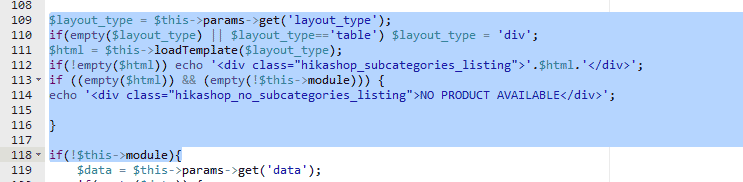
Let me try to explain better what we need.
We have a multi level category tree and only the bottom level categories contain products.
Example:
Category1
- Subcategory1
- Sub-Subcategory1
- Sub-Subcategory2
- Sub-Subcategory3
- ...
Only Sub-Subcategories contain products
Visitors can access these Sub-Subcategories 2 ways.
Example:
Menu item link to Sub-Subcategory: There is no message at all. The page shows nothing!
Step by step following the categories till we reach the bottom level category: There is no message at all. The page shows nothing!
Thank you
Unfortunately with the new code the message does not show at all...
Here is the code as it has been entered to listing.php
Let me try to explain better what we need.
We have a multi level category tree and only the bottom level categories contain products.
Example:
Category1
- Subcategory1
- Sub-Subcategory1
- Sub-Subcategory2
- Sub-Subcategory3
- ...
Only Sub-Subcategories contain products
Visitors can access these Sub-Subcategories 2 ways.
- By clicking on a menu item that links directly to the Sub-Subcategory
- By following the categories list menu item, and reach the Sub-Subcategory step by step
Example:
Menu item link to Sub-Subcategory: There is no message at all. The page shows nothing!
Step by step following the categories till we reach the bottom level category: There is no message at all. The page shows nothing!
Thank you
Last edit: 5 years 7 months ago by liaskas.
Please Log in or Create an account to join the conversation.
5 years 7 months ago - 5 years 7 months ago #330663
by Philip
Replied by Philip on topic Empty categories message
Hello,
Sorry for this but I have made a mistake, really sorry for this, I analyze deeper the solution let's restart from scratch, follow me step by step :
- First don't use category/Listing view but rather the product/Listing
- Go around line 270, find this code :
Code view :

The part underlined in red is the one that must be deleted.
- Remove the part after the "...|| $ctrl == 'category') && $task == 'listing' ", to have this :
This solution is a little tricky but must better fit your needs, and will display automatically a message thanks to this code :
Hope this will fit your needs.
Regards
Sorry for this but I have made a mistake, really sorry for this, I analyze deeper the solution let's restart from scratch, follow me step by step :
- First don't use category/Listing view but rather the product/Listing
- Go around line 270, find this code :
Code:
} elseif(( !$this->module || hikaInput::get()->getVar('hikashop_front_end_main',0) ) && ($ctrl == 'product' || $ctrl == 'category') && $task == 'listing' && !empty($this->filters) && is_array($this->filters) && count($this->filters) && !empty($this->filter_set)) {
Code view :
The part underlined in red is the one that must be deleted.
- Remove the part after the "...|| $ctrl == 'category') && $task == 'listing' ", to have this :
Code:
} elseif(( !$this->module || hikaInput::get()->getVar('hikashop_front_end_main',0) ) && ($ctrl == 'product' || $ctrl == 'category') && $task == 'listing') {
This solution is a little tricky but must better fit your needs, and will display automatically a message thanks to this code :
Code:
echo '<div class="hk-well hika_no_products"><i class="fa fa-search"></i> ' . JText::_('HIKASHOP_NO_RESULT') . '</div>';
Regards
Last edit: 5 years 7 months ago by Philip.
The following user(s) said Thank You: liaskas
Please Log in or Create an account to join the conversation.
5 years 7 months ago #330694
by liaskas
Replied by liaskas on topic Empty categories message
PERFECT....
Thank you! Everything is Ok now and no worries. What matters is that you have the will to help.
Thank you again.
Thank you! Everything is Ok now and no worries. What matters is that you have the will to help.
Thank you again.
The following user(s) said Thank You: Philip
Please Log in or Create an account to join the conversation.
4 years 9 months ago - 4 years 9 months ago #338565
by ilyaminsk
Replied by ilyaminsk on topic Empty categories message
Hello.
1. Did as you wrote.
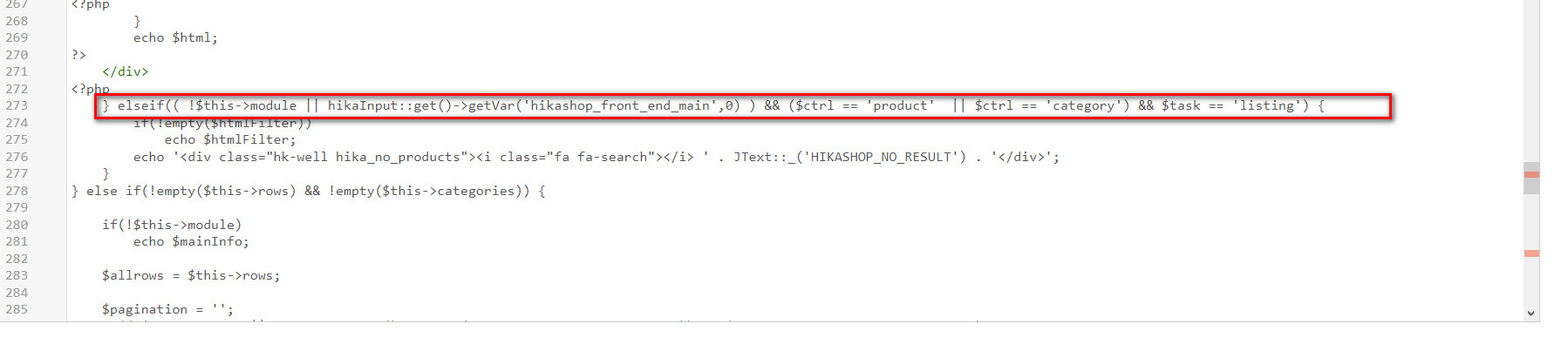
But for some reason it does not show correctly.
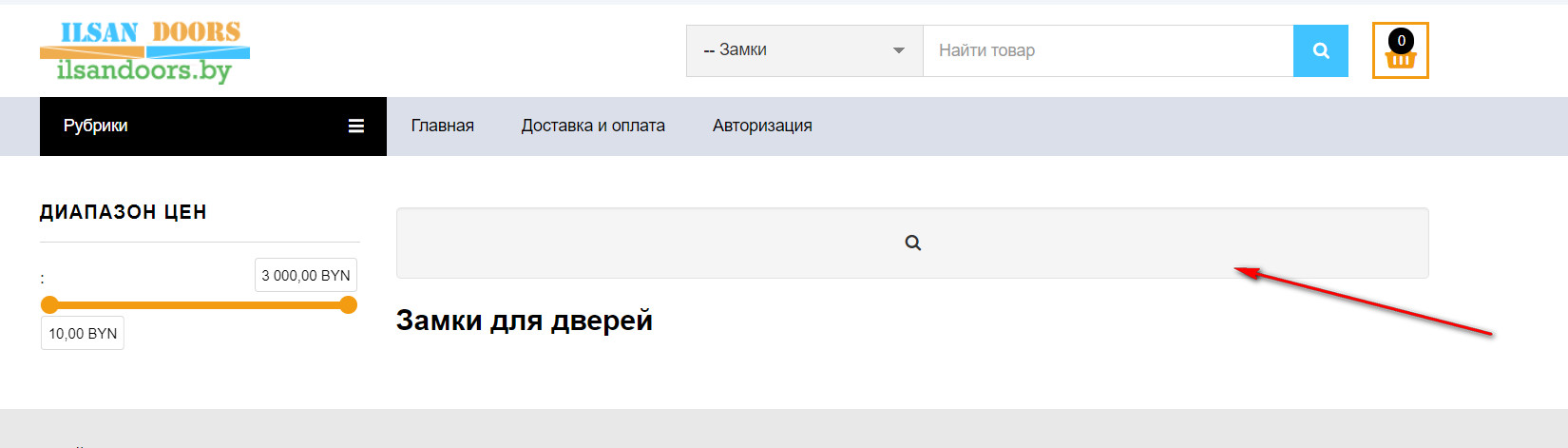
For some reason, the text does not say that there is no such product.
____________________________________________________
2. How to make sure that by entering these two searches, if the product is written incorrectly, it will be written: "There is no such product in this category"?
1. Did as you wrote.
Code:
"} elseif(( !$this->module || hikaInput::get()->getVar('hikashop_front_end_main',0) ) && ($ctrl == 'product' || $ctrl == 'category') && $task == 'listing') {"
But for some reason it does not show correctly.
This message contains confidential information
For some reason, the text does not say that there is no such product.
____________________________________________________
2. How to make sure that by entering these two searches, if the product is written incorrectly, it will be written: "There is no such product in this category"?
Last edit: 4 years 9 months ago by nicolas.
Please Log in or Create an account to join the conversation.
4 years 9 months ago #338566
by nicolas
Replied by nicolas on topic Empty categories message
Hi,
You have a translation issue.
The icon there will only display if there are no results and in that case, it will display the text for the translation key HIKASHOP_NO_RESULT next to it.
So that means that in your HikaShop translation file, you have the line:
HIKASHOP_NO_RESULT=""
which results in no message displayed.
But in the HikaShop English translation file (the main one), we have this:
HIKASHOP_NO_RESULT="No products found."
So you need to check your translations under the tab "Languages" of the HikaShop configuration and search for that translation key.
You have a translation issue.
The icon there will only display if there are no results and in that case, it will display the text for the translation key HIKASHOP_NO_RESULT next to it.
So that means that in your HikaShop translation file, you have the line:
HIKASHOP_NO_RESULT=""
which results in no message displayed.
But in the HikaShop English translation file (the main one), we have this:
HIKASHOP_NO_RESULT="No products found."
So you need to check your translations under the tab "Languages" of the HikaShop configuration and search for that translation key.
Please Log in or Create an account to join the conversation.
4 years 9 months ago #338588
by ilyaminsk
Replied by ilyaminsk on topic Empty categories message
Hello. Thanks. Helped. But another problem arose. When I open a subcategory in which there are other subcategories, it says that the product was not found. Example:
This message contains confidential information
I would like such a message to appear only for the search, when the product is not found. Is it possible to do it this way? Please Log in or Create an account to join the conversation.
4 years 9 months ago - 4 years 9 months ago #338596
by Philip
Replied by Philip on topic Empty categories message
Hello,
You can try 2 differents solutions :
1. First in the relative Item Menu (with the Id 2723), go to Categories options tab, and in Category data display
=> Define the "Only with products" on "Yes"
Il the previous solution didn't work :
2. A custom css command to directl hide this part for required context.
Example :
.required_context_id1 .hikashop_submodules,
.required_context_id2 .hikashop_submodules {
// To hide unwanted "no product found" message
display: none;
}
Hope this will you to achieved what you need.
Regards
You can try 2 differents solutions :
1. First in the relative Item Menu (with the Id 2723), go to Categories options tab, and in Category data display
=> Define the "Only with products" on "Yes"
Il the previous solution didn't work :
2. A custom css command to directl hide this part for required context.
Example :
.required_context_id1 .hikashop_submodules,
.required_context_id2 .hikashop_submodules {
// To hide unwanted "no product found" message
display: none;
}
Hope this will you to achieved what you need.
Regards
Last edit: 4 years 9 months ago by Philip.
Please Log in or Create an account to join the conversation.
4 years 9 months ago #338622
by ilyaminsk
Replied by ilyaminsk on topic Empty categories message
Hello. 2. Need to add to custom.css in Hikashop configurations? Added something not working.
Please Log in or Create an account to join the conversation.
4 years 9 months ago #338623
by ilyaminsk
Replied by ilyaminsk on topic Empty categories message
1. Did not help.
Please Log in or Create an account to join the conversation.
4 years 9 months ago #338650
by nicolas
Replied by nicolas on topic Empty categories message
Hi,
I think it comes from the code in product / listing.php
By default you should now have:
You're basically missing the part
which says "only when filters are there and used".
I think it comes from the code in product / listing.php
By default you should now have:
Code:
} elseif(( !$this->module || hikaInput::get()->getVar('hikashop_front_end_main',0) ) && ($ctrl == 'product' || $ctrl == 'category') && $task == 'listing' && !empty($this->filters) && is_array($this->filters) && count($this->filters) && !empty($this->filter_set)) {
Code:
&& !empty($this->filters) && is_array($this->filters) && count($this->filters) && !empty($this->filter_set)
Please Log in or Create an account to join the conversation.
Time to create page: 0.254 seconds