

- Posts: 193
- Thank you received: 11
Address Auto Complete
4 years 3 days ago #345048
by affaf1952
Address Auto Complete was created by affaf1952
Hello,
Recently we bought the plugin for Auto Complete it works perfect thank you for Nick with his Hint, but I face a little tiny issue just kind of modification I guess
the order of the name and address it should be like the attachment
this is how we set it up
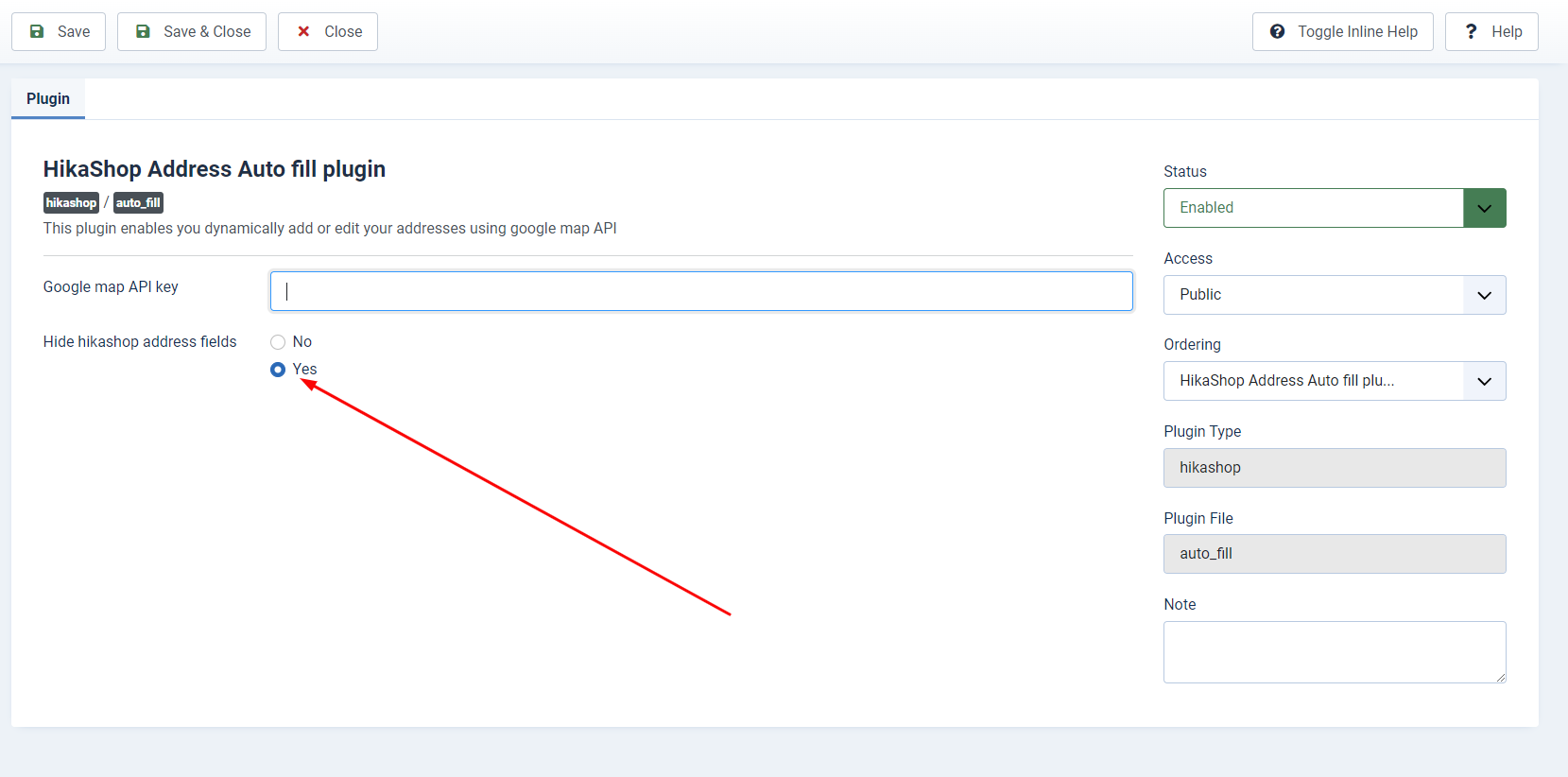
then this is how it looks
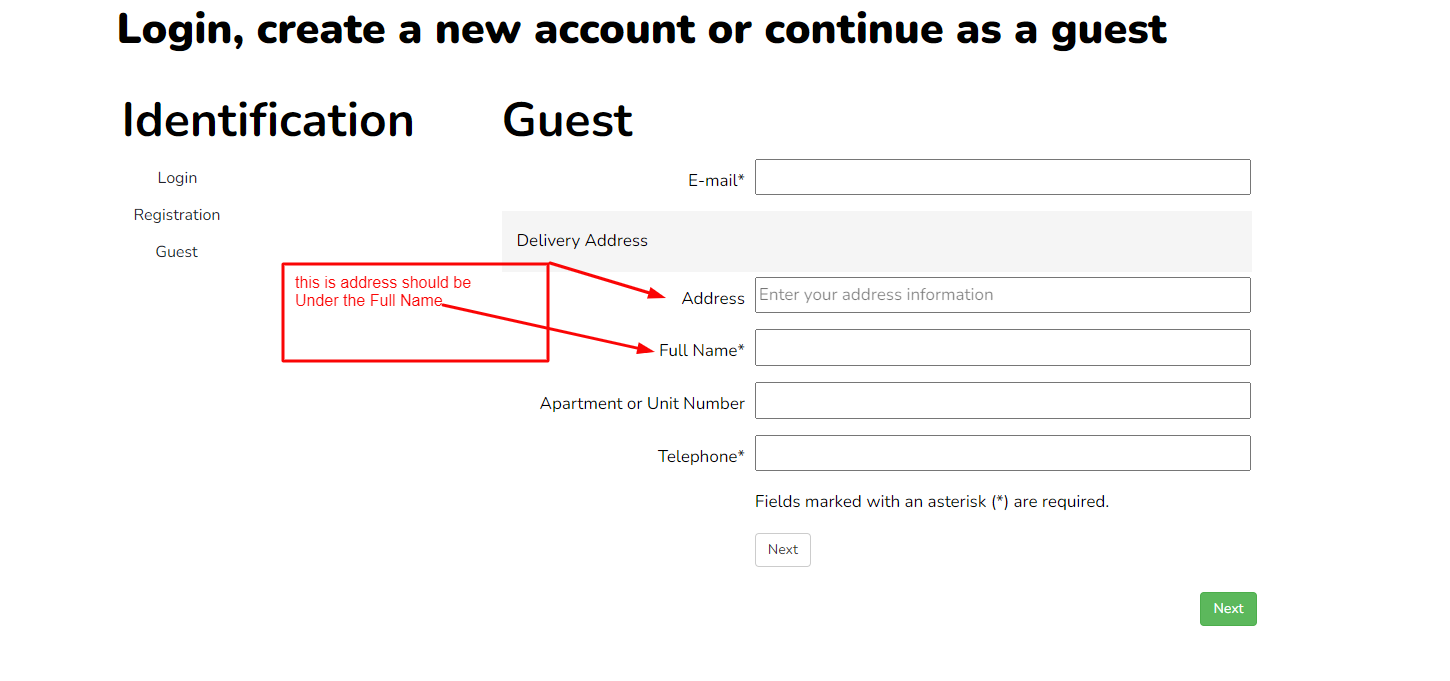
and it should email first then name then address,
would you please help us to accomplish this task thanks
Recently we bought the plugin for Auto Complete it works perfect thank you for Nick with his Hint, but I face a little tiny issue just kind of modification I guess
the order of the name and address it should be like the attachment
this is how we set it up
then this is how it looks
and it should email first then name then address,
would you please help us to accomplish this task thanks
Please Log in or Create an account to join the conversation.

4 years 2 days ago - 4 years 3 days ago #345050
by Philip
Replied by Philip on topic Address Auto Complete
Hello,
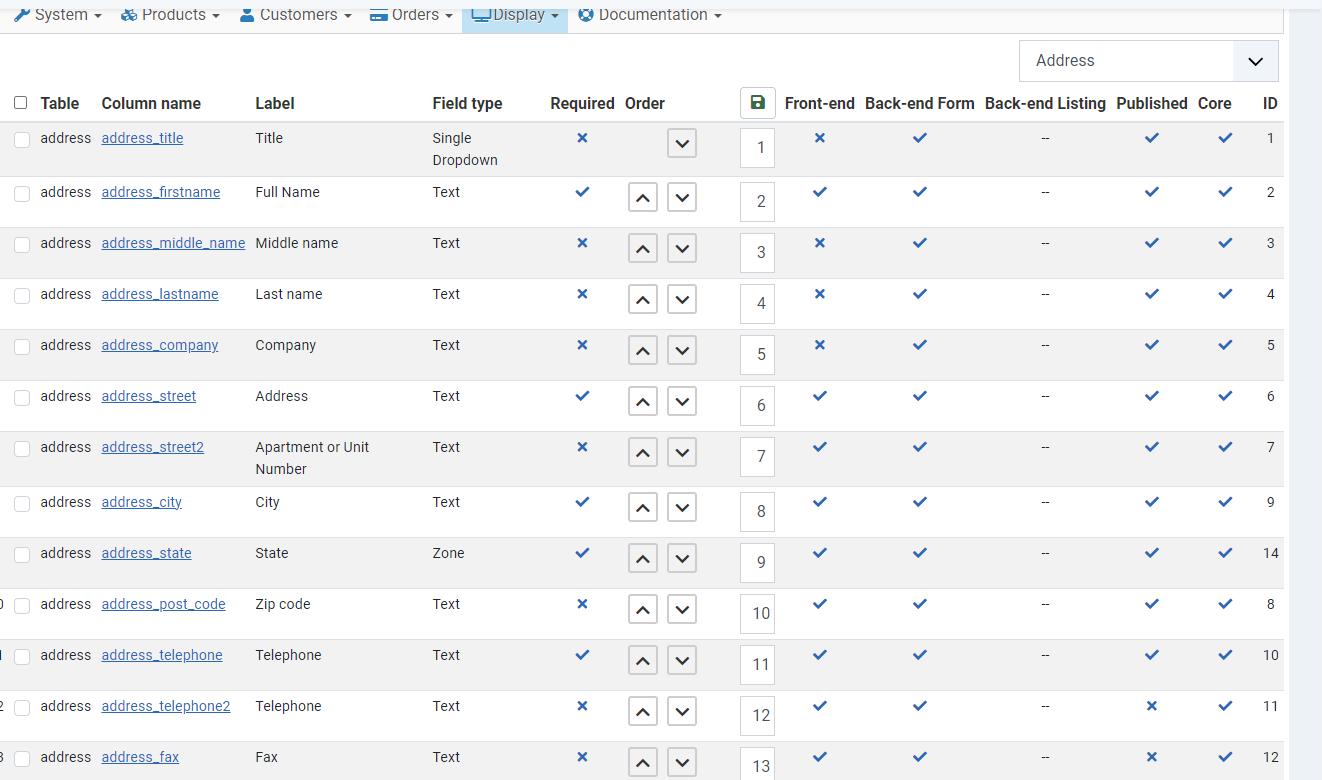
Did you check your your relative address field order from Main HikaShop Configuration, go to Display tab => Custom fields, then in the dropdown select "Address".
You have an order field in order to define your address field order, see my screenshot :

Regards
Did you check your your relative address field order from Main HikaShop Configuration, go to Display tab => Custom fields, then in the dropdown select "Address".
You have an order field in order to define your address field order, see my screenshot :
Regards
Last edit: 4 years 3 days ago by Philip.
The following user(s) said Thank You: affaf1952
Please Log in or Create an account to join the conversation.
4 years 2 days ago #345055
by affaf1952
Replied by affaf1952 on topic Address Auto Complete
Hello Phill,
I did some changes along the way when we are working on this website, then a few days ago we installed the auto-complete address plugin we choose yes in the plugin as you see in the first attachment,
see this attachment from the drop-down address if you could guide us thanks
Thanks
I did some changes along the way when we are working on this website, then a few days ago we installed the auto-complete address plugin we choose yes in the plugin as you see in the first attachment,
see this attachment from the drop-down address if you could guide us thanks
Thanks
Please Log in or Create an account to join the conversation.

4 years 2 days ago #345059
by nicolas
Replied by nicolas on topic Address Auto Complete
Hi,
It's not possible to add the auto fill input in between custom address fields with the options available.
Even custom coding is not that easy to add it.
However, what you can do is move it after the address fields (so below the telephone field).
To do that, you can edit the file sub_block_login_registration via the menu Display>Views and drag & drop the "billing address top extra data" block after the "billing address fields" block (and same for shipping).
It's not possible to add the auto fill input in between custom address fields with the options available.
Even custom coding is not that easy to add it.
However, what you can do is move it after the address fields (so below the telephone field).
To do that, you can edit the file sub_block_login_registration via the menu Display>Views and drag & drop the "billing address top extra data" block after the "billing address fields" block (and same for shipping).
The following user(s) said Thank You: affaf1952
Please Log in or Create an account to join the conversation.
4 years 2 days ago #345072
by affaf1952
Replied by affaf1952 on topic Address Auto Complete
Hello Nick and Phill,
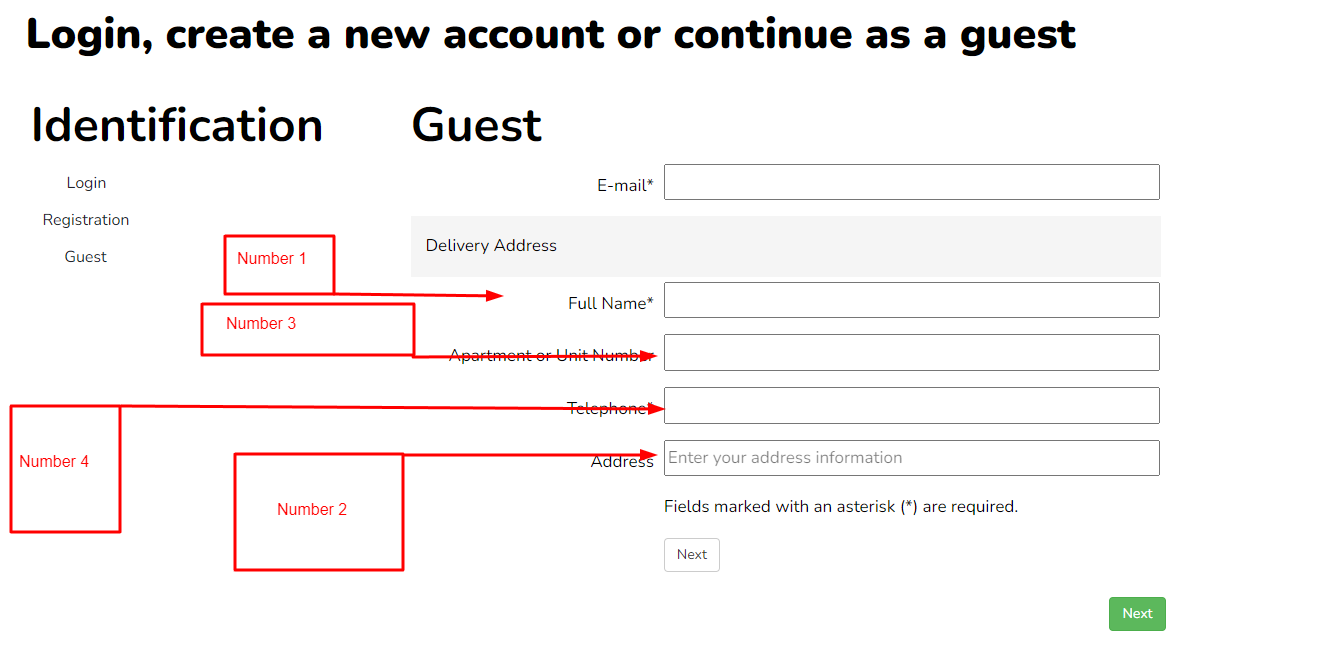
I follow and did the steps and make a little change, maybe I wasn't clear enough, here you go in the correct order if we could accomplish it, please see the attachment, thanks
I follow and did the steps and make a little change, maybe I wasn't clear enough, here you go in the correct order if we could accomplish it, please see the attachment, thanks
Please Log in or Create an account to join the conversation.
4 years 1 day ago #345074
by nicolas
Replied by nicolas on topic Address Auto Complete
Hi,
The steps I proposed in my previous message will indeed give the result of your last screenshot.
As I said in my previous message, it's not possible to add the auto fill input in between custom address fields with the options available. So the auto fill input field cannot be in position number 2, unless a developer implements a more complex customization to the view. Basically, it requires displaying the custom fields in two steps instead of one, and moving the extra data in between.
The steps I proposed in my previous message will indeed give the result of your last screenshot.
As I said in my previous message, it's not possible to add the auto fill input in between custom address fields with the options available. So the auto fill input field cannot be in position number 2, unless a developer implements a more complex customization to the view. Basically, it requires displaying the custom fields in two steps instead of one, and moving the extra data in between.
The following user(s) said Thank You: affaf1952
Please Log in or Create an account to join the conversation.
4 years 1 day ago #345084
by affaf1952
Replied by affaf1952 on topic Address Auto Complete
Hi, okay the. I will keep it the way how it was, thank you!
Please Log in or Create an account to join the conversation.
Time to create page: 0.165 seconds