

- Posts: 193
- Thank you received: 11
Food Available only on certain days
3 years 10 months ago #347790
by affaf1952
Food Available only on certain days was created by affaf1952
Hello,
we encountered a new issue and are not sure how to go around this, our client asked if there are certain items (food)from the menu not available only on those days, Wednesday and Friday, and how we can make these items okay to be added to the cart only on those two days and on the other days grayed out or something similar, any help and advice appreciated, thanks
we encountered a new issue and are not sure how to go around this, our client asked if there are certain items (food)from the menu not available only on those days, Wednesday and Friday, and how we can make these items okay to be added to the cart only on those two days and on the other days grayed out or something similar, any help and advice appreciated, thanks
Please Log in or Create an account to join the conversation.

3 years 10 months ago #347792
by nicolas
Replied by nicolas on topic Food Available only on certain days
Hi,
What you want to do is use the "shop close hours" plugin.
This plugins allows you to set openning hours for the sale of all or some products.
So customers will still be able to add the products to the cart. However, they will be blocked on the checkout based on the time of the day and the day and the rules you configure with the shop close hours plugin.
So first, I think you'll want to create an unpublished category for the products you want to restrict and add that category as second category of these products.
Then, you'll want to add your rules. To do that, go in the menu System>Plugins and click on the "new" button to create a new rule and select the shop close hours plugin. In it, you'll be able to enter a name, select that unpublished category, and enter the sale starting day of the week and hour, and the sale end day of the week and hour.
So you'll have to rince and repeat that procedure to enter all the different rules.
If you want to allow for the sale of these products on all the days except Wednesday and Friday, you'll want 2 rules:
- one with the start day being Thurday at 00:01 and the end day being Thurday at 23:59
- one with the start day being Saturday at 00:01 and the end day being Tuesday at 23:59
If you're selling food to pickup at a restaurant, usually, you would want to adapt these to match with the openning hours of the restaurant.
Finally, you might also want to use a translation override to customize the error message the customers will see on the checkout when trying to checkout with the products of that unpublished category on Wednesday/Friday so that it better match with the situation of the online shop.
Merry Christmas !
What you want to do is use the "shop close hours" plugin.
This plugins allows you to set openning hours for the sale of all or some products.
So customers will still be able to add the products to the cart. However, they will be blocked on the checkout based on the time of the day and the day and the rules you configure with the shop close hours plugin.
So first, I think you'll want to create an unpublished category for the products you want to restrict and add that category as second category of these products.
Then, you'll want to add your rules. To do that, go in the menu System>Plugins and click on the "new" button to create a new rule and select the shop close hours plugin. In it, you'll be able to enter a name, select that unpublished category, and enter the sale starting day of the week and hour, and the sale end day of the week and hour.
So you'll have to rince and repeat that procedure to enter all the different rules.
If you want to allow for the sale of these products on all the days except Wednesday and Friday, you'll want 2 rules:
- one with the start day being Thurday at 00:01 and the end day being Thurday at 23:59
- one with the start day being Saturday at 00:01 and the end day being Tuesday at 23:59
If you're selling food to pickup at a restaurant, usually, you would want to adapt these to match with the openning hours of the restaurant.
Finally, you might also want to use a translation override to customize the error message the customers will see on the checkout when trying to checkout with the products of that unpublished category on Wednesday/Friday so that it better match with the situation of the online shop.
Merry Christmas !
Please Log in or Create an account to join the conversation.
3 years 10 months ago - 3 years 10 months ago #347798
by affaf1952
Replied by affaf1952 on topic Food Available only on certain days
Hello and thank you for your replay, the sales not available all week days its only Wednesday and Friday so the rules below need to be adjusted, would you help please thank you
***If you want to allow for the sale of these products on all the days except Wednesday and Friday, you'll want 2 rules:
- one with the start day being Thurday at 00:01 and the end day being Thurday at 23:59
- one with the start day being Saturday at 00:01 and the end day being Tuesday at 23:59***
see attachment, the store hours always 11 AM to 10 PM
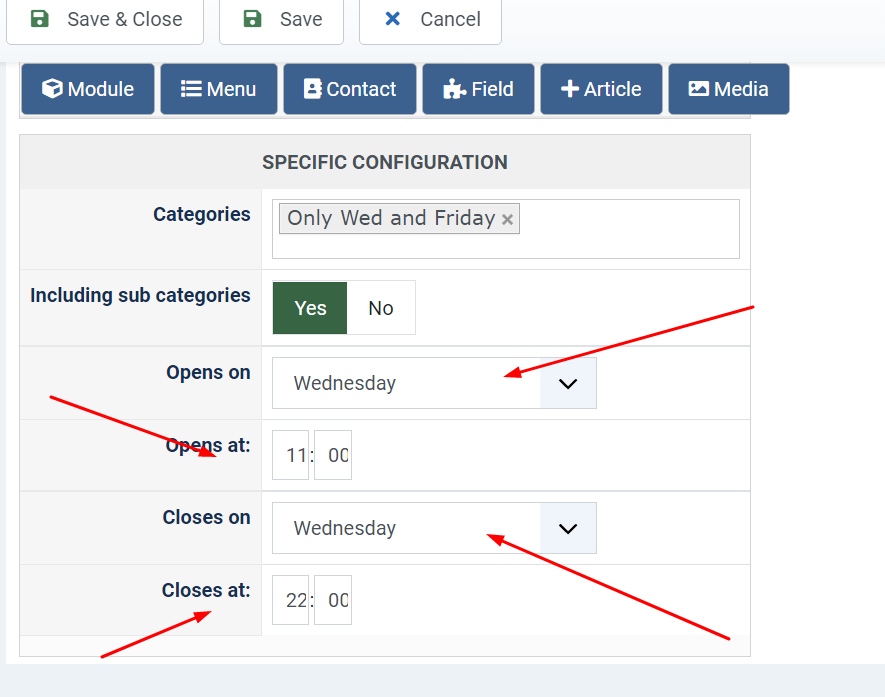
is that correct?
thanks
***If you want to allow for the sale of these products on all the days except Wednesday and Friday, you'll want 2 rules:
- one with the start day being Thurday at 00:01 and the end day being Thurday at 23:59
- one with the start day being Saturday at 00:01 and the end day being Tuesday at 23:59***
see attachment, the store hours always 11 AM to 10 PM
is that correct?
thanks
Last edit: 3 years 10 months ago by affaf1952.
Please Log in or Create an account to join the conversation.
3 years 10 months ago #347799
by affaf1952
Replied by affaf1952 on topic Food Available only on certain days
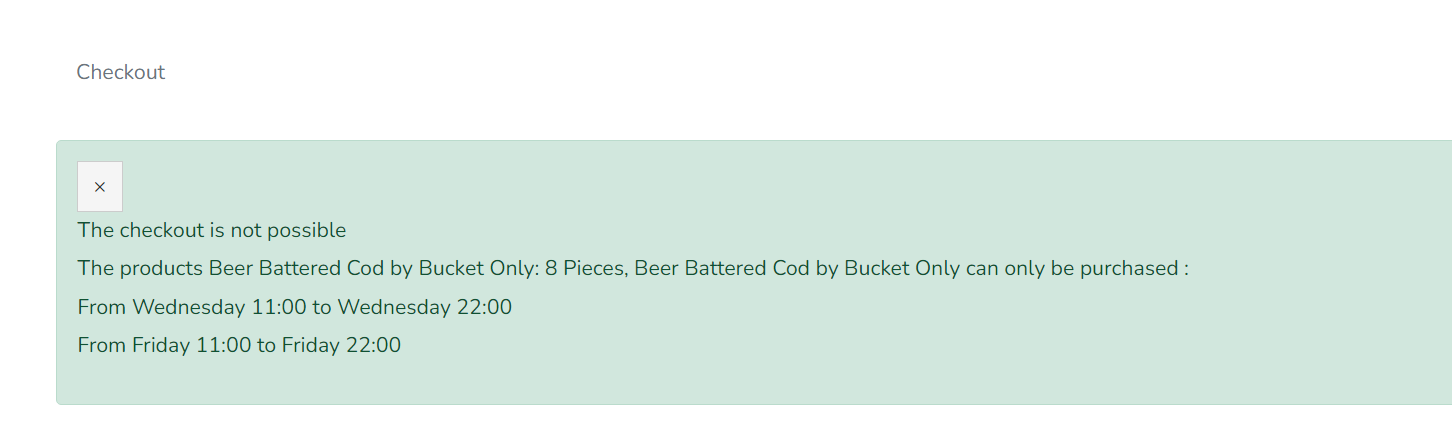
I took the initiative and tried it myself please take a look and let me know is that what do you mean
Please Log in or Create an account to join the conversation.
3 years 10 months ago #347804
by nicolas
Replied by nicolas on topic Food Available only on certain days
Hi,
Yes, that's the correct result with two rules to only allow sales on Wednesday and Friday.
Yes, that's the correct result with two rules to only allow sales on Wednesday and Friday.
Please Log in or Create an account to join the conversation.
Time to create page: 0.046 seconds