
Joomla Account Info on User Control Panel

15 years 7 months ago #9060
by hdracing
Joomla Account Info on User Control Panel was created by hdracing
It would be real handy if the Hikashop User Control Panel menu item could, along with links for Orders and Addresses and Affiliate Info (when configured), include a link to access the Joomla User Form (for changing username, password, etc). Is there a way to do that? This would keep all user account information in one place and not require multiple menu items.
Thanks,
Ed
Thanks,
Ed
Please Log in or Create an account to join the conversation.

15 years 7 months ago #9063
by nicolas
Replied by nicolas on topic Re: Joomla Account Info on User Control Panel
I'm not following. Could you do a screenshot of where you would like such a link ?
Please Log in or Create an account to join the conversation.
15 years 7 months ago #9066
by hdracing
Replied by hdracing on topic Re: Joomla Account Info on User Control Panel
On the dev site that we've been working on, I have a Hikashop User Control Panel menu item that looks like this when a user is logged in:
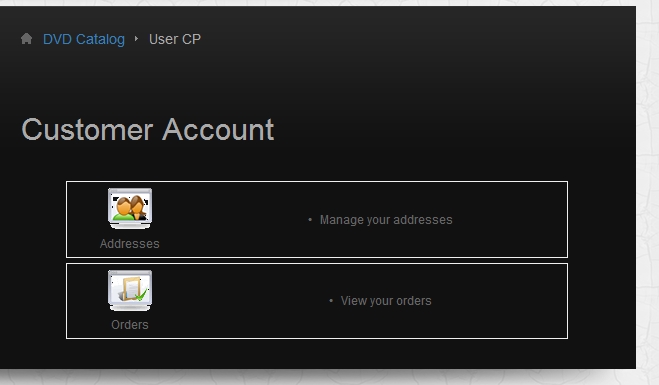
There is also the Joomla User/User Form Layout menu item that is displayed in my next post (how can you put more than one image in a post when using image upload?)
I just thought it would be nice to have a link on the Hikashop User Control Panel, similar to the Address and Orders plugin links, that would take the user to their Joomla login edit page.
Regards,
Ed
There is also the Joomla User/User Form Layout menu item that is displayed in my next post (how can you put more than one image in a post when using image upload?)
I just thought it would be nice to have a link on the Hikashop User Control Panel, similar to the Address and Orders plugin links, that would take the user to their Joomla login edit page.
Regards,
Ed
Please Log in or Create an account to join the conversation.
15 years 7 months ago #9067
by hdracing
Replied by hdracing on topic Re: Joomla Account Info on User Control Panel
Joomla User Form Layout:
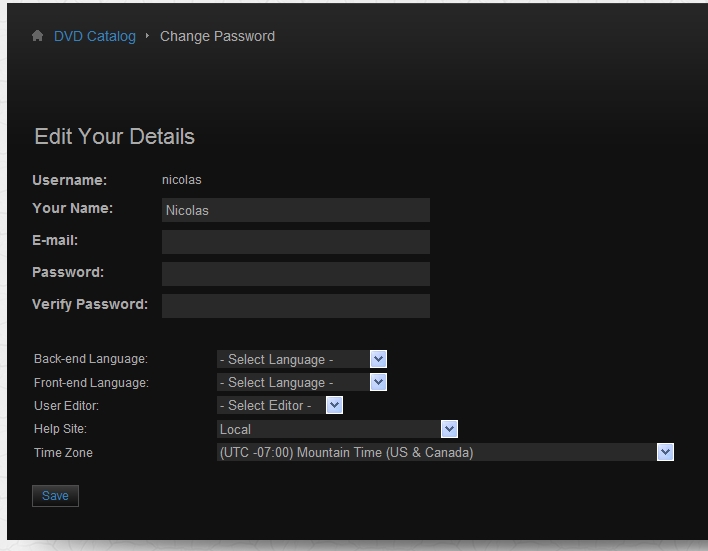
Please Log in or Create an account to join the conversation.
15 years 7 months ago #9104
by nicolas
Replied by nicolas on topic Re: Joomla Account Info on User Control Panel
OK. I see.
You can edit the file components/com_hikashop/views/user/view.html.php and add the code:
if(version_compare(JVERSION,'1.6','<')){
$url = JRoute::_('index.php?option=com_user&view=user&task=edit'.$url_itemid);
}else{
$url = JRoute::_('index.php?option=com_users&view=profile&layout=edit'.$url_itemid);
}
$buttons[] = array('link'=>$url,'level'=>0,'image'=>'user','text'=>JText::_('CUSTOMER_ACCOUNT'),'description'=>'');
after the line: $buttons = array();
We'll do a plugin on next version for that so that it can be easily deactivated (for example if the user wants to display a link to the joomsocial user profile instead...
You can edit the file components/com_hikashop/views/user/view.html.php and add the code:
if(version_compare(JVERSION,'1.6','<')){
$url = JRoute::_('index.php?option=com_user&view=user&task=edit'.$url_itemid);
}else{
$url = JRoute::_('index.php?option=com_users&view=profile&layout=edit'.$url_itemid);
}
$buttons[] = array('link'=>$url,'level'=>0,'image'=>'user','text'=>JText::_('CUSTOMER_ACCOUNT'),'description'=>'');
after the line: $buttons = array();
We'll do a plugin on next version for that so that it can be easily deactivated (for example if the user wants to display a link to the joomsocial user profile instead...
Please Log in or Create an account to join the conversation.
15 years 7 months ago #9126
by hdracing
Replied by hdracing on topic Re: Joomla Account Info on User Control Panel
Thanks Nicolas,
That looks like it will work for now and I look forward to the plugin in a later release.
Ed
That looks like it will work for now and I look forward to the plugin in a later release.
Ed
Please Log in or Create an account to join the conversation.
Time to create page: 0.191 seconds