
- Posts: 2
- Thank you received: 0
Volume Discount
- jimmysmooth
-
 Topic Author
- Offline
Less
More
1 year 5 months ago #367457
by jimmysmooth
Volume Discount was created by jimmysmooth
-- url of the page with the problem -- :
jimmysmoothsbbq.com/shop/product/1-smok-n-salsa-mild
-- HikaShop version -- : 5.1.6
-- Joomla version -- : 5.3.1
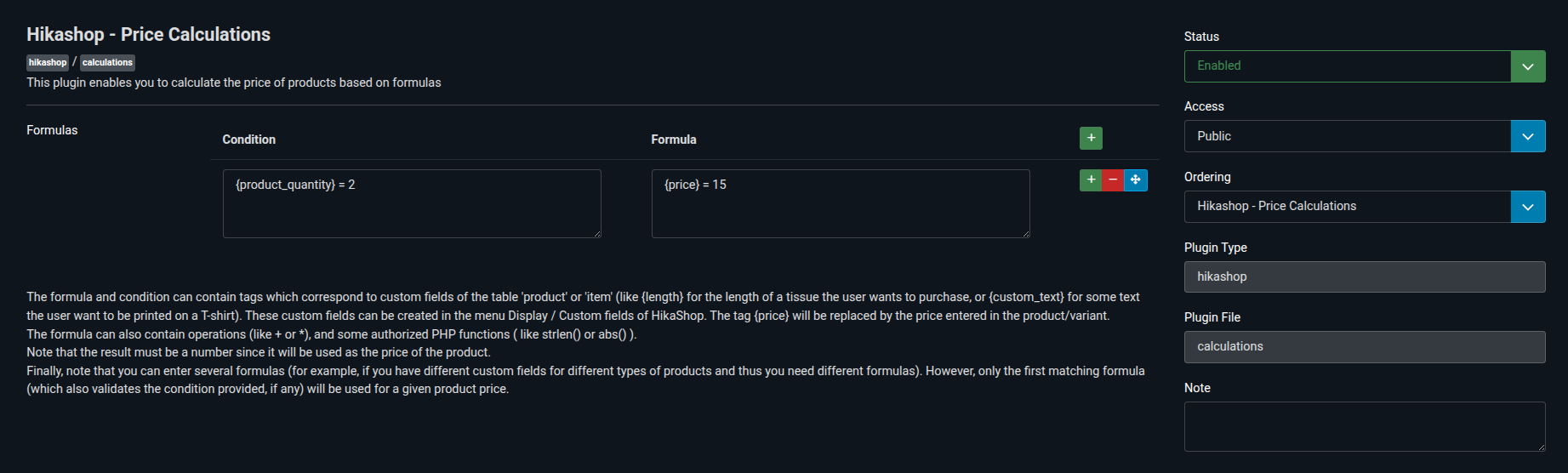
Very new to the backend part of all this. The product is priced by quantity ordered: 1 for $9, 2 for $15, 3 for $21. I have installed the Price Calculation plugin, but can't figure out how to write the necessary formulas. This is what I have so far, but it's not working:
Thanks for any help!
-- HikaShop version -- : 5.1.6
-- Joomla version -- : 5.3.1
Very new to the backend part of all this. The product is priced by quantity ordered: 1 for $9, 2 for $15, 3 for $21. I have installed the Price Calculation plugin, but can't figure out how to write the necessary formulas. This is what I have so far, but it's not working:
Thanks for any help!
Please Log in or Create an account to join the conversation.

1 year 5 months ago #367458
by nicolas
Replied by nicolas on topic Volume Discount
Hi,
The condition should be:
because this evaluates a condition in PHP, and in PHP, you need two "=" characters like this to compare the equality of two elements.
And the formula should ideally be:
because you want to provide the unit price and thus you need to divide the total price by the quantity selected by the user.
The condition should be:
Code:
{cart_product_quantity}==2
And the formula should ideally be:
Code:
15/{cart_product_quantity}
The following user(s) said Thank You: jimmysmooth
Please Log in or Create an account to join the conversation.
- jimmysmooth
-
Topic Author
- Offline
Less
More
- Posts: 2
- Thank you received: 0
1 year 5 months ago #367475
by jimmysmooth
Replied by jimmysmooth on topic Volume Discount
Thank you so much, that worked perfectly!
Is there any way to also accommodate the 3 for 21 pricing?
Is there any way to also accommodate the 3 for 21 pricing?
Please Log in or Create an account to join the conversation.
1 year 5 months ago #367476
by nicolas
Replied by nicolas on topic Volume Discount
Hi,
Sure, it's the same principle.
Add a second row to the plugin, and use the condition:
and the formula:
You can add as many rows as you want.
Sure, it's the same principle.
Add a second row to the plugin, and use the condition:
Code:
{cart_product_quantity}==3
Code:
21/{cart_product_quantity}
Please Log in or Create an account to join the conversation.
Time to create page: 0.065 seconds