

- Posts: 28
- Thank you received: 0
Apply tax only in Indiana
12 years 10 months ago #137283
by johnnyb12
Apply tax only in Indiana was created by johnnyb12
-- url of the page with the problem -- :
magtacicalsystems.com
-- HikaShop version -- : business 2.2.2
-- Joomla version -- : 2.5
-- PHP version -- : 5
My apologies if there is an answer already in for on this, but I looked all over and cannot resolve. I need taxes to be applied to indiana customers only. No matter how I set up zones or rules taxes always get applied no matter what state customer is in. Please advise.
Also, VAT shows in auto reply email to customer. How do I configure email to not show this? Thanks, and sorry again if I am missing this.
-- HikaShop version -- : business 2.2.2
-- Joomla version -- : 2.5
-- PHP version -- : 5
My apologies if there is an answer already in for on this, but I looked all over and cannot resolve. I need taxes to be applied to indiana customers only. No matter how I set up zones or rules taxes always get applied no matter what state customer is in. Please advise.
Also, VAT shows in auto reply email to customer. How do I configure email to not show this? Thanks, and sorry again if I am missing this.
Please Log in or Create an account to join the conversation.

12 years 10 months ago #137289
by nicolas
Replied by nicolas on topic Apply tax only in Indiana
Hi,
It's really simple to do. Simply create one tax rule via the menu System>Taxes and restrict it to your state for the rate which should apply and make sure that it is published. Then it will work.
If it doesn't, it means that you messed up somewhere and you can follow our FAQ on that:
www.hikashop.com/support/documentation/3...ion-listing.html#faq
I didn't understand what you said about emails. It's normal that the tax displays in the email notification if the user paid its order with taxes in it. So I don't see why you would like to remove that.
It's really simple to do. Simply create one tax rule via the menu System>Taxes and restrict it to your state for the rate which should apply and make sure that it is published. Then it will work.
If it doesn't, it means that you messed up somewhere and you can follow our FAQ on that:
www.hikashop.com/support/documentation/3...ion-listing.html#faq
I didn't understand what you said about emails. It's normal that the tax displays in the email notification if the user paid its order with taxes in it. So I don't see why you would like to remove that.
Please Log in or Create an account to join the conversation.
12 years 10 months ago #137301
by johnnyb12
Replied by johnnyb12 on topic Apply tax only in Indiana
Did everything you said, but it still applies taxes to any and every state. I have one tax rule and it is applied to one state and it is restricted to that state.
I had this working before , but when I updated hikashop a few weeks ago, this started. It is very frustrating.
I had this working before , but when I updated hikashop a few weeks ago, this started. It is very frustrating.
Please Log in or Create an account to join the conversation.
12 years 10 months ago #137308
by johnnyb12
Replied by johnnyb12 on topic Apply tax only in Indiana
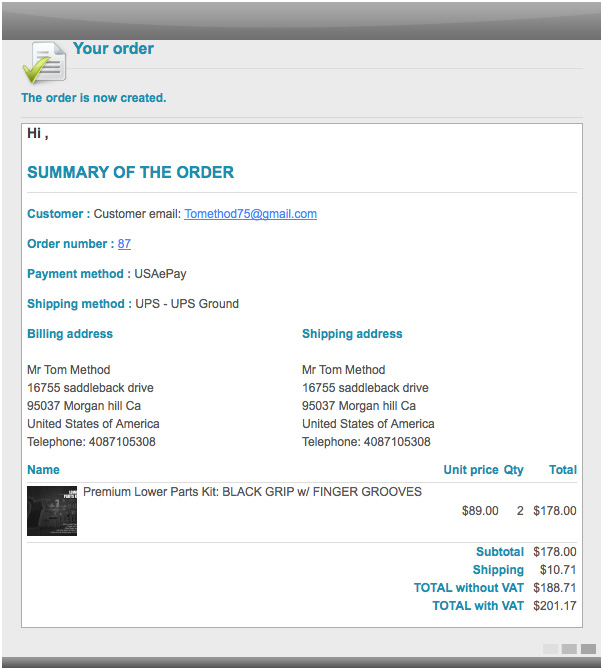
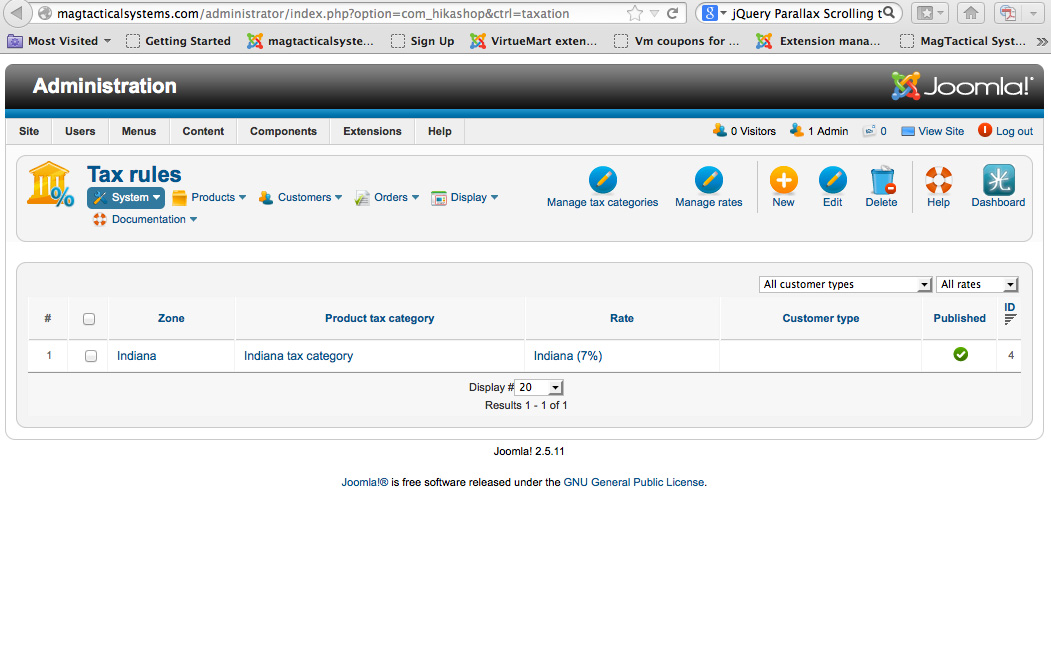
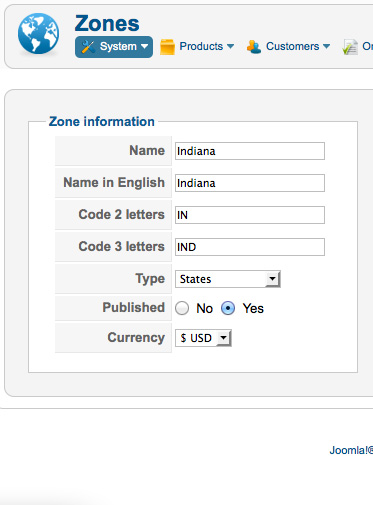
Just so you see what I mean, I've included images of my setting and a copy of an email from a customer outside the tax rule showing tax still on his charge. Please reply.
Please Log in or Create an account to join the conversation.

Less
More
- Posts: 12953
- Thank you received: 1778
12 years 10 months ago #137540
by Mohamed Thelji
Replied by Mohamed Thelji on topic Apply tax only in Indiana
Hi,
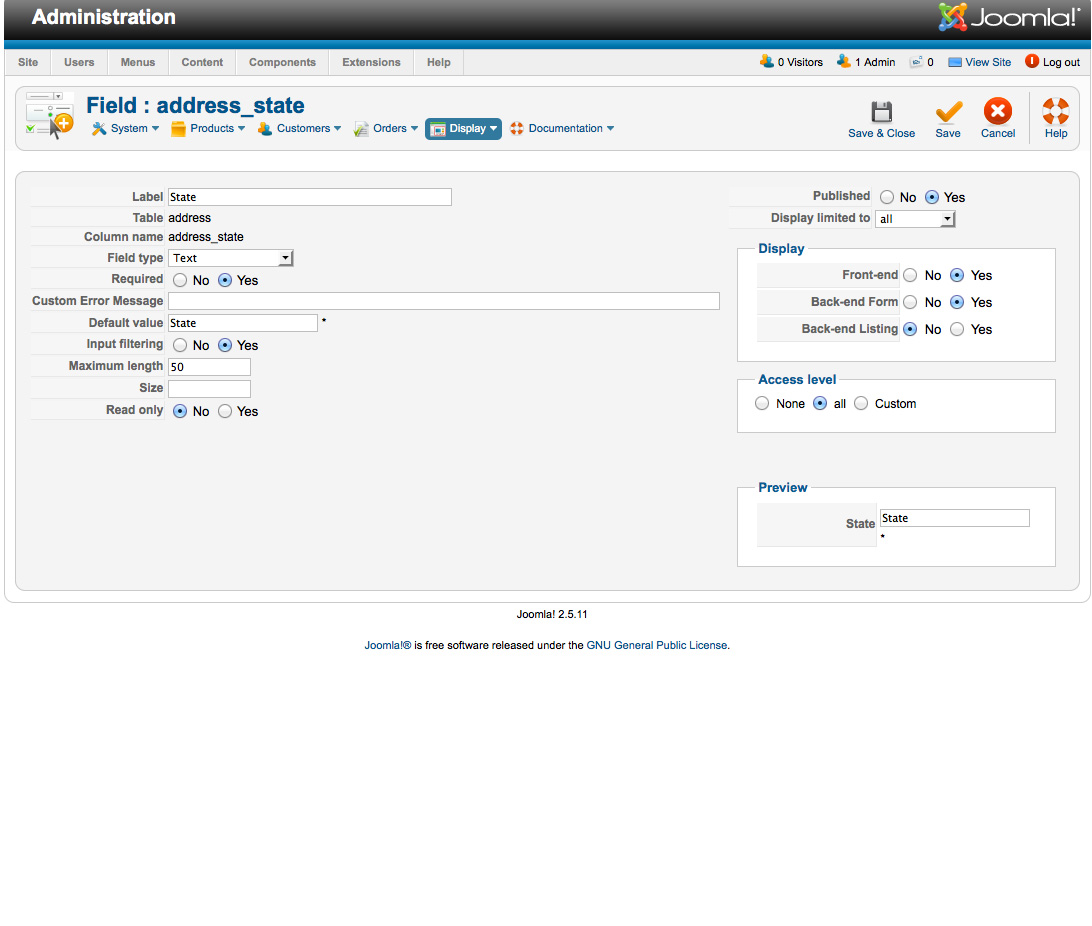
Can you show me how did you configured your "address_state" custom field through some screenshots via "Hikashop->Display->Custom fields" ?
Can you show me how did you configured your "address_state" custom field through some screenshots via "Hikashop->Display->Custom fields" ?
Please Log in or Create an account to join the conversation.
12 years 10 months ago #137557
by johnnyb12
Replied by johnnyb12 on topic Apply tax only in Indiana
Sure.
Please Log in or Create an account to join the conversation.
Less
More
- Posts: 12953
- Thank you received: 1778
12 years 10 months ago - 12 years 10 months ago #137579
by Mohamed Thelji
Replied by Mohamed Thelji on topic Apply tax only in Indiana
Ok,
And can you test it with the "Field type" option of your address_state custom field set to "zone" ?
And can you test it with the "Field type" option of your address_state custom field set to "zone" ?
Last edit: 12 years 10 months ago by Mohamed Thelji.
Please Log in or Create an account to join the conversation.
12 years 10 months ago #138199
by johnnyb12
Replied by johnnyb12 on topic Apply tax only in Indiana
I have tried that. Seems to work, but now i am experiencing another problem. The state dropdown menu does not show up upon registration! Been getting many customer complaints.
Please Log in or Create an account to join the conversation.
Less
More
- Posts: 12953
- Thank you received: 1778
12 years 10 months ago #138245
by Mohamed Thelji
Replied by Mohamed Thelji on topic Apply tax only in Indiana
Hi,
I think that you'll probably find your answer through this thread :
I think that you'll probably find your answer through this thread :
In System > Zones, thanks to publish back the france country.
Then in Display > Custom fields, change the value of the default country to france, save.
change the value of the state to a french one, save.
Change the value of the country again to the desired one, save.
Change the value of the state to the desired one, save.
Then go back in zone, and unpublish the france.
Please Log in or Create an account to join the conversation.
Time to create page: 0.084 seconds