
- Posts: 60
- Thank you received: 0
Tax only if user is in a certain US state?
- hikalikethat
-
 Topic Author
- Offline
Less
More
12 years 2 months ago #169545
by hikalikethat
Tax only if user is in a certain US state? was created by hikalikethat
-- HikaShop version -- : latest
-- Joomla version -- : 3.3.0
-- PHP version -- : 5.5.11
-- Browser(s) name and version -- : IE11
How does one setup taxes so they only apply for users if they are from one state in the US. It seems it's an all or nothing proposition.
-- Joomla version -- : 3.3.0
-- PHP version -- : 5.5.11
-- Browser(s) name and version -- : IE11
How does one setup taxes so they only apply for users if they are from one state in the US. It seems it's an all or nothing proposition.
Please Log in or Create an account to join the conversation.

12 years 2 months ago #169547
by lionel75
Replied by lionel75 on topic Tax only if user is in a certain US state?
Hi
i think hikashop take in account the billing adress for tax even the buyer buy from england something tos end to USA .
regard's
i think hikashop take in account the billing adress for tax even the buyer buy from england something tos end to USA .
regard's
Please Log in or Create an account to join the conversation.

12 years 2 months ago #169550
by nicolas
Replied by nicolas on topic Tax only if user is in a certain US state?
Hi,
Yes, when you configure your tax rule via the menu System>Taxes, you can set the zone of the tax, and the tax will only apply if the address of the user is within that zone. And you can change the main tax zone option of the configuration for the default zone of the user before he enters his address during the checkout.
Yes, when you configure your tax rule via the menu System>Taxes, you can set the zone of the tax, and the tax will only apply if the address of the user is within that zone. And you can change the main tax zone option of the configuration for the default zone of the user before he enters his address during the checkout.
The following user(s) said Thank You: hikalikethat
Please Log in or Create an account to join the conversation.

12 years 1 month ago #176175
by ichimonban
MicahFord.com
VOLT2.com | KLEANALL.com | GRAVITYMedia.co
Replied by ichimonban on topic Tax only if user is in a certain US state?
This isn't functioning as I require. I've had to remove all tax settings in order to not charge State sales tax to Out of State Buyers. I need the system to only apply tax when the buyer is in the same state as my Shop.
kindly detail the exact configuration to implement taxation only when the buyers address is located in the same state as the seller.
kindly detail the exact configuration to implement taxation only when the buyers address is located in the same state as the seller.
MicahFord.com
VOLT2.com | KLEANALL.com | GRAVITYMedia.co
Please Log in or Create an account to join the conversation.

12 years 1 month ago #176210
by Xavier
Replied by Xavier on topic Tax only if user is in a certain US state?
Hi,
You have to create a new zone, a zone with all the states but the one of the seller, then apply a tax rule on this zone.
And that should do the trick.
You have to create a new zone, a zone with all the states but the one of the seller, then apply a tax rule on this zone.
And that should do the trick.
Please Log in or Create an account to join the conversation.

Less
More
- Posts: 92
- Thank you received: 0
11 years 10 months ago #187918
by target4fun
Replied by target4fun on topic Tax only if user is in a certain US state?
I am digging up this old thread simply because I have the same exact problem. I have messed with it for a few hours and cant get it to add a new zone? Or figure out how to do what i need which is simply this. Have all states in the US listed for shipping but only tax if they are buying from my state of texas. I cant seem to figure it out please help Thanks
Please Log in or Create an account to join the conversation.
Less
More
- Posts: 92
- Thank you received: 0
11 years 10 months ago #187920
by target4fun
Replied by target4fun on topic Tax only if user is in a certain US state?
I managed to put texas in the "tax zone" and created a new zone called "non Tax US" Then went and added two rules one was 8.25 percent tax for texas and one that is zero tax for all the other US states outside of texas. When I go to the checkout it charges a texas tax to all and texas isnt visible as an option on the drop down state list at all.
My main tax zone is set to texas.
Please advise. I am still trying to tackle this. See attached picture
My main tax zone is set to texas.
Please advise. I am still trying to tackle this. See attached picture
Please Log in or Create an account to join the conversation.
Less
More
- Posts: 92
- Thank you received: 0
11 years 10 months ago #187921
by target4fun
Replied by target4fun on topic Tax only if user is in a certain US state?
I managed to put texas in the "tax zone" and created a new zone called "non Tax US" Then went and added two rules one was 8.25 percent tax for texas and one that is zero tax for all the other US states outside of texas. When I go to the checkout it charges a texas tax to all and texas isnt visible as an option on the drop down state list at all.
My main tax zone is set to texas.
Please advise. I am still trying to tackle this. See attached picture
My main tax zone is set to texas.
Please advise. I am still trying to tackle this. See attached picture
Please Log in or Create an account to join the conversation.
Less
More
- Posts: 92
- Thank you received: 0
11 years 10 months ago #187922
by target4fun
Replied by target4fun on topic Tax only if user is in a certain US state?
I managed to put texas in the "tax zone" and created a new zone called "non Tax US" and put all the other states in there... Then went and added two rules one was 8.25 percent tax for texas and one that is zero tax for all the other US states outside of texas. When I go to the checkout it charges a texas tax to all and texas isnt visible as an option on the drop down state list at all.
My main tax zone is set to texas.
Please advise. I am still trying to tackle this. See attached picture
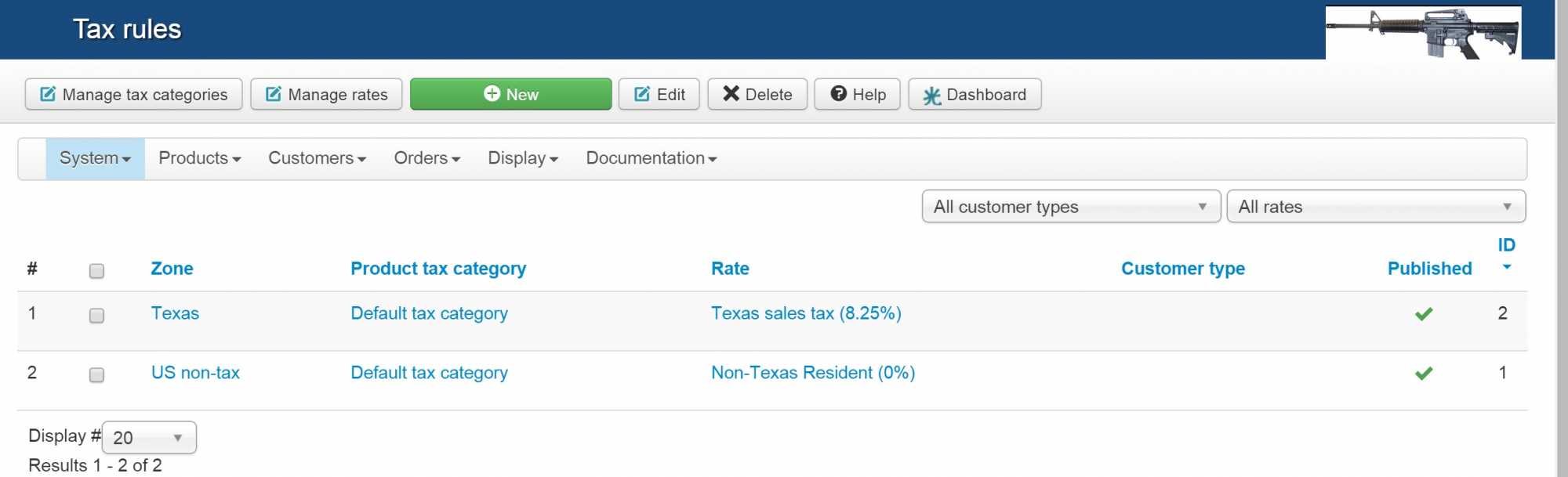
My main tax zone is set to texas.
Please advise. I am still trying to tackle this. See attached picture
Please Log in or Create an account to join the conversation.
Less
More
- Posts: 92
- Thank you received: 0
11 years 10 months ago #188003
by target4fun
Replied by target4fun on topic Tax only if user is in a certain US state?
Okay after another 4 hours of playing with it. I finally did trial an error until I figured it out. I am posting back on here so hopefully you will add some documentation for US users as it wasnt very clear on what needed to be done to make this work. Anyone who buys your product and sells a product in the US will need to do this.
For my case I am selling in Texas so I only need Texas sales tax, all other states set to 0%
Here is what you need to do:
First Set "main tax zone" to United States. This is found in Configuration/system
Then create two new zones
One zone Will be All states put in subzone but Texas. I labeled this new zone - non tax US. Then another zone labeled Texas Tax which i Put texas as a subzone.
You must create two tax rules for taxes one rule for Your state tax, Another rule for zero tax.
Then you must apply the rules to the new zones you created. It didnt work when I tried to apply the rule directly to the state.
I am sure this will help with all your US customers who sell any product.
Please Log in or Create an account to join the conversation.
11 years 10 months ago #188023
by nicolas
Replied by nicolas on topic Tax only if user is in a certain US state?
Hi,
Thank you for your feedback.
Note that when you first install HikaShop on a website, it displays a wizard where you can select your country/state, your tax rate and HikaShop will set all that up for you when you validate the wizard.
Thank you for your feedback.
Note that when you first install HikaShop on a website, it displays a wizard where you can select your country/state, your tax rate and HikaShop will set all that up for you when you validate the wizard.
Please Log in or Create an account to join the conversation.

11 years 9 months ago #189294
by tomhika
Replied by tomhika on topic Tax only if user is in a certain US state?
I have the same issue, I tried this solutions but it did not work for me
Please Log in or Create an account to join the conversation.
11 years 9 months ago #189315
by nicolas
Replied by nicolas on topic Tax only if user is in a certain US state?
Hi,
Please provide screenshots of your tax rules so that we can help you.
Please provide screenshots of your tax rules so that we can help you.
Please Log in or Create an account to join the conversation.
11 years 9 months ago - 11 years 9 months ago #189423
by tomhika
Replied by tomhika on topic Tax only if user is in a certain US state?
Thanks, after testing and reconfiguring I see that it does work with the address but before you input anything the NYS tax is added and shown to the costumer... very confusing and bad for business.
On the picture below:
- the subzone for NY its only NY state
- the US zone is all the states except NY
- the world zone is every country except the us
I answer this post because I tried the solution discussed here, but I open up a different post and someone is helping me
www.hikashop.com/forum/taxes/874722-taxe...erything.html#189415
Last edit: 11 years 9 months ago by tomhika.
Please Log in or Create an account to join the conversation.
11 years 9 months ago #189438
by nicolas
Replied by nicolas on topic Tax only if user is in a certain US state?
Yes, please don't send messages in different threads for the same issue.
We'll continue on the other subject.
We'll continue on the other subject.
Please Log in or Create an account to join the conversation.
Time to create page: 0.117 seconds