

- Posts: 447
- Thank you received: 20
Display Zero VAT
12 years 1 month ago #175337
by davec
Replied by davec on topic Display Zero VAT
Hi
the test account has ben set for admin access.
Thanks
Dave
the test account has ben set for admin access.
Thanks
Dave
Please Log in or Create an account to join the conversation.

12 years 1 month ago #175344
by Xavier
Replied by Xavier on topic Display Zero VAT
Hi,
I just added the code in the view "checkout / cart" to display a 0 VAT if no VAT are present in the cart.
And this seem to be working fine, the 0 is displayed when there is no VAT, and the VAT is displayed when I select a UK address.
If this is still no correct, thanks to give details about which address coutry to use, what should be the result, etc.
Please Log in or Create an account to join the conversation.
12 years 1 month ago #175355
by davec
Replied by davec on topic Display Zero VAT
Xavier
It is all now working correctly.
I made a mistake with the VAT calculations by trying to add VAT to all products when some of them were zero rated. Sincere apologies for the error on my part.
I take it that you saw no erros with my Tax configurations?
Dave
It is all now working correctly.
I made a mistake with the VAT calculations by trying to add VAT to all products when some of them were zero rated. Sincere apologies for the error on my part.
I take it that you saw no erros with my Tax configurations?
Dave
Please Log in or Create an account to join the conversation.
12 years 1 month ago #175359
by Xavier
Replied by Xavier on topic Display Zero VAT
Hi,
Yes the tax settings seemed to be correct.
Yes the tax settings seemed to be correct.
Please Log in or Create an account to join the conversation.
Less
More
- Posts: 3
- Thank you received: 1
10 years 9 months ago - 10 years 9 months ago #228779
by ralligeller
Replied by ralligeller on topic Display Zero VAT
Is there any way to display the VAT 0% in the notification email as well?
I set a tax rule with 0% for Europe (intra-Community - VAT free) but the tax row is automatically hidden (
I set a tax rule with 0% for Europe (intra-Community - VAT free) but the tax row is automatically hidden
(
Last edit: 10 years 9 months ago by ralligeller.
Please Log in or Create an account to join the conversation.

10 years 9 months ago #228912
by nicolas
Replied by nicolas on topic Display Zero VAT
Hi,
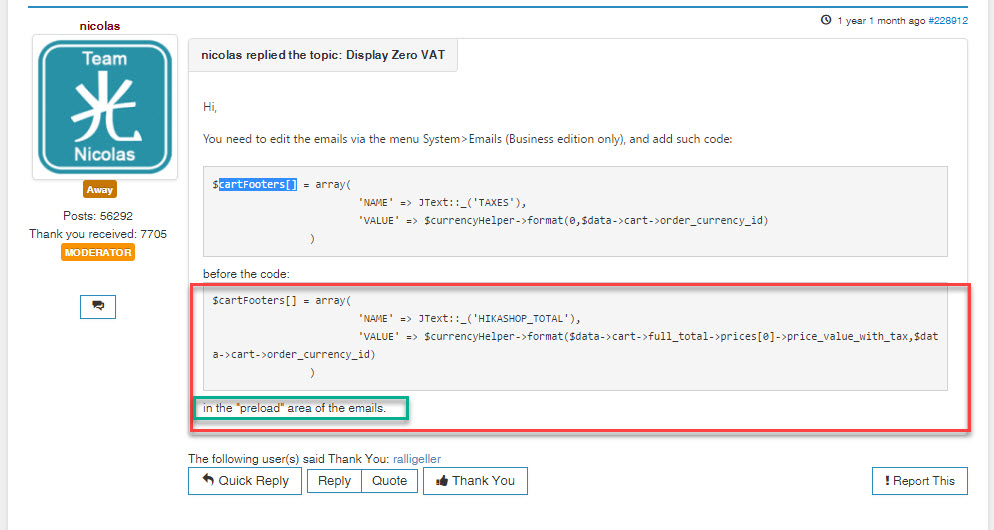
You need to edit the emails via the menu System>Emails (Business edition only), and add such code:
before the code:
in the "preload" area of the emails.
You need to edit the emails via the menu System>Emails (Business edition only), and add such code:
Code:
$cartFooters[] = array(
'NAME' => JText::_('TAXES'),
'VALUE' => $currencyHelper->format(0,$data->cart->order_currency_id)
)
Code:
$cartFooters[] = array(
'NAME' => JText::_('HIKASHOP_TOTAL'),
'VALUE' => $currencyHelper->format($data->cart->full_total->prices[0]->price_value_with_tax,$data->cart->order_currency_id)
)
The following user(s) said Thank You: ralligeller
Please Log in or Create an account to join the conversation.
Less
More
- Posts: 3
- Thank you received: 1
10 years 9 months ago - 10 years 9 months ago #228940
by ralligeller
Replied by ralligeller on topic Display Zero VAT
Thanks, the tax line appears in the mail now, but my problem isn't solved yet.
I want to have the name of the tax rate shown instead of 'taxes'. Everything works well as long as the tax rate is set to more than 0%.
I have two tax rates with different names (for EU- and non EU-Customers) both set to 0%.
I also use the attach invoice as PDF plugin, so this line also needs to be shown there.
Last edit: 10 years 9 months ago by ralligeller.
Please Log in or Create an account to join the conversation.
10 years 9 months ago - 10 years 9 months ago #228981
by nicolas
Replied by nicolas on topic Display Zero VAT
Hi,
Then, instead you can use such code:
You need to add all the country codes of EU in the array.
For the PDF invoice, you can edit the file plugins/hikashop/attachinvoice/attachinvoice/invoice.php and add such code:
before the code:
PS: For further customization of the views of HikaShop, please hire a developer if you're not one yourself. Otherwise, you can use this documentation as reference for how to modify the views of HikaShop:
www.hikashop.com/support/support/documen...ize-the-display.html
Then, instead you can use such code:
Code:
if(in_array($data->cart->billing_address->address_country_code_2,array('FR','DE','GB')){
$text = "Tax in EU";
}else{
$text = "Tax not in EU";
}
$cartFooters[] = array(
'NAME' => $text,
'VALUE' => $currencyHelper->format(0,$data->cart->order_currency_id)
)
For the PDF invoice, you can edit the file plugins/hikashop/attachinvoice/attachinvoice/invoice.php and add such code:
Code:
}else{ ?> <tr class="total">
<td colspan="3" class="newarea">
<?php echo JText::_( 'TAXES' ); ?>
</td>
<td class="price" >
<?php echo $currencyHelper->format(0,$order->order_currency_id); ?>
</td>
</tr>
Code:
} ?> <tr class="total">
<td colspan="3" class="newarea">
<?php echo JText::_( 'HIKASHOP_TOTAL' ); ?>
</td>
<td class="price" >
<?php echo $currencyHelper->format($order->order_full_price,$order->order_currency_id); ?>
</td>
</tr>
PS: For further customization of the views of HikaShop, please hire a developer if you're not one yourself. Otherwise, you can use this documentation as reference for how to modify the views of HikaShop:
www.hikashop.com/support/support/documen...ize-the-display.html
Last edit: 10 years 9 months ago by nicolas.
Please Log in or Create an account to join the conversation.
Less
More
- Posts: 3
- Thank you received: 1
10 years 9 months ago #229129
by ralligeller
Replied by ralligeller on topic Display Zero VAT
I solved it adding the code:
before
The countries are already defined in the tax rule.
In the invoices.php I just changed
to
There should be a option to do that in the configuration (0% Tax visible yes/no). Invoices often need a additional info/rider for the VAT depending on the customers country.
Code:
foreach($data->cart->order_tax_info as $tax) {
$cartFooters[] = array(
'NAME' => $tax->tax_namekey,
'VALUE' => $currencyHelper->format($tax->tax_amount,$data->cart->order_currency_id)
);
}
Code:
$cartFooters[] = array(
'NAME' => JText::_('HIKASHOP_TOTAL'),
'VALUE' => $currencyHelper->format($data->cart->full_total->prices[0]->price_value_with_tax,$data->cart->order_currency_id)
)
The countries are already defined in the tax rule.
In the invoices.php I just changed
Code:
if($taxes = 0){
Code:
if($taxes >= 0){
There should be a option to do that in the configuration (0% Tax visible yes/no). Invoices often need a additional info/rider for the VAT depending on the customers country.
The following user(s) said Thank You: Lumiga
Please Log in or Create an account to join the conversation.

9 years 7 months ago #266136
by Lumiga
Kind regards,
Lumiga
Replied by Lumiga on topic Display Zero VAT
Hi Nicolas,
Are there plans to making this as an option in the configuration.
FYI: It's a obligation of the tax authorities to show 0% on your invoice to other countries for business customers.
So this should be a standard functionality if you ask me.
Hope you will consider this to add this option in the future.
Kind regards,
Lumiga
Kind regards,
Lumiga
Please Log in or Create an account to join the conversation.
9 years 7 months ago #266140
by Lumiga
Kind regards,
Lumiga
Replied by Lumiga on topic Display Zero VAT
Hi Nicolas,
I can't find this code in the e-mails (preloads)
Is it changed in Hikashop 3?
Kind regards,
Lumiga
I can't find this code in the e-mails (preloads)
Is it changed in Hikashop 3?
Kind regards,
Lumiga
Kind regards,
Lumiga
Please Log in or Create an account to join the conversation.
9 years 7 months ago #266146
by nicolas
Replied by nicolas on topic Display Zero VAT
Hi,
That code is still the same in the preload of the emails in the latest versions of HikaShop.
The problem with the options is that we already have too many of them. The more you add options and the more you don't need to change code, but the more you don't find the options and it's actually easier for many to just change the code.
It's impossible to have a one size fit all solution. At one point you need to decide what should be added, removed or if an option would be appropriate.
For now, we didn't get enough feedback that such option would be necessary. We're taking your feedback into account and we'll wait for more feedback on that to decide what to do. In the mean time, the modification is easy to add to the emails if necessary.
That code is still the same in the preload of the emails in the latest versions of HikaShop.
It depends on your country. And in most cases you don't want that in the emails.FYI: It's a obligation of the tax authorities to show 0% on your invoice to other countries for business customers.
So this should be a standard functionality if you ask me.
The problem with the options is that we already have too many of them. The more you add options and the more you don't need to change code, but the more you don't find the options and it's actually easier for many to just change the code.
It's impossible to have a one size fit all solution. At one point you need to decide what should be added, removed or if an option would be appropriate.
For now, we didn't get enough feedback that such option would be necessary. We're taking your feedback into account and we'll wait for more feedback on that to decide what to do. In the mean time, the modification is easy to add to the emails if necessary.
The following user(s) said Thank You: Lumiga
Please Log in or Create an account to join the conversation.
9 years 7 months ago #266298
by Lumiga
Kind regards,
Lumiga
Replied by Lumiga on topic Display Zero VAT
Hi Nicolas,
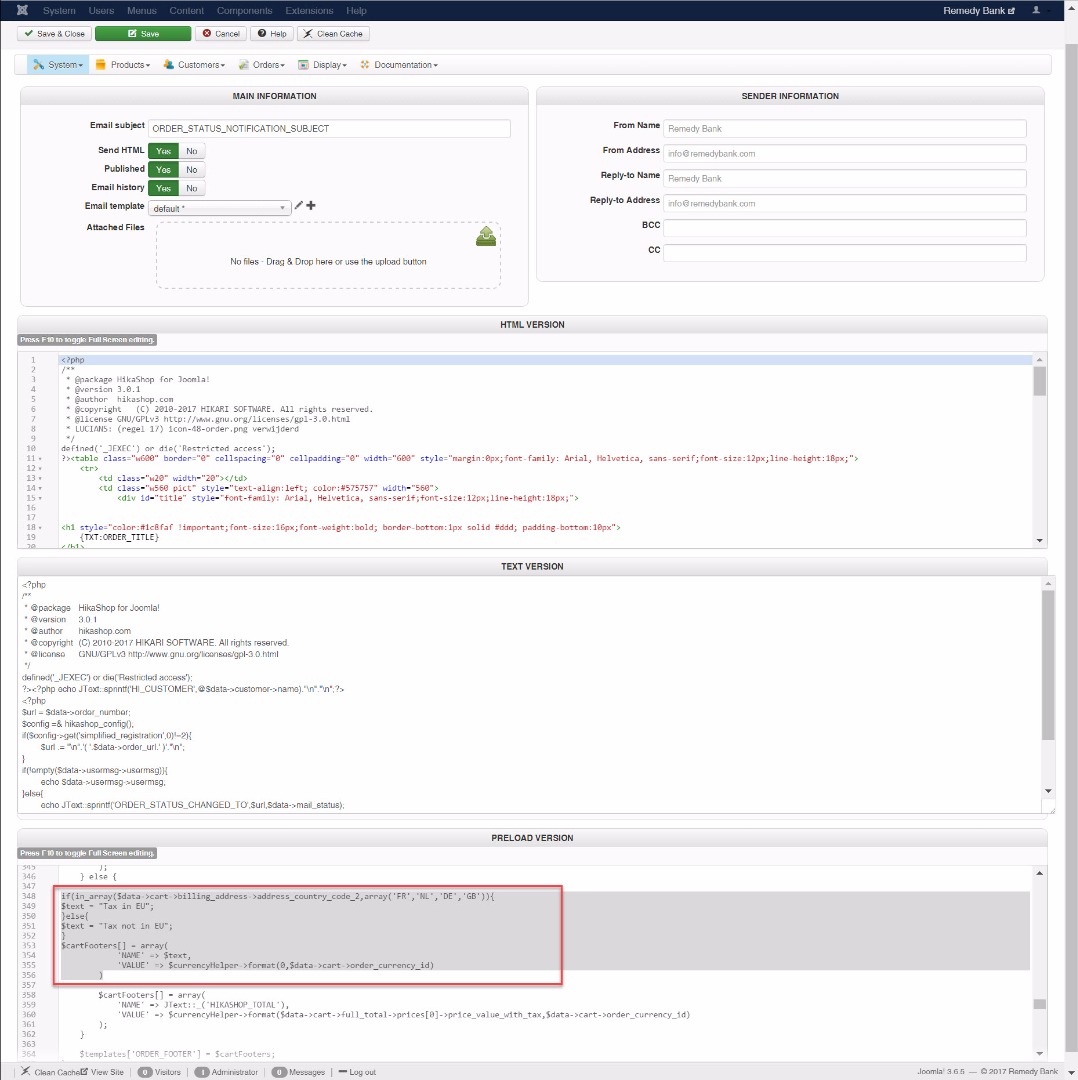
I have found the specific code
I have added your code into the preload version of the order status notification. See screenshot.
But I get a error when I want to change the order status to create an e-mail as test.
Without your code it's working fine.
I hope you have a solution for this.
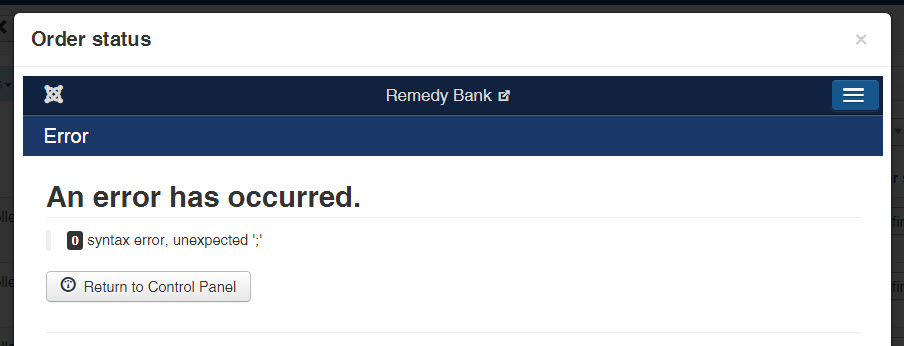
I have found the specific code
I have added your code into the preload version of the order status notification. See screenshot.
But I get a error when I want to change the order status to create an e-mail as test.
Without your code it's working fine.
I hope you have a solution for this.
Kind regards,
Lumiga
Please Log in or Create an account to join the conversation.

9 years 7 months ago #266302
by Jerome
Jerome - Obsidev.com
HikaMarket & HikaSerial developer / HikaShop core dev team.
Replied by Jerome on topic Display Zero VAT
Hi,
I don't know why you have "unexpected", in the code we can see in your screenshot, there is a missing semi colon (as in the Nicolas' message).
Please check your PHP error log for more details about the error and the line.
Regards,
I don't know why you have "unexpected", in the code we can see in your screenshot, there is a missing semi colon (as in the Nicolas' message).
Please check your PHP error log for more details about the error and the line.
Regards,
Jerome - Obsidev.com
HikaMarket & HikaSerial developer / HikaShop core dev team.
Please Log in or Create an account to join the conversation.
9 years 7 months ago #266446
by Lumiga
Kind regards,
Lumiga
Replied by Lumiga on topic Display Zero VAT
Hi Jerome,
Sorry, but I don't see an error in the errorlog. The last error is from 2 months ago and has nothing to do with Hikashop.
When I put a missing semi colon (see screenshot) I still get a error (see screenshot)
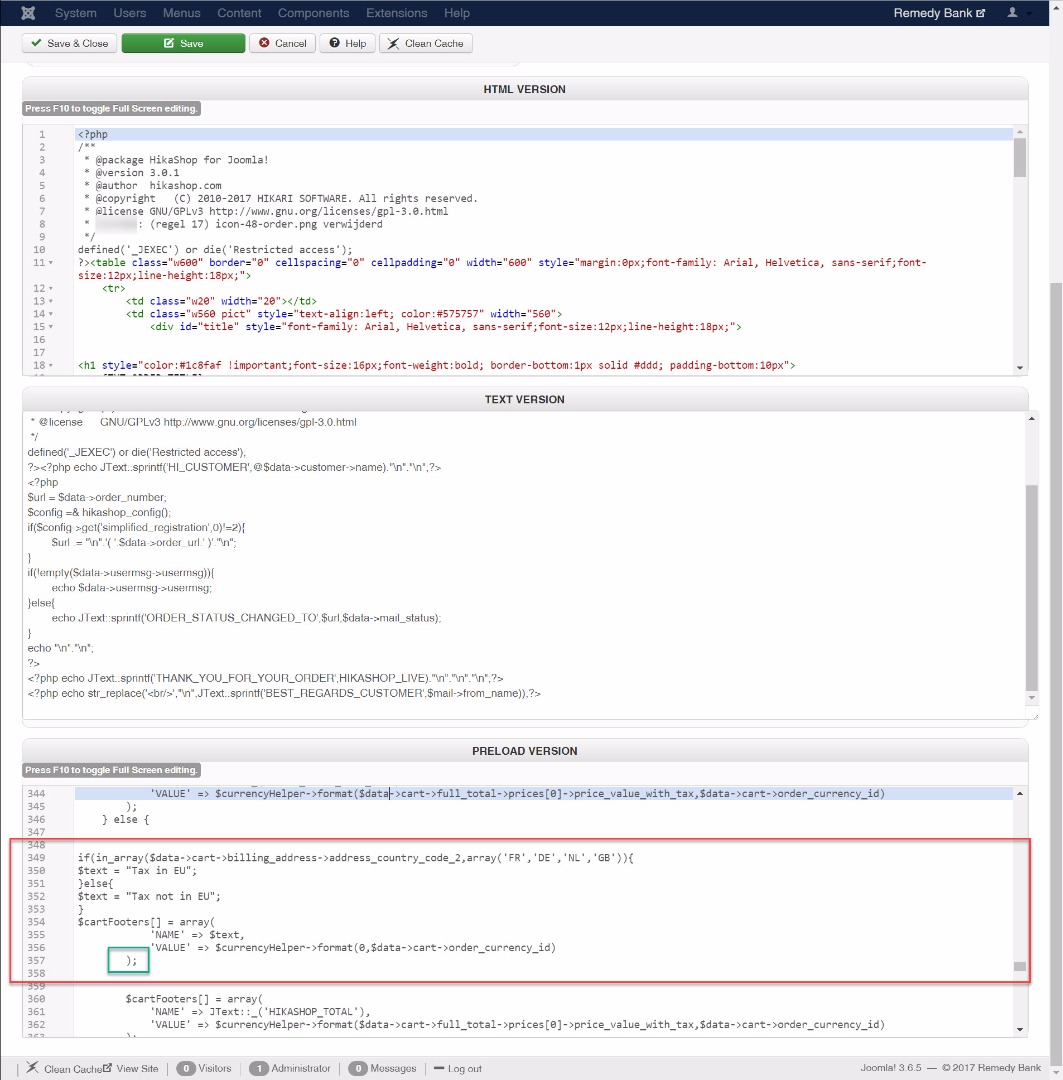
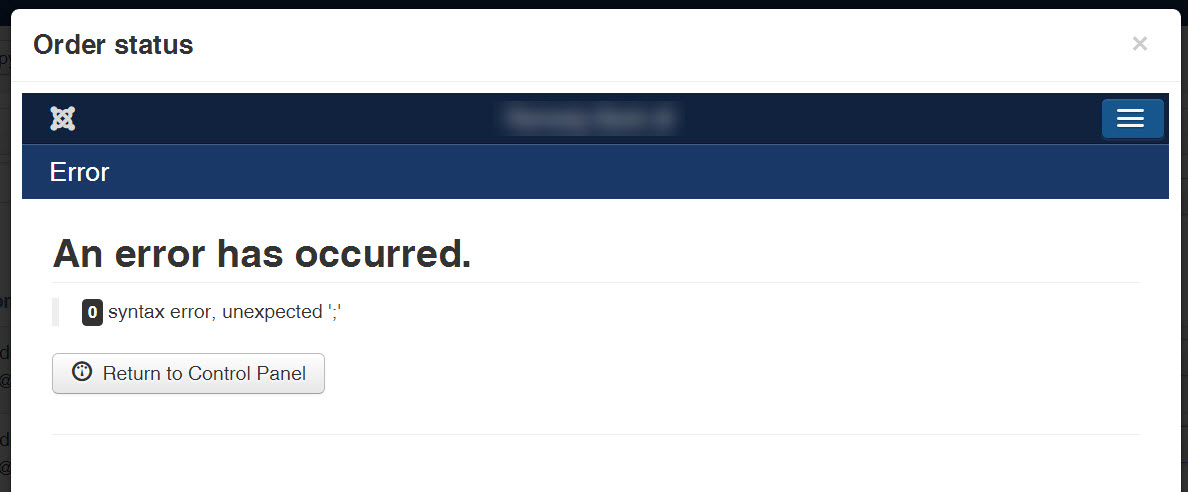
Sorry, but I don't see an error in the errorlog. The last error is from 2 months ago and has nothing to do with Hikashop.
When I put a missing semi colon (see screenshot) I still get a error (see screenshot)
Kind regards,
Lumiga
Please Log in or Create an account to join the conversation.
9 years 7 months ago #266465
by Lumiga
Kind regards,
Lumiga
Replied by Lumiga on topic Display Zero VAT
Is it also possible to use the name of the tax_namekey from Hikashop? Instead of typing the name in the PHP code.
So if we change the Tax rate name in Hikashop it automatically will change on the invoice.
I hope so.
Kind regards,
Lumiga
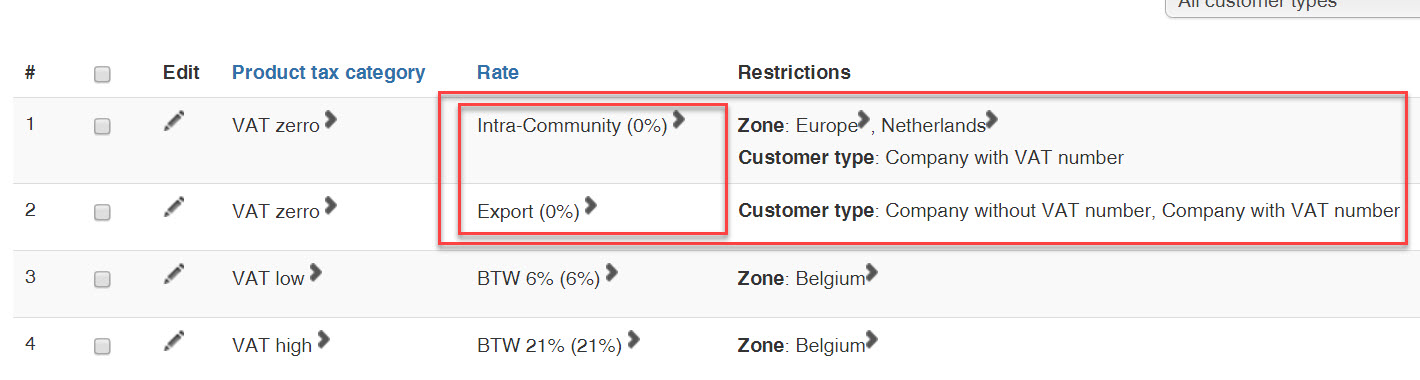
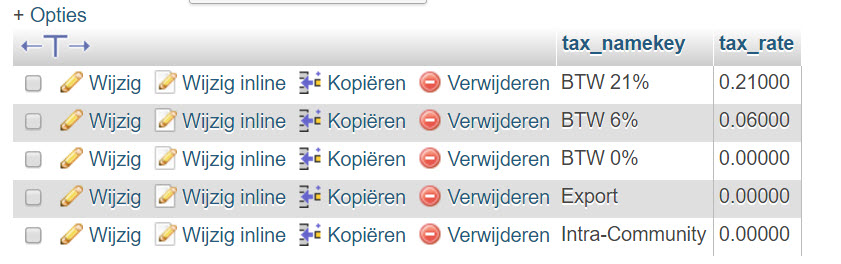
So if we change the Tax rate name in Hikashop it automatically will change on the invoice.
I hope so.
Kind regards,
Lumiga
Kind regards,
Lumiga
Please Log in or Create an account to join the conversation.
9 years 7 months ago #266456
by nicolas
Replied by nicolas on topic Display Zero VAT
Hi,
As Jerome said, that semi colon was misssing. So adding it is a good idea.
I don't see though why you'd get that error message with this modification.
The error message is not related to the missing ;
Try turning on the error reporting and debug mode of the Joomla configuration and do a test again. If you still have the error, you should then get a better error message with more information.
Please Log in or Create an account to join the conversation.
Time to create page: 0.121 seconds