

- Posts: 44
- Thank you received: 2
Discount applied without TAX but set to with TAX
12 years 2 days ago - 12 years 2 days ago #178327
by praes
Discount applied without TAX but set to with TAX was created by praes
-- HikaShop version -- : HikaShop [1404122243]
-- Joomla version -- : 3.3.3
-- PHP version -- : 5.4.16
Hi,
When using a discount coupon, it's using the price without tax to calculate the discount. I've set the 'Apply discount' in TAX to with TAX but it doesn't seem to make any difference. The prices are noted as TAX included and the total is also TAX included.
I've included two images, the first one is the coupon TAX switch set to include.
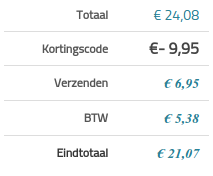
The other is the cart total, the discount (excl TAX which should be incl TAX), the shipping costs, the TAX which was applied on the cart total and shipping already and finally the total cost.
The coupon had a 50% discount which should result in:
24.08 * 0.50 = 12.04 discount
However it calculates it like:
24.08 / 1.21 = 19.90 > product without TAX
19.90 * 0.50 = 9.95 discount
Thanks,
Jasper

-- Joomla version -- : 3.3.3
-- PHP version -- : 5.4.16
Hi,
When using a discount coupon, it's using the price without tax to calculate the discount. I've set the 'Apply discount' in TAX to with TAX but it doesn't seem to make any difference. The prices are noted as TAX included and the total is also TAX included.
I've included two images, the first one is the coupon TAX switch set to include.
The other is the cart total, the discount (excl TAX which should be incl TAX), the shipping costs, the TAX which was applied on the cart total and shipping already and finally the total cost.
The coupon had a 50% discount which should result in:
24.08 * 0.50 = 12.04 discount
However it calculates it like:
24.08 / 1.21 = 19.90 > product without TAX
19.90 * 0.50 = 9.95 discount
Thanks,
Jasper
Last edit: 12 years 2 days ago by praes.
Please Log in or Create an account to join the conversation.
12 years 1 day ago #178369
by praes
Replied by praes on topic Discount applied without TAX but set to with TAX
I've been searching around and debugging the coupon code of the component.
So far I seem to have found a spot to solve my problem, however I doubt that it's the correct solution to this problem.
This is what I changed:
Line 356 and 389 in com_hikashop/classes/discount.php
Instead of:
If there is any better way to achieve the same results, please tell.
Thanks,
Jasper
So far I seem to have found a spot to solve my problem, however I doubt that it's the correct solution to this problem.
This is what I changed:
Line 356 and 389 in com_hikashop/classes/discount.php
Code:
$coupon->discount_flat_amount += ($coupon->discount_percent_amount * $product->prices[0]->price_value_with_tax) / 100;
Code:
$coupon->discount_flat_amount += ($coupon->discount_percent_amount * $product->prices[0]->price_value) / 100;
Thanks,
Jasper
Please Log in or Create an account to join the conversation.

12 years 1 day ago #178373
by Jerome
Jerome - Obsidev.com
HikaMarket & HikaSerial developer / HikaShop core dev team.
Replied by Jerome on topic Discount applied without TAX but set to with TAX
Hi,
HikaShop [1404122243] ? You are using HikaShop 2.3.1 ?
When you create a discount coupon, you can also select a "product tax category" ; it indicate the tax for the coupon.
If the product tax category is "none", it will not have tax included, so it will provide the same result in the checkout (if you include or exclude the tax).
About your patch proposal, I will create an issue ticket in our system so we will investigate on it.
Regards,
HikaShop [1404122243] ? You are using HikaShop 2.3.1 ?
When you create a discount coupon, you can also select a "product tax category" ; it indicate the tax for the coupon.
If the product tax category is "none", it will not have tax included, so it will provide the same result in the checkout (if you include or exclude the tax).
About your patch proposal, I will create an issue ticket in our system so we will investigate on it.
Regards,
Jerome - Obsidev.com
HikaMarket & HikaSerial developer / HikaShop core dev team.
Please Log in or Create an account to join the conversation.
12 years 1 day ago #178449
by praes
Replied by praes on topic Discount applied without TAX but set to with TAX
Oh, no, I'm using HikaShop 2.3.0. It might've been fixed in a later update but
I'm not sure if I can safely update so for now I'll just go with the edit I made
and experiment with updating on the development server.
I've set the product tax category correct so that should work,
however it makes no difference. The tax is still excluded from the discount.
Thanks,
Jasper
I'm not sure if I can safely update so for now I'll just go with the edit I made
and experiment with updating on the development server.
I've set the product tax category correct so that should work,
however it makes no difference. The tax is still excluded from the discount.
Thanks,
Jasper
Please Log in or Create an account to join the conversation.

12 years 22 hours ago #178452
by Xavier
Replied by Xavier on topic Discount applied without TAX but set to with TAX
Hi,
Yes please try to update before.
Yes please try to update before.
Please Log in or Create an account to join the conversation.

11 years 11 months ago - 11 years 11 months ago #180185
by nuevaera
productosnuevaera.com/
Productos Nueva Era | Un Mundo de Regalos Místico para ti
Replied by nuevaera on topic Discount applied without TAX but set to with TAX
Hi
I have something like this in the calculation of taxes and discounts problem.
1. I require that the discount is calculated the subtotal without tax, and resting the same before calculating the tax. ie:
Subtotal excluding VAT Bs. 52.124,82 - Coupon Bs.-18.243,00
Subtotal discount = Bs. 33.881,82
12% VAT Bs.4.065,82
Total Bs.37.947,63
and the shipping cost will be added to the grand total
Attached as I currently displayed.
2. I require to display in all, in the invoice, the cart, and the order.
Attachment image as shown.
We had already made a change to the invoice will show the subtotal before VAT, but with the discount calculation is wrong.
Help me ... Thanks. :side:
I have something like this in the calculation of taxes and discounts problem.
1. I require that the discount is calculated the subtotal without tax, and resting the same before calculating the tax. ie:
Subtotal excluding VAT Bs. 52.124,82 - Coupon Bs.-18.243,00
Subtotal discount = Bs. 33.881,82
12% VAT Bs.4.065,82
Total Bs.37.947,63
and the shipping cost will be added to the grand total
Attached as I currently displayed.
2. I require to display in all, in the invoice, the cart, and the order.
Attachment image as shown.
We had already made a change to the invoice will show the subtotal before VAT, but with the discount calculation is wrong.
Help me ... Thanks. :side:
productosnuevaera.com/
Productos Nueva Era | Un Mundo de Regalos Místico para ti
Last edit: 11 years 11 months ago by nuevaera.
Please Log in or Create an account to join the conversation.

11 years 11 months ago #180247
by nicolas
Replied by nicolas on topic Discount applied without TAX but set to with TAX
Hi,
There are two settings which handles the calculation of taxes for coupons:
1. The "apply discount" setting of the HikaShop configuration.
2. The "tax category" setting of the options screen of your coupon.
So you have 4 potential combination to try. One of them should give you the result you expect.
There are two settings which handles the calculation of taxes for coupons:
1. The "apply discount" setting of the HikaShop configuration.
2. The "tax category" setting of the options screen of your coupon.
So you have 4 potential combination to try. One of them should give you the result you expect.
Please Log in or Create an account to join the conversation.
11 years 11 months ago - 11 years 11 months ago #180365
by nuevaera
productosnuevaera.com/
Productos Nueva Era | Un Mundo de Regalos Místico para ti
Replied by nuevaera on topic Discount applied without TAX but set to with TAX
Hi Nicolas
Thank you for your prompt reply, yes, I see the calculations good , but views I need appear the unit prices without tax, and also in the discount, and require that appears same in all views.
Thank you
Thank you for your prompt reply, yes, I see the calculations good , but views I need appear the unit prices without tax, and also in the discount, and require that appears same in all views.
Thank you
productosnuevaera.com/
Productos Nueva Era | Un Mundo de Regalos Místico para ti
Last edit: 11 years 11 months ago by nuevaera.
Please Log in or Create an account to join the conversation.
11 years 11 months ago #180392
by nicolas
Replied by nicolas on topic Discount applied without TAX but set to with TAX
Hi,
The checkout will display the prices with taxes or without based on how you configure the "taxed prices display" option of the HikaShop configuration.
The option also affect the product page and potentially the listings so that your user gets a coherent experience on your website.
So you might need to edit the cart file of the view checkout to override that setting at the beginning so that it displays the prices with tax there and the prices without taxes on the other pages.
It's strange that you don't have a coherent display of the prices of the products in the order/cart on the different areas. We tried to have something coherent and do not have such display, which would indicate that either you're using an old version of Hikashop or that you modified some of the views in some ways.
In any case, you'll likely have to edit each one to modify the display of the prices to have them like you want. That can be done via the menu Display>Views and for the emails, it's via the menu System>Emails.
The checkout will display the prices with taxes or without based on how you configure the "taxed prices display" option of the HikaShop configuration.
The option also affect the product page and potentially the listings so that your user gets a coherent experience on your website.
So you might need to edit the cart file of the view checkout to override that setting at the beginning so that it displays the prices with tax there and the prices without taxes on the other pages.
It's strange that you don't have a coherent display of the prices of the products in the order/cart on the different areas. We tried to have something coherent and do not have such display, which would indicate that either you're using an old version of Hikashop or that you modified some of the views in some ways.
In any case, you'll likely have to edit each one to modify the display of the prices to have them like you want. That can be done via the menu Display>Views and for the emails, it's via the menu System>Emails.
Please Log in or Create an account to join the conversation.
11 years 11 months ago #181178
by Bob_M
Replied by Bob_M on topic Discount applied without TAX but set to with TAX
Hi Folks,
Joomla 3.3
HiksShop Essential 234
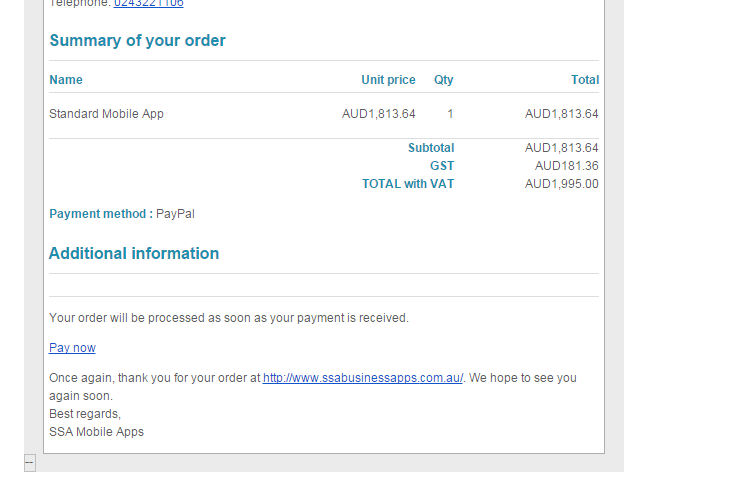
I have the problem that others have had that in the confirmation email it shows VAT in the total while showing GST for the tax. I have tried all of the combinations in the tax setup but it hasn't changed. How do I fix this. Also I wish to change the PAY NOW link on the email. Where do I do this?
Many thanks
Joomla 3.3
HiksShop Essential 234
I have the problem that others have had that in the confirmation email it shows VAT in the total while showing GST for the tax. I have tried all of the combinations in the tax setup but it hasn't changed. How do I fix this. Also I wish to change the PAY NOW link on the email. Where do I do this?
Many thanks
Please Log in or Create an account to join the conversation.
11 years 11 months ago #181234
by nicolas
Replied by nicolas on topic Discount applied without TAX but set to with TAX
Hi,
That "VAT" text comes from the translation file of Hikashop.
You can use a translation override in order to change that text:
hikashop.com/download/languages.html#modify
That "VAT" text comes from the translation file of Hikashop.
You can use a translation override in order to change that text:
hikashop.com/download/languages.html#modify
The following user(s) said Thank You: Bob_M
Please Log in or Create an account to join the conversation.
Time to create page: 0.084 seconds